
Elgato Stream Deck + XL
4.8Editor score
Thirty-six programmable macro keys
Six multifunction rotary dials
Expandable touch strip display
Our Streaming Decks for Twitch guide compares ten programmable controllers, key layouts, app integrations, audio controls, and setup options for creators.
A streaming deck for Twitch turns complex production commands into tactile, visual controls that are easier to remember than keyboard shortcuts. The right unit can simplify scene changes, audio mixing, lighting, camera switching, sound effects, and routine desktop tasks without interrupting your performance.
We compared the included ten products by their programmable key counts, additional dials and touch controls, macro capabilities, software integrations, platform support, visual feedback, and potential value for streamers. The list also includes one AI-tracking webcam because its Stream Deck integration can be useful in a broader Twitch production setup.
Each review identifies the product's strongest attributes, limitations, and most suitable creator. Ratings and product details reflect the supplied information, while prices can change frequently, so check the current listing and confirm software compatibility before purchasing.
4.8Editor score
4.8Editor score

4.4Editor score
This side-by-side comparison highlights the number of programmable controls, physical adjustment features, software compatibility, and production functions offered by each product.




The VSD M18 Macro Pad is an 18-control streaming deck built around 15 visual LCD keys and three physical buttons. Its 4.4 rating reflects a feature-rich approach to programmable shortcuts, particularly for creators who want more keys than a conventional six-button pad without moving to a much larger studio controller.
We may earn a commission when you buy through this link, at no additional cost to you.
Single commands and multi-step sequences are central to the M18's appeal. Users can assign actions for opening applications, entering text, launching files and webpages, controlling media, or changing OBS scenes. The Operation Follow function supports custom ordering or simultaneous execution, making it possible to build practical scene routines rather than treating every key as an isolated shortcut.
The fifteen LCD keys accept JPG, PNG, and GIF images or animations, which improves recognition and allows the layout to reflect a creator's own production hierarchy. A surrounding RGB ring includes an automatic color cycle and custom tones through firmware upgrades. The supplied information also identifies plugins for reminders, a clock, stopwatch, weather, and calendar functions, expanding its utility beyond streaming.
Compatibility covers Windows 11 and newer, macOS 11.0 and newer, OBS, Streamlabs, YouTube, Twitter, Discord, and common creative applications. Native Linux plug-and-play support is not available, although SDK development documents are offered for secondary development. This makes the M18 a compelling budget-oriented choice for Windows and Mac creators, but buyers who need Linux support or a mature app store should consider that limitation.
Sequential and simultaneous execution is the M18's most useful feature for Twitch. A single button can combine a scene switch, overlay action, and audio command, reducing the number of controls you must remember during a busy broadcast.
Custom JPG, PNG, and GIF key artwork makes each function easier to identify at a glance. The visual feedback and surrounding RGB lighting also help the deck fit neatly into a dim streaming setup.
We may earn a commission when you buy through this link, at no additional cost to you.
The Elgato Stream Deck + is a hybrid production controller with LCD keys, a touch strip, and dials. Its 4.6 rating reflects a balanced design that works as an audio mixer, studio controller, or production console, making it a strong option for streamers who want more direct control than a basic keypad provides.
We may earn a commission when you buy through this link, at no additional cost to you.
Its principal strength is the combination of discrete commands and continuous adjustments. Keys can launch actions, the touch strip can present changing information or additional pages, and the dials can manage audio, video, and lighting. Multi Actions can run commands together or in sequence, while Smart Profiles let the interface change with the active application or production stage.
Elgato's software and plugin ecosystem is another major advantage. Listed integrations include Wave Link, Camera Hub, Control Center, OBS, Twitch, YouTube, Twitter, Discord, Spotify, and Philips Hue. The Stream Deck App supports drag-and-drop setup, while the Store provides plugins, icons, royalty-free tracks, and sound effects that can be downloaded for individual projects.
This deck is most appropriate for a creator whose setup includes several controllable tools and who wants a single surface for production commands. It may feel excessive for someone who only needs to change a handful of OBS scenes, but the extra dials and touch controls make it easier to grow without replacing a basic six-key deck.
The dials are particularly useful when a stream needs subtle audio or lighting changes. Their tactile feedback makes them more immediate for live control than navigating nested software menus.
Smart Profiles can reshape the controller for OBS, editing, communication, and other tasks. This keeps frequently used commands visible while reducing the number of physical controls a creator must navigate.
We may earn a commission when you buy through this link, at no additional cost to you.
The VSD N4 Pro combines ten customizable LCD keys, four RGB knobs, and an interactive touch bar in a desktop production controller. Its 4.4 rating highlights a versatile design for creators who want scene presets, macro commands, audio control, and a more elaborate physical interface.
We may earn a commission when you buy through this link, at no additional cost to you.
Each key can trigger one command or a chained multi-step operation, and independent scene presets are unlimited. Creators can attach custom PNG, JPG, or GIF icons, making it easier to distinguish broadcasting, editing, gaming, and office layouts at a glance. The touch bar adds another layer of contextual control without requiring a separate large display.
Audio-related functionality extends through a USB sound deck feature and more than 500 downloadable plugins from VSDinside. Importantly, the controller sends audio control commands to the computer rather than producing sound through built-in speakers. That distinction is essential for anyone expecting a standalone speaker or hardware mixing surface.
The N4 Pro also includes adjustable audio-synced RGB lighting, switchable haptic key feedback, and a passive USB dock with additional ports for peripherals or storage. A foldable 60-degree stand supports long sessions, while USB-C plug-and-play operation covers Windows 10 and later and macOS 11 and later. It is a strong fit for a creator who wants rich features in a relatively compact setup.
Unlimited independent scene presets allow the N4 Pro to change with the task. A streamer can keep broadcast controls separate from editing shortcuts, gaming commands, and everyday productivity actions.
The passive USB dock expands desktop connectivity without requiring a powered hub. Combined with the folding 60-degree stand, it makes the controller easier to position during long creative sessions.
We may earn a commission when you buy through this link, at no additional cost to you.
The Elgato Stream Deck + XL is the most expansive traditional control platform in this list, offering 36 macro keys, six multifunction dials, and an expanded touch strip. Its 4.8 rating is supported by a design that can consolidate scene changes, camera switching, audio mixing, lighting, and editing commands into one professional surface.
We may earn a commission when you buy through this link, at no additional cost to you.
Thirty-six LCD keys make the XL appropriate for creators who routinely move between broadcast, post-production, music, and communication tasks. Multi Actions can automate complete sequences with one press, while the dials offer precise adjustments that can be assigned different functions through tools such as Action Trigger. The touch strip provides a quick overview of important information and supports swiping through additional action pages.
Custom profiles are another reason the XL stands apart. Creators can create layouts for specific workflows, projects, or team members, with unlimited profiles and page navigation. Integrations can connect the deck with DAWs, video switchers, and creative applications, and optional accessories such as the Network Dock can expand connectivity.
This is the premium choice for a busy studio or a streamer whose production desk is the center of a larger production system. The trade-off is physical size and a learning curve, but few compact alternatives offer this many keys and dials. A creator with only a few recurring commands will probably not need its full capacity.
The six dials turn the XL into more than a shortcut launcher. They are suited to continuous adjustments, letting a creator change levels or other parameters without leaving the immediate production view.
The touch strip can present current information and additional pages of commands. Unlimited profiles make it possible to keep each project or team member's most important actions close at hand.
We may earn a commission when you buy through this link, at no additional cost to you.
The Insta360 Link 2 Pro is not a programmable keypad in the traditional sense, but it belongs in a streaming-deck roundup because it directly supports Elgato Stream Deck workflows. Its 4.5 rating and broad feature set make it an interesting camera for creators who want automated framing and camera-control integration.
We may earn a commission when you buy through this link, at no additional cost to you.
The webcam captures sharp 4K video through a large 1/1.3-inch sensor, with improved low-light performance, HDR, and a natural bokeh effect created in the Link software suite. AI Tracking physically pans and tilts to follow a person or group, offering a level of movement that fixed-position cameras cannot provide.
Stream Deck integration allows users to switch modes, trigger presets, and control multiple cameras, which can streamline a multi-camera Twitch setup. Gesture and smartphone controls can also start tracking, zoom, switch modes, or activate Whiteboard Mode. DeskView, Whiteboard, and 4K Portrait modes support different presentation needs.
Compatibility includes Windows, macOS, Chrome OS, Linux, and major video conferencing and streaming platforms such as Microsoft Teams, Zoom, and Twitch. The camera is not compatible with ARM-based Windows systems or Windows Hello Face Recognition. It is therefore best viewed as a high-end production companion for creators already using or considering a Stream Deck, not as a substitute for a keypad.
AI Tracking adds physical pan and tilt movement, allowing the camera to follow a creator who moves around the room. That can reduce manual camera adjustments during demonstrations or standing segments.
Stream Deck commands can switch camera modes, trigger presets, and control multiple cameras. The integration is most valuable in a setup with several visual sources and a need for quick source changes.
We may earn a commission when you buy through this link, at no additional cost to you.
The Elgato Stream Deck Mini is a compact six-key controller intended for creators who want to replace difficult keyboard shortcuts without occupying a large portion of the desk. Its 4.7 rating makes it one of the strongest options for basic Twitch scene control and general productivity automation.
We may earn a commission when you buy through this link, at no additional cost to you.
Each customizable LCD key can launch a command or function with one tap. Multi Actions can execute several commands at once or in a precisely timed sequence, so even six physical keys can handle a surprisingly broad set of production routines. The user-friendly setup process is built around dragging actions onto keys and then personalizing their settings.
Compatible applications include Zoom, Teams, PowerPoint, Excel, Word, Google Suite, Microsoft Office, Photoshop, Adobe Creative Apps, Spotify, and Music. This makes the Mini useful during a stream as well as during planning, editing, meetings, and sponsor presentation preparation.
The obvious limitation is the number of controls. There are no dials or a touch strip, and six keys are easier to fill than a larger deck. For a new streamer who primarily needs start-stream, scene changes, microphone mute, and a few overlays, however, the Mini delivers the essential features in a highly manageable form.
The drag-and-drop interface makes the Mini approachable for first-time streaming deck users. A creator can begin with a small set of essential commands and expand later without changing hardware.
Timed multi-action routines help a small keypad handle larger workflows. One button can perform a sequence of software actions, reducing dependence on several individual keyboard shortcuts.
We may earn a commission when you buy through this link, at no additional cost to you.
The VSD M18 Stream Controller offers 18 programmable controls, including 15 visual LCD keys and three physical buttons. Its 4.5 rating reflects a generous control count and strong customization focus, making this version particularly attractive to streamers who like detailed, personalized command surfaces.
We may earn a commission when you buy through this link, at no additional cost to you.
Users can assign individual commands or macro sequences for game combinations, application launches, media control, and routine production actions. The Operation Follow function supports simultaneous execution or a defined order, giving creators a way to build compound workflows. JPG, PNG, and GIF artwork or animations can identify each key's purpose and make changes easier to recognize during a broadcast.
A surrounding RGB light ring supports automatic cycling and custom colors, adding more visible lighting control than the basic functional requirement of a deck. Functional plugins cover schedule reminders, a clock, stopwatch, weather, and calendar, which can make the device more useful away from live production.
The M18 operates through USB-C on Windows 11 and newer or macOS 11.0 and newer, with listed support for OBS, Streamlabs, YouTube, Twitter, Discord, Excel, Word, and Photoshop. Native Linux plug-and-play support is not included, and software development documents are offered for custom work. It is best for Windows or Mac creators who prioritize control quantity, macros, and visual personality.
The mix of LCD and physical controls supports a broad command library. Animated icons can make complex functions recognizable, while the three physical buttons remain available for frequently used actions.
The RGB surround can cycle automatically or display custom tones. It gives a dark streaming desk visual identity while helping the device remain distinct from surrounding equipment.
We may earn a commission when you buy through this link, at no additional cost to you.
The Elgato Stream Deck XL is an advanced live-production controller with 32 customizable LCD keys. Its 4.8 rating reflects a proven command-focused design that gives creators a large, clearly labeled surface for managing scenes, media, cameras, lighting, audio, and social tasks.
We may earn a commission when you buy through this link, at no additional cost to you.
The 32 keys can trigger unlimited actions through a tap, and visual feedback confirms when a command has been executed. That visible response is particularly helpful during a live show, where a missed keyboard shortcut or an uncertain command can interrupt the presentation.
Listed integrations include Elgato 4KCU, OBS, Twitch, YouTube, Twitter, Discord, Spotify, Philips Hue, vMix, and VoiceMod. One-touch operations can include changing scenes, launching media, switching cameras, adjusting lighting, modifying audio, or posting social content, covering a broad range of production tasks.
Compared with the Stream Deck + XL, this model concentrates on keys rather than dials and a large touch strip. That makes it a better fit for creators who want many discrete commands but do not need continuous rotary adjustment. Its size is the primary constraint, and a smaller or newer stream may not need all 32 controls.
Direct support for OBS, Twitch, audio tools, lighting, and social applications makes the XL practical for a complete broadcast setup. The broad plugin list reduces the need to rely on generic text-entry macros for common actions.
Each LCD can communicate the status or identity of its command. That feedback is useful when a creator needs certainty that a scene, camera, or audio action has registered successfully.
We may earn a commission when you buy through this link, at no additional cost to you.
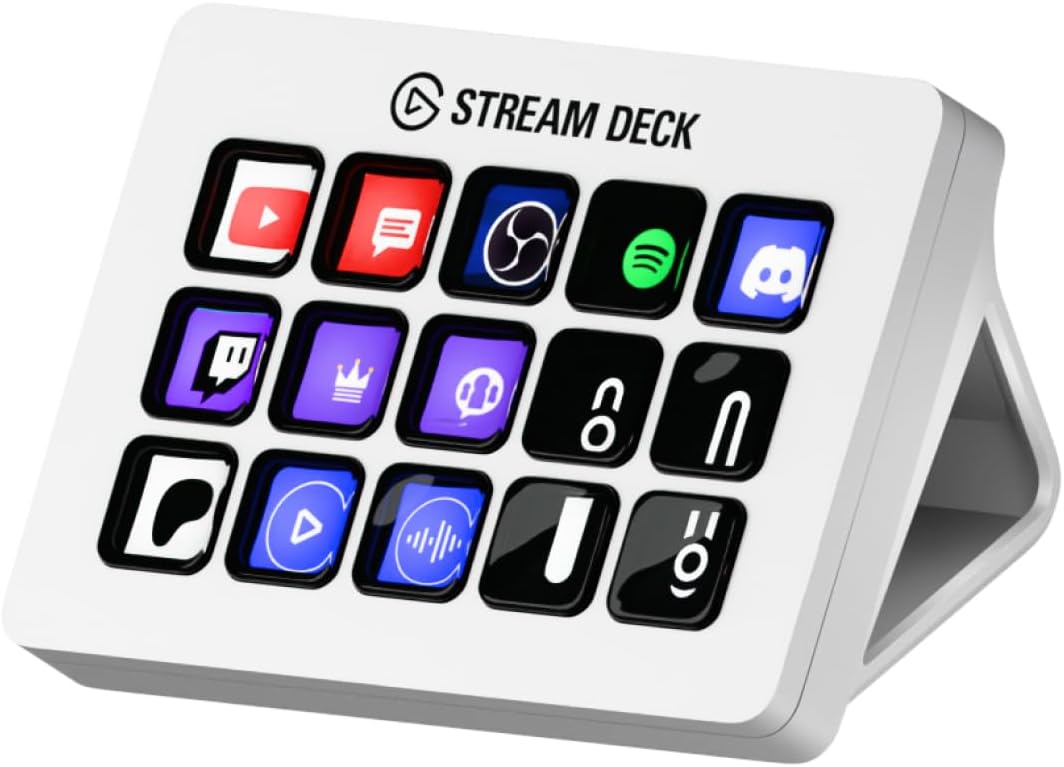
The Elgato Stream Deck MK.2 White is the strongest all-around choice in this guide, combining 15 customizable LCD keys with a 4.8 rating. It offers enough controls for a substantial Twitch production layout without approaching the desk space required by the 32-key and 36-key models.
We may earn a commission when you buy through this link, at no additional cost to you.
Single commands and multi-action sequences cover everything from launching a stream to muting a microphone, changing audio, turning on lights, adjusting levels, launching media, and posting to social platforms. Visual feedback makes it clear when a command has been executed, which helps reduce errors during a live broadcast.
Its integration list includes Elgato 4KCU, OBS, Twitch, YouTube, Twitter, Discord, Spotify, Philips Hue, and many more. The established plugin ecosystem is a major advantage for creators who want controls for audio, lighting, communication, and recording software without building every action from basic keyboard commands.
The white finish also makes the MK.2 visually distinctive on a creator's desk. Its main limitation is that it has no rotary dials, so creators who require frequent fine adjustments may prefer a Stream Deck + model. Even so, the balance of capacity, polished design, software support, and visual feedback makes it an excellent default choice for most Twitch creators.
Fifteen keys provide room for scene changes, overlays, audio, alerts, and social commands while keeping the most important actions accessible. It is a sensible middle ground between the six-key Mini and larger XL models.
Native connections to Twitch, OBS, audio platforms, lighting, and social tools let creators work with recognizable actions. This makes the deck more approachable than a generic macro keypad.
We may earn a commission when you buy through this link, at no additional cost to you.
The Elgato Stream Deck + White combines customizable LCD keys, a touch strip, and dials in a coordinated studio controller. Its 4.6 rating makes it a polished option for streamers who want precise physical adjustment alongside familiar scene-change buttons.
We may earn a commission when you buy through this link, at no additional cost to you.
The LCD keys activate commands and functions with one tap, while multi-actions can run several commands simultaneously or in a timed sequence. The dials are useful for live audio and other continuous settings, and the touch strip adds another method for navigating information or commands without crowding the key layout.
Compatible applications include Zoom, Teams, PowerPoint, Excel, Word, Google Suite, Microsoft Office, Photoshop, Adobe Creative Apps, Spotify, and Music. Easy drag-and-drop setup lets creators assign actions and personalize their settings without relying on command-line tools or programming.
The white finish distinguishes the device from typical black production peripherals and can complement a carefully coordinated desk. As with other hybrid controllers, the extra hardware may be unnecessary for a simple stream, but it becomes valuable when a creator wants audio, video, communication, and editing tools managed from one surface.
The dials offer a direct way to adjust changing levels during a broadcast. They complement discrete key commands and are especially useful when a creator wants finer control than a simple button provides.
The white enclosure gives the controller a distinctive appearance that can integrate with a matching desk setup. Its visual styling is paired with the same functional advantages found in the standard Stream Deck + design.
We may earn a commission when you buy through this link, at no additional cost to you.
The right streaming deck depends on your production complexity, desk space, operating system, software, and preferred mix of one-touch commands and live adjustments.
Start with the number of commands you expect to use during a normal show, not the largest number a device could theoretically store. Six keys work well for a new streamer with a simple scene structure, 15 keys suit a broader production layout, and 32 or 36 keys serve creators who move between broadcasting, editing, and communication tasks. More keys provide room for dedicated overlays, alerts, audio commands, and application shortcuts, but they also require a larger, more carefully organized layout.
Choose enough visible keys for your most frequent actions, then use folders or profiles for the rest.
A key-only deck is excellent for commands that happen once, while rotary dials are better for settings that change continuously. A touch strip can display contextual information, provide a strip of extra actions, or make navigation easier in software. Hybrid controllers are particularly useful when a Twitch setup includes audio mixing, camera control, lighting, and switching among several applications.
Choose dials for live levels and a touch strip for context; prioritize keys for repeatable scene commands.
Check the operating systems, streaming applications, and creative software you actually use. The products in this guide support major tools such as OBS, Twitch, Streamlabs, YouTube, Discord, Photoshop, and Microsoft Office, but the depth of integration varies. Some products include a broad plugin store and established production integrations, while others rely more heavily on customizable macro actions and downloadable utilities.
Confirm compatibility before buying, especially if your setup depends on Linux, ARM-based systems, specialist audio hardware, or a particular streaming application.
Multi Actions can execute several commands together or in a timed sequence. This is one of the most valuable features for a stream deck because it allows a complex production routine to be triggered with one physical press. Advanced macro controllers may also support simultaneous operation, ordered chains, text insertion, file launching, and webpage access.
Prioritize reliable multi-step execution if your show includes repeated scene packages, alert routines, recording sequences, or post-stream cleanup tasks.
Customizable LCD icons make commands easier to recognize and reduce the need to memorize every action. Some devices also support animated GIF artwork, while surrounding RGB lighting can add visual identity to a dark setup. Lighting is not essential to function, but clear labels and visual state changes are particularly valuable during a live broadcast when attention is divided.
Use large, distinct labels for frequent actions and reserve animations or lighting for status information that truly needs attention.
A streaming deck can control application audio, trigger sound effects, and send play or pause commands, but it does not necessarily function as a standalone speaker or powered audio mixer. The VSD N4 Pro explicitly sends audio control commands to the computer and has no built-in speakers. Elgato's Wave Link integration adds another route for compatible audio workflows. Determine whether you need a command interface, a physical mixer, or a combination before selecting a model.
Choose a control deck for software commands; use dedicated audio hardware when you need independent mixing, headphone monitoring, or physical signal routing.
Streaming decks range from a compact six-key unit to broad control surfaces with dozens of keys and rotary dials. A larger deck can keep every important command visible, but it requires room and may be pushed too far away to reach comfortably. Some controllers include folding stands or adjustable viewing angles, while others are designed to sit directly on the desk.
Compare the full footprint with your available space and ensure the keys remain easy to reach without moving your hands away from the keyboard and mouse.
Profiles allow a single deck to present different commands for streaming, editing, meetings, or gaming. Icons and community or official plugins can make setup faster, while royalty-free tracks and sound effects can be added to a production library. A strong asset ecosystem is useful if you want polished layouts without designing every icon and action from scratch.
Favor a device when its configuration tools, icon library, and plugins align with your software; otherwise, verify that custom macro functions are flexible enough for your workflow.
Begin by connecting the deck with its supplied USB cable and installing the associated control software. Create separate profiles for live streaming, editing, and other activities, then assign the most frequently used commands to visible keys. Test each button, dial, and touch control before going live, and use clear icons that describe the result rather than obscure software names.
Next, build multi-action sequences for repeated production routines. A single button might change an OBS scene, start or stop a recording, and adjust a related audio setting, but the sequence should be tested at normal operating speed. Keep destructive actions and lengthy workflows separate from frequently used scene controls, and confirm the expected order and timing in the software before assigning the routine.
For care, keep the device on a stable surface, avoid placing liquids over the keys, and clean the LCD surfaces with a soft, lint-free cloth. Check cable connections if a command stops responding, and restart the control software if a key becomes unresponsive. Update the application and plugins periodically, but save your profiles or export important layouts first so that maintenance does not interrupt a live production setup.
No, OBS and a keyboard can handle basic streaming controls. A streaming deck becomes useful when you want faster access to scenes, overlays, audio commands, lights, cameras, and multi-step routines without memorizing many keyboard shortcuts. It is an optional productivity and production tool rather than a requirement for broadcasting.
A conventional Stream Deck typically provides established integrations and a mature app store, making it easier to control supported services with visual buttons. A macro keypad offers broader programmable sequences and can trigger text, files, webpages, and application actions. Both can be useful, but the former generally offers a smoother path for common creator software.
Yes, all of the dedicated keypad-style products in this guide are listed as compatible with OBS, and most explicitly support Twitch actions. A creator can assign scene changes, audio controls, media launches, overlays, and other production functions. Check the current software and operating-system requirements before setup.
A six-key deck can be sufficient for a simple show with a few recurring commands. Timed multi-actions can make each key handle a more complex routine. As a channel becomes more complex, a model with additional keys, dials, profiles, and touch controls may offer a more organized production surface.
Most stream decks are control surfaces rather than standalone speakers. They can send software commands that play, pause, or adjust audio on the computer, but actual sound output depends on the computer, audio software, and connected equipment. The VSD N4 Pro is explicitly designed to control audio operations without built-in speakers.
Yes, and doing so is one of the main benefits of profiles. You can create separate layouts for Twitch, video editing, gaming, meetings, and everyday tasks, then switch to the appropriate profile. The Elgato models in particular emphasize smart or unlimited custom profiles for this type of changing workflow.
Start with commands you use during every broadcast, such as scene changes, microphone mute, camera selection, and starting or stopping recording. Put overlay controls and less frequent actions on a second row or a separate profile. Clear, color-consistent labels are more useful than trying to fit every possible action onto the visible layout.
Both brands support widely used creator applications such as OBS, Twitch-related workflows, YouTube, Discord, and common desktop software. Their integration depth differs, however. Elgato generally provides established plugins and a larger store, while VSD emphasizes customizable macros, downloadable plugins, RGB features, and broad command configuration.
The Elgato Stream Deck MK.2 White is the strongest overall recommendation because its 15 LCD keys, 4.8 rating, visual feedback, and established integrations provide a balanced Twitch control surface. The Stream Deck + XL is the premium option for creators who need 36 keys, six dials, and a detailed touch display, while the VSD M18 Macro Pad offers the strongest budget-oriented route to 18 programmable controls and extensive custom macros.
Prioritize the hardware that matches your actual production load. New streamers may get more value from the compact Elgato Stream Deck Mini, while busy creators should consider the VSD N4 Pro for its combination of LCD keys, knobs, touch bar, presets, and USB dock. Those who control cameras remotely may find the Insta360 Link 2 Pro particularly useful because its Stream Deck integration can manage modes, presets, and multiple cameras.
Before purchasing, verify operating-system support, confirm that your preferred streaming and creative applications are integrated, and check the current listing for availability and price. Product configurations, software updates, and prices can change, so the final choice should reflect both the supplied specifications and the tools you use every day.
