
CRAVERLAND 30-Piece Pen Adapter Kit
4.7Editor score
Thirty adapter components included
Supports more than 40 pens
Dual-coded reference manual included
A Cricut pen adapter allows compatible cutting machines to hold writing and drawing tools that may not have come with a standard holder. The right adapter should fit the machine, grip the pen securely, and keep the writing tip properly centered so drawn lines and cut paths remain aligned.
This guide compares ten adapters based on supported machines, accepted pen sizes, included components, installation method, centering accuracy, and organization features. It covers universal designs, dedicated Sharpie sets, multicolor systems, scoring-tool options, and adapters made for the separate Joy and Joy Xtra machine family.
Each product entry explains the adapter's strongest qualities, practical limitations, and most suitable user. Ratings and product details can change over time, so readers should verify the current machine model, tool dimensions, and compatibility information before making a final selection.
4.7Editor score

4.5Editor score

4.5Editor score
As an Amazon Associate we earn from qualifying purchases.
The comparison below organizes all ten adapters by their intended machines, tool compatibility, included pieces, and practical setup features. It makes it easier to distinguish universal systems from dedicated Sharpie adapters and sets designed specifically for Joy-family machines.


The CRAVERLAND Universal Pen Adapter Set earns a 4.5 rating and stands out as the most versatile option in this guide. It is designed for Cricut Venture, Maker 4, Maker 3, Maker, Explore 4, Explore 3, Explore, Air 2, and Air machines, while accepting writing tools with a shaft diameter below 0.5 inches. That combination makes it a practical choice for crafters who want to use pens they already own instead of limiting themselves to one proprietary tool.
We may earn a commission when you buy through this link, at no additional cost to you.
The set is particularly useful for drawing, writing, coloring, and mixed-media projects. Its stated compatibility includes Sharpie, BIC, Crayola, Staedtler, Pilot, Sakura, Paper Mate, Pentel, Tombow, infusible ink, brush pens, fine liners, markers, oil-based paint tools, gel pens, highlighters, glitter pens, and other instruments. Two adapter sets, two calibration units, instructions, and a storage box are included, providing a more complete package than a basic replacement holder.
Installation involves removing the original adapter, installing the universal holder, and checking the tool's depth before a full project. The product description notes that skilled users may eventually determine the proper depth without repeated calibration. A possible slight off-center drawing result is also disclosed, but the recommendation to perform a test before committing to a larger piece is sensible and helps protect alignment accuracy.
This is the strongest recommendation for anyone who owns one of the supported machines and works with a varied collection of pens. It is less suitable for Explore 5, Explore One, or Joy-family machines, and the number of included components may exceed what a user with only one pen style needs. Even so, its range of supported tools, organized packaging, and calibration support give it the best overall balance for a broad crafting setup.
A below-0.5-inch shaft limit covers an unusually broad collection of everyday pens, technical pens, markers, and coloring tools. The compatibility list also includes recognizable brands such as Sharpie, Sakura, Pilot, and BIC, reducing the chance that a favorite pen will be unusable.
Two adapter sets, calibration units, instructions, and a gift-style organizer give the package more structure than a single loose holder. The box also offers a convenient place to keep the components when they are not in use.
We may earn a commission when you buy through this link, at no additional cost to you.
This 20-piece pen adapter set carries a 4.4 rating and offers one of the broadest selections of dedicated holders in the guide. It is intended for Explore 4, Explore 3, Explore Air 2, Explore Air, Maker 4, Maker 3, and Maker machines. Rather than relying on one adjustable design for every tool, it includes 20 components that can accommodate popular Sharpie, BIC, Crayola, Sakura, Pilot, Pentel, Paper Mate, and Mitsubishi uni-Ball pens and markers.
We may earn a commission when you buy through this link, at no additional cost to you.
The centered-grip design is a major practical advantage. According to the product information, each adapter holds the writing tool in the center, helping drawing and cutting operations remain aligned. The set also eliminates the need for depth calibration, reducing setup time and making it easier to switch between writing tools during a project.
Identification features are especially useful in a set this large. Engraved abbreviations and distinct color codes let users recognize a holder without repeatedly testing several options. The adapters are made from ABS plastic, and the manufacturer states that each one is inspected before shipment, adding confidence to a system intended for repeated use.
Choose this set if your machine belongs to the supported Explore or Maker range and you regularly alternate among multiple brands or nib styles. It is less appropriate for Explore One or Joy machines because those systems use different clamps. The number of pieces also means the product may be more than necessary for someone who works with a single marker type, but for a varied collection it provides ready-to-use flexibility.
Keeping the pen centered in the clamp helps the machine follow a more consistent writing path. That focus on alignment is particularly valuable when a project combines handwritten details with a cut shape.
With 20 dedicated components and clear identifiers, users can move between different pens and markers without repeatedly performing depth calibration. The system is designed to keep workflow moving while changing tools.
We may earn a commission when you buy through this link, at no additional cost to you.
The CRAVERLAND Universal Pen Holder has a 4.5 rating and uses a straightforward one-adapter approach for tools below 0.5 inches in diameter. It fits the Explore 4, Explore 3, Air 2, Air, Explore, Maker 4, Maker 3, Maker, and Venture. The ability to work with pens, markers, tools, and a scoring stylus makes it more versatile than a holder devoted to writing instruments alone.
We may earn a commission when you buy through this link, at no additional cost to you.
CRAVERLAND states that more than 100 pens were tested repeatedly during product research and development. The holder is designed to slide smoothly into the pen clamp and keep the selected tool stable throughout a project. Compatibility information names Sharpie, Crayola, Paper Mate, BIC, Stabilo, Pilot, Sakura, Tombow, Pentel, and Cricut tools, along with other brands.
Packaging is another important feature. Six packs of components are organized in an original gift box that can also serve as storage for a collection. This makes the product easier to organize than a small group of loose adapters and gives it a more finished presentation for crafters who keep their accessories together.
This product is best for users of supported Explore, Air, Maker, and Venture machines who value a simple universal grip and organized storage. It is explicitly excluded from Explore 5, Explore One, Joy, and Joy Xtra, so checking the machine model is essential. Within the supported range, its broad tool acceptance and stable construction make it a strong all-purpose choice.
The holder is designed to resist wobbling while a project is in progress. Stable placement helps maintain line quality and supports consistent marks when drawing or writing.
Six component packs fit inside the included gift box. Users can keep related pieces together and move the complete set between a work area and storage location with less clutter.
We may earn a commission when you buy through this link, at no additional cost to you.
This Universal Maker Adapter receives a 4.2 rating and focuses on uncomplicated installation. It supports the Maker 4, Maker 3, Maker, Explore 4, Explore 3, Explore Air 2, and Explore Air, giving it wide relevance across two of Cricut's major machine groups. Its core purpose is to expand drawing and writing choices without requiring a proprietary pen.
We may earn a commission when you buy through this link, at no additional cost to you.
The adapter accepts most pens and markers below 0.5 inches, or 12.7 millimeters. The stated tool list includes gel pens, ballpoints, fine liners, permanent markers, highlighters, brush pens, felt-tip pens, rollerballs, mechanical pencils, oil-based paint tools, washable markers, ink pens, and glitter pens. That range makes it useful for lettering, labeling, journaling, and decorative drawings.
Its plug-and-play format keeps the setup simple: insert the adapter into the machine, place the pen inside, and begin a project. The manufacturer emphasizes accurate alignment, smooth writing, consistent ink flow, and clean lines without shifting or wobbling. Construction from ABS plastic gives the adapter a lightweight profile intended for repeated DIY use.
This is a practical choice for a Maker or supported Explore user who wants a straightforward universal holder. It is less compelling for buyers who want multiple labeled adapters, calibration accessories, or an included storage case. Its lower rating should also prompt buyers to consider the amount of available compatibility information and the simplicity they value most.
The adapter drops into the machine without tools or a complicated adjustment sequence. A user can change writing tools quickly and return to the main creative task.
The broad tool list includes highlighters, glitter pens, oil-based tools, and ordinary gel or ballpoint pens. This makes the holder useful for projects that require more than a single permanent marker.
We may earn a commission when you buy through this link, at no additional cost to you.
The Dual-Thread Universal Pen Adapter earns a 4.4 rating and differentiates itself through a two-thread retention design. That feature is intended to secure the pen more firmly and reduce side-to-side movement, which is valuable when a machine is drawing fine lettering or extended decorative lines.
We may earn a commission when you buy through this link, at no additional cost to you.
Machine compatibility covers the Maker 4, Maker 3, Maker, Explore 4, Explore 3, Explore Air 2, and Explore Air. Compatible tools include most pens and markers under 0.5 inches, with Sharpie, BIC, Crayola, and Sakura specifically named. The product is explicitly not designed for the Explore 5.
Installation is described as an easy drop-in process: place the adapter in the clamp, add the pen, and begin creating. No tools are required, and the design is intended to make switching between markers convenient. Suggested uses include cards, invitations, planners, labels, decorations, and routine writing or drawing projects.
This adapter is a good match for crafters who have experienced lateral movement with a looser holder. It also remains simple enough for users who do not want to manage many individual components. Its limitations are the lack of Explore 5 support and the absence of a larger labeled set, so dedicated Sharpie or multi-tool buyers may find another option more convenient.
The dual-thread construction tightens the relationship between the pen and the holder. A more secure grip can improve the consistency of narrow lines and extended writing passes.
The holder suits a variety of common paper crafts, from labels and planner elements to invitations and decorations. Its tool-free setup also supports quick changes during longer sessions.
We may earn a commission when you buy through this link, at no additional cost to you.
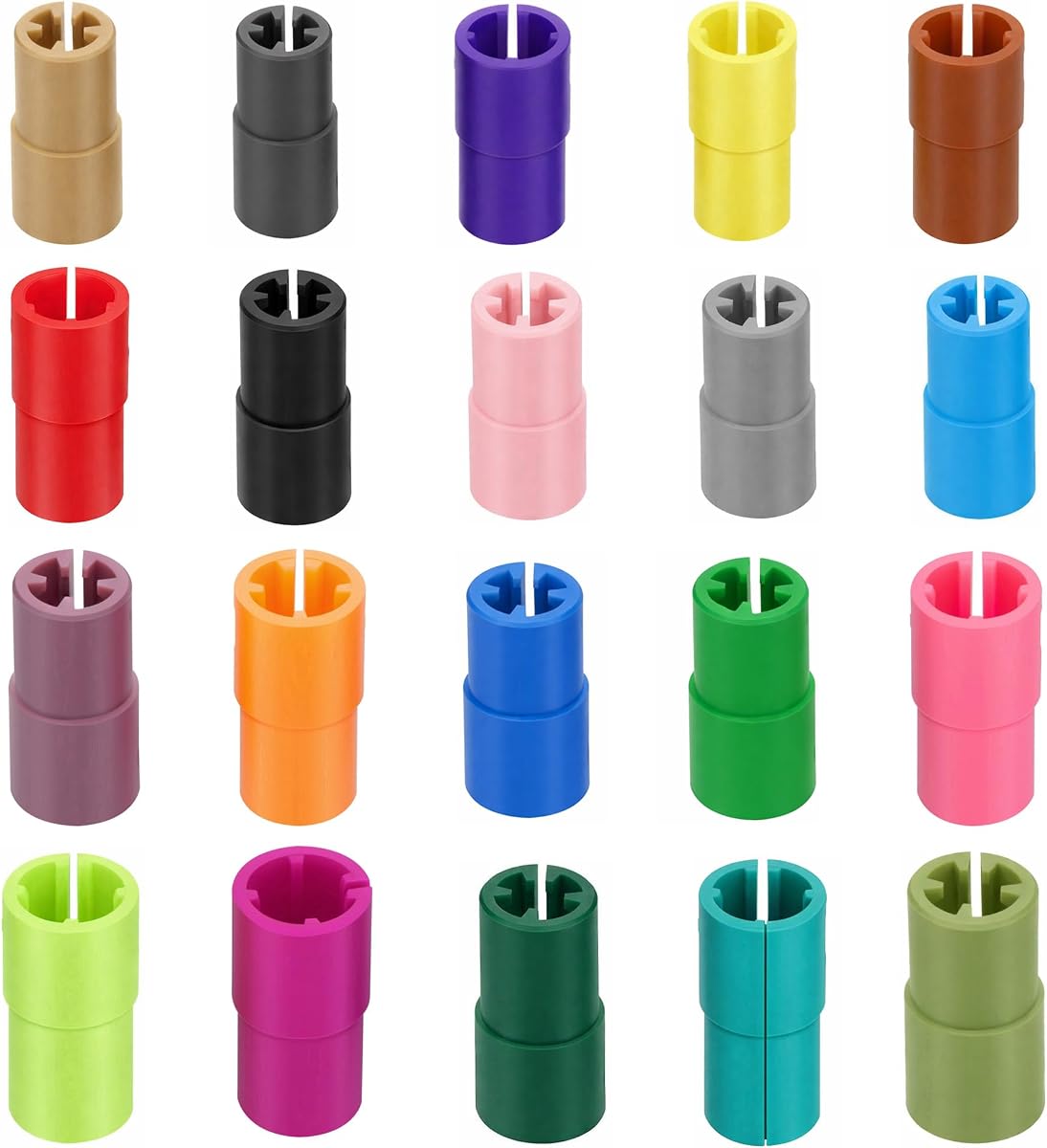
The CRAVERLAND Thirty-Piece Pen Adapter Kit has a 4.7 rating, making it one of the highest-rated products in the guide. It is designed for Cricut Venture, Explore 4, Explore 3, Air 3, Air 2, Air, Maker 4, Maker 3, Maker, and Explore machines. Its 30 components are intended to fit more than 40 pens and markers across numerous brands.
We may earn a commission when you buy through this link, at no additional cost to you.
The set includes adapters for Sharpie, Crayola, Paper Mate, Pentel, Tombow, Stabilo, Sakura, Signo, Pilot, BIC, and others. It also includes a special holder designed to replace the original adapter for supported pens and styluses. This is helpful for a user whose factory holder has been lost or damaged, particularly when the original branded tool is already part of a regular workflow.
A dual-coding manual helps users identify the correct adapter, and the compact design is intended to sit correctly in the machine's pen clamp without depth calibration. The manufacturer emphasizes that the holders grip the tool firmly and are designed not to harm the machine. Those characteristics make the kit useful for frequent use rather than only occasional lettering.
This is the strongest option for a serious crafter with a collection of pens who wants dedicated, readily identifiable holders and one complete replacement system. It is not the right choice for a Joy-family machine, and buyers with only one frequently used pen may not need 30 components. For a broad, supported collection, however, its organization and tool range are difficult to match.
Rather than relying only on a universal sleeve, the kit provides tailored components for a large assortment of popular writing tools. Dedicated sizing can support steadier placement and quicker selection.
The special replacement holder provides continuity for a compatible original pen or stylus. It also offers a practical solution when a missing or damaged original adapter interrupts a project.
We may earn a commission when you buy through this link, at no additional cost to you.
The DESMOR Original Adapter Set has a 4.7 rating and offers a focused solution for crafters who rely on Sharpie pens. It is compatible with Cricut Explore Air-series machines and Maker-series machines. Instead of trying to make one holder accommodate every writing instrument, the three-pack provides dedicated configurations for Sharpie Fine Point, Ultra Fine Point, and Art Pens.
We may earn a commission when you buy through this link, at no additional cost to you.
The engraved abbreviations help users identify the correct holder without relying on color alone. The SFP configuration accommodates Sharpie Fine Point models, including classic, metallic, extreme, neon, and color burst versions. SUFP covers Ultra Fine Point classic, electro pop, and color burst markers, while SAP is intended for Sharpie Art Pen stylo and art tools.
Depth calibration is unnecessary because the adapters are designed to align each pen's height and point center. That feature reduces setup and supports consistent writing. The manufacturer also highlights the quality of its products and provides support through a small United States-based business, although buyers should still compare the included machine compatibility with their own model.
This set is an efficient choice for someone whose writing workflow is built around Sharpie markers. It is less appealing for users who want gel pens, brush pens, highlighters, or a broad mix of tools. Within its specialized category, the 4.7 rating, clear engraving, and dedicated fit make it one of the strongest alternatives in the guide.
Each holder corresponds to a defined Sharpie category and tip configuration. Dedicated sizing avoids the uncertainty that can come with a general-purpose adapter.
The manufacturer states that no depth calibration is needed because each adapter aligns the pen's height and point center. This can make recurring writing jobs more efficient.
We may earn a commission when you buy through this link, at no additional cost to you.
The Cricut Accessory Adapter Replacement has a 4.7 rating and provides a direct official-style option for supported Explore and Maker machines. It installs into the machine's A clamp and expands the range of creative tasks the machine can perform. Drawing, writing, and scoring are the three principal functions identified in the product information.
We may earn a commission when you buy through this link, at no additional cost to you.
Its machine-focused design is a major strength for buyers who value straightforward integration with the clamp. Rather than requiring a multi-piece system for several popular pens, the accessory provides a general platform for compatible tools. Installation is described as easy, allowing a user to add the holder and begin the intended operation.
The product is not for use with the Explore One. That exclusion should be checked before purchase, especially by owners of older or differently named machines. The product data does not describe a universal shaft-size limit or a large collection of tool-specific adapters, so buyers seeking support for many miscellaneous pens should examine one of the broader universal sets instead.
This adapter is best for a supported Explore or Maker owner who needs a straightforward machine accessory for writing, drawing, or scoring and may prefer the familiarity of an official Cricut-branded option. It is less suitable for Explore One users or crafters whose main goal is accommodating an unusually large assortment of pen brands. Its 4.7 rating and clear installation method make it a dependable specialized pick.
The accessory is designed specifically to install in the A clamp of supported machines. This focused design simplifies the physical connection between the tool holder and cutting system.
Drawing, writing, and scoring extend the machine beyond its basic cutting role. These functions make the adapter useful for lettering, decorative marks, and dimensional craft work.
We may earn a commission when you buy through this link, at no additional cost to you.
The CRAVERLAND Joy Eight-Piece Adapter Set has a 4.6 rating and is designed specifically for the Joy, Joy 2, and Joy Xtra. It is the clear choice in this guide for owners of those compact machines who want access to familiar pens, markers, and a scoring stylus through eight dedicated pen holders.
We may earn a commission when you buy through this link, at no additional cost to you.
Compatibility includes Sharpie Fine Point, Sharpie Ultra Fine Point, Sharpie Art, BIC Brite Liner Chisel Tip, Pilot V5 and V7, original and third-party Cricut pens, Mitsubishi uni-Ball UM153, and the Tombow Dual Brush brush tip. The felt-tip version of the Tombow tool is not supported, an important distinction to check before assuming every tip style fits.
Each holder includes an engraved abbreviation, and the manual lists compatible pen model names. The manufacturer states that the adapters have been tested repeatedly and are made from ABS plastic for durability. Installation involves placing the appropriate holder on the tool and inserting it into the pen clamp of the Joy, Joy 2, or Joy Xtra.
This is the appropriate choice for a Joy-family machine owner and should not be selected for an Explore or Maker machine. Its dedicated approach, recognizable-tool coverage, and scoring stylus support make it a strong specialist set. Users with a mixed machine collection would need a separate adapter system for the other machine types.
The holders are shaped around the clamp requirements of the Joy, Joy 2, and Joy Xtra. That targeted compatibility is more useful than attempting to adapt a holder intended for a different machine family.
The set covers several popular Sharpie, Pilot, and BIC styles while also including a scoring stylus. It gives Joy users access to both marking and scoring without changing their preferred tools.
We may earn a commission when you buy through this link, at no additional cost to you.
The Likart Six-Pack Sharpie Adapter Set carries a 4.5 rating and provides a larger version of the dedicated Sharpie-adapter concept. It is compatible with the Maker 4, Maker 3, Maker, Explore 3, Explore 2, and Explore Air. The package includes six adapters covering Sharpie Fine Point, Ultra Fine Point, and Art Pen configurations.
We may earn a commission when you buy through this link, at no additional cost to you.
Color coding and engraved abbreviations make the different holders easy to distinguish. The green F adapter is assigned to Fine Point markers, including classic, metallic, extreme, neon, and color burst versions. The pink U adapter covers Ultra Fine Point classic, electro pop, and color burst markers. The blue A adapter supports Sharpie Art Pen stylo and art tools.
The adapters are designed to align the pen's height and center without depth calibration. They can be installed and removed easily, which is useful when switching between marker types during lettering or coloring work. Their dedicated construction is intended to produce output comparable to an original holder while providing a replacement option for compatible machines.
This six-pack is a good fit for a Maker or supported Explore user who works regularly with Sharpie pens. It is less useful for anyone seeking a universal pen platform, and it cannot be used with the Explore One. Its combination of clear labels, multiple pieces, and no-calibration setup makes it an approachable, focused option within the Sharpie market.
Green, pink, and blue correspond to the three main Sharpie categories, while the engraved letters provide another way to identify each holder. This reduces selection errors during busy projects.
The manufacturer states that each adapter aligns the tool's height and point center without depth calibration. Stable alignment supports writing consistency across multiple uses.
We may earn a commission when you buy through this link, at no additional cost to you.
The best Cricut Pen Adapter depends on machine compatibility, the tools you want to use, and how often you change writing instruments. Review model restrictions, shaft size, centering method, calibration requirements, and included organization features before choosing.
Begin with the exact model of your cutting machine because the supported families are not interchangeable. Universal products in this guide commonly cover Maker, Explore, and Air models, while the eight-piece set is specific to Joy, Joy 2, and Joy Xtra. The official Cricut Accessory Adapter is designed for Explore and Maker machines but not Explore One. Several universal listings also exclude Explore 5, and one explicitly excludes Explore One, Joy, and Joy Xtra. Checking the machine name before considering pen range prevents an otherwise capable adapter from being unusable.
Universal holders commonly accept shafts under 0.5 inches, or 12.7 millimeters, but a diameter limit does not guarantee that every tip or barrel shape will work equally well. Dedicated sets focus on specific brands and configurations, such as Sharpie Fine Point, Ultra Fine Point, Art Pen, Pilot V5 and V7, BIC Brite Liner Chisel Tip, and Mitsubishi uni-Ball UM153. Brush pens, felt tips, mechanical pencils, and other narrow or unusual tools may behave differently. Review the included tool list and look for the exact marker you plan to use most often.
A universal adapter offers convenience when you switch among gel pens, brush pens, highlighters, and other tools with compatible barrels. A dedicated system can be easier to center because each holder is made for a defined pen category. The trade-off is reduced flexibility: dedicated sets are best for a narrow favorite-brand workflow, while universal products suit larger and less predictable collections. Some users may also prefer a complete dedicated kit, as offered by the 30-piece CRAVERLAND set, over a single adjustable holder.
Accurate centering matters when the machine writes or draws long lines, detailed lettering, or patterns that must remain aligned with a cut shape. Product descriptions emphasize centered pen placement, stable grips, and reduced side-to-side wobbling. The Dual-Thread Universal Adapter specifically uses a two-thread retention design, while dedicated sets are engineered around the dimensions of particular pens. Whatever format you choose, perform a small test and inspect the line before running a full project, because a pen that sits slightly off-center can affect the finished result.
Some adapters require a calibration unit and initial depth check, while others are specifically designed to avoid depth calibration. A no-calibration product can save time and reduce uncertainty, especially for frequent lettering work. If you are new to machine drawing, look for a system that provides clear instructions or a calibration aid. If convenience matters most, several dedicated and multi-piece sets use pre-positioned holders intended to align the tool automatically. Neither approach is universally superior, but matching the process to your experience level can prevent frustrating setup sessions.
A large set is valuable when many tools need holders, while a single adapter may be sufficient for one recurring pen. Look for engraved abbreviations, color codes, and a reference manual to reduce confusion between similar holders. The 20-piece set uses engraved abbreviations and color codes, while the 30-piece kit includes a dual-coding manual. The DESMOR and Likart sets rely on engraved labels, with Likart also adding colors. An included organizer or gift box can make a multi-piece system easier to store and retrieve.
Some users need more than drawing and writing. The Cricut Accessory Adapter supports scoring, and the CRAVERLAND Universal Pen Holder includes scoring stylus holders. The Joy set also includes a scoring stylus. If scoring is part of your regular process, confirm that the adapter supports the exact stylus and machine family. A universal pen holder that accepts many writing tools may still require a separate tool-specific holder for a scoring implement.
Most of the newer universal adapters are made from ABS plastic, providing a lightweight holder intended for repeated use. The broader CRAVERLAND sets go further by including organized packaging, a gift box, or an organizer. Consider both the holder's material and the way the package will live in your workspace. Multiple loose adapters can become difficult to match, while a labeled kit with a dedicated box makes switching tools more orderly and reduces the chance of putting the wrong holder on a pen.
Start by confirming that your cutting machine and chosen writing tool are explicitly supported. For a universal adapter, measure the pen's shaft and compare it with the stated limit. For a dedicated set, match the barrel and tip to the engraved label or manual. Clean the holder and clamp area, insert the correct adapter into the machine's pen clamp, and then place the pen into the holder.
Run a small test before beginning a full project. Draw a short line, a curved shape, and a few repeated marks so you can check centering, depth, and ink flow. If calibration guidance is included, follow it during this test. If the line is faint, sits too high, or appears slightly offset, adjust the tool according to the machine's instructions and repeat the test before moving on.
For care, remove the pen and adapter after use rather than leaving a wet marker in place. Wipe the holder gently with a dry or lightly damp cloth, and avoid forcing narrow or unusual tools into a holder that does not list them. Keep labeled components in their original case or organizer, and periodically check the grip for ink residue, looseness, or visible damage that could affect alignment.
Some universal adapters support several Maker, Explore, Air, and Venture models, but compatibility is not automatically shared across every machine family. Joy and Joy Xtra use a different adapter arrangement, while Explore One is excluded by many products. Always match the exact model name with the manufacturer's stated compatibility list before ordering.
Most universal holders in this guide accept pens and markers with a shaft diameter below 0.5 inches, equivalent to 12.7 millimeters. A barrel measurement alone does not guarantee a perfect fit, because some specialized tips or irregular bodies may be excluded. Check the product's tool list and perform a test before using a pen for an important project.
It depends on the adapter. Several products use dedicated dimensions or a centered design that eliminates depth calibration, while the CRAVERLAND universal set includes calibration units for setup and adjustment. If instructions call for calibration, complete it before a full project and confirm the result with a small test.
Yes, but only when the product specifically lists scoring-tool support. The Cricut Accessory Adapter, the CRAVERLAND Universal Pen Holder set, and the Joy adapter set all mention scoring capability. A holder for a pen barrel may not hold a scoring stylus correctly, so verify the exact stylus and machine model.
Generally, no. The eight-piece CRAVERLAND set is made for the Joy, Joy 2, and Joy Xtra, while the other broad kits primarily target Maker, Explore, Air, and Venture models. Users with machines from both families should plan on separate adapter systems rather than assuming one set crosses the entire product line.
Many of the universal and multi-piece adapters list Sharpie, BIC, and Sakura among compatible brands. Dedicated sets may support only selected Sharpie configurations, while universal holders usually accept tools with a shaft under 0.5 inches. Match the barrel and tip to the listed examples, then test the pen to confirm stability and alignment.
Start with an adapter designed for your pen's exact brand and tip configuration, since a dedicated holder often centers it more consistently. A dual-thread universal design may also reduce side-to-side movement. Check that the pen is seated fully, verify the adapter is the correct size, and test on a small cut to identify any remaining offset.
Third-party pens can work when their barrel and tip meet the adapter's stated dimensions and supported tool list. The Joy set explicitly mentions original and third-party Cricut pens, while other products focus on named brands and universal shaft sizes. Confirm compatibility and test the tool before beginning a long writing or drawing job.
The CRAVERLAND Universal Pen Adapter Set is the strongest overall choice because it combines broad machine support, a large range of compatible tools, calibration aids, and organized storage. The CRAVERLAND Thirty-Piece Kit is the most comprehensive dedicated system for users with a varied collection, while the Likart Six-Pack Sharpie Set delivers a focused and approachable option for popular Sharpie workflows.
Machine compatibility should always come first, followed by the type of pen or marker you actually use. Broad collections benefit from universal or multi-piece kits, while a consistent favorite-brand workflow may be better served by dedicated holders. Pay attention to centering, calibration instructions, engraved identifiers, and whether the package includes the machines and tools you need.
Ratings, product details, and machine support can change, so review the current listing and manufacturer instructions at the time of purchase. Taking a few minutes to verify compatibility can prevent a mismatched holder and help ensure smoother drawing, writing, and scoring results.