
RasTech Pi 5 Accessories Kit
4.3Editor score
Case and active cooler included
27W GaN USB-C power supply
Compatible with four memory configurations
Explore the best Raspberry Pi 5 accessories for 2026, with expert comparisons of cooling, power, cases, displays, cameras, storage, and learning kits.
Raspberry Pi 5 accessories can transform a capable single-board computer into a practical workstation, learning platform, media center, camera system, or compact network appliance. The right add-ons improve cooling, power delivery, storage, displays, connectivity, and expandability while helping protect the board from heat, dust, and accidental damage.
This guide compares ten Raspberry Pi 5 accessory options across electronics learning, touchscreens, cooling, cases, power supplies, NVMe storage, camera functionality, and active cooling. Products were evaluated using the supplied specifications, compatibility details, included components, customer ratings, and intended use cases rather than personal testing claims.
Each pick highlights a different way to expand the platform, from a comprehensive starter kit to a dedicated active cooler and compact aluminum enclosure. Ratings and included components help illustrate relative strengths, while current availability, pricing, board configuration, and connector requirements should always be checked before purchasing.
4.3Editor score

4.6Editor score

4.6Editor score
The table below compares every product by its core purpose, compatibility, included equipment, and primary benefit. It is a practical way to identify whether you need learning components, active cooling, enclosure protection, a display, camera support, or high-speed storage.




The Freenove Ultimate Starter Kit is a comprehensive electronics learning bundle for Raspberry Pi 5 owners, other Raspberry Pi models, and compatible Zero systems. Its 4.6 rating reflects a strong overall reception, while the broad collection of components makes it one of the most versatile choices for education, prototyping, and experimentation. The Pi itself is not included, so this is an expansion kit rather than a complete Raspberry Pi package.
We may earn a commission when you buy through this link, at no additional cost to you.
The centerpiece of the kit is its educational material: 128 projects progress from straightforward exercises to more complex builds. Each project includes schematics, wiring diagrams, complete code, and detailed explanations, reducing the guesswork involved in connecting sensors, modules, and other components. Instructions are available through a downloadable, 962-page tutorial or an online version, with browser-based translation support for readers who need another language.
Five sets of code cover Python, C, Java, Scratch, and Processing. Python 2 and 3 compatibility is specified, while Scratch and Processing provide graphical interfaces that can make the kit more approachable for younger users or beginners. With 223 included items, the package goes beyond basic LEDs and wiring to cover commonly used electronic components, modules, sensors, wires, and related accessories.
The main trade-off is quantity. Someone focused on one specific sensor, robotics role, or classroom lesson may not need every supplied item, and the board must be purchased separately. Even so, the kit reduces the need to order dozens of small components individually, making it a strong choice for families, educators, and hobbyists who want structured guidance. It is our top pick for hands-on Raspberry Pi learning.
The 128-project library is more valuable than a loose assortment of parts because it connects each component to a defined exercise. Learners can move from basic inputs and outputs toward more involved electronics while using complete wiring diagrams and code examples.
Python, C, and Java suit users who want to explore conventional code, while Scratch and Processing offer visual interfaces. That range makes the bundle useful across age groups, experience levels, and different ways of thinking about hardware projects.
We may earn a commission when you buy through this link, at no additional cost to you.
The Hosyond 7-Inch Touchscreen provides a relatively large, portable display for Raspberry Pi 5 projects that need direct interaction. It carries a 4.4 rating and uses a 7-inch IPS panel with 800-by-480 resolution. The capacitive screen is designed for smooth touch response, while the IPS panel supplies a wide viewing angle for dashboards, control panels, and status displays.
We may earn a commission when you buy through this link, at no additional cost to you.
Installation is centered on the Raspberry Pi's MIPI DSI interface. No additional connections are required, and the product is described as plug-and-play without configuration for new systems or systems whose settings remain unchanged. Raspbian supports two-point zoom on the older version, while Ubuntu, Kali, and Windows 10 IoT are specified for single-touch operation. Backlight brightness adjustment is also supported.
Compatibility covers Raspberry Pi 5, 4B, 3B+, 3B, 3A+, and 2B. It does not use HDMI, so it will not function as a general-purpose monitor for unrelated devices. Its 800-by-480 resolution is suitable for many embedded interfaces, but it may feel less spacious on a desktop with numerous open windows or small text.
This display is most appealing to makers building a dedicated control panel, home automation dashboard, kiosk, or portable status terminal. The combination of a seven-inch panel, touch input, and direct DSI connection makes it more specialized than a standard HDMI monitor, but that specialization is exactly what makes it convenient for compatible Raspberry Pi projects.
The larger screen gives dashboards, appliance controls, and monitoring interfaces more usable working space. Capacitive interaction allows direct selection without a separate pointing device, making the panel suitable for a dedicated single-purpose installation.
Using the MIPI DSI interface avoids the need for a separate HDMI display path and removes driver installation for supported configurations. The supplied instructions and simple connection scheme also make this easier to deploy than a generic touchscreen that requires additional conversion hardware.
We may earn a commission when you buy through this link, at no additional cost to you.
The RasTech Pi 5 Accessories Kit combines three foundational items: an ABS case, an active cooler, and a 27W GaN power supply. Its 4.3 rating indicates that the bundle addresses the essential protection and power needs of a Raspberry Pi 5 without asking buyers to assemble a complete accessory setup from separate sellers.
We may earn a commission when you buy through this link, at no additional cost to you.
The active cooler combines an aluminum heatsink with a PWM fan and thermal pads. PWM speed regulation is compatible with Pi OS, allowing cooling demand to follow processing conditions. The product description states that the cooler and ventilated case can help keep the board below its thermal throttle point under typical ambient temperatures and heavy loads, making the bundle especially relevant for sustained computing tasks.
The included GaN adapter delivers 5.1V at 5A for the Raspberry Pi 5 and also offers 9V, 12V, and 15V output options for compatible devices. The removable-top ABS case provides access to the GPIO and camera connectors while allowing the major ports, card slot, and power button to remain usable. Mesh and slot patterns support airflow and hot-air dispersion.
The limitation is that the board is not included, and neither is storage or a display. Even so, this is a focused package for someone who already owns a 2GB, 4GB, 8GB, or 16GB Raspberry Pi 5 and wants immediate cooling, enclosure, and power support. It is a particularly convenient choice for first-time Pi 5 owners.
A Pi 5 can generate meaningful heat under sustained workloads, while its exposed board can collect dust or suffer accidental contact with conductive objects. Pairing the PWM active cooler with a ventilated case addresses both concerns in one coordinated bundle.
The GaN power supply is designed around the Pi 5's 5.1V and 5A requirement, while its additional voltage outputs add flexibility for other compatible equipment. It removes the need to determine whether an unrelated adapter provides suitable output for the board.
We may earn a commission when you buy through this link, at no additional cost to you.
The RasTech Raspberry Pi 5 8GB Kit is the most complete package in the roundup, combining the computer itself with cooling, an enclosure, power, storage, readers, and display cables. Its 4.6 rating makes it a strong all-in-one recommendation for users who want a ready-to-configure platform rather than a set of individually sourced essentials.
We may earn a commission when you buy through this link, at no additional cost to you.
At its center is an 8GB Raspberry Pi 5 with a 64-bit quad-core Arm Cortex-A76 processor running at 2.4GHz and an 800MHz VideoCore VII GPU. The board supports dual 4Kp60 display outputs, HDR, OpenGL ES 3.1, and Vulkan 1.2, while its dual 4-channel MIPI camera and display transceivers are designed for modern camera and display workflows. The included 64GB card, two card readers, and dual micro HDMI cables provide useful setup flexibility.
Thermal management and power are handled by the included active cooler and 27W 5.1V 5A USB-C GaN supply. The case exposes the power, micro HDMI, USB, Ethernet, card, button, and MIPI connectors. While that breadth reduces assembly work, it also means the bundle is more elaborate than necessary for a small learning exercise, and buyers interested specifically in 2GB, 4GB, or 16GB configurations would need a different board package.
This is an excellent choice for a new Pi 5 owner who wants the main accessories arranged together, especially if the system will run multiple applications, media tasks, or connected peripherals. It is also practical as a ready-made base for desktop use, networking, development, or media projects. For those priorities, the convenience and coordinated components justify the premium bundle.
The board, 64GB card, readers, power supply, cooler, case, and cables cover the main items needed to begin configuring a Pi 5. This reduces compatibility guesswork and saves the buyer from having to assemble a basic system one component at a time.
The 8GB board's 2.4GHz Cortex-A76 CPU, VideoCore VII GPU, and dual 4Kp60 outputs are well suited to multimedia, graphics-intensive applications, and general development. Additional memory also gives users more room to run concurrent services than a lower-capacity configuration would allow.
We may earn a commission when you buy through this link, at no additional cost to you.
The RasTech Case and Cooler is a compact practical upgrade for Raspberry Pi 5 owners who already have suitable power but want improved thermal management and physical protection. It earns a 4.5 rating and combines a high-temperature-resistant ABS enclosure with a temperature-controlled active cooler and a small screwdriver for installation.
We may earn a commission when you buy through this link, at no additional cost to you.
The cooler joins an aluminum heatsink with a PWM fan designed to maintain appropriate operating temperatures across different applications. The enclosure protects against damage, dust, and scratches while leaving access to the USB-C power connection, micro HDMI ports, USB ports, Ethernet jack, card slot, power button, and four-lane MIPI DSI and CSI connectors. This arrangement preserves normal access to the board's important external features.
Compared with larger thematic bundles, the focused contents are easier to understand. A buyer is not paying for unrelated accessories that may never be used. The trade-off is that a USB-C power supply is not included, nor are storage, networking, display, or learning components. Existing owners can add the kit without replacing functioning essentials, while new owners still need to source power separately.
It is a strong fit for users running servers, automation systems, camera applications, or other workloads that may keep the board active for extended periods. It also makes sense for anyone who wants a basic enclosure and cooling solution without assembling a full accessory set. The combination is straightforward, useful, and broadly compatible across the listed Pi 5 memory configurations.
A basic case does more than improve appearance: it creates a physical barrier against dust and scratches while helping maintain airflow around the board. The connector layout keeps frequently used ports accessible without requiring the case to be dismantled.
The PWM fan can regulate its speed, making it more adaptable than a permanently running small fan. Combined with the aluminum heatsink and thermal pads, it provides a practical thermal solution for sustained Raspberry Pi 5 workloads.
We may earn a commission when you buy through this link, at no additional cost to you.
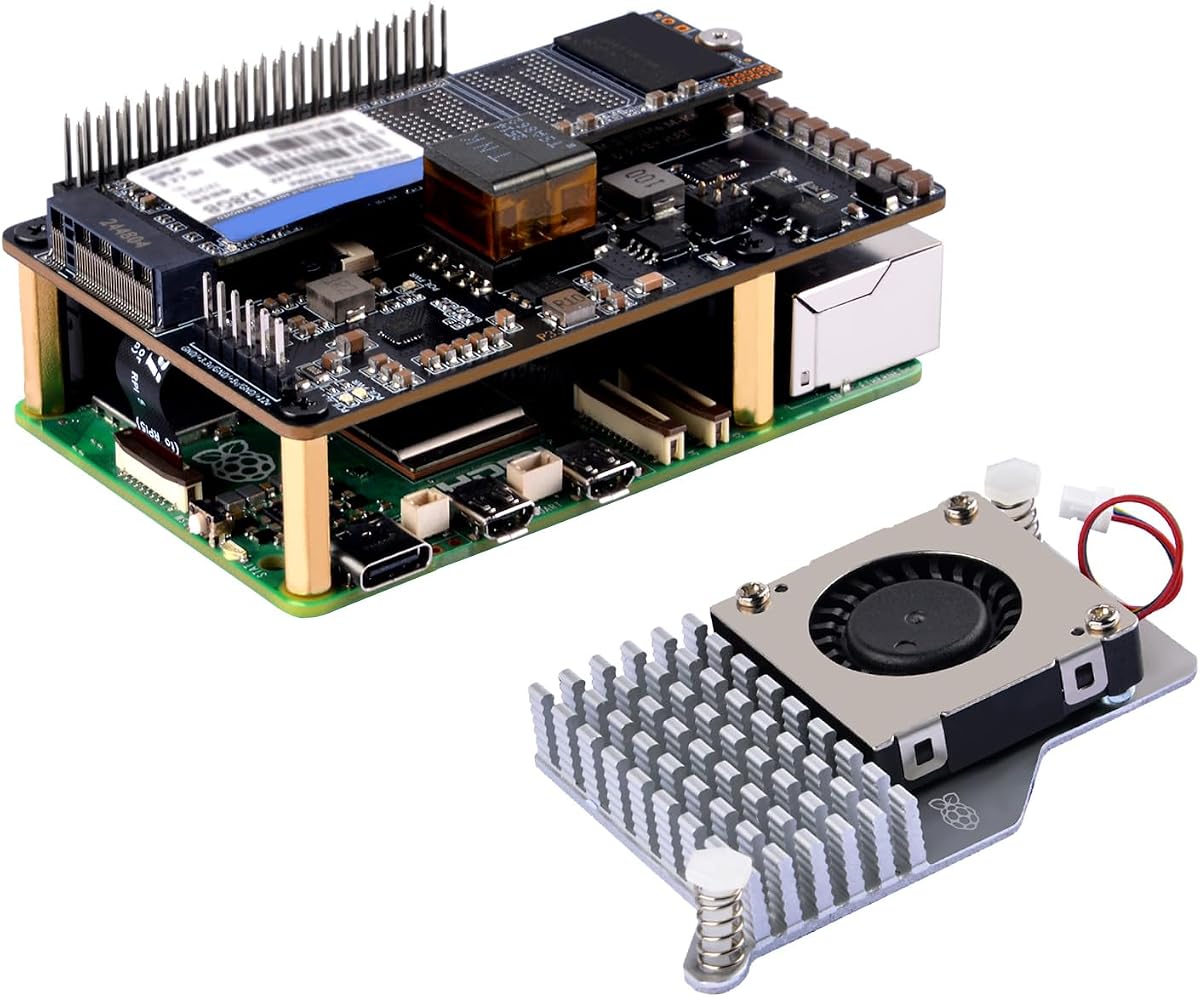
The GeeekPi P33 M.2 NVMe M-Key PoE+ HAT is built for Raspberry Pi 5 systems that need faster storage and cleaner network power delivery. It has a 4.2 rating and uses the board's PCIe interface to communicate with an M.2 NVMe SSD, making it a more specialized but potentially transformative storage upgrade.
We may earn a commission when you buy through this link, at no additional cost to you.
The HAT supports M.2 drives in 2230, 2242, 2260, and 2280 sizes. It also includes an aluminum active cooler with a PWM fan to help manage the Pi 5's temperature. This combination is particularly relevant for network-attached storage, server workloads, development environments, and applications where microSD card performance can become a limiting factor.
Power over Ethernet capability allows the Raspberry Pi 5 to receive power through the Ethernet connection using the 802.3at PoE+ protocol, with input specified up to 25.5W. The product provides 5.1V at 4.5A for the board and attached peripherals. An important safety instruction is not to connect a power supply to the Pi's USB-C port while the PoE+ HAT is being used, since the system should receive only one power source.
A separate case is not included, although the listing directs buyers to another ASIN for a compatible case kit. Users also need suitable NVMe hardware, a PoE+ switch or injector, and an appropriate Ethernet connection if they want remote power delivery. For projects that benefit from a dedicated SSD and a single network cable, however, this HAT offers a clean and capable expansion path.
Moving active data to a compatible NVMe SSD can reduce storage-related bottlenecks compared with relying entirely on a microSD card. The HAT uses the PCIe interface, so it provides a direct high-speed route for compatible M.2 drives.
PoE+ can simplify deployments where the Pi is located away from a convenient wall outlet by carrying data and power over Ethernet. The requirement for 802.3at equipment and the prohibition on simultaneous USB-C power mean the network plan should be established before installation.
We may earn a commission when you buy through this link, at no additional cost to you.
The Arducam OV5647 camera module gives a Raspberry Pi 5 the ability to capture images and video, opening possibilities in machine vision, robotics, monitoring, and educational projects. Its 4.4 rating reflects a well-established general-purpose camera option, while the 5-megapixel Omnivision OV5647 sensor remains easy to find in the broader Raspberry Pi ecosystem.
We may earn a commission when you buy through this link, at no additional cost to you.
The module can capture still images at up to 2592 by 1944 pixels and video at a maximum resolution of 1080p. An integrated infrared filter is included, and the supplied version uses a fixed-focus lens. Compatibility covers Raspberry Pi 5, 4, 3, 3B+, and earlier A and B-series models, but the listing specifically excludes the Pi Zero.
This is not a specialized machine-vision camera with motorized focus, high-frame-rate modes, or advanced controls. Users who need those capabilities will require a different module. The fixed-focus design, however, is perfectly reasonable for learning image processing, building a simple camera, creating a security or observation setup, or introducing computer vision concepts.
The camera is a versatile accessory for anyone who wants the Pi to interact with the physical world visually. Software and ribbon-cable arrangements vary among camera models and Pi generations, so buyers should confirm the connector and software requirements for their exact board. When those details line up, the Arducam provides a straightforward way to add visual data to Raspberry Pi 5 projects.
The familiar OV5647 sensor provides a straightforward way to begin experimenting with still images, video, and image-processing libraries. Its 1080p maximum video resolution is suitable for instructional and general-purpose projects.
Raspberry Pi camera modules and boards use different CSI connector arrangements, so physical compatibility should be verified before installation. The listed model is not intended for the Pi Zero, and software support may also vary by operating system and camera revision.
We may earn a commission when you buy through this link, at no additional cost to you.
The ElectroCookie Aluminum Mini Tower Case gives a Raspberry Pi 5 the appearance and footprint of a compact desktop computer. Its 4.4 rating reflects a combination of attractive design and practical cooling. The silver aluminum enclosure uses a mini-PC-style form factor, making it especially appealing for desk setups, workshops, and wall-mounted installations.
We may earn a commission when you buy through this link, at no additional cost to you.
Cooling is handled by a large heat-dissipation structure and a PWM fan with color-changing ambient lighting. The fan automatically adjusts its speed according to CPU temperature, allowing it to remain quiet when appropriate and increase airflow under heavier loads. The illumination is not programmable, and the fan may not spin while the processor is cool. It may also run continuously if no operating system or boot drive is available to control it.
The enclosure preserves access to GPIO pins, the SD card slot, USB, Ethernet, power, and micro HDMI ports. A soft-touch power button adds a desktop-like control experience. ElectroCookie also identifies compatible M.2 HAT NVMe SSD shields for expansion, but those shields are sold separately, and the enclosure is not compatible with the Raspberry Pi 4 because its USB and Ethernet port positions differ.
This case is a strong choice when appearance is as important as thermal performance. It turns the exposed board into something that can sit on a desk without looking like an exposed development platform. Buyers who want integrated NVMe storage should plan to add the appropriate shield, while everyone else gets an attractive, actively cooled enclosure with straightforward port access.
The mini-tower format changes how a Pi 5 appears in a workspace. Combined with the aluminum construction, soft-touch power control, and ambient lighting, it offers a more finished look than a typical exposed board or basic plastic case.
The PWM fan is designed to adjust according to processor temperature, balancing cooling demand with noise. The larger heat-dissipation structure supplements that active airflow and supports sustained operation under substantial workloads.
We may earn a commission when you buy through this link, at no additional cost to you.
The Hosyond 5-Inch Touchscreen is a compact option for Raspberry Pi 5 projects where a full-size monitor would be unnecessary or inconvenient. It has a 4.4 rating and pairs a 5-inch 800-by-480 IPS panel with capacitive touch. The result is a focused display for compact control panels, portable projects, and dedicated embedded interfaces.
We may earn a commission when you buy through this link, at no additional cost to you.
The screen connects directly through the Raspberry Pi's MIPI DSI output and is described as plug-and-play without driver installation for new or unchanged configurations. Raspbian supports two-point zoom in its older version, while Ubuntu, Kali, and Windows 10 IoT support single touch. PWM backlight brightness adjustment gives users some control over visibility and power use in different environments.
Compatibility extends across Raspberry Pi 5, 4B, 3B+, 3B, 3A+, 2B, 1B+, and 1A+ models. The display has no HDMI input, which prevents it from serving as a universal monitor for a laptop, camera, or other device. Its 800-by-480 resolution is also less detailed than modern desktop panels, although it remains practical for simplified applications.
The main advantage over the larger Hosyond option is portability. A five-inch screen is easier to incorporate into a handheld housing, compact terminal, or small control station, while retaining touch functionality and direct DSI operation. It is a good pick for makers who value a small, integrated interface over maximum screen area or broad monitor compatibility.
The five-inch panel is easier to embed in compact projects and portable builds. It retains the direct touch interaction of a larger display without requiring an additional input device for many kiosk-style applications.
Driver-free operation reduces setup friction on supported Raspberry Pi systems. Touch behavior differs by operating system, so users should select a configuration that provides the number of touch points their interface actually requires.
We may earn a commission when you buy through this link, at no additional cost to you.
The Raspberry Pi Active Fan is a narrowly focused thermal accessory, and it has the highest listed customer rating in this roundup at 4.8. It combines a single-piece anodized aluminum heatsink with a temperature-controlled blower fan, giving Raspberry Pi 5 users a direct way to improve cooling without purchasing a complete case-and-cooler bundle.
We may earn a commission when you buy through this link, at no additional cost to you.
The fan attaches to the heatsink and is secured using three screws. Spring-loaded push pins provide the mounting mechanism on Raspberry Pi 5, while pre-applied thermal pads handle heat transfer between the cooler and the relevant board components. Because the blower is controlled according to temperature, it can respond to processing demand instead of operating continuously at one fixed speed.
Its simplicity is both an advantage and a limitation. There is no enclosure around the board, no power adapter, and no other accessories, so users must decide whether their existing case allows access to the cooler mounting area. Some compact third-party cases may also require a separate arrangement to preserve the intended airflow path.
The product is best for owners who already have a suitable Raspberry Pi 5 case but need improved cooling for demanding work, or for builders who want a specific active cooler rather than a bundled solution. Its high rating, straightforward installation, and Pi 5-specific push-pin design make it a compelling dedicated upgrade for sustained workloads.
A dedicated active cooler keeps the purchase focused on thermal performance. The aluminum heatsink spreads heat away from the processor while the controlled blower provides additional airflow when operating conditions require it.
Pre-applied thermal pads reduce the need for separate installation materials. Spring-loaded push pins and three screws create a simple mounting arrangement intended specifically for the Raspberry Pi 5, although the surrounding case must allow the fan to sit correctly.
We may earn a commission when you buy through this link, at no additional cost to you.
The most useful Raspberry Pi 5 accessory depends on how the computer will be used, where it will be installed, and which essentials you already own. Compatibility, thermal needs, connector arrangement, and expansion goals should be evaluated before choosing a bundle or individual component.
Raspberry Pi generations may use the same broad connector categories while differing in physical layout, power requirements, and operating-system support. A display that works through MIPI DSI may not have an HDMI input, while a case designed around the Pi 5's USB and Ethernet positions may not fit a Pi 4. Camera modules also use different ribbon-cable arrangements across board and camera revisions. Confirm the exact Pi 5 memory capacity, accessory model, and connector arrangement before ordering to avoid an otherwise suitable product becoming incompatible.
Start with the board and accessory model, then verify the connector type and required operating system.
Light desktop tasks and intermittent projects may not require the same cooling arrangement as sustained computing, video processing, or server use. Active coolers combine an aluminum heatsink with a PWM fan, while passive cases help move heat away from the board. Check whether the chosen case supports the official-style cooler mounting pattern and whether its vents align with the cooler outlet. Thermal accessories should support the board without obstructing airflow or preventing access to connectors.
Choose active temperature-controlled cooling for sustained loads and confirm that it fits the case.
The Raspberry Pi 5 has greater power requirements than many earlier Pi models, so a compatible USB-C supply with the correct voltage and current is essential. A 27W 5.1V 5A supply is a common choice for the board, while multi-voltage adapters can be useful when powering related USB-C devices. Products with PoE+ capability provide an alternative network-based power route, but they require compatible 802.3at equipment and should not be used alongside a separate USB-C power connection.
Match the power source to the board and avoid connecting two power methods simultaneously.
A complete kit can include the board, storage card, readers, case, cooler, power supply, and cables, providing convenient coverage for a new system. An accessories-only bundle may be more attractive if the board and basic equipment are already owned. Individual components offer the greatest flexibility but require separate compatibility checks. Inventory the existing setup before buying so that a useful bundle does not duplicate equipment that is already present or omit a needed power adapter, storage card, or display cable.
Inventory existing equipment first, then choose the bundle that fills the largest remaining gaps.
A five-inch touchscreen suits compact control panels, portable builds, and embedded interfaces, while a seven-inch panel offers more room for dashboards and menus. Both featured Hosyond displays use 800-by-480 capacitive panels connected through MIPI DSI and do not provide HDMI input. Touch-point support differs by operating system, with Raspbian offering two-point zoom in the older version and Ubuntu, Kali, and Windows 10 IoT listed for single touch. Resolution and touch behavior should match the intended interface.
Choose a larger panel for information density or a smaller one for compact portability.
A microSD card remains a simple and portable way to boot a Raspberry Pi 5, particularly for the complete kit that includes a 64GB card and two readers. An NVMe HAT provides a different path by using the board's PCIe interface for higher-speed storage and can be useful for servers or demanding applications. Account for the supported M.2 drive sizes, enclosure clearance, boot configuration, cooling, and power. The listed GeeekPi HAT also supports PoE+ and includes a cooler, making it a combined storage and networking upgrade.
Use a microSD card for portability or an NVMe HAT for higher-speed storage.
A case should protect the board from dust, scratches, and contact while preserving access to the ports and connectors used in the intended setup. Pay particular attention to the card slot, micro HDMI ports, USB connections, Ethernet jack, GPIO header, camera or display connectors, and power button. Some premium cases prioritize a desktop-like appearance and cooling, while simpler ABS cases focus on ventilation and straightforward access. The design should fit the installation location rather than merely look attractive on a desk.
Choose an enclosure that protects the board without blocking connectors or airflow.
The most appropriate accessory depends on the intended workload. Electronics education calls for sensors, wiring, and guided code; machine vision needs a compatible camera; embedded control projects need a touchscreen; and long-running systems benefit from active cooling and reliable storage. For a new user, a comprehensive electronics kit or complete board bundle reduces setup friction. For an established Pi 5 owner, a focused upgrade—such as the active fan, display, camera, or NVMe HAT—solves a more immediate need.
Define the project's function first and select accessories that solve a specific requirement.
Begin by identifying which Pi 5 board you own, checking every included component against the product listing, and reading the supplied instructions before assembly. Power the system down before attaching a display, camera, HAT, or cooler. Connect the board to the correct USB-C supply, route the ribbon cable without sharp bends, and avoid placing conductive parts against exposed board contacts. For PoE+ systems, use only the specified Ethernet power route and do not attach a second USB-C power source.
After assembly, install the appropriate operating system and verify that the board appears in the display, camera, or storage interface expected by the accessory. Run the system under a moderate workload and check airflow around the active cooler and case vents. Keep the storage, camera connection, and cooling hardware secure, and periodically inspect the system for loose screws, obstructed vents, damaged cables, or accumulated dust. A short restart can clear temporary system behavior, but persistent instability should be investigated rather than hidden with repeated restarts.
Protect the Pi 5 by using a suitable case and keeping liquids away from the board. Clean displays with a soft, lint-free cloth and avoid spraying liquid directly onto the screen. Do not disassemble the power supply, and follow local electrical guidance when using PoE+ equipment. For project-specific maintenance, follow the guidance provided with the selected electronics kit, display, camera, cooler, or storage expansion hardware.
A compatible USB-C power supply, active cooling, and a protective case form the most practical core. A microSD card with Raspberry Pi OS is also needed for normal use. A complete bundle can supply these items together, while owners with compatible equipment can add only the missing pieces. The exact power and cooling needs depend on the workload and case design.
Active cooling is strongly worth considering for sustained workloads, compact enclosures, video processing, or server-like use. The Pi 5 can generate enough heat for thermal throttling under demanding conditions, although light tasks may not always require the strongest cooling option. A PWM-controlled active cooler that responds to temperature offers a practical balance between noise and performance.
No. The featured Hosyond 5-inch and 7-inch screens connect through the Raspberry Pi's MIPI DSI interface and have no HDMI port. They are designed for compatible Raspberry Pi boards rather than unrelated computers, cameras, or media devices. Their driver-free operation applies to supported Raspberry Pi configurations and supported operating systems.
One RasTech bundle includes an ABS case, active cooler, 27W GaN power supply, and screwdriver but does not include the board. Another RasTech product is a fuller package containing an 8GB Raspberry Pi 5, 64GB card, two readers, active cooler, case, 27W supply, dual micro HDMI cables, and instructions. A third option focuses on just the case, cooler, and screwdriver.
An NVMe HAT adds storage capability, but it does not necessarily replace the storage used to boot the operating system. Whether the Pi 5 can boot directly from NVMe depends on the system configuration and setup, so a compatible microSD card remains a useful fallback. The complete RasTech bundle includes a 64GB card and two readers for exactly this kind of flexibility.
No. The listed camera supports Raspberry Pi 5, 4, 3, 3B+, and several A and B-series models, but it is not compatible with the Pi Zero. Camera connector and ribbon-cable arrangements can differ across models, so confirm physical compatibility and operating-system support for the specific board and camera revision before installation.
The product instructions for the listed GeeekPi P33 HAT explicitly say not to connect a power supply to the USB-C port when the PoE+ HAT is in use. The board should receive power through the compatible PoE+ Ethernet connection instead. Using two power inputs can create conflict or damage risks and should be avoided.
A complete kit is convenient for a new user because the board, case, cooling, power, storage, and cables are coordinated in one package. Individual accessories are more economical when suitable equipment is already owned or when a project needs only one upgrade. Compare the included items carefully, verify compatibility, and avoid buying duplicate components that add little value.
The Freenove Ultimate Starter Kit is the strongest choice for structured electronics education, offering 223 components, 128 projects, and five programming paths. The RasTech 8GB complete bundle is ideal for a new owner who wants a coordinated computer, storage, cooling, case, power, and cable package, while the RasTech essential bundle covers the most important thermal and power accessories for an existing board.
For more specialized goals, the 7-inch Hosyond screen provides a roomy touch interface, the 5-inch version favors compact installations, the Arducam adds visual input, the GeeekPi HAT introduces NVMe storage and PoE+ power, and the ElectroCookie case delivers a polished desktop-style presentation. A board already equipped with adequate cooling can consider the standalone Raspberry Pi Active Fan, while the RasTech case-and-cooler set is a focused two-part upgrade.
Before ordering, confirm the exact Raspberry Pi 5 configuration, required connectors, operating-system support, case clearance, and power method. Product contents and availability can change, and current prices should be checked at the retailer. The right accessory is the one that solves a clear project need while fitting the board and working environment without introducing unnecessary complexity.