
WOLFBOX G900 PRO
4.2Editor score
STARVIS 2 low-light sensor
4K front and 2.5K rear
128GB storage card included
A rear view mirror dash camera combines forward and rearward video recording with a large display that can make driving, reversing, and reviewing footage more convenient. The best models balance image quality, touchscreen responsiveness, blind-spot coverage, parking assistance, and dependable loop recording rather than simply offering the largest screen.
We compared the ten products in this guide using their supplied specifications, including camera resolution, lens coverage, display size, night-vision features, wireless connectivity, collision locking, parking modes, navigation support, storage options, and installation requirements. The list covers premium driver-assistance systems, straightforward front-and-rear recorders, and one unusual four-channel design.
Each pick highlights a different reason to consider a mirror-style dash camera, from detailed road evidence and app-based playback to extra side coverage or a budget-friendly dual-camera setup. Product features and availability can change, so verify the current listing, compatibility details, included accessories, and installation requirements before purchasing.
4.2Editor score

4.3Editor score

4.1Editor score
As an Amazon Associate we earn from qualifying purchases.
The table below compares the ten mirror dash cameras by display, recording capability, connected features, parking functions, and distinguishing extras, making it easier to identify the model that best matches a particular vehicle and driving routine.


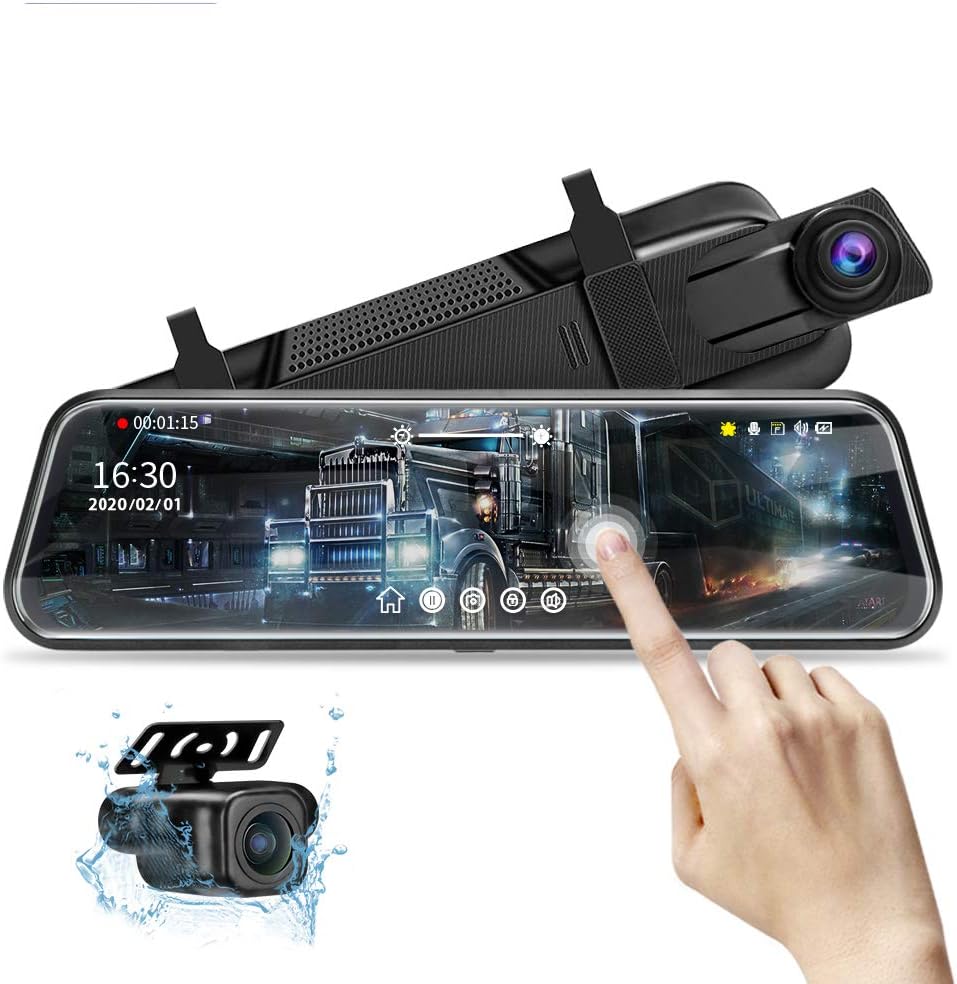


The WOLFBOX G850 PRO is a feature-rich mirror dash camera with a 4.3 rating and a particularly broad set of driver-alert functions. Its front and rear cameras record simultaneously, while ADAS alerts cover forward collision, pedestrian collision, lane departure, lead-vehicle start, and distance monitoring. That combination makes it more than a passive recorder for drivers who want timely warnings about changing road conditions.
We may earn a commission when you buy through this link, at no additional cost to you.
Its recording specification lists front video at 2560 by 1440 and 30 frames per second, with rear video at 1080p and 25 frames per second. Both channels use WDR or HDR processing and wide-angle lenses, which should help preserve detail when moving between direct sunlight, shaded roads, and nighttime conditions. A full IPS touchscreen provides direct control, and 5.8GHz WiFi supports app-based downloading and sharing.
The strongest addition is the enhanced blind-spot algorithm. It is designed to identify hazards during lane changes involving the vehicle and surrounding traffic, as well as provide rear-collision alerts. These systems are aids rather than substitutes for attentive driving, and their usefulness depends on correct calibration, clean installation, and the camera receiving an unobstructed field of view.
This is a strong all-around choice for drivers who want detailed road evidence alongside proactive alerts. It suits commuters, highway drivers, and anyone who values fast wireless access to recordings without needing a card reader. Those who require continuous parking surveillance should budget for the separately sold hardwire kit and confirm that the electrical connection is professionally appropriate.
ADAS and blind-spot monitoring give the G850 PRO the strongest driver-assistance focus in this group. The alerts can provide useful prompts during lane changes, traffic approach, and potentially hazardous forward driving situations, although the driver must remain fully responsible for every maneuver.
The upgraded 5.8GHz WiFi makes recorded clips easier to retrieve through the WOLFBOX app. This is particularly useful after an incident when transferring relevant footage promptly is more convenient than locating files manually on a memory card.
We may earn a commission when you buy through this link, at no additional cost to you.
The WOLFBOX G900 PRO is the premium imaging option here, pairing an 8MP STARVIS 2 IMX678 front sensor with a 4MP rear camera. Its front channel records at 3840 by 2160 and 30 frames per second, while the rear records at 2560 by 1440 and 30 frames per second. The result is a specification package aimed at drivers who care about fine detail and nighttime documentation.
We may earn a commission when you buy through this link, at no additional cost to you.
Low-light performance is the defining feature. STARVIS sensors are designed to work effectively in difficult lighting, and the G900 PRO pairs that sensor with a seven-glass lens. That combination is particularly relevant for unlit roads, garages, parking areas, and poorly illuminated streets where a conventional sensor may produce softer or noisier images.
The camera also includes upgraded 5.8GHz WiFi for app-based footage access and smart voice control for essential functions. A 128GB memory card is included, and the supplied information states that storage capacity can be expanded to as much as 512GB. A one-year guarantee is also listed, providing some reassurance for a major electronic purchase.
Choose the G900 PRO when image quality is the priority and you regularly drive after dark. Its specifications also make it attractive for documenting travel, traffic, or parking activity. Continuous parking mode still requires a separately purchased hardware kit, and the larger memory card does not remove the need for proper hardwire installation.
The STARVIS 2 IMX678 front sensor is the model’s decisive advantage for nighttime use. Combined with its seven-glass lens, it is designed to capture clearer, more useful road imagery when available light is limited.
Front 4K and rear 2.5K recording provide substantially more detail than basic 1080p systems. The included 128GB card also reduces the need for an immediate additional purchase while leaving room for expansion.
We may earn a commission when you buy through this link, at no additional cost to you.
The Jansite 10-inch mirror dash cam is a practical front-and-rear recorder with a 4.1 rating. Its main appeal lies in a large IPS touchscreen, dual 1080p cameras, a six-layer rear lens, and automatic parking assistance. Unlike some premium contenders, its focus is on straightforward recording and reversing convenience.
We may earn a commission when you buy through this link, at no additional cost to you.
The rear camera carries an IP68 waterproof rating, making it a sensible choice for vehicles where moisture, road spray, or exposure during exterior mounting may be a concern. Improved light suppression and night-vision processing are intended to retain detail under low-light conditions, while the wide-angle rear view helps reveal more of the area behind the vehicle.
When the vehicle enters reverse, the display changes to the rear-camera perspective and shows parking guide lines. The supplied information also mentions six guide-wire height adjustments and a one-key rear-camera angle control, offering more ways to align the image with a particular vehicle or parking environment. G-sensor locking protects collision clips from being overwritten by loop recording.
This model is best for drivers who prioritize an affordable, touch-operated display and reversing aids over advanced ADAS. Check the physical dimensions and weight before buying because the mirror may not fit over every factory mirror. It also cannot act as a conventional reflective mirror when the screen is off, and the maximum 128GB memory card must be purchased separately.
Automatic full-screen rear imagery and adjustable guide lines make the parking function more useful than a simple camera feed. The ability to shift the displayed range helps drivers match the image to their vehicle’s actual position more closely.
The IP68-rated rear camera is built for more demanding mounting conditions. Its six-glass lens and improved night exposure processing support usable evidence when visibility is reduced by darkness, glare, or wet weather.
We may earn a commission when you buy through this link, at no additional cost to you.
The AZDOME 12-inch camera is a well-equipped all-around model with a 4.2 rating. It records the front at 3840 by 2160 and the rear at 2560 by 1440, then adds ADAS, blind-spot detection, lane-change assistance, reverse guidance, voice commands, and app-based review features.
We may earn a commission when you buy through this link, at no additional cost to you.
Its AI-powered AR video analysis is especially interesting after an incident. Footage viewed in the AZDOME app can include recognized license plates, vehicle-distance information, speed, and lane guidance, reducing the need to search individual frames for relevant details. A timeline playback interface and 5.8GHz WiFi also make organizing and transferring recordings more convenient.
The system supports ten English voice commands for actions such as taking pictures, locking the current recording, changing camera views, and managing audio, WiFi, or the screen. Reverse assist automatically displays the rear view with parking lines when the vehicle shifts into reverse. Time-lapse and collision-detection parking modes are also available, subject to installing the specified three-lead Type-C hardwire kit.
AZDOME appeals to drivers who want sophisticated assistance and convenient incident review without moving to the premium sensor class of the G900 PRO. The included 64GB card is helpful, and the 12-inch screen offers generous visibility. The separate hardwire kit and the need to calibrate ADAS correctly are the main practical considerations.
AI overlays can surface license plates, speed, distance, and lane context during playback. These additions may make a recorded event easier to understand, though they should support rather than replace careful review of the original footage.
ADAS, blind-spot detection, lane-change assistance, and ten voice commands reduce the need to manipulate the touchscreen while driving. Each alert remains supplementary and should never replace checking mirrors, blind spots, and surrounding traffic directly.
We may earn a commission when you buy through this link, at no additional cost to you.
The Hufdic 10-inch mirror dash cam delivers a focused set of features at a budget-oriented tier. It has a 4.1 rating, a full-screen touchscreen, front and rear 1080p cameras, a 170-degree front lens, and an included 32GB card. It is a sensible option for drivers who want a functioning dual-camera recorder without a large collection of alerts.
We may earn a commission when you buy through this link, at no additional cost to you.
The touchscreen supports recording and playback, exposure adjustment, brightness control, and date or time settings. The wide front angle gives the driver a broad road view, while the rear channel adds evidence from behind the vehicle. Loop recording overwrites the earliest clips when the card fills, allowing continuous operation without regular manual deletion.
A G-sensor automatically locks the current file following a collision, helping protect important footage from later overwriting. The parking monitor offers low-frame-rate time-lapse recording for reduced storage use, while parking assistance supports maneuvering. A compatible hardwire kit is required for parking surveillance and is not included with the listed package.
This is a strong choice for daily commuters, occasional long-distance travelers, and drivers seeking simple front-and-rear coverage. It lacks the sophisticated ADAS and blind-spot tools found in higher-ranked models, but it covers the fundamentals clearly. Users who want the unit ready for extended parking should plan for the additional hardwire installation.
Dual 1080p cameras, a wide front lens, and an included memory card cover the central needs of a mirror dash camera. The result is a more convenient package than choosing separate front and rear devices that require independent storage and playback.
Loop recording keeps ordinary footage running continuously, while the G-sensor separates collision clips from files eligible for overwriting. This combination is more useful than loop recording alone when the goal is preserving evidence of an incident.
We may earn a commission when you buy through this link, at no additional cost to you.
The WOLFBOX G930 is a balanced 10-inch mirror camera with a 4.3 rating. It combines 4K front recording, 1080p rear recording, a 64GB card, 5.8GHz WiFi, GPS information, wide dynamic range, and collision locking. It does not chase advanced alerts, but it focuses on dependable evidence and convenient access.
We may earn a commission when you buy through this link, at no additional cost to you.
The interface supports sliding vertically to adjust the viewing angle and horizontally to select split-screen or rear imagery. A low-reflectivity display is intended to reduce daytime glare, while WDR balances exposure in high-contrast scenes. The six-glass lens supports the model’s night-vision positioning, and the larger screen can make simultaneous front and rear monitoring easier to understand.
Once the GPS receiver is inserted, the screen can display real-time speed and direction. Recorded videos can also be reviewed in the GPS player, which adds context to a route and incident. The upgraded 5.8GHz connection supports app-based viewing, downloads, and sharing, while loop recording in one-, two-, or three-minute intervals provides flexible recording behavior.
The G930 suits drivers who want front-and-rear documentation without advanced ADAS. It is especially attractive for travel and road-trip use because of the combination of GPS, 4K front footage, and 64GB of included storage. Those seeking active lane-change or forward-collision warnings may prefer the G850 PRO instead.
GPS tracking can display speed and direction and provide a route trail during playback. This context can make a recorded event easier to place geographically, which is useful for travel documentation and roadside assistance.
The camera pairs a detailed 4K forward view with a 1080p rear view. This is a practical resolution split for general use, although drivers who require the same high pixel count at the rear should examine higher-end alternatives.
We may earn a commission when you buy through this link, at no additional cost to you.
The 4K 10-inch WiFi camera has the highest customer rating in this comparison at 4.5. It records 4K footage through the front camera and 1080p through the rear, using a 130-degree front lens and a wider 145-degree rear lens. A 32GB card is included, making it a well-rounded package for everyday evidence.
We may earn a commission when you buy through this link, at no additional cost to you.
Its F1.8 aperture and night-vision capability are designed to improve low-light capture, while the full-touch IPS display offers direct switching between front and rear views. When the vehicle enters reverse, the camera automatically changes to the rear perspective, helping the driver verify the area behind the vehicle without manually selecting a view.
WiFi connectivity supports app-based downloads and sharing, which makes incident footage easier to retrieve. A G-sensor locks recordings when it detects a collision. For parking surveillance, the model uses an OBD connection and provides a 24-hour monitoring mode, distinguishing it from systems that require a more involved hardwire connection.
This camera is a good middle-ground choice for commuters and families who want 4K detail, night recording, and convenient wireless access. It does not list GPS tracking or ADAS warnings, so the feature set is simpler than that of the AZDOME or WOLFBOX PRO models. The included card and responsive screen offset much of that simplicity.
The 4K front channel and F1.8 aperture are useful specifications for daylight and low-light journeys. The rear camera retains 1080p recording, providing a balanced second view without duplicating the front camera’s pixel count.
The OBD-based parking connection may be more approachable for some drivers than a full hardwire installation. Once connected, the camera can support continuous monitoring while the vehicle is parked.
We may earn a commission when you buy through this link, at no additional cost to you.
The 12-inch CarPlay and Android Auto mirror dash cam has a 4.6 rating, the highest among the ten products. It combines a large curved touchscreen, 4K front recording, 1080p rear recording, wireless smartphone connectivity, voice control, reverse assist, and 24-hour parking monitoring in one mirror-mounted unit.
We may earn a commission when you buy through this link, at no additional cost to you.
Its built-in display measures 1920 by 480 and uses 2.5D curved glass for a clean appearance over the factory mirror. The front camera has a 170-degree viewing angle and the rear camera a 140-degree angle. The wide horizontal presentation is intended to improve side-to-side visibility while retaining a more streamlined appearance than some large housings.
After Bluetooth is enabled, the unit can connect with CarPlay or Android Auto. That integration allows supported maps, music, video apps, calls, and navigation to be accessed through the mirror, reducing the need for a separate phone mount. Touch and voice controls provide several ways to operate the system while driving.
For recording, the camera supports loop recording, G-sensor event locking, reverse assistance, and parking monitoring after impact. It is best for drivers who want navigation and connectivity in addition to road evidence. Confirm that the original factory mirror is longer than 6.3 inches, and note that the unit weighs approximately 1.3 pounds and cannot serve as a reflective rearview mirror.
CarPlay and Android Auto compatibility makes the mirror more like a central in-car interface. Drivers can use supported navigation, communication, and media functions while keeping the phone out of view, although app availability depends on the connected device.
A 170-degree front lens and 140-degree rear lens support broad road coverage, while 4K and 1080p channels preserve detail in the two directions. The 12-inch display provides a large canvas for reviewing either feed.
We may earn a commission when you buy through this link, at no additional cost to you.
The WOLFBOX G840S is a 12-inch mirror dash camera offering 4K front recording, 1080p rear recording, 5.8GHz WiFi, and an external GPS antenna. Its 4.3 rating reflects a balanced feature set, while the large curved display provides more room for split-screen monitoring and reversing images.
We may earn a commission when you buy through this link, at no additional cost to you.
The front camera uses a 170-degree lens and the rear a 140-degree lens, creating a broad view intended to reduce blind spots. The low-reflectivity LCD is designed to limit daytime reflections, and WDR, HDR, a professional-grade sensor, and a six-glass lens support image quality in changing light.
The external GPS antenna allows real-time location data to appear on the display. Through the WOLFBOX app, users can view recordings, play them back, and share clips over WiFi. A 32GB card is included, and a smart split-screen function allows both camera views to be monitored together.
The G840S is a good match for drivers who prioritize a large display and straightforward navigation context. Its parking monitor records in time-lapse mode to conserve power and storage, but a hardwire kit must be purchased separately. It offers fewer active safety alerts than the G850 PRO, relying more heavily on recording quality and broad camera coverage.
The 12-inch display offers 1.5 times the viewing area of a standard mirror according to the supplied information. Its larger canvas is useful for split-screen views, GPS information, and manually checking the rear camera without sacrificing much of the forward view.
The external GPS antenna and 5.8GHz WiFi combine route context with rapid app-based retrieval. Drivers can check real-time information while driving and transfer selected clips for later review or sharing.
We may earn a commission when you buy through this link, at no additional cost to you.
The Four-Channel 360 Camera is the most unconventional product in the group. Instead of limiting itself to a front and rear view, it supports detached cameras for the left and right sides as well, using a 12-inch display and a 150-degree lens to cover more of the vehicle’s surroundings.
We may earn a commission when you buy through this link, at no additional cost to you.
Each channel records at 1920 by 1080. The front camera uses an F1.8 aperture for stronger night performance, while the multi-camera arrangement is intended to reduce dead angles around the vehicle. Side-camera placement can be adjusted to suit the body shape, although the best positioning depends on the vehicle and available mounting points.
Dual-band WiFi connects through the GFG Drive app for live viewing, downloading, sharing, and settings. An external GPS module supplies location, speed, time, and route information, including a path trail in the GPS player. Loop recording, collision locking, time-lapse parking, and impact-triggered parking clips are also included, with a separate hardwire kit required for the parking modes.
This model is worth considering for drivers who want side visibility more than maximum single-channel resolution. It is especially relevant to larger vehicles, parking-sensitive situations, or drivers seeking near-360-degree awareness. It demands more thoughtful camera placement than a conventional two-camera mirror, but the strap-based installation avoids drilling into the vehicle.
Detached left and right cameras extend the recording system into areas normally excluded from a standard front-and-rear setup. This is valuable when side awareness and parking context matter more than having 4K resolution in every channel.
The GPS module records location, speed, time, and route trails, while two parking modes support extended surveillance. Impact detection can automatically save a short locked clip, adding context beyond the camera facing the road.
We may earn a commission when you buy through this link, at no additional cost to you.
The most useful mirror dash camera is not necessarily the one with the longest feature list. Resolution, display visibility, low-light performance, parking support, field of view, and reliable file management should be matched to the vehicle, driving conditions, and installation tolerance of the buyer.
Resolution determines how much fine detail each camera can preserve. A 4K front camera is useful when reading signs or identifying vehicles at a distance, while 1080p on the rear is common because rear footage is often reviewed mainly for traffic, parking, and incident context. Some premium models also provide 2.5K rear recording, creating a stronger balance when both views need detail.
Choose higher resolution when vehicles travel quickly, roads are busy, or the footage may be reviewed carefully after an incident. Do not assume a 4K label applies to every channel; some products list 4K for the front camera while recording the rear at 1080p. Compare resolution and frame rate for each camera separately.
Night performance depends on more than a night-vision label. Aperture, sensor technology, lens construction, HDR or WDR processing, and display reflectivity all influence whether a scene remains readable. The STARVIS 2 IMX678 sensor in the G900 PRO represents the most explicitly advanced low-light specification in this group, while other products emphasize enhanced exposure processing, an F1.8 aperture, or a six-glass lens.
For frequent nighttime driving, prioritize a model that clearly states how its sensors and lenses improve low-light capture. A low-reflectivity screen is also valuable because it can reduce distracting glare on the mirror during darkness. Confirm that night claims cover the rear camera as well as the front when both views matter.
Mirror dash cameras commonly use displays between 10 and 12 inches. A larger screen can make split-screen views, touch controls, parking lines, and GPS information easier to inspect, but it may obscure more of the forward view. The physical dimensions and weight also matter because the unit must sit securely over the factory rearview mirror without interfering with its function.
Measure the original mirror and compare the product dimensions before buying. Some units require a factory mirror longer than a stated minimum, while others may be too wide or heavy for compact vehicles. Remember that many streaming mirrors cannot act as reflective glass when switched off, so consider a second conventional mirror for those who require one.
Wide-angle lenses help reveal more of the road, side traffic, and the area behind the vehicle. A 170-degree front lens and 140-degree rear lens are common among several products, while the four-channel model can add detached side cameras. The best coverage is not simply the largest angle; excessive distortion, poor lens quality, or an obstructed mounting position can make the image harder to interpret.
Look for a balanced setup that covers the forward road and the vehicle’s rear without blocking important details. Blind-spot detection and lane-change assistance can add active prompts, but they should be considered supplementary. The driver must still inspect mirrors and physically check lanes before changing direction.
A useful parking setup combines a clear rear image, automatic switching into reverse, and adjustable guide lines. Some products add a low-frame-rate time-lapse mode or collision-triggered parking recording. These surveillance modes usually need a hardwire kit or another power connection, so verify whether that accessory is included before planning an installation.
Also consider whether your vehicle has a suitable connection point and whether installation requires professional work. A hardwired camera can provide continuous operation, but routing and connecting the power cable incorrectly can create complications. Model-specific guidance in the product listing and a compatible installation kit are important parts of the purchase decision.
WiFi makes a mirror dash camera much easier to use because drivers can view, download, and share clips through a phone rather than repeatedly removing a memory card. 5.8GHz and dual-band connections may provide a better transfer experience than a basic 2.4GHz system. Bluetooth may also support hands-free calling or smartphone projection functions.
Check which app is required, whether it is available for your phone, and whether the app handles live preview, timeline playback, settings, and downloads. Loop recording is standard on most of these systems, while a G-sensor locks event clips so they are not overwritten. Confirm the supported card capacity and whether a card is included.
ADAS, blind-spot detection, lane-change assistance, and voice commands can make a mirror camera feel more like an integrated driving aid. The G850 PRO offers the broadest explicit alert set, while the AZDOME combines ADAS with AR overlays and ten voice commands. These tools can provide valuable prompts, but they are not autonomous safety systems and require proper calibration.
Prioritize models that clearly explain what each alert detects. Avoid choosing solely on the number of advertised features, since some are more developed than others. Keep voice commands limited to useful, low-distraction actions and confirm that the system can be muted or adjusted according to personal preference.
Storage capacity affects how much footage can be retained before loop recording replaces older files. Several products include 32GB, 64GB, or 128GB cards, and some support larger capacities. Reliable customer support, a guarantee, and clearly documented included accessories can add value even when two cameras appear similar on paper.
Check the supplied card size against the recording format and your desired retention period. Confirm the app, GPS module, installation hardware, rear camera cable, and any parking-power adapter are present when promised. Keep original accessories and follow the manufacturer’s installation instructions, as compatibility problems can be easier to resolve when the full system is traceable to one product.
Begin by identifying the correct front and rear camera connections, reading the model-specific instructions, and checking that the included card is properly inserted. Mount the mirror unit centrally over the factory rearview mirror using the supplied straps, then position the rear camera where it does not obstruct lights, sensors, license plates, or the driver’s view. Route the rear cable carefully so it cannot interfere with pedals, seats, or a trunk opening.
Before driving, power the unit on, confirm that both camera images appear, adjust the viewing angle, set the date and time, and test the touchscreen. Connect it to the stated app over WiFi, review the recording interface, and learn how to lock an important clip manually. Test reverse assistance with the vehicle safely parked, and verify that guide lines correspond to the vehicle’s actual position rather than assuming they are exact.
For care, clean the front and rear lenses with a soft microfiber cloth and avoid harsh cleaners or fingerprints on the display. Review footage regularly, confirm that the card remains writable, and keep enough free space for reliable loop recording. If a parking monitor is installed, check the connection and time-lapse function periodically, and have the wiring inspected if the vehicle experiences a drained battery or electrical fault.
Usually not. Most streaming mirror dash cameras use a digital display that cannot show a reflective image when the unit is powered off, and the product may physically cover the original mirror. Drivers who require a conventional reflective view should verify this limitation or plan to keep a separate standard mirror available. A few products are designed to work alongside the original mirror, but installation guidance remains essential.
For most models in this guide, yes. The WOLFBOX G840S, G900 PRO, G850 PRO, Hufdic model, and AZDOME specify a separately sold hardwire kit for continuous parking surveillance. The Four-Channel Camera also requires an additional kit, while the 10-inch WiFi camera lists OBD-based parking monitoring. Always follow the instructions for the exact model and confirm that the connection is suitable for your vehicle.
It can be, especially when fine details must remain visible in fast-moving traffic or footage is reviewed after an incident. The advantage is strongest on the front channel, where signs, vehicles, and road markings are more often examined. A 2.5K rear channel can also provide a useful balance, but 4K resolution does not replace good sensor performance, proper exposure, or a clean lens.
Storage needs depend on resolution, frame rate, clip length, and how often you drive. The products listed include cards ranging from 32GB to 128GB, while one model supports cards up to 512GB. Check the maximum supported capacity, use a reliable card of an appropriate type, and leave sufficient free space so the camera can continue writing files during loop recording.
No. ADAS, blind-spot detection, and lane-change alerts are supplementary tools that can help prompt a closer look, but they can be affected by calibration, weather, lighting, obstructions, and software limitations. The driver must continue checking mirrors, blind spots, and surrounding traffic directly and remain responsible for every lane change and maneuver.
They can, but image quality and installation care matter. Keep the lens clean from rain, road spray, salt, and condensation, and confirm that the rear camera has suitable environmental protection. One listed model specifies an IP68 waterproof rear camera, while others provide night-vision or exposure processing but no stated ingress rating. Extreme cold can also reduce battery performance or storage reliability.
Most models in this guide support WiFi app control, and several use 5.8GHz or dual-band WiFi for faster transfers. Depending on the model, the app may offer live viewing, downloads, sharing, timeline playback, and settings control. Download the correct app before installation, confirm that your phone supports it, and avoid trying to operate complex playback functions while the vehicle is moving.
First measure the factory mirror and verify that the replacement is not too wide, long, or heavy for the mounting point. Next compare front and rear resolutions, low-light features, parking connections, storage support, app requirements, and included cables. Finally, read the installation instructions and compatibility notes, especially if the vehicle has a large mirror, roof-mounted camera, trailer, or unusual reversing setup.
The WOLFBOX G850 PRO stands out for drivers who want active assistance, blind-spot alerts, fast WiFi access, and simultaneous front-and-rear recording. The WOLFBOX G900 PRO is the stronger choice when premium image quality and low-light performance matter most, while the Hufdic 10-inch model delivers the most straightforward budget-oriented package with dual 1080p cameras and an included card.
Across the remaining choices, prioritize the features you will actually use. Wide field of view helps reduce blind spots, a large display improves reversing and split-screen review, GPS adds route context, and G-sensor locking protects collision footage. If parking surveillance matters, verify the required power connection before installation, and if you need an original reflective mirror, check whether the replacement obscures it.
Before making a final choice, review the current product listing, included accessories, supported memory capacity, app compatibility, and physical fit. Product specifications and package contents can change over time, so confirm the latest details directly on the product page. A careful compatibility check is as important as image resolution when choosing a mirror dash camera for long-term use.