
ULTRARM Extra-Tall Heavy-Duty Monitor Arm
4.6Editor score
33.4-inch maximum height
22-inch extended reach
Supports 17–40-inch displays
Expandable to four monitors
A tall monitor arm can transform a cramped workstation by raising the display, reclaiming usable desk space, and making it easier to position a screen near eye level. The right model should balance pole height, reach, articulation, load capacity, and compatibility with your monitor and desk rather than simply offering the longest reach.
We compared ten monitor arms using the specifications supplied for each product, including supported screen sizes, maximum loads, VESA patterns, mounting systems, vertical adjustment, movement, and cable-management features. The list covers standard, long-reach, heavy-duty, and ultrawide designs for both seated and standing setups.
Each review identifies the type of user best served by a particular arm and explains where its specifications may not suit another setup. Ratings and product details can change over time, and current prices vary by seller, promotion, and availability, so shoppers should confirm the latest listing before purchasing.
4.6Editor score

4.6Editor score
4.7Editor score
As an Amazon Associate we earn from qualifying purchases.
The table below compares all ten arms by their core design attributes, showing how maximum height, reach, load capacity, and installation options differ across the shortlist.


The HUANUO Single Monitor Arm combines a genuinely tall 39-inch adjustable center pole with broad screen compatibility and a 4.6 rating, making it the most balanced choice in this guide. It is intended for users who want meaningful vertical positioning rather than simply a little extra lift above a standard monitor arm.
We may earn a commission when you buy through this link, at no additional cost to you.
Its strongest feature is the 39-inch center pole, which provides a generous range between seated and standing positions. The arm supports most 13-to-32-inch screens and ultrawide displays up to 38 inches, with a maximum load of 22 pounds. Movement includes 180-degree tilt, 180-degree swivel, and 360-degree rotation, so the display can be turned, shared, or changed between landscape and portrait orientation.
Installation flexibility is another major strength. A C-clamp accommodates desks up to 3.93 inches thick, while the included grommet base supports desktops up to 2.75 inches. That gives buyers a practical way to avoid drilling when the desk layout permits it. The only notable limitations are the relatively modest 22-pound limit and the fact that the 38-inch maximum size excludes larger professional and super-ultrawide displays.
This is the recommendation for most people searching for a tall monitor arm. It combines a high pole, full-motion positioning, two installation options, and cable management without requiring a specialized desk. Buyers with larger or heavier monitors should look to the heavy-duty models later in the guide, while those with a very deep desk may prefer an extra-long arm.
The long center pole makes this arm useful for taller users, sit-stand desks, and displays that would otherwise sit low behind a deep desk. Because the pole is adjustable, the final screen height can be fine-tuned after the arm reaches a comfortable reach position.
Including both a C-clamp and grommet base gives buyers flexibility when deciding where and how to install the mount. The C-clamp is the more convenient option for many desks, while the grommet base suits users who want a permanent-looking installation.
We may earn a commission when you buy through this link, at no additional cost to you.
The VIVO Extra Tall Monitor Desk Mount is a close competitor to the leading HUANUO model, pairing a 39-inch pole with a 4.5 rating and a particularly clear emphasis on integrated cable management. It is designed for users who want a high display position and a neat route for power and audiovisual cords.
We may earn a commission when you buy through this link, at no additional cost to you.
The mount fits most monitors from 13 to 32 inches, as well as ultrawide screens up to 38 inches, and supports up to 22 pounds. Its articulation is impressive for a pole-mounted design: tilt runs from positive 90 to negative 90 degrees, while swivel and rotation both cover 360 degrees. Height adjustment along the center pole adds a further layer of positioning flexibility.
Cable clips along the arm and center pole help keep cords from falling behind the display. Installation can be drill-free with the heavy-duty C-clamp on surfaces up to 4 inches thick, or through the optional grommet mount. The product includes a detachable VESA bracket plate, a step-by-step manual, and the necessary assembly hardware.
VIVO is a strong fit for office users, programmers, and anyone alternating between seated and standing work. Its main drawback is the same 22-pound limit seen on many conventional monitor arms. It also stops at 38 inches, so buyers with a 40-inch or larger display need a model designed specifically for those dimensions.
The built-in clips run along the arm and central pole, giving power and AV cables a defined path. This is more useful than relying on loose cables that may pull against the display or disappear behind the monitor.
Full 360-degree swivel and rotation make the mount useful when a screen needs to face a colleague, move between portrait and landscape layouts, or shift into different positions throughout the day.
We may earn a commission when you buy through this link, at no additional cost to you.
The WALI Tall Monitor Arm offers a 31.5-inch pole, broad screen support, and an expanding design for freeing desk space. No current customer rating is supplied for this listing, so its recommendation relies on the stated compatibility, adjustment range, installation hardware, and practical design features rather than a numerical review history.
We may earn a commission when you buy through this link, at no additional cost to you.
It fits most flat-panel monitors up to 34 inches and supports loads of up to 22 pounds. Detachable mounting plates accommodate the standard 75-by-75-millimeter and 100-by-100-millimeter VESA patterns. The arms extend and retract, tilt and swivel through plus and minus 90 degrees, and rotate 360 degrees for portrait use.
A two-stage locking installation system includes a C-clamp and a 3.5-inch-diameter grommet base, each suited to a desktop up to 3 inches thick. Once installed, the display is lifted away from the work surface, making room for a keyboard, laptop, docking station, or other accessories. Built-in cable management keeps wires directed along the arm.
WALI is most appropriate for users who want meaningful lift, adjustable positioning, and a tidier desk without moving to a very heavy-duty or ultrawide-specific design. The 31.5-inch pole is shorter than the 39-inch options from HUANUO and VIVO, however, so taller users or standing workstations should check available pole travel carefully.
Removing the factory-style monitor base can create a broad, flat working area beneath the screen. That reclaimed room can accommodate a laptop, notes, a keyboard, or a docking setup without forcing peripherals into narrow side spaces.
The C-clamp and grommet base provide secure alternatives for different desk surfaces. The included hardware and user manual also make it easier to compare both approaches before choosing the most appropriate installation method.
We may earn a commission when you buy through this link, at no additional cost to you.
The ULTRARM Extra-Tall Heavy-Duty Monitor Arm stands out for combining a 33.4-inch maximum height, 22-inch reach, and a 4.6 rating at the budget end of the shortlist. It is aimed at users with larger flat, curved, or ultrawide displays who want more vertical and horizontal movement than a basic desk stand.
We may earn a commission when you buy through this link, at no additional cost to you.
Its modular structure is a defining feature. A single pole can expand from one display to dual, triple, or quad-monitor configurations, which makes the system appealing for a workstation that may grow over time. A gas spring provides fluid vertical changes, while the mechanical spring structure is intended to maintain a consistent tilt feel without drifting.
The arm supports 17-to-40-inch flat and curved displays, including 1000R, 21:9, and 32:9 ultrawide formats. Each arm can carry between 2.2 and 26.4 pounds. Its combination of a tall lift and extended reach is particularly useful for clearing desk accessories or positioning a large display farther back for a more natural viewing distance.
This is the best budget-oriented choice in the guide for buyers who want substantial height, reach, and load capacity without focusing on the largest possible screen. Buyers should note that the supplied information does not detail the included desk-mounting hardware, and expanding beyond one monitor may require additional compatible arms or accessories.
The gas spring is designed to make vertical changes feel controlled and fluid, which can be helpful with a large or heavy display. Its mechanical spring structure is also intended to preserve a consistent tilt response over time.
The modular pole design allows a single-screen setup to grow into a multi-display arrangement. That makes the arm more versatile for users planning to add a second screen later, provided the necessary components are available.
We may earn a commission when you buy through this link, at no additional cost to you.
The WALI Extra Long Single Monitor Arm is built for desks where horizontal positioning matters almost as much as vertical lift. It extends 26.77 inches and raises the display as high as 29.13 inches above the desktop, with a 4.3 rating and a 26.4-pound maximum load.
We may earn a commission when you buy through this link, at no additional cost to you.
Compatibility covers most flat or curved LCD and LED screens from 17 to 38 inches using standard 75-by-75-millimeter or 100-by-100-millimeter VESA holes. The screen can swivel through 180 degrees in either direction, tilt through a broad range, and rotate 360 degrees, allowing it to move between landscape and portrait configurations.
A wider VESA head and tighter-fitting VESA panel are intended to improve stability. The durable core has reportedly been tested through more than 20,000 adjustment cycles. Cable management is built into the arm, keeping cords guided along its structure rather than loose across the desktop.
This WALI model is a sensible fit for a deep workstation, creative desk, or spacious office where the display needs to sit farther back. Installation can use a C-clamp or grommet base for desktops between 0.39 and 2.76 inches thick. WALI recommends a wooden desk without a crossbeam obstructing the underside, so buyers with unusual desk frames should verify clearance first.
The 26.77-inch extension gives users more freedom to pull a large display forward, push it back, or move it aside. This is especially useful when a wide monitor would otherwise occupy nearly the entire usable depth of the desk.
A wider VESA head and tighter panel connection help support a stable hold, especially with 26.4-pound displays. The stated cycle testing also suggests attention to repetitive adjustment during daily use.
We may earn a commission when you buy through this link, at no additional cost to you.
The MOUNT PRO Single Long Monitor Arm combines a 28.5-inch maximum height, 27.76-inch extension, and a 4.5 rating. It is especially relevant to taller users because the taller pole offers more adjustment than many standard arms and can help bring the display closer to eye level.
We may earn a commission when you buy through this link, at no additional cost to you.
The arm fits most flat or curved LCD and LED displays from 13 to 32 inches, with a supported load from 4.4 to 19.8 pounds. It accepts the common 75-by-75-millimeter and 100-by-100-millimeter VESA patterns and is listed as compatible with major monitor brands including ASUS, Acer, Samsung, LG, AOC, and Dell.
Motion includes plus and minus 90-degree swivel, plus 85 and negative 45-degree tilt, and 360-degree rotation. The tall pole, extended reach, and integrated cable management work together to lift a display while freeing room for a keyboard, mouse, and laptop. The arm is also claimed to have been tested through 20,000 movement cycles.
MOUNT PRO is a good match for users with a standard-sized monitor who want long reach and higher positioning. Its limitations are meaningful: the stated 19.8-pound maximum excludes heavier professional panels, and it is not compatible with 1000R, 1500R, or 1800R curved screens. Buyers with those displays should choose a purpose-built ultrawide arm.
The tall column provides a broader vertical range than many arms, making it useful for taller users or desks where the screen would otherwise remain below a comfortable line of sight. The 28.5-inch maximum offers room for meaningful adjustment once the clamp and pole are set.
With a 27.76-inch extension, the display can be moved forward when viewing and pushed back when the desk is needed. The arrangement can create a clearer work area for accessories that normally compete with a monitor base.
We may earn a commission when you buy through this link, at no additional cost to you.
The ErGear Heavy Duty Monitor Arm is designed around stability rather than extreme pole height. It supports monitors from 13 to 49 inches, carries up to 37.4 pounds, and earns a 4.4 rating, making it an interesting option for a large curved, super-wide, or weighty display.
We may earn a commission when you buy through this link, at no additional cost to you.
A dual C-clamp spreads the load for additional stability, while a thickened steel arm is designed to reduce shaking during typing, mouse movement, and screen repositioning. It accepts standard VESA 75-by-75-millimeter and 100-by-100-millimeter mounting patterns. The grommet alternative supports desktops between 0.39 and 2 inches thick.
Adjustment includes positive 30 and negative 40-degree tilt, plus and minus 90-degree swivel, and 360-degree rotation. The arm extends up to 21.2 inches and raises the monitor to 22.2 inches high. Its pre-assembled design and step-by-step instructions are intended to simplify setup, and the manufacturer states a durability expectation of up to 10 years.
ErGear is most suitable for people who need to support a very large or heavy monitor more than they need a maximum-height pole. The 22.2-inch lift is lower than the leading 28-to-33-inch designs, so it may not be the first choice for a tall standing workstation. Its support strength and broad size range compensate for that limitation.
The 37.4-pound capacity provides meaningful margin for large displays that can be difficult to balance on a standard arm. It is a particularly relevant specification for super-ultrawide, curved, and high-refresh gaming monitors.
A dual-clamp arrangement spreads the installation force, while the reinforced steel arm is designed to limit sway. Together, these features are intended to keep a large monitor planted during active desk use.
We may earn a commission when you buy through this link, at no additional cost to you.
The Extra Long Arm Monitor Mount focuses on reach and vertical positioning, offering a 27.76-inch extension and a 28.5-inch maximum height. Its 4.2 rating places it behind several higher-rated options, but the specifications may still appeal to users with large desks and standard-sized displays.
We may earn a commission when you buy through this link, at no additional cost to you.
Most flat or curved LCD and LED monitors from 13 to 32 inches are supported, with loads from 4.4 to 19.8 pounds. Standard 75-by-75-millimeter and 100-by-100-millimeter VESA patterns are accepted. The listed brand compatibility includes ASUS, Acer, Samsung, LG, AOC, and Dell, covering many common office and gaming displays.
The screen can swivel through plus and minus 90 degrees, tilt from plus 85 to negative 45 degrees, and rotate 360 degrees. A taller pole provides a wider vertical range than conventional arms, while the extended reach allows a display to be placed farther back or brought closer for use. Integrated cable management keeps the connection area orderly.
This mount is a practical option for users who want a long-reach arm on a deep workstation without moving to a heavier-duty product. It uses clamp or grommet mounting for desktops between 0.39 and 2.76 inches thick, and its arms are stated to have been tested through 20,000 motion cycles. The weight ceiling rules out many large ultrawide panels.
The 27.76-inch extension allows the monitor to move through a wide horizontal range, which is useful for creating space in front of a large display. It can also help maintain a comfortable viewing distance on a spacious desk.
The stated 28.5-inch maximum height creates useful flexibility for taller users and sit-stand arrangements. It offers a noticeable lift without requiring the longer pole of the leading 39-inch models.
We may earn a commission when you buy through this link, at no additional cost to you.
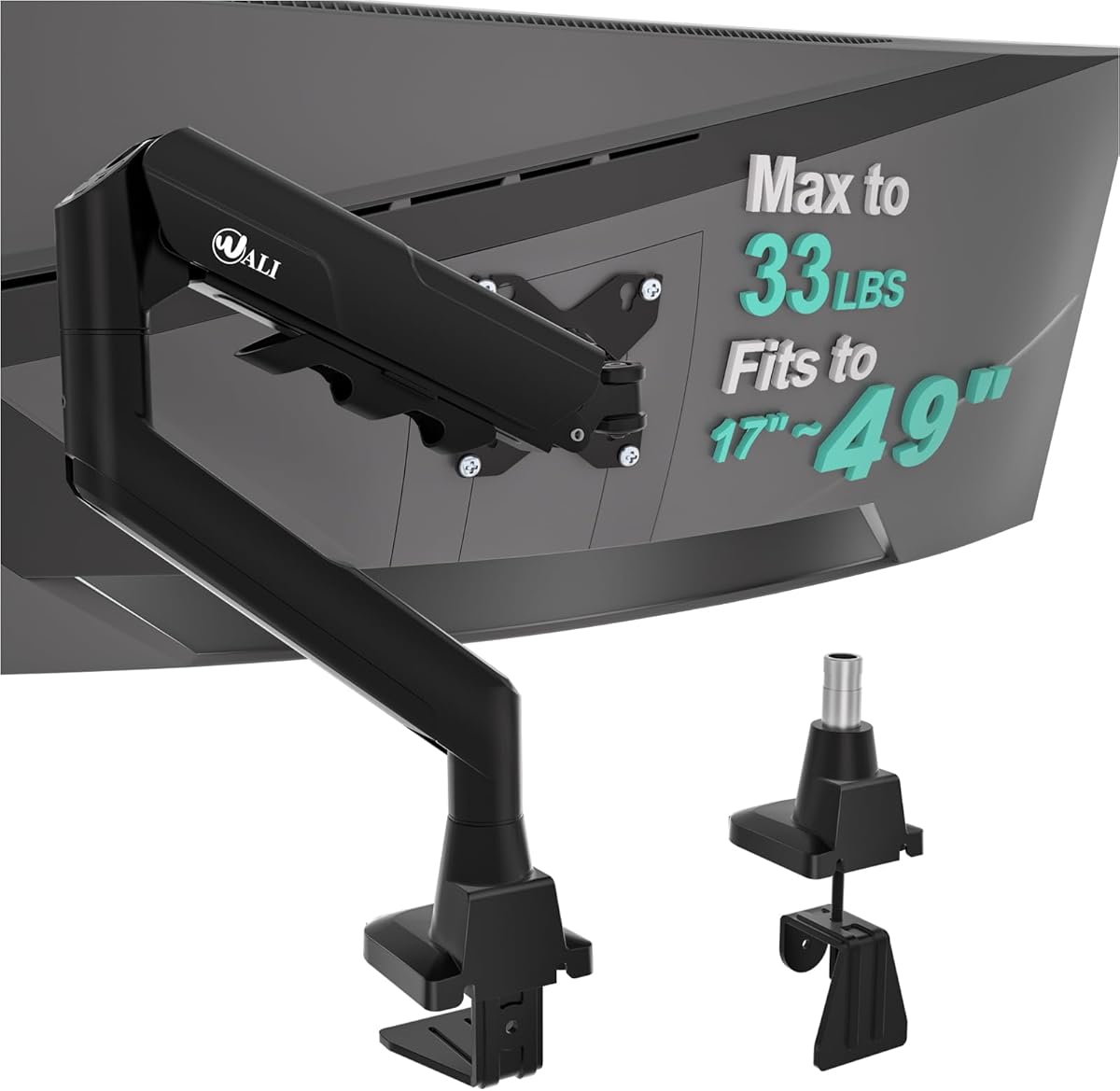
The WALI Ultrawide Monitor Arm is purpose-built for large displays, accepting most flat or 1800R curved LCD and LED screens from 17 to 49 inches. It carries up to 33 pounds and has a 4.3 rating, positioning it between standard monitor arms and the most heavy-duty models in the guide.
We may earn a commission when you buy through this link, at no additional cost to you.
The screen can extend 21.14 inches from the mount and rise as high as 20.59 inches above the desktop. Swivel spans plus and minus 90 degrees, tilt spans plus and minus 75 degrees, and 360-degree rotation supports changes between landscape and portrait. A wider VESA head and tighter-fitting panel are intended to keep a large display secure.
Cable management is integrated into the arm, helping route cords along the support structure. Installation can use a C-clamp or grommet base on desktops between 0.39 and 1.96 inches thick. WALI recommends a wooden desk and advises checking that no crossbeam obstructs the underside, which is particularly important for a wide clamp.
The WALI is a compelling option for a 49-inch flat or gently curved monitor, though it does not support tighter 1000R curvature. Its vertical maximum is also lower than the 28-to-39-inch poles in this guide, so the best use case is a large screen on a conventional-height desk rather than an unusually tall standing configuration.
The 49-inch size limit and 33-pound capacity make this mount more appropriate for a super-sized display than a conventional 22-pound arm. The broad VESA support and reinforced head are designed to manage the leverage created by a wide panel.
The combination of 21.14-inch reach, wide tilt, broad swivel, and full rotation provides enough freedom to reposition a large display without constantly rotating its base. It can also move out of the way when the desktop is needed.
We may earn a commission when you buy through this link, at no additional cost to you.
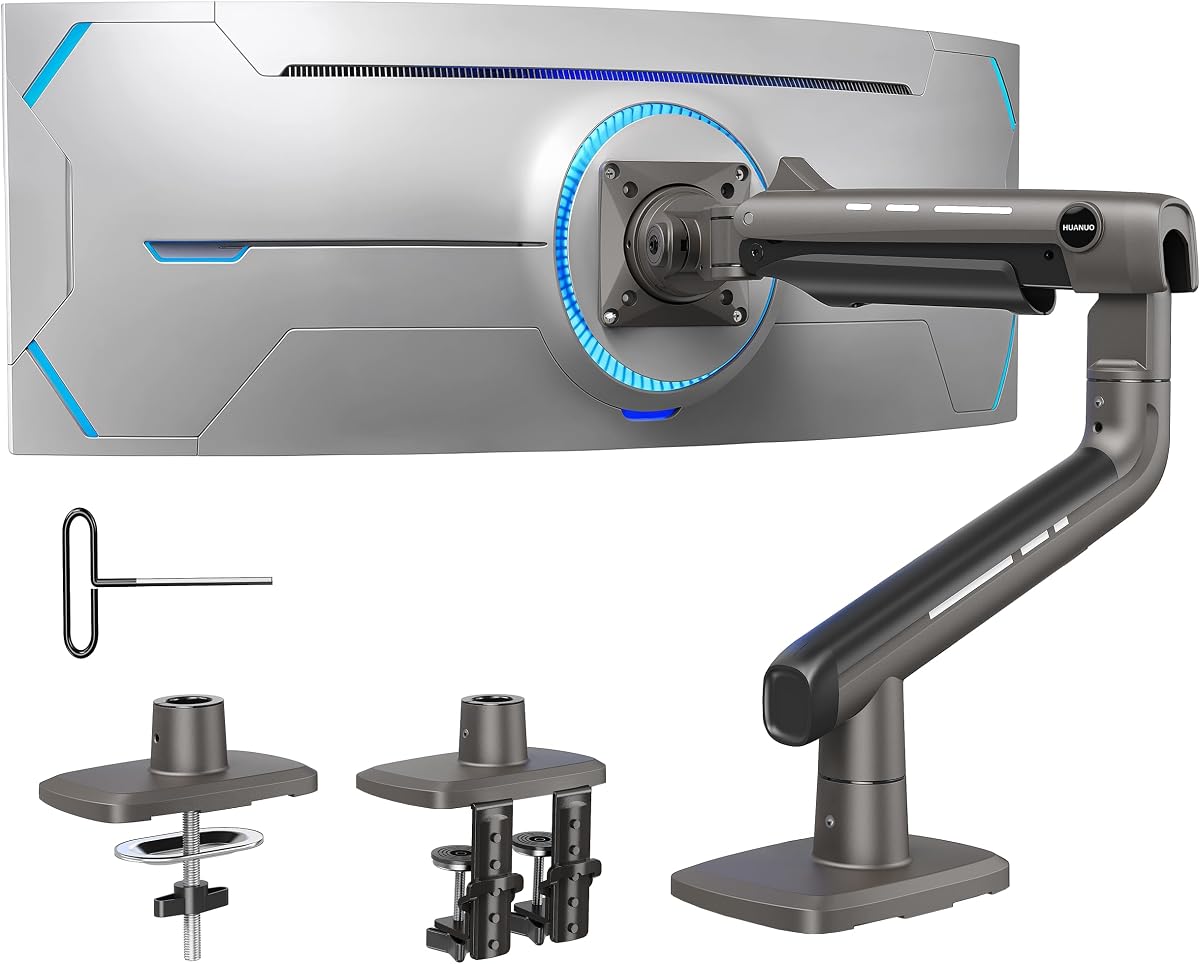
The HUANUO TitanLift Heavy Duty Monitor Arm is the premium, strength-focused choice in this guide. It has the highest supplied rating at 4.7, supports screens from 17 to 49 inches, and carries up to 44 pounds, giving it the strongest load specification among the ten products.
We may earn a commission when you buy through this link, at no additional cost to you.
Constructed from aluminum alloy, it uses a VESA head described as 20 percent thicker and arms described as 30 percent wider, plus a wider base. The product has passed stated 50,000-cycle motion tests and a three-times load test. Dual C-clamps are included for a firm installation, while built-in cable management keeps the display area tidy.
Movement is broad but not unlimited. Tilt extends from plus 50 to negative 50 degrees, swivel reaches 180 degrees in either direction, and horizontal and vertical rotation are rated as 360 degrees for screens up to 35 inches. The arm extends up to 22.5 inches and raises the VESA mount center 19.6 inches above the desk surface.
The TitanLift is ideal for a heavy 49-inch ultrawide, a high-refresh gaming display, or a large professional monitor that needs exceptional support. Installation requires a wooden desk between 0.8 and 3.5 inches thick with no interfering crossbeam or panel. Plastic and glass desks are not recommended, and buyers should confirm all three conditions before ordering.
A 44-pound capacity gives the TitanLift an advantage for large, heavy monitors. The aluminum construction, reinforced head, wide arms, and dual-clamp base are all oriented toward reducing flex and maintaining a stable hold.
The included Allen key permits one-handed fine-tuning of the arm tension. This makes it easier to balance the display after installation and can reduce the trial-and-adjustment process associated with spring-based arms.
We may earn a commission when you buy through this link, at no additional cost to you.
A useful tall monitor arm is defined less by a single maximum number than by the match among screen weight, pole height, reach, articulation, and desk construction. Review these factors before purchasing to avoid a mount that lacks clearance, sits too low, or cannot safely hold the display.
Height is one of the most important considerations because an arm can only improve sightlines if its pole extends far enough above the desk. Products in this guide range from a 19.6-inch maximum on the HUANUO TitanLift to 39-inch center poles on the HUANUO and VIVO models. A taller pole offers more room between the base and display, which can improve eye-level alignment for tall users, seated work, and standing desks. It can also help a screen clear desk organizers, speakers, or other accessories. However, the published maximum does not reveal the exact usable range in every installation, so the clamp position, desk thickness, monitor height, and VESA head dimensions all affect the final screen position.
Every arm has a size range and maximum load, and both limits must be respected. Most products in the guide accommodate standard screens from roughly 13 to 32 inches, while dedicated ultrawide options extend to 40, 49, or even 38 inches depending on the model. The maximum weight is equally important: a 22-pound limit may suit a mainstream display but fall short for a large ultrawide or a high-refresh gaming panel. Buyers should locate the exact model name printed on the display and check its weight, including any stand or accessory attached to the mounting area. A monitor within the size range but over the load limit should never be mounted, regardless of the apparent sturdiness of the arm.
VESA compatibility determines whether the arm can physically connect to the display. Most products support the common 75-by-75-millimeter and 100-by-100-millimeter patterns, but the monitor must also provide suitable holes or an appropriate adapter. Curved displays need special attention because some arms exclude aggressive 1000R, 1500R, or 1800R curves. The MOUNT PRO explicitly rejects those high-curvature formats, while the ULTRARM supports 1000R and other ultrawide styles, and the WALI Ultrawide model accepts flat or 1800R screens. Checking only the diagonal size can therefore lead to an incompatible purchase, particularly with a newer super-ultrawide or a curved gaming display.
Most arms include a C-clamp and a grommet base. A clamp grips the desktop without requiring a drilled hole, making it the easier choice for many users, while a grommet mount can provide a cleaner permanent installation. Desk thickness limits vary substantially: the listed maximumes range from 1.96 inches on the WALI Ultrawide model to 4 inches on the VIVO, while the HUANUO TitanLift requires at least 0.8 inches. The underside also matters because a crossbeam, drawer support, or panel can prevent the clamp from opening fully. Measure both thickness and clearance rather than assuming every desk is compatible.
Reach determines how far the display can move toward or away from the user, while articulation determines how its angle can change. The longest reaches in this group are 26.77 and 27.76 inches, offered by WALI and the two extra-long MOUNT PRO-style products. A long arm is useful on a deep desk because it can move a monitor back to free work space or forward for comfortable viewing. Tilt, swivel, and rotation add further control: common ranges include plus or minus 90-degree swivel, broad tilt angles, and 360-degree rotation for portrait use. Buyers should consider whether they need to share a screen with a colleague, rotate to a side workstation, or simply fine-tune the display to reduce neck and eye strain.
Structural support depends on more than the advertised maximum weight. The arm, VESA head, clamp, base, and mounting location all contribute to stability. The dual clamps on the ErGear and HUANUO TitanLift are designed to spread force across the desktop, while reinforced heads and wider arms are useful with large panels. A long extension can also increase the tendency of a display to move when touched. Heavier users or anyone with a large curved panel should prioritize capacity, clamp design, and a narrow desktop that can be gripped securely. For lighter monitors, a 22-pound arm with standard 75-by-75- or 100-by-100-millimeter support is generally sufficient.
A mount that lifts a display also creates dangling cables unless the installation includes a deliberate route. Clips along the pole and arm, as found on the HUANUO, VIVO, and WALI models, keep power and video cords gathered near the support. Integrated management is particularly valuable on standing desks, where moving the screen can tug against otherwise unsecured cables. Before buying, consider whether the included routing system is sufficient for the number and direction of cables in the setup. Users may also need to leave slack near the desk’s moving section so the display and cable bundle can travel without pulling sharply against connectors.
Installation difficulty depends on the arm, the desk, and the user’s comfort with basic assembly. Products that include labeled parts, a manual, and all necessary hardware simplify the process, while a detachable VESA plate can make attaching the screen after securing the pole easier. Heavy-duty models may require two people because the display and arm are awkward to align alone. Desk material is also relevant. The HUANUO TitanLift and WALI models specifically recommend wooden desks, and several products warn against undersides blocked by beams or panels. Users should not force a clamp onto glass or plastic or install a grommet through a tabletop that is not designed for it.
Before installing the arm, measure the desktop thickness, locate a suitable mounting area, and inspect the underside for beams, drawers, panels, or other obstructions. Confirm that the monitor’s weight, size, curvature, and VESA pattern fall within the arm’s specifications. Remove the factory monitor base only after checking the manufacturer’s instructions so the display remains supported during the process.
Assemble the base and vertical pole first, then secure the arm and VESA head before bringing the monitor close to the desk. If using a C-clamp, position it with the display centered over the supported area and tighten gradually while watching for twisting. With a grommet installation, insert the provided grommet and base according to the manual. Connect the display and route cables through the arm’s clips before tightening the final adjustment controls.
For daily use, lift or support the monitor while loosening tension so the joints are not forced. Move the display to a comfortable eye-level position, tighten the controls, and confirm the mount remains stable. Periodically inspect the clamp, bolts, and VESA connection for loosening, especially after moving between sitting and standing positions. Clean the arm with a soft, dry cloth and keep liquids away from the joints and mounting hardware.
A tall monitor arm has an extended vertical pole or a greater maximum lift height than a conventional arm. That extra height can bring a display closer to eye level, clear desk accessories, and make the screen easier to use with a standing desk. It does not automatically mean the arm supports a larger or heavier monitor, so size and load ratings must still be checked independently.
The upper edge of the screen should generally be near or slightly below eye level, with the center of the display positioned slightly below eye height for a relaxed downward gaze. The ideal position depends on your height, chair, desk, and viewing distance. A tall pole provides more room to tune the screen, but the final height should still feel neutral rather than forcing you to look upward.
It can, but only if the arm meets the monitor’s size, weight, VESA, and curvature requirements. Some general-purpose models support up to 32 or 38 inches and explicitly exclude 1000R curvature, while heavier-duty options are designed for 40- or 49-inch displays. Check the exact display model and confirm all four specifications before purchasing.
A C-clamp is usually easier because it attaches to the edge of a desk without drilling a hole. A grommet base can look cleaner and may be more secure when the desk construction permits it. The better choice depends on desktop thickness, material, underside clearance, and whether you want a removable or more permanent installation.
Yes, provided the arm is suitable for the desk’s construction and the mounting area remains clear as the desk moves. Extra cable slack may be necessary so the display does not pull on connectors. Check the arm’s movement range and the manufacturer’s desk requirements before assembly, particularly if a crossbeam or panel sits beneath the desktop.
Use the monitor’s actual weight as the starting point and choose an arm rated comfortably above it. Standard arms in this guide often support up to 22 pounds, while heavier options reach 26.4, 33, 37.4, or 44 pounds. A higher-rated arm is sensible for a large ultrawide because leverage and touch-induced movement can make a close capacity limit less forgiving.
Not if the arm includes a C-clamp and the desk thickness falls within the clamp’s range. A grommet base does require a hole in the desktop, so it is better suited to a permanent setup. Always inspect the underside and confirm that the clamp can open around the full thickness without striking a support.
The amount of space recovered depends on the display and its original base, but lifting the monitor commonly exposes room for a keyboard, laptop, notebook, docking station, or other accessories. Long-reach arms can move the display farther back when the work surface is needed, creating additional practical space without changing the overall desk footprint.
The HUANUO Single Monitor Arm is the strongest all-around recommendation because its 39-inch pole, 4.6 rating, full articulation, and two installation systems cover the needs of most users. The VIVO Extra Tall Monitor Arm is a particularly tidy alternative for buyers who value organized cables, while the HUANUO TitanLift is the premium choice for heavy displays requiring exceptional support.
Prioritize compatibility before features. A tall pole cannot compensate for insufficient load capacity, an incompatible VESA pattern, restricted curvature support, or inadequate desk clearance. Users with ordinary monitors should balance lift and reach, while those with large ultrawides should begin with weight capacity and clamp stability rather than choosing on pole height alone.
Ratings, seller availability, promotions, and prices can change, so check the current listing and verify the specifications against the manufacturer’s latest information before buying. Taking measurements of the desk, monitor, mounting holes, and underside will make the installation smoother and help ensure that the selected tall monitor arm fits the workspace as intended.