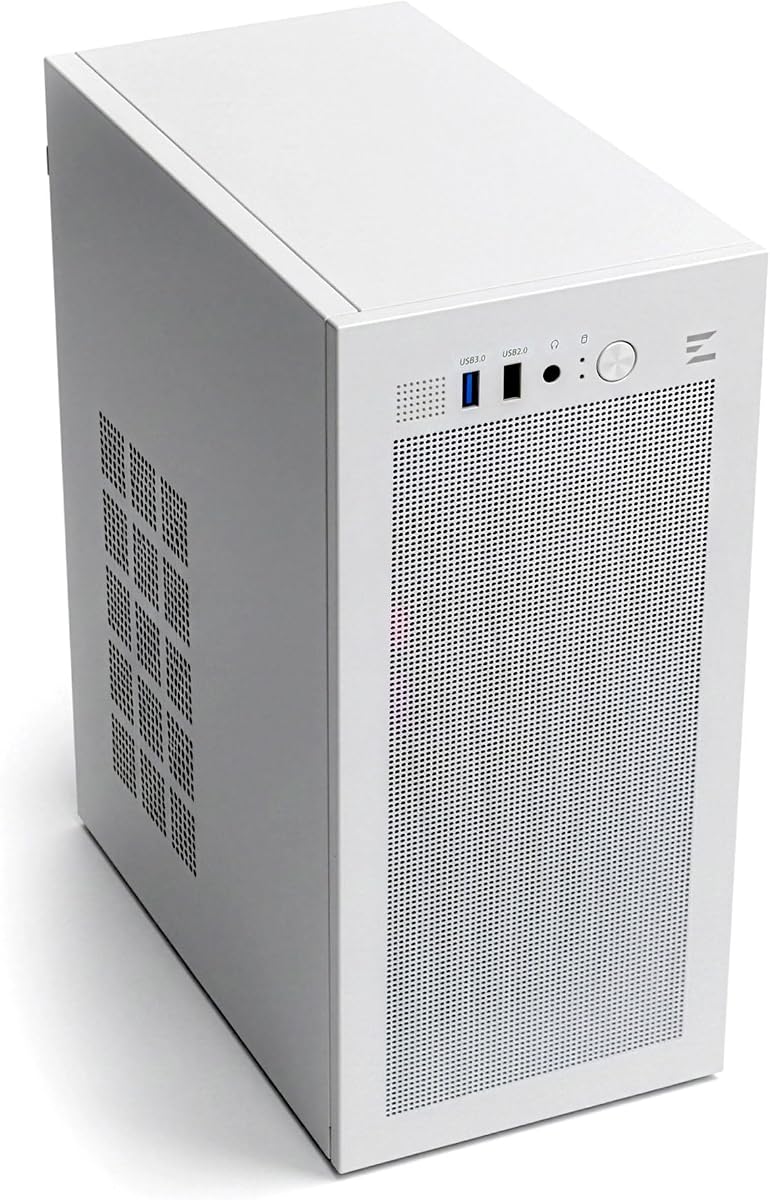
Zalman CUBIX
4.5Editor score
Only 17.1 liters
Standard ATX PSU support
260 mm graphics-card clearance
Pre-installed 80 mm fan
Our Smallest ATX Case guide compares 10 compact micro-ATX and Mini-ITX models for size, cooling, expansion, storage, and ease of use.
A small desktop build starts with a chassis that fits your components without wasting room. The best compact micro-ATX cases balance motherboard support, graphics-card clearance, airflow, cable routing, and convenient access without turning every installation into a puzzle.
We compared the ten featured cases using their stated dimensions, motherboard support, maximum graphics-card length, CPU-cooler allowance, power-supply options, fan and radiator provisions, storage layouts, front connectivity, and build-access features. The list includes models for simple daily-use systems as well as compact gaming and custom-cooled builds.
Each pick reveals what makes a particular case useful, from tiny 17.1-liter designs to roomier micro-ATX enclosures with panoramic glass, pre-installed lighting, and flexible layouts. Product details and prices can change, so confirm current specifications and component dimensions before purchasing.
4.5Editor score

4.7Editor score

4.8Editor score
This side-by-side overview highlights the most important differences among the featured compact cases, including enclosure volume, motherboard format, component clearance, cooling capacity, and expansion options.


The FOIFKIN F100 is a feature-oriented micro-ATX case built for compact gaming builds that want more visual presence and cooling flexibility than a barebones desktop enclosure. It holds a 4.3 rating and stands out with a 270-degree panoramic-glass design, a dual-chamber layout, three pre-installed ARGB fans, and support for two 240 mm radiators.
We may earn a commission when you buy through this link, at no additional cost to you.
Its internal arrangement separates the power supply and storage area from the main hardware chamber, which can simplify cable routing and improve the organization of a compact system. The case accepts micro-ATX and Mini-ITX motherboards, graphics cards up to 320 mm, and standard power supplies up to 170 mm. Storage is limited to one HDD and two SSDs, making it best suited to builds that rely primarily on solid-state drives.
Cooling support is the strongest part of the specification sheet. The F100 comes with two reverse 120 mm fans and one forward 120 mm fan, while the cooling system can accommodate two 240 mm radiators. Those radiator dimensions are especially useful for a compact gaming case because they can deliver strong heat-transfer capacity without requiring an oversized custom loop. USB 3.0 is available at the front, although the feature list does not highlight newer USB Type-C connectivity.
The main trade-off is size. Its stated dimensions of 340 by 275 by 330 mm make it larger than models such as the 17.1-liter Zalman CUBIX, so buyers hoping to fit a genuinely tiny system should measure their available area first. Even so, it is a compelling choice when a micro-ATX build needs a polished appearance, multiple fans, and broad radiator options in one enclosure.
The three included ARGB fans provide a useful starting configuration, while dual 240 mm radiator support gives builders room to move to liquid cooling as power or CPU heat levels rise.
Panoramic glass displays the illuminated interior, and the separated chamber keeps the power supply and drives away from the primary component area.
We may earn a commission when you buy through this link, at no additional cost to you.
The TGDGAMER MATX Micro ATX Case is a slim, function-first enclosure aimed at builders who need a small but straightforward desktop system. Its 4.0 rating reflects a basic feature set centered on a perforated front panel, support for micro-ATX and Mini-ITX motherboards, and compatibility with a normal-size ATX power supply.
We may earn a commission when you buy through this link, at no additional cost to you.
Air enters through the perforated front and moves through the interior toward the installed cooling hardware. The chassis can fit up to two 120 mm fans and one 80 mm fan, with radiator support listed up to 135 mm in height. This arrangement is sufficient for many office, media-center, and entry-level gaming configurations, particularly when paired with a low-profile or moderately sized CPU cooler.
Graphics-card clearance is the most important limitation to understand. With no chassis fan occupying the front position, the longest supported graphics card is 250 mm. Installing a fan at the front reduces that allowance to 225 mm. That distinction can determine whether a modern card fits, so buyers should check the exact dimensions of their intended GPU and the position of any additional fan.
Front connectivity includes one USB 3.0 port, one USB 2.0 port, and an audio connection. This is a sensible pick for a basic build where low cost and compact dimensions matter more than panoramic glass, elaborate lighting, or extensive storage support. It is less suited to enthusiasts planning a large graphics card, multiple liquid-cooling components, or a visually elaborate system.
The perforated front creates a direct path for outside air, while the available fan positions allow enough flexibility for a small desktop or entry-level gaming system.
The case supports a 250 mm card without a front fan, but that allowance falls to 225 mm when one is installed, making the layout choice essential.
We may earn a commission when you buy through this link, at no additional cost to you.
The ASUS Prime AP201 combines a 33-liter footprint with unusually accommodating component support. Its 4.6 rating reflects a well-rounded design that may not be the absolute smallest enclosure here, but offers generous room for large graphics cards, power supplies, custom cooling, multiple storage devices, and up to six fans.
We may earn a commission when you buy through this link, at no additional cost to you.
Its quasi-filter mesh panels contain more than 57,000 machined 1.5 mm holes, combining ventilation with a clear view of the interior. Cooling capacity includes support for 280 mm and 360 mm radiators. The AP201 also accepts graphics cards up to 338 mm and ATX power supplies up to 180 mm, making it a strong fit for a powerful micro-ATX gaming build that does not need full-size ATX motherboard support.
Assembly convenience is another major strength. Tool-free side panels use a secure clip mechanism designed to resist accidental removal, while an extended motherboard tray, strategic cutouts, and a 32 mm gap improve cable routing. These details matter in a compact chassis because easier access reduces the risk of awkward angles, damaged connectors, or frustration during the first build.
The AP201 is not the first choice for someone optimizing every millimeter of desk space. However, its spacious efficiency, broad cooling support, and cable-management features make it an excellent middle ground between a tiny specialty enclosure and a conventional mid-tower. It is particularly appealing for builders who want current hardware flexibility without giving up the footprint advantages of micro-ATX.
The 33-liter design accommodates a 338 mm GPU and 180 mm PSU, giving builders more freedom with modern desktop hardware than many slim cases.
Precision-mesh panels promote cooling while preserving visibility, and tool-free side panels make routine maintenance considerably more convenient.
We may earn a commission when you buy through this link, at no additional cost to you.
The DARKROCK EC2 is a full-size ATX mid-tower rather than a true small-form-factor chassis. It earns inclusion because it demonstrates the other end of the size spectrum: a flexible platform that can accept both ATX and micro-ATX motherboards. Its 4.4 rating and broad hardware support make it an appealing choice when future component compatibility matters more than a minimal footprint.
We may earn a commission when you buy through this link, at no additional cost to you.
The meshed front panel supports airflow, while tempered-glass side panels provide visibility into the build. It can hold up to eight 120 mm fans and a 360 mm radiator at the front. Graphics cards up to 340 mm and power supplies up to 200 mm are supported, giving users considerable freedom with contemporary hardware and room for future upgrades.
Separate magnetic dust filters at the top and bottom are a thoughtful maintenance feature. They can be removed for cleaning without disassembling the entire chassis, which helps maintain airflow and reduce the buildup of particles. The case is also described as Type-C Ready, adding a modern connection option for compatible accessories and components.
Its obvious limitation is physical size. If your primary goal is the smallest possible case, a dedicated micro-ATX or Mini-ITX enclosure will usually be more appropriate. The EC2 makes more sense for someone with enough desk or floor space who appreciates standard motherboard support, extensive cooling options, and a conventional tempered-glass mid-tower layout.
Support for ATX, micro-ATX, and ITX motherboards makes the EC2 useful for builders who may want to change motherboard standards later.
Up to eight 120 mm fans and a front 360 mm radiator provide strong cooling capacity, while removable magnetic filters simplify cleaning.
We may earn a commission when you buy through this link, at no additional cost to you.
The Zalman CUBIX-G is a compact micro-ATX mini tower designed for budget gaming systems and clean desktop setups. It carries a 4.4 rating and combines a relatively small enclosure with three pre-installed 120 mm FRGB fans, modern front connectivity, and support for common desktop components.
We may earn a commission when you buy through this link, at no additional cost to you.
Its hardware support includes graphics cards up to 280 mm, ATX power supplies up to 140 mm, and CPU air coolers up to 155 mm. These limits are important for small builds because they can rule out oversized mainstream components. The case also accommodates up to three 2.5-inch drives plus one 3.5-inch drive, offering enough storage flexibility for a general-purpose system.
The included fans use three-pin DC power and fixed RGB illumination. That makes the lighting ready immediately without requiring separate fan purchases or complex software configuration. It is not the same as adjustable ARGB, so buyers should not expect extensive lighting effects or synchronization. The front I/O includes USB Type-C and USB 3.0 for convenient peripheral connections.
This is a well-balanced recommendation for a small gaming or productivity PC that does not need full-size ATX support. Its stronger advantages over barebones designs are the included lighting fans, wider GPU allowance, and more storage positions. The trade-offs are modest graphics-card headroom, a 140 mm PSU limit, and fixed rather than fully customizable lighting.
Three pre-installed FRGB fans create an illuminated interior immediately, reducing the need to choose and install case fans separately.
Support for several drives, USB Type-C, and USB 3.0 makes the CUBIX-G practical for a modern everyday desktop as well as a gaming system.
We may earn a commission when you buy through this link, at no additional cost to you.
The Okinos MiniArt 4 is one of the most versatile compact cases in the guide, earning a 4.8 rating with a 24.5-liter body, full mesh panels, three pre-installed fans, and flexible cooling support. It suits builders who want a genuinely compact micro-ATX enclosure without giving up modern connectivity or enough room for a substantial graphics card.
We may earn a commission when you buy through this link, at no additional cost to you.
The case supports up to five fans, with two 120 mm reverse fans installed at the bottom and one 120 mm fan at the rear. A 240 mm radiator fits at the top. Tool-free top and side panels use 1.2 mm mesh to promote ventilation while simplifying access and routine cleaning, which is particularly useful in a chassis where dust filtering and airflow maintenance are important.
Its front-mounted power-supply design is distinctive. PSUs up to 150 mm are supported without cable, and a 10A extension cable is included. Graphics-card clearance depends directly on PSU length: cards up to 330 mm fit with a PSU no longer than 140 mm, while the allowance falls to 280 mm with longer power supplies. Prospective buyers should coordinate both component choices before ordering.
Front I/O includes a power button, USB Type-C 3.2 Gen 2, USB 3.1, and a combined headphone and microphone jack. Cable-management areas include a 25 mm main route and an 8 mm space behind the motherboard tray. The unusual PSU arrangement may take planning, but the result is an efficient layout with a high rating, good cooling provisions, and attractive minimalist styling.
Three included fans establish airflow immediately, while support for five fans and a top 240 mm radiator offers a clear path to stronger cooling.
Because the power supply sits at the front, its length directly changes graphics-card clearance, making coordinated component measurement essential.
We may earn a commission when you buy through this link, at no additional cost to you.
The Cooler Master QUBE 540 is a compact ATX mid-tower distinguished by flexible orientation and broad hardware support. It has a 4.4 rating, can operate horizontally or vertically, and uses a reversible I/O panel and movable handles so builders can adapt the enclosure to their available space.
We may earn a commission when you buy through this link, at no additional cost to you.
Its headline component support is impressive for a relatively compact ATX case. Graphics cards up to 415 mm fit when the front fan is removed, including high-end models from major GPU families. Motherboards can be ITX, ATX, or large E-ATX up to 11 inches wide. This flexibility makes the QUBE 540 a logical option for a powerful system that does not need a tiny enclosure.
A full front mesh panel promotes airflow, and one 120 mm SickleFlow fan is pre-installed. The front I/O includes two USB 3.2 Gen1 ports and a USB 3.2 Gen2 Type-C port. Tempered glass adds a conventional visual element, but the orientation system is the more unusual feature: vertical placement can suit a conventional desk tower, while horizontal placement can integrate with a broader entertainment setup.
For buyers focused strictly on the smallest possible micro-ATX build, the QUBE 540 is larger than several alternatives in this guide. Its advantage is adaptability. A builder can retain access to full-size and E-ATX motherboard options, install a very long GPU, and reposition the chassis later. It is the pick for performance-focused compact builds where hardware range matters more than minimum volume.
Horizontal and vertical operation, a reversible I/O panel, and movable handles make the QUBE 540 adaptable to different desk and room arrangements.
Graphics-card clearance reaches 415 mm without a front fan, giving the enclosure substantially more upgrade flexibility than typical mini cases.
We may earn a commission when you buy through this link, at no additional cost to you.
The JONSBO D32 STD combines an unusually capable set of component options with a compact desktop footprint. Its 4.7 rating is among the highest in the group, and the case supports a 365 mm graphics card, a 240 mm AIO radiator, a 163 mm CPU air cooler, and several power-supply formats. That combination makes it our most balanced recommendation.
We may earn a commission when you buy through this link, at no additional cost to you.
Motherboard support includes Mini-ITX, standard micro-ATX, and back-connect micro-ATX boards. The back-connect compatibility is valuable for newer systems designed to route cables through the rear of the motherboard, reducing clutter behind the tray. Storage configurations include three 2.5-inch SSDs or two 2.5-inch SSDs plus one 3.5-inch HDD, providing flexibility for fast system storage and larger data drives.
Power-supply compatibility is another major strength. Standard ATX units from 150 to 200 mm, SFX-L, and SFX are supported, although buyers should follow the specific PSU specifications. Front I/O includes USB 3.2 Gen1 Type-A, USB 3.2 Gen2 Type-C, and a combined headset connector. The size is listed as 15.55 by 8.15 by 12.36 inches, with feet included.
Cooling positions include room for 120 or 140 mm fans at the top and bottom, plus a rear 120 mm position. A 240 mm AIO fits at the top, and CPU air coolers can reach 163 mm on AMD platforms or 164 mm on Intel platforms according to the listed guidance. The case is not intended for full-size ATX motherboards, but within micro-ATX, it balances size, expansion, cooling, and everyday convenience better than most competitors.
Back-connect micro-ATX support can reduce hidden cable clutter, while standard micro-ATX and Mini-ITX boards remain fully practical choices.
A 365 mm GPU, top-mounted 240 mm AIO, multiple fan positions, and several drive options give this compact case broad build potential.
We may earn a commission when you buy through this link, at no additional cost to you.
The Zalman CUBIX is the smallest clearly micro-ATX-compatible case in this roundup, with a total volume of 17.1 liters. Its 4.5 rating demonstrates that a genuinely small enclosure can still provide a durable structure, standard ATX power-supply support, and enough flexibility for a practical compact PC.
We may earn a commission when you buy through this link, at no additional cost to you.
Despite its tiny footprint, the case accepts standard ATX power supplies, graphics cards up to 260 mm, and CPU coolers up to 137 mm. Those limits are appropriate for a compact office, home-theater, travel, or light gaming system, but they may exclude some of the largest graphics cards and tower coolers found in full-size builds. Checking component dimensions before purchasing is especially important.
Cooling is handled through a perforated front panel and a pre-installed 80 mm fan. This is a straightforward configuration for a low-power system and one of the main trade-offs of a case only 17.1 liters in volume. There is no indication of broad radiator support or multiple fan positions, so this model is better suited to efficient components than to a high-heat custom-cooled configuration.
Front I/O includes one USB 3.0 port, one USB 2.0 port, and a 3.5 mm stereo AUX connection. The steel body is specified at 0.8 mm, providing a sturdy foundation despite the small dimensions. Choose the CUBIX when minimizing desk or cabinet space is the primary goal and the selected CPU, cooler, GPU, and PSU remain comfortably within the stated limits.
At 17.1 liters, the CUBIX saves meaningful space compared with conventional micro-ATX and ATX towers while retaining a metal chassis.
The pre-installed 80 mm fan and perforated front are sensible for lower-power systems, while component limits keep expectations realistic.
We may earn a commission when you buy through this link, at no additional cost to you.
The LIAN LI Vector V100 MINI is the premium pick for a polished compact build. It has a 4.8 rating, combines 4 mm tempered-glass front and side panels for a 270-degree view, and includes an integrated ARGB light strip. Its micro-ATX platform is compact, although LIAN LI explicitly notes that MINI does not mean ultra-small SFF.
We may earn a commission when you buy through this link, at no additional cost to you.
The case measures 436 by 221.5 by 443.9 mm, so buyers should measure their available space and avoid assuming that the product name represents a miniature tower. It supports standard micro-ATX, back-connect micro-ATX, and Mini-ITX motherboards, but it does not accept full-size ATX boards. That restriction keeps the overall footprint more manageable while preserving support for modern compact platforms.
Five 120 mm ARGB PWM fans are included: four side-mounted intake fans and one rear exhaust fan. The case can hold up to nine fans and supports a top-mounted 360 mm or 240 mm radiator. Hardware clearance is generous for the category, including graphics cards up to 415 mm, CPU coolers up to 163.5 mm, and ATX power supplies up to 200 mm. An adjustable horizontal GPU anti-sag bracket is also included.
The tradeoff is physical bulk rather than capability. This model is best for a dedicated gaming or showpiece system where lighting, component visibility, cooling, and a long GPU matter. A buyer with extremely limited space should choose a smaller specialist case instead. For those who have room for a compact mid-tower, the V100 MINI delivers the strongest combination of appearance, cooling equipment, and premium case features here.
Four millimeters of tempered glass and an integrated ARGB strip create a wide interior display without requiring separate decorative lighting.
Four intake fans and one exhaust fan are included, with further expansion available for larger top-mounted radiators.
We may earn a commission when you buy through this link, at no additional cost to you.
The smallest usable case is not simply the enclosure with the lowest volume. It is the one that fits your hardware, provides adequate cooling, remains easy to assemble, and suits the space and appearance you need.
In short, choose the board standard first and the enclosure second. A micro-ATX case can save considerable space, but only if your processor, graphics card, cooler, and PSU also fit.
Always leave room for connectors and airflow. A nominally compatible card can still be difficult to install if its power cable bends sharply against the case or a drive cage.
If you want the smallest case, begin with a low-profile cooler or a compact liquid cooler. Do not purchase the chassis before confirming the exact height of your chosen CPU cooler.
Match both the PSU format and its exact length. A form factor alone is not enough, and proprietary power leads or tightly bending cables can affect fit.
Pre-installed fans offer convenience, but confirm their size, connector type, and control method. Also check whether additional radiator positions conflict with storage or PSU mounting.
Plan your storage first if you need multiple drives. A simpler SSD-only build will usually be easier to assemble and cool inside a compact enclosure.
Think about how often you will open the case. Frequent upgrades or maintenance favor removable panels and broad access, while a rarely touched system can prioritize compactness over convenience.
Do not compare only the advertised dimensions. Include nearby objects and leave enough room for installation, maintenance, and unobstructed intake and exhaust airflow.
Before assembling a compact system, lay out the motherboard, graphics card, power supply, cooling hardware, and drives outside the case. Confirm that each component fits, check the location of front connectors, and identify any clearance relationship between the GPU, fans, radiator, and PSU. Installing difficult parts first can prevent the need to disconnect other components later.
Connect the motherboard and front-panel wiring before closing the case, and route cables through the designated openings as you go. Use the supplied screws and spacers only where intended, avoid forcing connectors, and ensure that the side panel or mesh does not press against a cable. A small amount of planning makes compact-case assembly considerably less frustrating.
After the build is complete, check fan direction and confirm that every intake and exhaust position has unobstructed airflow. Clean removable dust filters regularly, keep intake vents away from carpet and dust, and inspect the interior for cable interference. After several months of operation, tighten any accessible connections and verify that the GPU, CPU cooler, and power supply remain properly seated.
Usually not. Most cases marketed as small ATX or micro-ATX support micro-ATX and Mini-ITX boards only, while a few compact mid-towers also accept full-size ATX. Check the compatibility list before buying, and do not assume that a case supporting ATX power supplies also supports ATX motherboards.
Mini-ITX is smaller than micro-ATX and offers fewer expansion slots, while micro-ATX provides more room for expansion cards and storage. A case that supports micro-ATX generally accepts Mini-ITX boards as well, but the case dimensions still determine which of the two formats makes the most practical internal layout.
They can be, because cables, fans, and large components compete for the same limited space. Cases with removable panels, clear cable routes, and shorter PSU options are easier to assemble. Building outside the chassis where possible and routing each cable as it is connected can make a tiny case much more manageable.
Only if the card length falls within the case's stated clearance and the required power cables have room to bend safely. Some cases reduce clearance when a front fan is installed, and others tie GPU space to PSU length. Measure the exact card and consider connector overhang before making a selection.
No. Low-power CPUs and processors with efficient coolers can perform well with air cooling in a small enclosure. A larger air cooler may conflict with the case height, while a compact liquid cooler can free interior space. Choose the cooling format based on the CPU's thermal demands and the case's supported dimensions.
Use the format supported by your selected case and confirm the unit's exact length. Standard ATX supplies offer broad compatibility with some compact cases, while SFX and SFX-L units are useful when a case supports them but cannot accommodate a full-size PSU. Check cable bend radius and manufacturer guidance as well.
A micro-ATX case can house a powerful gaming system, including a long graphics card, high-output CPU, and several fans or a radiator. The chassis must provide enough cooling, PSU clearance, and connector space. Compact cases are especially important for long GPUs because power plugs can require extra clearance beyond the card's stated body length.
Measure the available width, height, and depth where the case will sit, then add room for cables, door hinges, removable panels, and airflow. If the system will operate horizontally, compare the footprint in that orientation as well as the listed product dimensions. Checking the dimensions after your components are selected reduces the risk of a fitment problem.
The JONSBO D32 STD is the strongest all-around option because it combines a compact footprint with a 365 mm GPU allowance, top 240 mm AIO support, back-connect board compatibility, and multiple PSU formats. The Zalman CUBIX is the space-minimizing choice at 17.1 liters, while the LIAN LI Vector V100 MINI delivers the most polished appearance and premium cooling package.
Prioritize the components you already own or plan to buy. Measure the graphics card, CPU cooler, motherboard, and PSU, then verify that the case supports both the relevant format and dimensions. Cooling, storage, front ports, and accessible panels are more useful than an unusually small volume when they prevent an awkward or restrictive build.
Finally, confirm current specifications and prices at the time of purchase because case designs, component limits, and market details can change. A careful measurement and compatibility check will help you choose a compact enclosure that looks right, performs well, and remains practical for future upgrades.