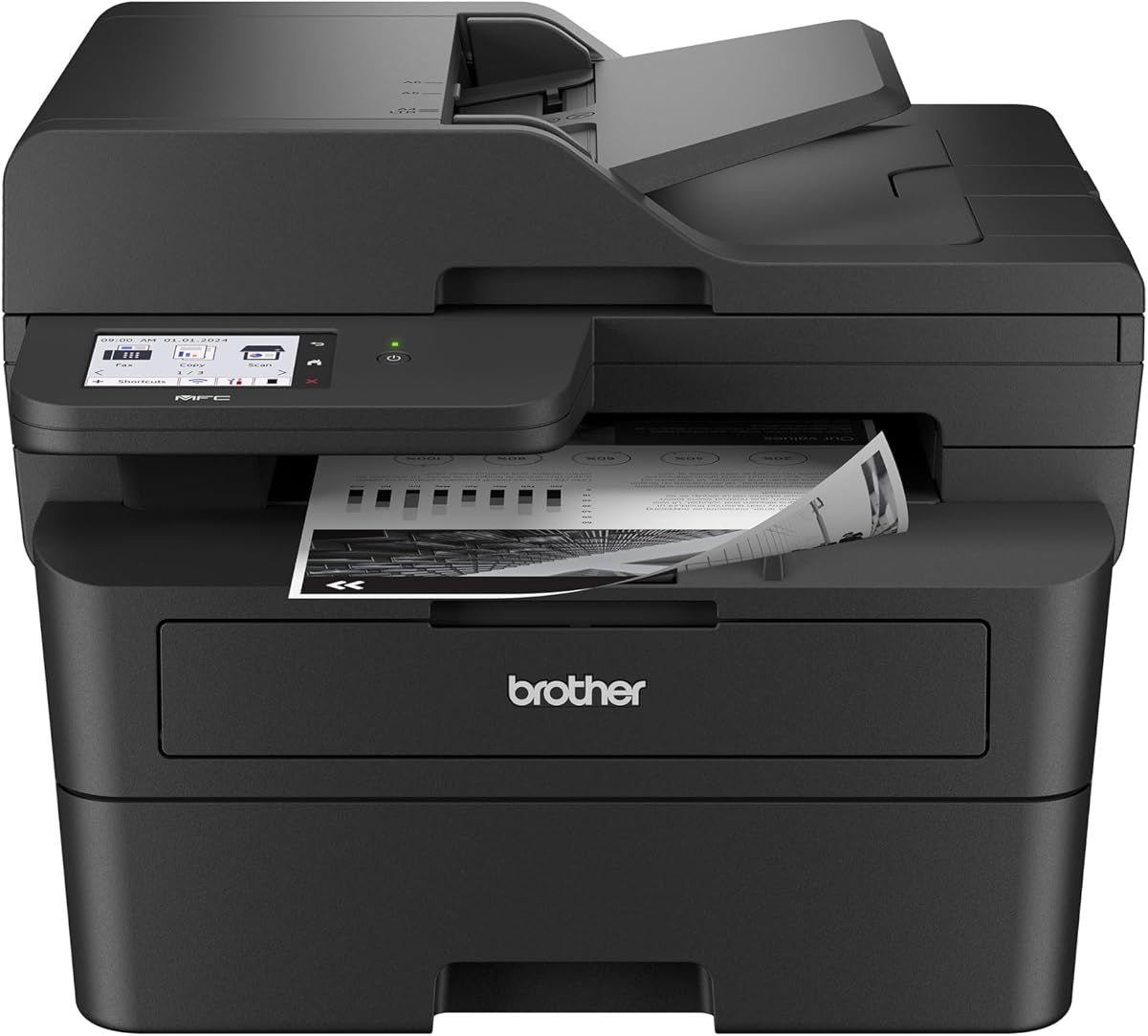
Brother Professional Laser Printer with Scanner
4.2Editor score
Single-pass two-sided scanning
Thirty-six page laser speed
Cloud service access
A printer with double sided scanning can process both sides of a document in a single pass, reducing manual page flipping and helping office workflows move faster. The best models combine a duplex-capable document feeder with automatic two-sided printing, useful connectivity, and controls that make routine jobs straightforward.
This guide compares ten current all-in-one and multifunction printers across scan automation, print speed, paper capacity, monochrome or color output, touchscreen usability, mobile support, and office-oriented features. It also distinguishes true two-sided document scanning from ordinary automatic document feeding, because not every printer with an ADF supports both sides automatically.
The rankings reveal three especially relevant choices: a flexible Brother inkjet for small businesses, a high-speed Brother monochrome laser model, and an HP OfficeJet Pro with a single-pass duplex ADF. Product details and configurations can change over time, so readers should verify current specifications and prices before purchasing.
4.2Editor score
4.2Editor score

3.9Editor score
As an Amazon Associate we earn from qualifying purchases.
This side-by-side comparison highlights duplex-scanning support, document handling, output type, speed, and connectivity. Models without a confirmed two-sided ADF are clearly identified so buyers do not mistake automatic page feeding for true double-sided scanning.



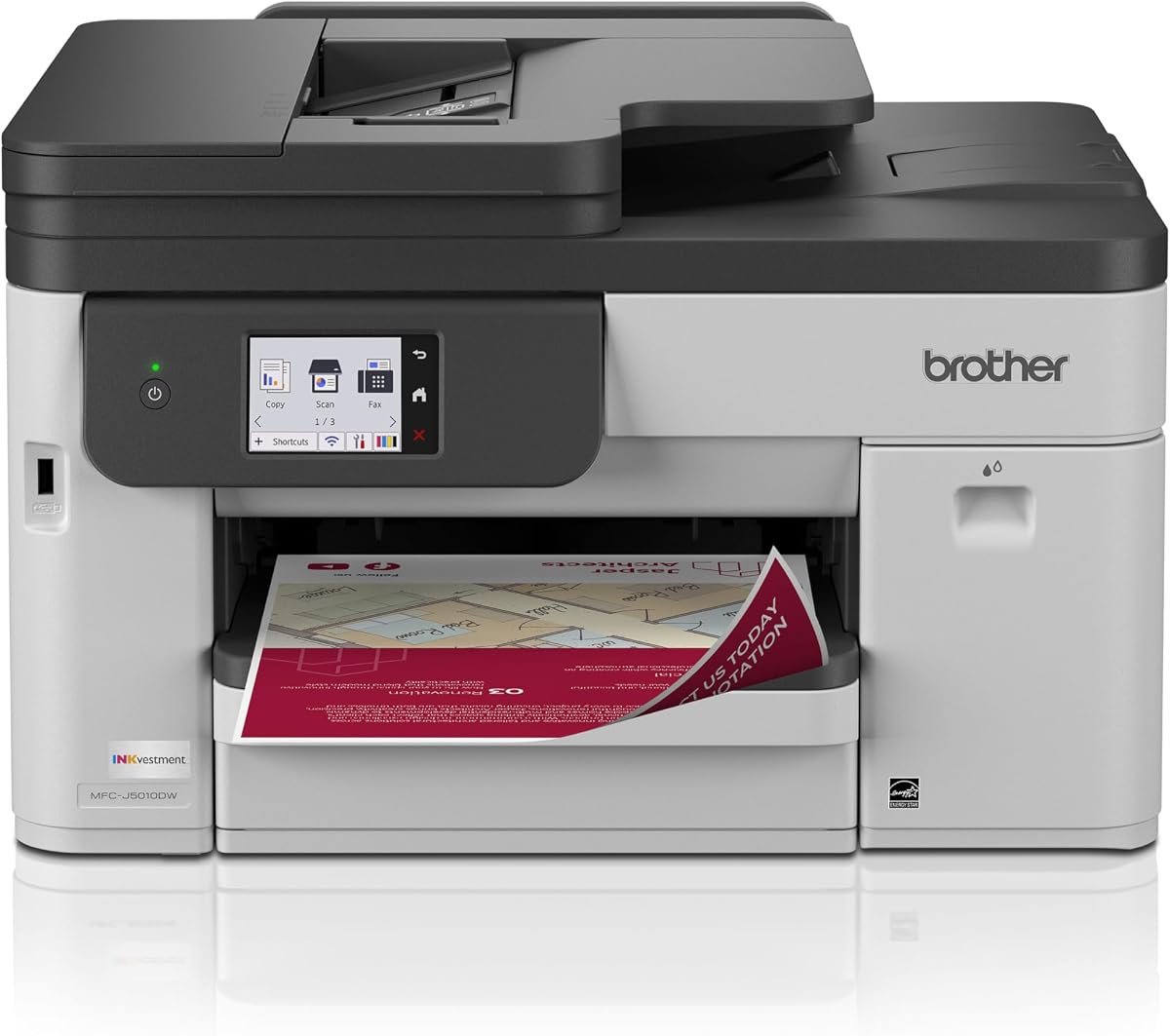
The Brother INKvestment 5010 is the most balanced choice in this guide for a business that needs true double-sided scanning alongside color output. Its 4.2 rating reflects a capable package combining printing, copying, scanning, faxing, a 50-page single-pass duplex ADF, and a 2.7-inch color touchscreen. The machine is designed for small-business reports, presentations, and other professional-looking color documents.
We may earn a commission when you buy through this link, at no additional cost to you.
The most important feature is the 50-page single-pass duplex document feeder. It reads both sides of a stack without requiring the user to flip every sheet manually. Automatic duplex printing is also supported on media as large as 8.5 by 14 inches, while print speeds reach 28 ppm in black and 26 ppm in color. A 250-sheet paper tray gives it more capacity than a typical compact home model.
Connectivity is unusually versatile for an inkjet. Wi-Fi Direct, wireless networking, Ethernet, and USB are all listed, and popular cloud applications can be reached directly from the touchscreen. The Brother Mobile Connect app adds mobile printing, scanning, copying, and device management. The principal tradeoff is the ongoing cost structure of inkjet consumables, particularly for a business that prints high volumes of monochrome pages.
This printer is most appropriate for offices, hybrid workspaces, and advanced home users who regularly scan two-sided documents and also need color. It is a better keyword match than models that merely have an ADF, and it is more versatile than monochrome-only alternatives. The INKvestment 5010 earns the top recommendation because it covers the full duplex workflow without asking buyers to sacrifice color printing, connectivity, or larger-paper support.
The duplex ADF handles both sides of each sheet in one pass, which is particularly valuable for contracts, reports, and multi-page records. Its 50-sheet capacity also reduces the number of refills required during a long document.
Wireless, Ethernet, USB, and Wi-Fi Direct options accommodate different office networks and device arrangements. Cloud access and the Brother Mobile Connect app extend routine print and scan tasks beyond the control panel.
We may earn a commission when you buy through this link, at no additional cost to you.
The HP OfficeJet Pro 9125 is a straightforward office-focused color inkjet with confirmed duplex printing and scanning. It carries a 4.0 rating and includes printing, copying, scanning, faxing, an automatic document feeder, a 2.7-inch color touchscreen, and a 250-sheet input tray. Its listed print speed reaches 22 ppm in black and 18 ppm in color.
We may earn a commission when you buy through this link, at no additional cost to you.
The two-sided ADF is the central advantage for this keyword. Users can scan multi-page documents with both sides captured automatically, avoiding repetitive manual turns. Automatic two-sided printing is also included, allowing the device to reduce paper use in everyday reports. The larger touchscreen uses a phone-like interface, making common copy, scan, and job-management settings comparatively easy to locate.
Dual-band Wi-Fi is designed to detect and resolve connection issues, while the HP app provides mobile control for printing, scanning, copying, and faxing. HP AI formatting can clean up web pages and emails before printing. The main restriction is cartridge compatibility: the supplied information says the printer is intended to work only with cartridges containing original HP chips or circuitry.
The OfficeJet Pro 9125 fits small offices that need dependable duplex scanning, color capability, and straightforward connectivity in one device. It may be less attractive than a two-tray model for frequent media changes, but it remains a balanced option for teams that want the duplex function without moving to a premium business class. Buyers should also consider ink delivery needs before choosing an inkjet for high-volume use.
The duplex-capable feeder makes the OfficeJet Pro 9125 relevant for contracts, research packets, and archival records. Both sides are captured without a separate second pass through the scanner.
A 2.7-inch color touchscreen gives users quick access to frequently used functions. The HP app mirrors many device controls on a phone, while AI-assisted page formatting is designed to reduce awkward print layouts.
We may earn a commission when you buy through this link, at no additional cost to you.
The Brother MFC-L2900DW is the premium choice for workflows dominated by black-and-white documents. Its 4.2 rating accompanies 36 ppm laser printing, a 50-page ADF, automatic duplex printing, single-pass two-sided scanning, and a 3.5-inch touchscreen. It combines several functions in one package: printing, scanning, copying, and likely core office workflow features associated with the multifunction design.
We may earn a commission when you buy through this link, at no additional cost to you.
Single-pass two-sided scanning is especially important in a document-heavy environment. Rather than sending the back of every sheet through again, the ADF captures both sides during one movement. That can shorten batch scanning sessions and make digitizing lengthy records more practical. Automatic duplex printing similarly reduces paper consumption for reports and internal documents.
The 36 ppm monochrome speed leads this list, making the machine attractive to small businesses that produce many text-based pages. The 3.5-inch display is larger than the screens on many competitors and provides direct access to Google Drive, Dropbox, and OneNote. Dual-band Wi-Fi, Ethernet, USB, and mobile printing and scanning through the Brother Mobile Connect app create a flexible connection setup.
This printer is ideal for legal offices, accounting practices, warehouses, and other teams that mainly produce monochrome paperwork. Its limitation is equally clear: it cannot provide the color output available from the inkjet choices. If crisp, fast monochrome documents and productive double-sided scanning matter more than brochures or photographs, the MFC-L2900DW is an excellent premium fit.
A 50-page ADF, rapid monochrome output, and single-pass duplex scanning work together to reduce interruptions during document batches. The design is aimed at offices that regularly handle reports, forms, and records.
Direct shortcuts for Google Drive, Dropbox, and OneNote reduce the steps between a cloud document and a finished scan or print. The sizable touchscreen also makes local device management more approachable.
We may earn a commission when you buy through this link, at no additional cost to you.
The Canon PIXMA TR7120 is a compact color all-in-one aimed at home users and hybrid workers. It has a 4.2 rating and combines printing, copying, scanning, an automatic document feeder, automatic two-sided printing, and a 1.42-inch monochrome OLED display. It also supports media up to 8.5 by 11 inches, with or without borders.
We may earn a commission when you buy through this link, at no additional cost to you.
The main attraction is a useful feature mix in a relatively small package. Automatic duplex printing conserves paper for multi-page assignments and reports, while the ADF makes routine copying and scanning more convenient than using only the flatbed. A two-cartridge hybrid ink system is designed to produce sharp text and vivid color photographs.
Dual-band Wi-Fi supports connections on both 2.4 GHz and 5 GHz networks, and setup can be managed from a smartphone or computer. Canon PRINT, Apple AirPrint, and Mopria support expand mobile printing options. The supplied specifications confirm automatic duplex printing, but they do not explicitly confirm that the ADF scans both sides automatically.
The TR7120 is best for a home office that values automatic two-sided printing, compact size, and color output. It should not be selected on the assumption that its ADF provides double-sided scanning without checking the current manual or Canon specifications. For confirmed one-pass two-sided scanning, the Brother INKvestment 5010, Brother MFC-L2900DW, or the relevant HP OfficeJet Pro models are safer choices.
Automatic two-sided printing is a meaningful advantage for long reports and reference documents. It reduces the number of physical sheets needed without requiring users to change a manual duplex setting each time.
The TR7120 handles everyday text, copies, and color photos while keeping its footprint suitable for a home workspace. The OLED display provides quick status information even though it is monochrome and compact.
We may earn a commission when you buy through this link, at no additional cost to you.
The HP OfficeJet Pro 9135 delivers a number of useful office features at a lower tier within this list, including true single-pass two-sided scanning. Its 3.9 rating is the lowest among the ten products, yet the supplied feature set remains strong: color output, copying, faxing, automatic duplex printing, a duplex ADF, and two 250-sheet input trays.
We may earn a commission when you buy through this link, at no additional cost to you.
The two paper trays are a major practical advantage. Users can keep standard paper in one tray and another media type in the second without repeatedly swapping stock. The 4.3-inch color touchscreen is the largest in this comparison and presents a phone-like interface for navigating device functions.
Print speeds reach 25 ppm in black and 20 ppm in color. Dual-band Wi-Fi, the HP app, and HP AI-assisted page formatting support connected workflows, while HP Wolf Pro Security is included to help protect the network. As with the OfficeJet Pro 9125, the printer is intended to work only with cartridges containing original HP chips or circuitry.
The 9135 is a sensible pick for a home office or small business that genuinely needs duplex ADF scanning but does not need a premium monochrome laser system. Its two trays, large display, and strong office functions offset its comparatively modest rating. Buyers should account for cartridge restrictions and assess ongoing ink requirements before finalizing the purchase.
Separate 250-sheet input trays make it easier to keep letter paper, presentation stock, or other media readily available. That is useful for mixed-output offices that do not want to reload the printer for every document type.
The single-pass duplex ADF captures both sides of each sheet automatically. This supports faster digitizing of multipage records and reduces the labor involved in handling folded or stapled documents.
We may earn a commission when you buy through this link, at no additional cost to you.
The Brother DCP-L2640DW is a compact monochrome laser multifunction printer with a 4.1 rating. It combines printing, scanning, and copying, supports duplex printing, and includes a 50-page ADF. Its listed print speed reaches 36 ppm, placing it alongside the fastest monochrome models in the guide, while scan speeds are listed at up to 23.6 ipm in black and 7.9 ipm in color.
We may earn a commission when you buy through this link, at no additional cost to you.
Its main strengths are speed, compact construction, and flexible connectivity. Built-in dual-band Wi-Fi, Ethernet, and USB let it fit into different network configurations. The Brother Mobile Connect app supports printing, scanning, device management, toner tracking, and ordering Brother Genuine Supplies from a mobile device.
The important distinction is that the supplied product information confirms duplex printing and a 50-page ADF, but does not explicitly state that the ADF scans both sides in one pass. It is therefore not a confirmed match for buyers whose sole requirement is double-sided document scanning. Its color scan capability refers to color documents being scanned, not to the printer producing color output.
This DCP-L2640DW is well suited to compact offices that mainly need fast black-and-white printing, copying, and scanning. It offers an attractive blend of laser speed, paper capacity, and connectivity in a smaller package than many business multifunction devices. Buyers seeking automatic two-sided scanning should verify the current ADF specification or consider the Brother MFC-L2900DW, which explicitly provides it.
A listed speed of 36 ppm makes the DCP-L2640DW well suited to routine internal documents. Its relatively compact design also makes it more practical for small offices than many full-size business multifunction printers.
The Brother Mobile Connect app extends more than basic printing. It can support scanning, device administration, toner tracking, and reordering compatible Brother Genuine supplies.
We may earn a commission when you buy through this link, at no additional cost to you.
The Canon PIXMA TS6520 is a compact color inkjet built around straightforward home printing, copying, and scanning. It has a 4.2 rating, a 1.42-inch monochrome OLED display, dual-band Wi-Fi, and automatic two-sided printing. A two-cartridge hybrid ink system is designed to produce sharp text alongside vivid color photos and graphics.
We may earn a commission when you buy through this link, at no additional cost to you.
Its strongest features are compactness, automatic duplex printing, and flexible connection options. Users can print media up to 8.5 by 11 inches, with or without borders, and can access mobile services through the Canon PRINT app, Apple AirPrint, and Mopria Print Service. The integrated scanner supports ordinary copy and scan operations for lighter document volumes.
Unlike some more expensive office-oriented models in the list, the supplied information does not mention faxing. It also does not explicitly confirm a duplex ADF. Automatic two-sided printing should not be confused with double-sided scanning, so buyers who need the latter should review the current product manual before purchase.
The TS6520 is a good fit for students, home workers, and families that regularly print assignments, notes, recipes, and photographs. It helps reduce paper use and fits neatly into a smaller workspace. For automated two-sided document capture, however, a model with an explicitly stated duplex ADF is the more dependable choice.
Automatic two-sided printing helps users conserve paper during long documents. It is a practical daily feature even for a model designed primarily for home and hybrid work.
The hybrid ink system is intended to balance clear document text with colorful photo output. Borderless printing and mobile service support make it useful for creative as well as administrative jobs.
We may earn a commission when you buy through this link, at no additional cost to you.
The Epson EcoTank ET-4800 is a wireless color all-in-one built around refillable ink tanks rather than conventional small cartridges. Its 3.8 rating is modest, but the high-capacity tank design, built-in scanner, copier, color display, and Micro Piezo print technology make it relevant to buyers who want a different ownership model.
We may earn a commission when you buy through this link, at no additional cost to you.
EcoFit ink bottles make it possible to replenish the internal tanks without repeatedly purchasing cartridge-style consumables. Epson states that the cartridge-free approach can reduce cartridge waste, while the high-capacity tanks are designed to lessen interruptions caused by running out of ink. Print output covers sharp text as well as color photos and graphics.
The scanning feature is a high-resolution flatbed scanner, accompanied by copying and a color display for navigation. However, the supplied information does not state that the ET-4800 offers an automatic document feeder, automatic duplex printing, or double-sided document scanning. It therefore falls short of the keyword's core requirement unless a separate ADF is attached and its duplex behavior is verified.
The ET-4800 is best considered for a home or hybrid user who values high-volume color ink capacity and refillable tanks more than automated two-sided scanning. It can be a good general-purpose printer for creative and administrative work, but it is not one of the strongest confirmed choices for this particular guide. Buyers prioritizing double-sided documents should choose an ADF model with explicitly listed duplex scanning.
High-capacity tanks and keyed EcoFit bottles can reduce the frequency of consumable purchases. That model may appeal to users who print enough to value a larger supply of ink at once.
The built-in high-resolution flatbed scanner supports copying and scanning alongside printing. It is useful for photos and individual documents, though it does not provide the batch convenience of a duplex ADF.
We may earn a commission when you buy through this link, at no additional cost to you.
The Epson EcoTank ET-4950 is a feature-rich Supertank color model with automatic duplex printing, an automatic document feeder, copying, scanning, and faxing. Its 4.1 rating reflects a versatile package for homes and small offices, particularly those that want to minimize repeated cartridge purchases.
We may earn a commission when you buy through this link, at no additional cost to you.
The supplied data notes that the printer includes enough ink for up to 6,600 black pages or 5,500 color pages. Keyed EcoFit bottles simplify refilling and are designed to reduce mixing mistakes. The printer also has a 250-sheet tray, a 2.4-inch color display, and an ADF, giving it a stronger office feature set than the more basic ET-4800.
Automatic duplex printing helps conserve paper, and the ADF makes batch copying and scanning more convenient than a flatbed-only arrangement. Nevertheless, the specifications do not explicitly state that the ET-4950 scans both sides of a sheet in one pass. As a result, it should not be advertised as confirmed double-sided ADF scanning based only on the available information.
The ET-4950 is a good choice for a small office that values color output, refillable high-capacity ink, duplex printing, and batch document handling. It is also attractive for a home user who wants more office capability without moving to a monochrome laser printer. For guaranteed one-pass two-sided scanning, choose one of the explicitly documented Brother or HP duplex-ADF models.
The refillable tank system and large initial page capacity can suit users who print frequently enough to value fewer cartridge replacements. The keyed bottle design adds a practical safeguard against incorrect refills.
An ADF, fax support, automatic duplex printing, and a large input tray give the ET-4950 greater flexibility for administrative work. Its color display also makes local navigation and status checks more convenient.
We may earn a commission when you buy through this link, at no additional cost to you.
The Canon PIXMA TR8620a is a wireless four-function printer for home offices, combining printing, copying, scanning, and faxing. It carries a 4.0 rating and includes an automatic document feeder, automatic two-sided printing, color photo capability, and a combined 200-sheet paper capacity divided between a 100-sheet cassette and a 100-sheet rear feed.
We may earn a commission when you buy through this link, at no additional cost to you.
Its 1,000-page duty cycle and 15/10 ipm listed print speed are oriented toward regular home-office use rather than the heaviest commercial output. A Micro SD slot adds a way to work with compatible image files, while AirPrint and Android support cover common mobile ecosystems. Alexa can notify users when ink is low and, if enrolled, place a smart reorder through Amazon.
The supplied information confirms automatic duplex printing and use of an ADF, but it does not explicitly say that the ADF performs double-sided scanning in one pass. Buyers who need that exact capability should not infer it from the separate duplex-printing and ADF features. The distinction should be checked in the current Canon documentation or on the manufacturer's current product page.
The TR8620a is most appropriate for a home office that needs several functions in one device, including occasional faxing and photo printing. Its smart ink notifications are useful for avoiding unexpected shortages, while the rear feed adds flexibility for particular media. It finishes the list as a capable general-purpose option rather than a confirmed double-sided scanning specialist.
Print, copy, scan, and fax support covers a broad range of home-office tasks. Consolidating these functions can reduce the need for separate equipment on a crowded desk.
Alexa can provide low-ink notifications and support a smart reorder when the user enrolls the printer. The service is presented as requiring no subscription, offering a practical way to manage supply interruptions.
We may earn a commission when you buy through this link, at no additional cost to you.
The most important distinction is whether the scanner can capture both sides of a sheet automatically. After confirming that feature, compare paper handling, output type, speed, connectivity, controls, and consumables to find a printer that matches the intended workload.
Prioritize an explicit single-pass duplex ADF for the smoothest batch workflow. It avoids sending each sheet through the scanner twice and is particularly useful for contracts, records, and long reports.
For recurring multi-page jobs, choose a generous ADF and a duplex function that works with it. Occasional users can prioritize compact size and a lower overall footprint instead.
Choose color for visual materials and monochrome for fast, text-heavy workflows. Avoid paying for color capability if regular output is exclusively black and white.
Match performance to your daily volume rather than focusing on the largest headline number. A fast laser with simple duplex scanning may outperform a slower inkjet for routine office paperwork.
Look for a standard 250-sheet tray in a busy office. Dual trays are especially useful when media changes are frequent, while a single compact tray may be enough for light home use.
Choose a model that supports both your network type and the devices you actually use. Wireless convenience matters most when several people need access; Ethernet may be preferable for a fixed workstation.
Prioritize an intuitive interface and the app features your team needs. A larger screen helps in a shared office, whereas a basic display may be sufficient for occasional home use.
Look beyond the purchase decision and consider the cost and inconvenience of supplies. The most economical printer is the one whose consumables suit your page volume and usage pattern.
Begin by unpacking the printer, removing any transport restraints, installing the supplied ink or toner, and loading plain paper into the main tray. Connect the unit through Ethernet or Wi-Fi, complete the manufacturer's setup process, and update its firmware if prompted. Confirm that the duplex-scanning option is enabled before sending a test document through the ADF.
For reliable scanning, fan the stack, remove staples and clips, and place pages in the feeder with the correct orientation. Use the scanner's preview or preview application to check alignment, orientation, color mode, resolution, and file format. Choose a destination such as a computer, email, a network folder, or a supported cloud service, and save each job to a clearly named location.
Care for the machine by keeping the scanner glass and white guide surfaces clean with a soft, lint-free cloth. Use appropriate print media, avoid overfilling the paper tray, and follow the documented cleaning cycle for the ADF and duplex path. Replace ink or toner before prolonged operation at low levels, and address paper jams gently to avoid bending internal guides or rollers.
Duplex printing places content on both sides of a sheet, while double-sided scanning captures the front and back of an original document. A printer can support one function without supporting the other, so both features should be verified separately. For genuine double-sided scanning, look for an ADF explicitly described as duplex or single-pass duplex.
Single-pass duplex scanning captures both sides of a document during one movement through the feeder. This is generally faster than scanning one side first and then turning every sheet for a second pass. It is particularly useful for contracts, reports, invoices, and records that contain many pages.
Neither is universally better. Laser models are often stronger for high-volume monochrome offices, while color inkjets can be more appropriate when photographs, presentations, or mixed-color pages are important. The decisive factors are confirmed duplex ADF support, feeder capacity, speed, paper handling, and the ongoing consumable requirements.
No. An automatic document feeder means the machine can feed pages without manual placement, but it does not necessarily capture both sides. Some models scan only the visible side, while others offer a dedicated duplex or single-pass duplex ADF. Check the exact scanning specification rather than assuming all ADFs are double-sided.
The Brother INKvestment 5010 offers a clear balance of single-pass duplex ADF scanning, color output, a touchscreen, cloud access, and several connection methods. Its 50-page feeder and automatic duplex printing suit shared use, although buyers should compare inkjet consumable requirements with those of a laser model.
It may not be essential for a short document, but it becomes valuable as soon as records, reports, or multiple pages are involved repeatedly. A flatbed scanner can work for individual sheets, while a duplex ADF is more efficient for batches. Consider also whether automatic duplex printing can reduce paper use in daily work.
Prioritize a clearly documented single-pass duplex ADF, adequate feeder capacity, and suitable file output. Security, network reliability, and direct cloud or network-folder destinations can also matter in professional settings. The Brother MFC-L2900DW and HP OfficeJet Pro models with explicitly listed duplex scanning are stronger matches than products that mention only duplex printing.
Clean the rollers and feed path with the manufacturer-approved method, and remove dust or paper fragments that can cause skew or jams. Feed clean, unstapled pages and keep the side guides aligned without forcing them tightly against the stack. Follow the printer's cleaning prompts and avoid lubricating components unless the manual specifically instructs you to do so.
The Brother INKvestment 5010 is the strongest all-around recommendation because it combines true single-pass duplex scanning with color printing, a 50-page ADF, automatic duplex printing, flexible connectivity, and cloud functions. The Brother MFC-L2900DW is the premium choice for fast monochrome offices, while the HP OfficeJet Pro 9135 provides confirmed duplex scanning, two input trays, and a large display in a more budget-conscious office package.
Prioritize explicit double-sided ADF language above all other features. Automatic duplex printing, a flatbed scanner, and ordinary page feeding are useful, but none proves that both sides of a document will be captured automatically. After confirming that requirement, choose based on color needs, document volume, paper handling, network environment, and the most convenient way to manage ink or toner.
Specifications, bundled supplies, subscriptions, and prices can change, so confirm the current listing and manufacturer documentation before placing an order. Reviewing the latest duplex-scanning configuration, page-yield details, and connectivity requirements helps ensure that the chosen printer still fits your workflow at the time of purchase.