
HUANUO FlowLift Pro Monitor Arm
4.5Editor score
Mechanical spring counterbalance
Tool-free VESA mounting plate
Visible tension calibration window
A PC desk arm for gaming can improve screen placement, reclaim desk space, and make long sessions more comfortable, but the right support depends on your monitors, desk, and preferred setup. The best option balances secure mounting, smooth movement, useful adjustment ranges, and enough reach for your viewing position.
This guide compares ten gaming-oriented desk arm and ergonomic support products across screen compatibility, load capacity, mounting methods, articulation, cable management, and installation. It covers single, dual, and triple monitor arms as well as two related arm and elbow supports for players seeking a more comfortable workstation.
Each pick highlights a particular use, from a versatile dual-screen setup to a compact single-screen mount or a three-display command center. Ratings and specifications reflect the supplied product information, while availability and prices can change, so shoppers should confirm current listing details before purchasing.
4.5Editor score

4.6Editor score

4.6Editor score
As an Amazon Associate we earn from qualifying purchases.
This side-by-side comparison covers the key differences among monitor mounts, multi-screen systems, and related ergonomic supports, with special attention to compatibility, adjustment, stability, and installation.


The HUANUO FlowLift Dual Monitor Stand is the strongest all-around choice in this guide for gamers who want two elevated displays without giving up meaningful desk space. Its supplied rating is 4.6, and its defining advantages are a dual full-motion design, a reinforced clamp structure, flexible installation, and enough weight capacity for a broad range of gaming screens.
We may earn a commission when you buy through this link, at no additional cost to you.
Each arm supports a monitor from 13 to 32 inches weighing 4.4 to 19.8 pounds. Both 75x75mm and 100x100mm VESA patterns are supported, covering many common flat and curved gaming displays. Movement includes an 85-degree upward and 50-degree downward tilt range, 90-degree swivel in either direction, 360-degree rotation, and up to 15.75 inches of height adjustment. These ranges make it practical to move between a centered game view, a side-by-side arrangement, and a more compact position when the desk is needed for other equipment.
The upgraded dual C-clamp uses a larger platform for a steadier hold, while the grommet option offers an alternative for desks that permit through-hole installation. The mount is recommended for wooden desktops between 0.59 and 3.54 inches thick, and its underside should not contain a crossbeam or panel that blocks the clamp. Those constraints make it less universal than a basic pole stand, but they are clearly stated and important to verify before ordering.
This is the best option for a dual-screen gaming rig where one display carries the game and another handles chat, inventory, streaming tools, or a second game. It also suits productive players who alternate between entertainment and focused computer work. Those wanting a single display should consider the more specialized single-arm options, while buyers needing three screens should look to the triple mount. For a balanced two-screen gaming setup, however, this dual FlowLift stand offers the most complete feature package in the list.
The combination of height, swivel, tilt, and rotation makes it possible to place two screens at a comfortable height and independently change their orientation. That flexibility is especially useful when the main game moves between a centered display and a wider multi-screen arrangement.
Lifting both displays frees room for a keyboard, mouse, notebook, or docking equipment, while integrated cable guides reduce loose wiring. The larger platform and dual clamp structure add reassurance that the screens will remain steady during active use.
We may earn a commission when you buy through this link, at no additional cost to you.
The HUANUO FlowLift Pro Monitor Arm is a cost-conscious single-screen option that avoids the usual compromises of a basic desk mount. It carries a supplied rating of 4.5 and stands out for its mechanical spring system, visible tension indicator, tool-free VESA plate, and straightforward choice of clamp or grommet installation.
We may earn a commission when you buy through this link, at no additional cost to you.
The mount supports monitors measuring 13 to 32 inches, with a maximum load of 15.4 pounds and compatibility with 75x75mm or 100x100mm VESA holes. Rather than relying on gas pressure, the MechaSpring arm uses a mechanical mechanism intended to maintain consistent support and resist droop over time. The product information also states that it offers up to twice the service life of conventional mounts and includes 90 percent professional-grade metal construction.
Its PrecisionView window is one of the most useful features for a first-time installer. A yellow indicator moves as tension is adjusted, providing visible feedback instead of relying entirely on feel. The tool-free VESA plate also reduces assembly friction by letting the user snap the display into place. A simplified main assembly includes one base and one screw, while both C-clamp and grommet bases are available.
This arm is best for a gamer with one 13-to-32-inch display, particularly one who values repeatable positioning over maximum load capacity. It is less appropriate for unusually heavy monitors because the stated limit is 15.4 pounds, and it should not be installed on glass, plastic, or irregular-edge desktops without careful review of the guidance. For a supported screen and a compatible wooden desk, it offers a focused feature set at a practical budget level.
The mechanical spring design is intended to keep the monitor steady and avoid the pressure loss associated with gas-spring arms. That makes it appealing for players who repeatedly change viewing angles or want a display to remain exactly where it is positioned.
The tool-free VESA plate and visible tension indicator simplify setup in two different ways. One reduces the need to align and tighten monitor screws, while the other helps identify a balanced setting without repeated trial and adjustment.
We may earn a commission when you buy through this link, at no additional cost to you.
The HUANUO FlowLift Single Monitor Mount is a refined single-screen solution for gamers who want a more substantial feel than a lightweight pole stand. It has a supplied rating of 4.6 and combines broad screen compatibility, a 19.8-pound load limit, one-handed articulation, and a simple installation process.
We may earn a commission when you buy through this link, at no additional cost to you.
Monitors from 13 to 32 inches are supported, provided they use 75x75mm or 100x100mm VESA mounting and weigh between 4.4 and 19.8 pounds. The arm offers an 85-degree upward and 50-degree downward tilt, 90-degree swivel, 360-degree rotation, and enough vertical travel to raise a screen by as much as 15.6 inches from the desktop. This makes it easy to bring the panel close for focused games, push it back for a wider field of view, or turn it vertically when multitasking.
The product information highlights automotive-grade components and 20,000 motion tests, indicating that durability and repeated adjustment are central to the design. Its one-piece structure simplifies assembly, and the stated three-step process covers attaching the desk bracket, connecting the VESA plate, and adjusting tension for the monitor. Buyers can select a C-clamp or grommet base, making the mount appropriate for a wider range of compatible wooden desks.
This is the premium-style pick for a single-monitor gaming setup because it combines polished full-motion control with a higher stated load capacity than the FlowLift Pro. It is ideal for players who want the main display precisely positioned and who appreciate a stable arm that can be adjusted with one hand. It does not solve the needs of a dual- or triple-screen enthusiast, but for one well-matched gaming monitor it is a particularly complete and polished solution.
One-handed control makes it practical to pull a display closer during close-range play, reposition it for comfort, or move it out of the way when the desk is needed. The broad articulation range supports several playing styles and work patterns.
The stated use of automotive-grade components and completion of 20,000 motion tests suggests a focus on longevity under repeated adjustment. That matters for a gaming arm that may be moved every day rather than treated as a fixed stand.
We may earn a commission when you buy through this link, at no additional cost to you.
The ErGear Single Monitor Arm is a strong choice when screen size or reach matters more than having multiple arms. Its supplied rating is 4.4, and the mount accepts flat or curved displays from 13 to 34 inches, up to 19.8 pounds, using standard 75x75mm or 100x100mm VESA patterns.
We may earn a commission when you buy through this link, at no additional cost to you.
Its adjustment coverage is one of the most generous in the guide. The arm raises the display by up to 17.5 inches and extends outward as far as 18.1 inches, giving players room to place a large screen near a wall and still bring it forward for a closer viewing position. Tilt ranges from 80 degrees up to 50 degrees down, with 90-degree swivel and 360-degree rotation.
The widened VESA head and tighter-fitting VESA panel are designed to improve stability, while the durable core has reportedly been tested through more than 20,000 cycles. Tool-free mounting reduces the number of steps needed at the display itself, and openable cable clips make routine cable management less cumbersome. A C-clamp works with desks from 0.39 to 2.56 inches thick, while the grommet base accommodates desks from 0.39 to 2.95 inches.
This arm best suits a gamer with a larger compatible display who wants substantial horizontal reach and frequent angle changes. Verify the monitor's size, weight, and VESA pattern before buying, and check the desk thickness against the appropriate mounting method. ErGear's design is particularly compelling when a player wants to lift and reposition one screen while preserving a broad, usable area underneath.
An extension reach of 18.1 inches gives a large monitor more freedom to move toward the player and away from obstacles. This is useful where wall clearance, desk depth, or a multi-purpose work surface makes a fixed position inconvenient.
The tool-free-opening cable clips allow wires to be removed or redirected without extra tools. For a frequently rearranged setup, that makes ongoing adjustments faster and keeps the desk more orderly.
We may earn a commission when you buy through this link, at no additional cost to you.
The NB SmooVex Model-A5 is a compact mechanical-spring monitor arm for players who want a cleaner desk without carrying the complexity of a multi-screen mount. Its supplied rating is 4.5, and its appeal comes from a slim arm profile, modern spring mechanism, flexible adjustment, and straightforward installation.
We may earn a commission when you buy through this link, at no additional cost to you.
It is designed for flat and curved monitors up to 32 inches that use 75x75mm or 100x100mm VESA mounting. The mechanical spring is presented as an upgrade over traditional gas springs, with an emphasis on smooth movement, stable support, reduced sagging, and no gas-leakage concern. That design also helps limit the arm's tendency to block a wall or crowd the desk visually.
Adjustment includes 90-degree rotation in either direction, a tilt range from 25 degrees down to 90 degrees up, swivel movement, and 230 millimeters of height travel. The arm can therefore rise to a more natural eye line and rotate for different seating or viewing needs. C-clamp and grommet options are included, allowing a no-drill or through-hole installation depending on the desk.
The Model-A5 is best for gamers with one standard VESA-compatible display who values a slim, modern profile and smooth positioning. The supplied information does not state a maximum load figure, so buyers should verify both the screen weight and the current manufacturer specifications before purchase. It is also less specialized than the HUANUO models, which provide explicit load limits, tension indicators, or tool-free VESA features.
The mechanical spring system is intended to deliver consistent support without the leakage and long-term pressure-loss concerns associated with gas springs. For regular gaming use, that can mean dependable positioning and smoother daily adjustments.
The slimmer arm helps preserve visual space and reduces wall-blocking issues. It is a practical option for a compact workstation where every bit of visible room matters but a multi-screen configuration is unnecessary.
We may earn a commission when you buy through this link, at no additional cost to you.
The WALI Adjustable Single Monitor Arm is the option to consider when a gaming display is heavy or unusually large. Its supplied rating is 4.3, while its standout specification is a 26.4-pound capacity for flat screens. Curved displays have a separate stated limit of 19.8 pounds.
We may earn a commission when you buy through this link, at no additional cost to you.
Screens from 13 to 34 inches are supported with standard 75x75mm or 100x100mm VESA holes. The arm can extend 19.3 inches from its base and rise 17.3 inches above the desktop, providing enough travel for many gaming layouts. It also offers a broad 180-degree swivel in either direction, a 70-degree upward and 45-degree downward tilt range, and full 360-degree rotation.
A wider VESA head, tighter-fitting panel, and a durable core tested through more than 20,000 cycles support the stability-focused design. Cable guides help route wiring along the arm, while lifting the screen opens desktop space for a keyboard, mouse, notebook, or docking station. The arm supports C-clamp and grommet installation on wooden desks between 0.39 and 2.76 inches thick.
This is the best fit for a flat gaming monitor approaching the upper end of the supported weight range. Curved-screen owners should pay closer attention to the lower 19.8-pound limit, and every buyer should confirm VESA compatibility and desk clearance. The WALI is not as feature-rich at installation as some quick-release models, but it makes up for that with a particularly strong stated load capacity and generous movement.
A 26.4-pound flat-screen limit gives this arm more headroom than most choices in the guide. That makes it worth checking for players using a large panel, although the separate curved-screen limit should still guide the final decision.
The combination of 19.3-inch reach, 17.3-inch height, broad swivel, tilt, and rotation supports everything from a centered display to a pulled-back multi-purpose position. It works well for gamers who alternate between active play and desk-focused tasks.
We may earn a commission when you buy through this link, at no additional cost to you.
The HUANUO Triple Monitor Mount is built for gamers who want an expansive command center with a dedicated display for gameplay, communication, and supporting information. Its supplied rating is 4.5, and it supports as many as three monitors between 13 and 27 inches, with each arm rated for up to 19.8 pounds.
We may earn a commission when you buy through this link, at no additional cost to you.
The arm system uses aerospace-grade aluminum and has been tested through 20,000 lift cycles. Each screen can be adjusted through 360-degree rotation, 90-degree swivel in either direction, and 45-degree tilt, while the overall height can change by 12.2 inches. A tilt-lock bolt and adjustable tension allow each display to be positioned and secured for the user's chosen arrangement.
All three monitors must use 75x75mm or 100x100mm VESA mounting patterns. Desks from 0.39 to 3.15 inches thick are supported. Built-in cable clips help route the wiring, and the elevated design leaves more room below the screens for keyboard, mouse, and other accessories.
This is the natural choice for a simulation, strategy, racing, or streaming setup that benefits from multiple panels. It is less appropriate for compact desks or displays above the 27-inch limit, and its three-arm structure requires more planning than a single mount. Players who routinely use three screens will appreciate the independent articulation and the ability to create a wider, more immersive field of view.
Each of the three arms supports its own rotation, swivel, and tilt adjustment. That lets the center display act as the focal screen while side panels are angled inward, raised, or turned toward different parts of a room.
Three elevated panels can create a broader visual field for games with dense surroundings. Dedicated side displays can also carry chat, performance tools, maps, or streaming controls without reducing the central play area.
We may earn a commission when you buy through this link, at no additional cost to you.
The MEKASS L-Shaped Desk Elbow Pad set is not a monitor mount, but it complements a gaming desk arm by addressing contact pressure at the desk edge. With a supplied rating of 4.4, its main benefits are an L-shaped design, slow-rebound memory foam, breathable Lycra covering, and a non-slip rubber base.
We may earn a commission when you buy through this link, at no additional cost to you.
Each cushion measures 11.8 by 4.3 by 0.78 inches and wraps around the corner of a desk, supporting the arm and elbow where prolonged contact would otherwise create pressure. The two-piece set can be spaced independently, making it useful for players who use a broad keyboard, keep the mouse near the edge, or alternate between straight and L-shaped desk arrangements.
The Lycra surface is designed to resist stains and can be wiped with a damp cloth, which is convenient in a gaming space where drinks, snacks, and regular hand movement are common. The rubberized base helps the cushions remain stable during rapid typing or active mouse use, reducing the need to reposition them constantly.
This product is best for players who notice forearm, elbow, or wrist discomfort caused by pressing against a hard desk edge. It does not position a display or reclaim desk space, so it should be viewed as an ergonomic accessory rather than a PC desk arm substitute. Pairing it with an elevated monitor mount can create a more comfortable setup, provided the elbow pads have sufficient clearance beneath the arm.
The cushioned L-shape creates a softer contact point around the desk corner. That can make long keyboard-and-mouse sessions more comfortable without changing the position of the display or keyboard.
Two separate cushions can be spaced to suit the user's arm positions and desk shape. Their non-slip bases are intended to remain in place during quick inputs and active gaming movements.
We may earn a commission when you buy through this link, at no additional cost to you.
The VIVO STAND-V002O is a conventional dual-screen arm system with a mechanical spring design, broad screen support, and easy slide-on VESA attachment. Its supplied rating is 4.5 makes it a dependable alternative for gamers building a two-monitor command center.
We may earn a commission when you buy through this link, at no additional cost to you.
Each screen can measure from 17 to 32 inches, weigh between 4.4 and 19.8 pounds, and use either 75x75mm or 100x100mm VESA mounting. The mechanical articulation supports tool-free monitor placement and counterbalanced movement in multiple directions. The mounting brackets provide a 90-degree upward and 90-degree downward tilt, 180-degree swivel, and 360-degree rotation.
Open-top VESA plates make it easier to slide a compatible monitor onto the bracket. A heavy-duty C-clamp supports desktops up to 3.1 inches thick, while the optional bolt-through grommet mount handles desktops up to 1.9 inches. Elevating two screens frees desk space for input devices and accessories, giving the system a clear gaming-oriented benefit.
The VIVO is best for players who want two screens without the larger footprint of a three-arm arrangement. One important detail is that the arms extend beyond the rear edge of the desk, so buyers should check clearance and ensure the setup does not interfere with a wall, cable channel, or other equipment. It is a solid choice for standard 17-to-32-inch gaming monitors and work displays.
The mechanical spring system allows each display to be moved without relying on gas pressure. Players can shift a side screen toward the main view and return it afterward with a smooth, controlled motion.
Open-top VESA plates slide onto the brackets, reducing the effort involved in attaching each display. Once aligned and secured, the dual arrangement creates a broader and more adaptable viewing area.
We may earn a commission when you buy through this link, at no additional cost to you.
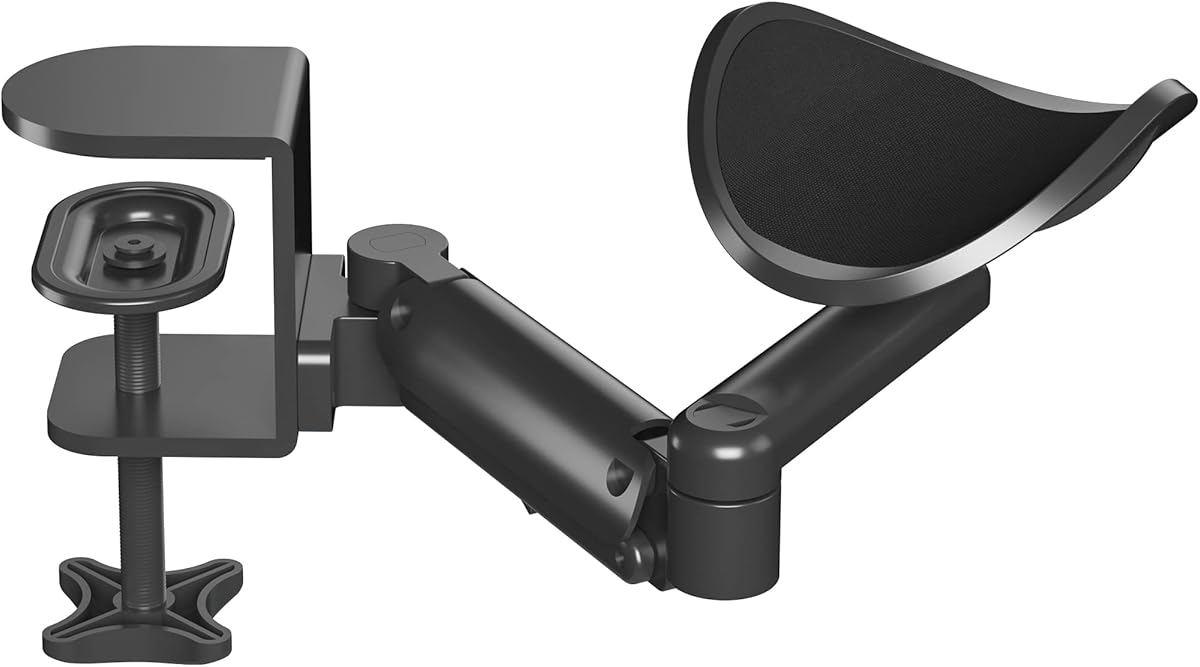
The BONTEC Adjustable Arm Rest is a related ergonomic accessory rather than a monitor arm. It is intended for players who want a movable platform for the forearm or elbow, with a supplied rating of 4.4 and a design that emphasizes 360-degree rotation, extension, and height adjustment.
We may earn a commission when you buy through this link, at no additional cost to you.
The aluminum support extends as far as 13 inches and rotates through 360 degrees, allowing the tray to follow the user's arm as seating position or desk height changes. It places the arm rest 2.8 inches above the desktop by default, while the overall height can be adjusted from 2.4 to 5.3 inches. Those ranges allow use in both seated and standing workstation arrangements.
The ABS tray is designed to resist cracking, bending, and wear, and the arm rest has a listed load capacity of 26.5 pounds. It can serve either left- or right-handed users and is compatible with most conventional desks. The supplied information explicitly states that it is not a wrist rest, so buyers should understand that it supports the broader forearm and elbow rather than resting the wrist directly.
This product is best for a gamer who spends long sessions at a desk and experiences pressure under the forearm or elbow. It is not compatible with sloped edges or raised decorative strips, so those desk designs should be avoided. Combined with a proper monitor arm for screen placement, it can complement a gaming setup by addressing a separate ergonomic need that a screen mount cannot solve.
The rotating, extendable platform can move with the user's arm instead of forcing a fixed position. This makes the support more useful when changing posture, reaching for controls, or alternating between seated and standing work.
Unlike a wrist rest, this platform supports a wider section of the forearm and elbow. It is therefore most useful for players who feel concentrated pressure along the arm during long keyboard-and-mouse sessions.
We may earn a commission when you buy through this link, at no additional cost to you.
The best monitor arm for a gaming desk is determined less by headline movement than by compatibility, stability, and how the setup will be used. Consider the number and weight of displays, desk construction, available mounting methods, adjustment range, and cable-management needs before choosing.
Start by deciding whether the gaming setup needs one, two, or three elevated displays. Single arms offer the simplest footprint and usually accommodate the broadest screen sizes, while dual and triple systems create a wider visual field but require more desk width, more mounting hardware, and more careful arrangement. Several single-arm models support displays as large as 34 inches, while the triple-mount option is limited to 27-inch screens. A dual setup commonly supports 17-to-32-inch screens, although the exact range varies by model.
Every monitor arm must match both the screen's weight and mounting pattern. VESA 75x75mm and 100x100mm are the most common patterns in this category, but a compatible-looking back panel is not enough; the mounting holes must match the supplied plate. Weight ratings range from 15.4 pounds on the FlowLift Pro to 26.4 pounds for flat screens on the WALI arm. Curved displays sometimes have a lower limit, as on the WALI, and some product listings do not state a maximum load. Checking both specifications prevents an unsuitable fit and helps the arm support the monitor without instability.
The desk is as important as the monitor when selecting an arm. Most products in this guide recommend a wooden desktop because the clamp pressure and mounting hardware are designed for that surface. Glass and plastic desks are generally unsuitable, while metal and composite desks require individual verification. Compatible thickness also varies: several HUANUO models accept approximately 0.59 to 3.54 inches, while common ranges elsewhere begin around 0.39 inches. Check the full thickness range, not just the maximum, because a desk that is too thin can prevent a clamp from tightening securely.
A C-clamp attaches to the edge of a desk and usually requires no drilling, making it the easiest option for many gaming rooms. A grommet base passes a bolt through an existing or newly drilled hole, which can create a cleaner installation when the desktop layout permits it. Some arms offer both, while others include one base with an alternative available. Because grommet mounting may require extra tools and desk modification, compare the included components carefully. Also inspect the underside for crossbeams, support panels, drawer rails, or other obstructions that could prevent the clamp from seating properly.
Useful movement includes height adjustment, extension, swivel, tilt, and rotation, but more angles do not automatically create a better gaming arm. Look for a range that fits the intended viewing position without forcing the user to move their chair or neck. Mechanical spring systems are intended to maintain consistent support, while visible tension indicators can make initial balancing easier. Gas-style systems may also feel smooth, but buyers should consider whether consistent long-term positioning is important. The supplied products emphasize one-handed adjustment, repeatable positions, or resistance to droop, all of which can be useful during a long session.
An elevated monitor can reclaim valuable surface area for a keyboard, mouse mat, notebook, or streaming equipment, but the benefit can be undermined by loose cables. Integrated guides, clips, or routing channels keep wiring closer to the arm and out of mouse or controller paths. The HUANUO dual and triple systems include dedicated cable management, while the ErGear uses easily opened clips. Consider where cables must travel between the desk and wall, whether the arm can rotate freely, and whether the monitor's own cables can bend sharply at the VESA head. A neat installation also makes it easier to move a display without snagging a wire.
A quick installation can make a substantial difference, particularly for gamers who move equipment frequently. Tool-free VESA plates let users attach a monitor with less fiddling than a conventional screw-on plate. The FlowLift Pro and ErGear arm both highlight this feature, while the HUANUO single mount emphasizes a three-step setup. At the same time, the simplest installation process cannot compensate for poor desk compatibility. Budget time to identify VESA holes, inspect the desktop underside, select the correct base, attach the arm, balance the monitor, and adjust the final position before connecting accessories.
A monitor arm addresses screen height and viewing angle, but it does not support the forearm or relieve pressure where the arm rests against a desk edge. Players who experience contact discomfort may benefit from the MEKASS L-shaped memory foam pads or the BONTEC adjustable arm rest. These accessories are not substitutes for a screen mount, and their desk-edge compatibility differs. The MEKASS cushions are intended to soften contact around straight or L-shaped edges, while the BONTEC platform raises and rotates the forearm. They are best considered as optional additions to a complete gaming workstation.
Before installation, measure the desktop thickness, inspect the underside for beams or panels, and verify the monitor's VESA pattern and weight. Confirm that the chosen base is appropriate for the desk. Assemble the clamp or grommet hardware according to the included instructions, tightening the desk attachment evenly and checking that the arm sits securely before adding the display.
Attach the VESA plate to the back of the monitor, connect any required cables, and place the monitor onto the arm. Before full tightening, balance the arm around its intended center of gravity. Adjust the spring or tension until the display remains stable at the desired height, then tighten the locking hardware and test tilt, swivel, extension, and rotation with gentle pressure.
For daily care, wipe the metal arm and mounting surfaces with a soft, dry or lightly damp cloth, and avoid harsh chemicals that could damage finishes or pads. Periodically check the clamp tension and monitor attachment. Route cables so they cannot catch on moving joints, and follow the manufacturer's load and desk requirements. A quick inspection before a long gaming session can identify looseness early.
Compatible monitor size depends on the model. The single-arm products in this guide range from 13 inches to as much as 34 inches, while dual systems generally support 17-to-32-inch screens and the triple mount supports 13-to-27-inch displays. Screen size alone is not enough; the display must also meet the arm's weight limit and use a compatible 75x75mm or 100x100mm VESA pattern.
A mechanical spring arm can offer consistent support without relying on gas pressure, which may lose firmness over time. It can also avoid gas-leakage concerns. The best choice still depends on overall build quality, tension adjustment, and installation fit, so buyers should consider the complete design rather than treating one spring type as automatically superior.
Most products reviewed here are recommended only for wooden desktops because the clamp is intended to grip a suitable surface. Glass can crack or be damaged by clamp pressure, and plastic may not provide adequate grip or support. If the desk is not wood, consult the arm manufacturer and consider a grommet installation only if the desk has a compatible reinforced hole.
A properly positioned arm can raise a display toward eye level and make it easier to bring the screen closer, turn it, or adjust it for different activities. That may help reduce the need to hunch or twist the neck. Comfort also depends on chair and keyboard placement, so a monitor arm should be part of a broader ergonomic setup rather than treated as a complete solution.
The appropriate number depends on the games, screen sizes, available desk width, and whether streaming or communication tools are used. One arm is enough for a focused single-display setup, two arms are useful for separating gameplay from chat or system information, and three arms create a wide command center. More screens require more space, cable planning, and suitable viewing angles.
A C-clamp is usually simpler because it attaches to the desk edge without drilling. A grommet base may look cleaner and can be preferable when an existing desk hole is available, but it requires permanent modification. Check desktop thickness, underside clearance, and manufacturer limits before deciding, as some arms include one method while offering the other separately.
Install the arm according to the instructions and adjust its tension or spring mechanism for the monitor's specific weight. Some products include a visible calibration indicator, while others require a more tactile balancing process. Do not exceed the stated load limit, and inspect the arm periodically because changing displays or repeated adjustments can affect the balance.
No. A monitor arm positions and elevates a display, while an elbow pad or adjustable arm rest supports the player's forearm or elbow. These accessories solve a different comfort issue and can complement a gaming monitor setup, but they do not replace screen positioning, display clearance, or VESA-compatible monitor mounting.
The HUANUO FlowLift Dual Monitor Stand is the strongest overall choice because it combines two independently adjustable screens, a reinforced clamp, useful height travel, and cable management. The FlowLift Pro is the budget-minded single-screen option, with a mechanical spring, visible tension indicator, and tool-free VESA plate, while the premium FlowLift Single offers a higher stated capacity and polished full-motion control.
The right choice for other setups depends on the number and size of the displays. ErGear and WALI suit one larger or heavier monitor, VIVO serves players who want a traditional dual-screen arrangement, and the HUANUO Triple Monitor Mount is intended for a wide three-screen command center. The MEKASS pads and BONTEC arm rest address forearm and elbow comfort rather than display placement, so they work best as complementary ergonomic accessories.
Before purchasing, confirm monitor weight, screen size, VESA pattern, desk material, desktop thickness, and underside clearance. Those checks are essential because a feature-rich mount cannot overcome an incompatible monitor or desk. Prices and listing details may change, so review the current product page and compare the final configuration before making a purchase.