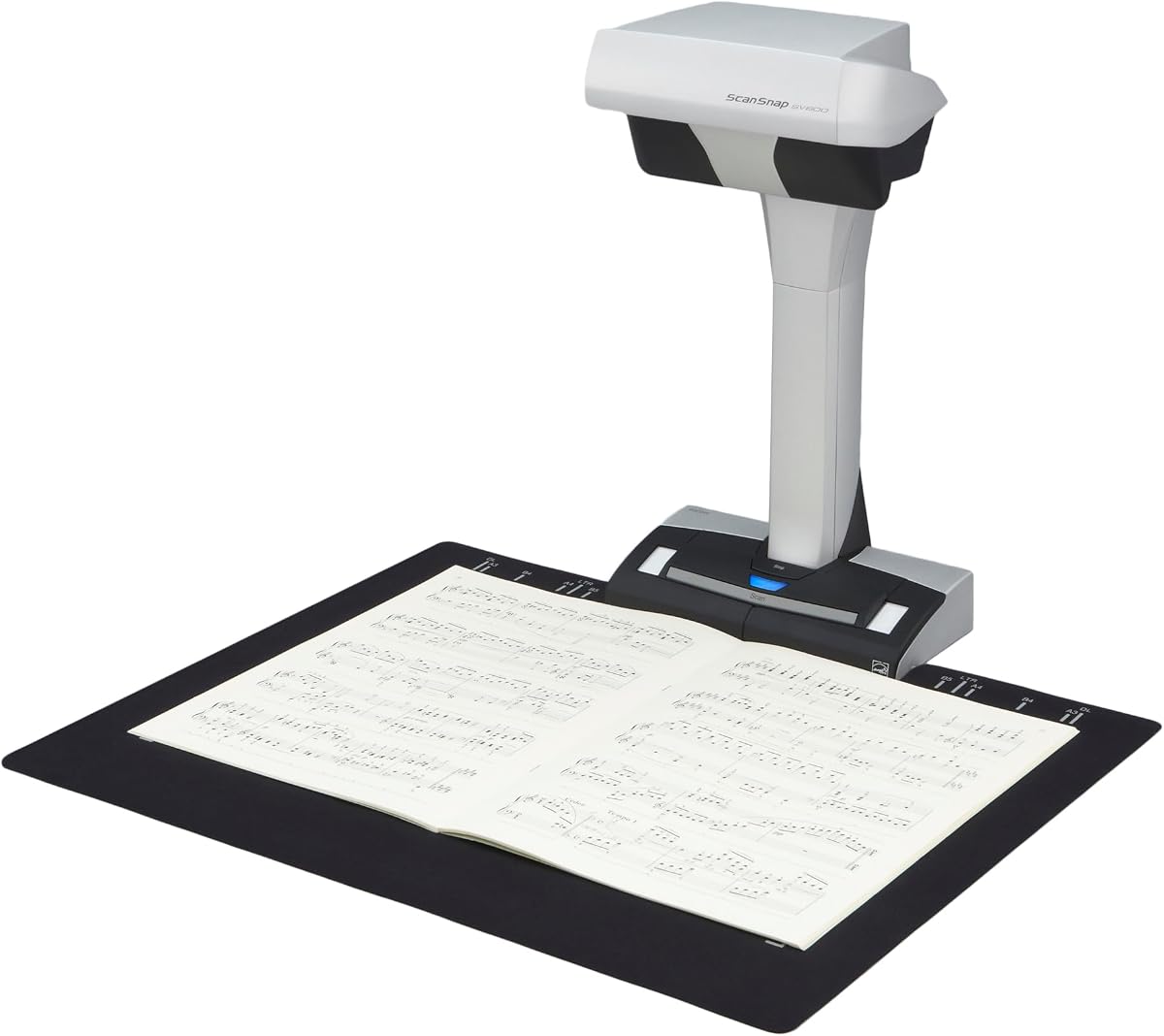
ScanSnap SV600 Overhead Book and Document Scanner
4.1Editor score
Non-destructive overhead capture
Automatic book correction
Finger retouch tools
Automatic page detection
A newspaper scanner should capture large, fragile pages without flattening, cutting, or damaging the original. The right device may be an overhead book scanner, A3 flatbed, or automatic document scanner, depending on the collection, workspace, and desired level of automation.
We compared the 10 products using their stated scanning formats, resolution, paper handling, OCR capabilities, connectivity, and suitability for newspapers, magazines, books, and oversized documents. The list includes dedicated overhead scanners, flatbeds, mobile scanners, and photo-focused models.
Each review explains the most useful features and practical trade-offs of its scanner. The top selections represent the strongest options for different needs, from large-format preservation to affordable portable digitization, and current prices should be checked before purchase.
4.1Editor score

4.0Editor score

4.3Editor score
As an Amazon Associate we earn from qualifying purchases.
The table below compares all 10 scanners by format, resolution, automation, and practical newspaper-scanning capabilities. It shows how each model approaches the task, from automatic sheet-fed scanning to non-destructive overhead capture and large-format flatbed imaging.


The VIISAN Large Format Book & Document Scanner combines an A2/A3 overhead capture area with a 26-megapixel sensor and software-enhanced resolution of up to 600 DPI. Its 4.1 rating reflects a capable, versatile approach to scanning newspapers, manuscripts, maps, books, and other oversized material without placing pressure on fragile pages.
We may earn a commission when you buy through this link, at no additional cost to you.
The strongest feature is the combination of large capture size and intelligent page processing. The scanner can digitally flatten curved pages, remove fingers from captured images, repair damaged page edges, and split a double-page spread into separate files. Its OCR tools convert scans into searchable PDF, Word, Excel, Epub, and text documents, making it more useful than a basic image-only camera.
There are important limitations. The bundled OfficeCam software is not compatible with ARM-based devices, including the Surface Pro X. The manufacturer also advises against using the integrated LEDs in bright rooms and does not recommend the scanner for highly glossy or glare-prone paper. These restrictions may matter for reflective magazines, coated inserts, or modern archival material.
This is an excellent choice for families, researchers, libraries, and small offices digitizing broad newspaper collections. Its non-contact overhead design is particularly valuable when preserving the physical item matters. For users who need a genuine A2 area, automatic page correction, and searchable output in one system, it offers the most balanced feature set in this guide.
The adjustable overhead frame covers A2 and A3 areas, allowing broad newspaper pages, maps, and oversized documents to remain flat and undisturbed. This is safer than trying to force a broadsheet into a narrow sheet-fed scanner.
Automatic flattening, finger removal, page-edge repair, and spread splitting reduce manual cleanup. OCR then turns the captured pages into useful formats such as searchable PDF and editable office files.
We may earn a commission when you buy through this link, at no additional cost to you.
The ScanSnap SV600 is designed specifically for newspapers, magazines, books, and other material that should not be cut or damaged. Its overhead format captures pages visually rather than pulling them through rollers, and its 4.1 rating reflects a well-rounded feature set for readers and home archives.
We may earn a commission when you buy through this link, at no additional cost to you.
Automatic Book Correction flattens the appearance of curved pages, while the Point Retouch function removes fingers that appear in the capture area. Multi Document Detection can identify, crop, and rotate several smaller items, including business cards, photos, and newspaper clippings, during one scan. Page Turning Detection begins a capture when a page is turned, and Time Mode supports continuous scanning at a set interval.
Its main disadvantage is physical size compared with compact feeders and mobile scanners. That is the central trade-off of the non-contact approach, but it is justified when preserving fragile, valuable, or oversized material. Users should also consider the overhead setup and lighting conditions when preparing a permanent digitization station.
The SV600 is well suited to archivists, researchers, book collectors, and households converting a sizable newspaper collection. It is a particularly compelling option when automatic page handling, curve correction, and finger removal can reduce the labor involved in preserving bound or fragile material.
The camera-based design keeps newspapers and books away from feeder mechanisms. It can capture awkward material without cutting, tearing, or feeding fragile pages through a narrow mechanism.
Page-turn detection and timed capture make it possible to scan continuously while handling each page. Automatic correction and retouching then clean up common visual issues.
We may earn a commission when you buy through this link, at no additional cost to you.
The ScanSnap iX2500 is built for fast, organized document workflows rather than direct overhead capture of broadsheet newspapers. Its 4.3 rating is among the highest in the group, and its 45-page-per-minute duplex scanning, 100-sheet feeder, large touchscreen, and wireless connectivity make it compelling for modern offices.
We may earn a commission when you buy through this link, at no additional cost to you.
Personalized touchscreen profiles simplify repeatable jobs, while Wi-Fi 6 and USB-C connectivity allow users to send files to a PC, Mac, mobile device, or cloud service. Automatic optimization, naming, and sorting reduce administrative work, and the scanner can be used without a computer when the desired destination is selected directly.
The central limitation is its sheet-fed design. It is not intended to scan a bound newspaper, a page spanning multiple sheet-fed dimensions, or a magazine without separating pages. Those wanting true oversized-page capture should favor one of the A2, A3, or overhead models in this guide.
The iX2500 is an excellent choice for offices that already separate and organize newspaper pages before digitization. It also makes sense for mixed document collections where speed, cloud delivery, and automated optimization outweigh the need for non-destructive book scanning.
The 45-page-per-minute duplex rate and 100-sheet feeder reduce interruptions during large scanning jobs. A brake roller, multi-feed sensor, and skew detection help maintain reliable feeding.
Wi-Fi 6 and USB-C let users choose between wireless and wired workflows. The touchscreen also allows scanning to computers, mobile devices, and cloud services without a conventional desktop.
We may earn a commission when you buy through this link, at no additional cost to you.
The Epson Workforce ES-50 is a compact, lightweight scanner for users who want to digitize documents away from a permanent desk. It has a 4.3 rating, scans one sheet in as quickly as 5.5 seconds, and supports documents up to 8.5 by 72 inches, giving it useful versatility for long and narrow materials.
We may earn a commission when you buy through this link, at no additional cost to you.
USB power removes the need for batteries or an external adapter, making the scanner convenient to carry between rooms, offices, or archival sites. Epson ScanSmart supports review, saving, cloud destinations, and OCR conversion into searchable PDF, Word, and Excel files. Automatic feeding mode can combine successive inserted sheets into one document.
It is a single-sheet scanner, so each page must be fed manually. A standard broadsheet newspaper will not fit without being separated and handled in smaller sections, and bound material is not its intended use. Long-page support is valuable for receipts, narrow records, and continuous documents rather than oversized pages.
The ES-50 is best for researchers, students, mobile office workers, and households needing an inexpensive portable scanner. It offers a strong balance of portability, OCR, and document handling for narrow or separated newspaper pages, especially when bench space is limited.
The scanner draws power through USB and has no internal battery requirement. That keeps the setup light and makes it easy to use with a laptop in a home, classroom, or temporary archive.
Bundled OCR converts captured text into searchable PDF and editable office formats. Automatic page combining also reduces the work required to assemble a sequence of single-page scans.
We may earn a commission when you buy through this link, at no additional cost to you.
The VIISAN 3120 is a professionally refurbished A3 flatbed for documents, photos, books, magazines, and newspapers. Its stated 5.0 rating is the highest among the listed products, though a high customer rating does not replace checking the condition, warranty terms, and return policy of a refurbished item.
We may earn a commission when you buy through this link, at no additional cost to you.
It scans up to 304 by 426 millimeters at up to 1200 DPI with 48-bit color, and the listed data indicates that A3 color pages can be scanned in eight seconds at 200 DPI. A frameless design supports large and relatively thick materials, while the LED source requires no warm-up and supports continuous operation.
The most important caveat is that this is a refurbished unit. It may have minor cosmetic signs of previous use, although it is described as inspected, cleaned, and function-tested. Reaching 1200 DPI also requires the supplied VIISAN scanning software. Flatbed capture means books must be opened and positioned carefully rather than scanned by an automatic overhead system.
This scanner is best for schools, libraries, small offices, and design-conscious users who want a large flatbed at a potentially favorable acquisition point. Buyers comfortable with refurbished equipment can gain useful A3 capacity, high resolution, and fast workflow in a compact format.
The combination of an A3 bed, 1200 DPI optical resolution, and 48-bit color is well suited to fine print, photographs, maps, and reproductions. The frameless border further reduces dead space around large items.
The scanner is described as professionally tested and verified, but buyers should review cosmetic grading, warranty coverage, and return terms carefully. Functionality is guaranteed, while visible signs of previous use may remain.
We may earn a commission when you buy through this link, at no additional cost to you.
The VIISAN VF3240 combines an A3 flatbed with a stated four-second color scan at 200 DPI and resolution up to 2400 DPI. Its 4.0 rating makes it a strong choice for users who need fine detail, large working areas, and rapid flat-document capture.
We may earn a commission when you buy through this link, at no additional cost to you.
The frameless glass reduces border constraints, and Auto-Scan starts capture when the lid closes. Four front controls provide direct access to Scan, Email, Print, and PDF functions. It is positioned for CAD drawings, blueprints, legal documents, newspapers, magazines, and photo albums, while its 48-bit color pipeline supports image-oriented work.
The specifications include platform-specific resolution limits. Full A3 at 2400 DPI requires macOS with native ICA support, while Windows users reach 1200 DPI through ViiScan software. Windows WIA is limited to 600 DPI because of Microsoft restrictions. The CIS sensor is intended for flat paper and should not be used for clothing, CDs, acrylic sleeves, or other three-dimensional objects.
This model suits drafting offices, publishers, architects, and serious home archivists. It is particularly attractive for users who want high optical detail without moving to a dedicated overhead camera. Windows users should choose it primarily for its A3 size, speed, and 1200 DPI software workflow rather than expecting the maximum 2400 DPI setting on that platform.
The scanner supports up to 2400 DPI and can capture A3 color pages in four seconds at 200 DPI. That makes it useful for workflows that combine oversized formats with repeated daily scanning.
macOS users can access the highest stated A3 resolution through native ICA support. Windows users receive 1200 DPI through ViiScan, and WIA access is restricted to 600 DPI.
We may earn a commission when you buy through this link, at no additional cost to you.
The ScanSnap iX1300 is a compact duplex scanner intended for offices where desk space matters. Its 4.2 rating, space-saving body, and support for up to 30 pages per minute make it a practical general-purpose document scanner, especially for pages that have already been separated from a newspaper.
We may earn a commission when you buy through this link, at no additional cost to you.
A one-touch workflow starts scanning with automatic de-skewing, color optimization, and blank-page removal. Wi-Fi and USB provide flexible placement, while destinations can include a Mac, PC, mobile device, cloud service, or Chromebook through the mobile app. ScanSnap Home and Quick Menu simplify organization and transfer to frequently used applications.
The scanner handles documents, photos, and plastic cards, including relatively thick items, but it does not solve the large-format problem. A folded broadsheet must be divided into sheets that fit the feeder, and bound volumes should not be forced through it. Manual page feeding also means no automatic book correction.
The iX1300 is best for small businesses, home offices, and people with mixed paper records who want rapid wireless or USB capture. It can be a good companion to an overhead scanner, handling ordinary documents while a separate device preserves fragile or oversized pages.
The vertical, space-saving design helps keep a compact workspace usable. It can remain available for routine documents without taking up the footprint of a large flatbed.
De-skew, color optimization, and blank-page removal are applied without extensive driver setup. These features help maintain consistent results across mixed batches.
We may earn a commission when you buy through this link, at no additional cost to you.
The Book Scanner & Document Scanner combines an A2/A3 overhead format, a 26-megapixel sensor, and software-enhanced 600 DPI output with Gemini integration. Its 4.0 rating reflects a feature-rich option for people who want newspaper capture, OCR, and AI-assisted document interpretation in a foldable design.
We may earn a commission when you buy through this link, at no additional cost to you.
The software flattens curved pages, removes finger marks, repairs damaged edges, and splits double-page spreads. Its OCR engine supports more than 180 languages and exports to searchable PDF, Word, Excel, Epub, and TXT. The Gemini connection through VisualCam Lite in Chrome adds translation, summarization, reading guidance, and visual analysis for compatible workflows.
The scanner is not recommended for highly glossy or glare-prone papers. It does not support ARM-based systems such as the Surface Pro X. The three-level integrated light is useful in dim conditions, but the quality of the result still depends on controlling reflections, keeping the page properly aligned, and using a stable surface.
This model is best for multilingual researchers, students, educators, and remote collaborators who value more than image capture. It is particularly attractive when translated text, editable files, and non-destructive scanning are central goals, though conventional office users may prefer a simpler sheet-fed unit.
Support for more than 180 OCR languages makes the scanner useful for international newspaper collections and research materials. Export options cover both fixed-layout and editable document workflows.
Gemini integration can translate visible content, summarize passages, guide reading, and analyze images through a browser interface. It adds value after the page has already been captured.
We may earn a commission when you buy through this link, at no additional cost to you.
The Brother DS-640 is among the smallest and lightest scanners in this guide, with a body under one foot long and a weight of about 1.5 pounds. Its 4.3 rating reflects a capable portable design for narrow documents, receipts, business records, and separated newspaper pages.
We may earn a commission when you buy through this link, at no additional cost to you.
It scans color and black-and-white documents at up to 16 pages per minute, and color mode does not reduce the stated scan speed. Automatic color detection and adjustment, image rotation, bleed-through prevention, background removal, text enhancement, and color-drop functions improve output without extensive intervention. OCR and document-management software are included.
Power comes through the included micro USB cable, removing the need for a separate outlet or battery. The software supports PC, network, cloud, email, and OCR destinations, while Windows, Mac, and Linux are supported through the relevant drivers. Even so, the narrow feeder means broad pages must be separated before scanning.
The DS-640 is an excellent portable companion for interviews, field research, receipts, and a home office. Buyers should focus on its convenience rather than large-page capability, and pair it with an overhead or flatbed scanner if preserving full broadsheets is part of the project.
The compact housing and low weight make the scanner easy to place in a bag and carry between locations. USB power further reduces the number of accessories required.
Automatic color handling, rotation, bleed-through reduction, background removal, and text enhancement produce cleaner results for everyday financial and administrative records.
We may earn a commission when you buy through this link, at no additional cost to you.
The Epson FastFoto FF-680W leads the listed products with a 4.5 rating and combines high-speed photo scanning with capable document capture. Although it is not a dedicated broadsheet scanner, it is excellent for the photographs, clippings, and smaller newspaper images that often accompany family archives.
We may earn a commission when you buy through this link, at no additional cost to you.
It can scan one photo per second at 300 DPI and batch up to 36 photos at a time. Automatic enhancement, color restoration, red-eye reduction, de-skew, crop, and rotation help improve imperfect originals. Its SafeTouch technology, carrier sheet, and microfiber cloth support careful handling of fragile photographs, while duplex capture preserves handwritten notes on the reverse.
The scanner supports 300, 600, and 1200 DPI options, uses USB or Wi-Fi, and can upload to Dropbox and Google Drive. Epson FastFoto adds voice and text overlays and creates slideshows from a phone. It also includes OCR, scans documents up to 240 inches, and reaches 45 pages per minute with 90 images per minute in duplex mode.
The FF-680W is best for families and photo archivists who want fast, polished results from prints and small clippings. It should not be mistaken for a full newspaper scanner, but its strong rating, batch handling, restoration features, and wireless workflow make it a valuable complementary tool for mixed visual collections.
One-photo-per-second capture and batches of up to 36 help process large print collections efficiently. Automatic restoration features reduce the need to correct faded color, rotation, and red-eye individually.
SafeTouch technology, a carrier sheet, and an included microfiber cloth help protect delicate originals. Duplex scanning also captures notes written on the back of a photograph.
We may earn a commission when you buy through this link, at no additional cost to you.
The most important choice is how the scanner receives and illuminates the original. Format, speed, page correction, OCR, and connectivity should then be matched to the size and condition of the newspaper collection you actually need to scan.
A full-size broadsheet may require an A2 scanner, while A3 devices commonly handle folded newspapers, magazines, and oversized sections. Sheet-fed scanners are suitable only when pages can be separated and fit within the feeder. Overhead scanners offer the most freedom because the camera can frame broad pages, maps, and bound material without forcing them through a narrow mechanism.
Match the maximum physical size to the collection. A larger bed creates a more flexible workstation but may occupy more desk space, while a compact feeder is easier to transport.
Newspaper text benefits from enough resolution to make small type legible and preserve detail in photographs and halftone patterns. Available specifications range from 1200 DPI on large flatbeds to 600 DPI software-enhanced output on some overhead cameras, with the 26-megapixel sensors providing a different kind of image detail.
Look beyond the headline number and check the resolution offered by your operating system and software. Some Windows drivers impose lower limits, and speed may decrease substantially at the highest settings.
Newspapers become brittle with age, and books can be damaged by pressure or awkward feeding. Overhead scanners photograph the page from above, while flatbeds place it against glass. Automatic sheet feeders are efficient but expose pages to rollers and repeated handling. For valuable originals, direct-contact and high-pressure methods deserve careful consideration.
Use carrier sheets where a scanner permits them, keep brittle pages flat, and never force a folded or bound page through a feeder. Non-contact capture is generally the safer default for archival material.
Curved pages, fingers, shadows, and skewed edges are common in overhead captures. Automatic flattening digitally reduces the appearance of page curvature, while fingerprint removal isolates the hand area from the background. Edge repair can improve pages with small tears, although no software should be expected to reconstruct missing printed information.
These tools save substantial editing time when they work reliably. A good workflow should still include a visual check for missing letters, shadows, or incorrect page boundaries before a large batch is exported.
OCR converts printed words into searchable and editable text, making archives easier to navigate and reuse. Some scanners include mature OCR suites, while overhead models may offer multilingual recognition and export to PDF, Word, Excel, Epub, or TXT. Consider the languages present in the collection as well as the accuracy of small headlines and column text.
OCR is not required for preserving an image, but it adds considerable value to research, education, and long-term searchable archives. Always inspect representative pages before processing an entire collection.
The fastest flatbed specifications apply to particular combinations of page size and resolution, such as A3 color at 200 DPI. Higher resolutions, heavier books, and different settings will take longer. Sheet-fed scanners can process many pages automatically, while overhead systems require someone to position and turn each page.
Estimate the total workload rather than focusing on a single-page speed claim. A slower scanner may be more appropriate when visual quality and page handling matter more than processing thousands of pages.
A scanner's bundled application can determine how much manual cleanup, naming, sorting, and exporting you must perform. Look for searchable PDF, cloud, email, mobile, and folder destinations that match your existing workflow. Compatibility details matter: some models support Windows and macOS only, and the listed OfficeCam products do not support ARM-based systems.
Confirm driver and operating-system support before buying, especially when the scanner is intended for an institution or a shared workstation. Also check whether advanced resolution settings require vendor software.
Overhead cameras need even illumination and a stable viewing surface. Integrated LEDs help in dim rooms, but bright ambient light and reflective paper can create glare. Large flatbeds require enough desk area to open the lid and position the original, while portable feeders need less space and can be used directly from a laptop.
Create a dedicated station for long projects. Keep the lens and glass clean, position the camera correctly, and use soft, controlled lighting to prevent shadows and reflections.
Prepare each page before scanning by removing loose debris, flattening obvious folds, and checking for torn edges. Place fragile newspapers on a clean, level support and keep fingers away from the text. For overhead models, lower the camera into its stable position and set the height so the entire page is framed with a small margin.
Choose the appropriate resolution and color mode for the project. Use higher settings for fine print, photographs, and reproduction, but use lower settings for straightforward text preservation when storage space is important. Test one representative page, inspect the text and image edges, and adjust exposure or lighting before scanning the full collection.
After capture, review each page for shadows, cropping errors, curvature, and unreadable text. Save the original image alongside the OCR document when possible, back up the collection in more than one location, and organize files with descriptive names. Clean the scanner glass or lens with a soft dry cloth, and follow the manufacturer's guidance for consumables, software updates, and storage.
Only if the newspaper is folded into sections that fit within the scanner's sheet size. A full broadsheet generally requires an A2, A3, or overhead scanner with a sufficiently wide capture area. Check both the feeder's width and the scanner's maximum supported page length before attempting a large newspaper.
Overhead scanning is usually preferable for fragile or valuable material because it avoids pulling pages through rollers. The original remains flat and is captured by a camera from above. You still need even lighting and careful alignment, and the scanner must be kept stable while pages are positioned.
Higher resolution generally improves legibility for small type and preserves halftone photographs. However, the best setting depends on the scanner, output purpose, and file-size limits. Test a page at different resolutions before committing to a full collection, and prioritize clear text over a resolution figure alone.
Many do, but the supported languages and export formats vary. The devices in this guide include options that create searchable PDF, Word, Excel, Epub, and TXT files. OCR quality depends on page clarity, focus, lighting, and the original typeface, so inspect a sample before relying on automatic recognition.
Overhead and A3 flatbed models can generally capture an opened book or magazine without feeding it through rollers. Automatic flattening can reduce the appearance of curved pages. Sheet-fed scanners should not be used with bound material because forcing the binding through the mechanism can damage the book or the scanner.
Choose a flatbed for large, fragile, or oversized pages and for controlled high-resolution work. Choose a sheet-fed scanner when pages are loose, already separated, and processed in large batches. The sheet-fed models listed here offer useful speed and organization but cannot provide the broad page area of the A2, A3, and overhead options.
Use controlled, diffuse lighting and avoid direct glare from the camera or overhead fixture. Some overhead scanners in this guide are not recommended for highly glossy paper. If a page remains reflective, reposition the source, lower the viewing angle, or use a diffuse surface and accept some reduction in contrast.
Preserve each page as a high-quality image for visual fidelity, and add OCR output when searchable text is important. TIFF or lossless image formats are useful for long-term preservation, while PDF is convenient for document distribution. Keep the original image and OCR document linked so edits do not replace the visual record.
The VIISAN Large Format Book & Document Scanner is the strongest all-around choice for genuine A2 capture, automatic page correction, and multilingual OCR. The ScanSnap SV600 stands out for non-destructive overhead scanning with particularly useful book correction and retouch tools, while the Epson Workforce ES-50 provides a portable and economical route for narrow or separated pages.
Prioritize the original before features. A scanner that accommodates the entire page without damage is more valuable than a faster model that forces the material through a narrow feeder. Resolution, OCR, correction software, lighting, and destination support should then be matched to the intended archive and workflow.
Finally, check current prices, warranty coverage, compatibility, and return terms before purchasing, since all of these can change. A refurbished option may provide strong value after inspection, while a premium overhead system may justify its cost when preserving fragile material is the main objective.