
USB to Dual 3.5mm Audio Splitter
5.0Editor score
USB audio and microphone
High-resolution DAC support
Four-foot braided cable
A mic and speaker splitter can connect a headset, microphone, or pair of headphones to a device without matching its available audio ports. The right adapter depends on connector gender, CTIA or OMTP wiring, device support, and whether you need shared audio, separated microphone input, or a USB upgrade.
This guide compares ten splitters and audio adapters based on their stated connector configurations, compatibility, construction, portability, and intended uses. It covers traditional 3.5mm Y-cables, PC headset adapters, dual-headphone splitters, and a USB-to-dual-jack option, with special attention to the differences between TRRS and TRS connections.
Each pick highlights a distinct practical advantage, from compact PC compatibility to longer USB reach or two-headphone sharing. Product ratings reflect the supplied marketplace feedback, while prices and availability can change, so readers should confirm the current listing and connector requirements before purchasing.
5.0Editor score

4.7Editor score

4.3Editor score
As an Amazon Associate we earn from qualifying purchases.
The table below compares all ten adapters by connection type, principal device fit, construction, and core use, making it easier to identify the correct plug and wiring standard before buying.




The D & K Exclusives Headphone Splitter is a compact 3.5mm Y-adapter designed to connect a combined headset plug to a computer or laptop with separate headphone and microphone sockets. It carries a 4.3 rating, and its straightforward construction makes it useful for VOIP, chat, online gaming, and other situations where a wired headset needs a legacy-style dual-jack connection.
We may earn a commission when you buy through this link, at no additional cost to you.
Its most appealing feature is the 3.5mm female input feeding two 3.5mm male outputs, with one output intended for a computer's headphone jack and the other for its microphone jack. The product description highlights gold-plated contacts and oxygen-free copper, while the small footprint makes it convenient to keep in a laptop bag. It also supports the newer headset style that combines audio and microphone in one connector.
The main limitation is that it solves a specific analog port mismatch rather than every audio-routing problem. Apple and Android wiring standards can differ, and computers without compatible 3.5mm microphone inputs will not gain that capability merely because the adapter is connected. It also does not address modern USB-only machines or provide a means of sharing audio with two separate headphone users.
This is a sensible choice for someone using a wired PC gaming headset on a desktop or laptop that still has separate 3.5mm audio and microphone jacks. Buyers should confirm that the headset uses a combined four-pole plug and that the computer provides the corresponding legacy ports. For those conditions, it is a direct, affordable, and easy-to-carry solution.
The adapter translates one combined headset connection into two separate outputs for a computer's headphone and microphone sockets. That makes it particularly useful for voice chat, meetings, and multiplayer gaming with a wired headset.
Gold-plated 3.5mm contacts and oxygen-free copper are designed to support reliable signal transmission, while the compact construction makes the splitter easy to store and carry between work, school, and gaming setups.
We may earn a commission when you buy through this link, at no additional cost to you.
The UGREEN Headphone Splitter for Computer combines a 3.5mm TRRS female socket with two 3.5mm male outputs for separate headphone and microphone ports. Its 4.5 rating reflects a generally favorable response, and the product is positioned for people joining calls, classes, online games, and team meetings with a CTIA-compatible wired headset.
We may earn a commission when you buy through this link, at no additional cost to you.
Construction details distinguish this model from a basic loose adapter. The listed features include polished 24K gold-plated connectors, oxygen-free copper wire, an aluminum alloy casing, and a nylon braided jacket rated to withstand more than 10,000 bending tests. At 20 centimeters, or 7.87 inches, it remains short enough for portability while providing more cable than a rigid block.
Compatibility is the decisive trade-off. The microphone path works with CTIA-compliant four-pole cables but not OMTP or other standards, and the manufacturer specifically notes that some CTIA-standard Apple earbuds and Beats headphones are not compatible. The adapter also targets older computers with separate 3.5mm TRS microphone and audio jacks rather than modern USB-only ports.
It is a good option for a compatible legacy PC and a gaming headset with a single combined plug. Users who know their equipment uses CTIA wiring will benefit from the sturdy construction and compact design, while users with Apple or OMTP headsets should seek a manufacturer-confirmed alternative before purchasing.
The braided jacket, aluminum housing, and bend-test rating make this a more substantial travel accessory than a basic adapter. Its short length is especially convenient for users who switch between desktop, laptop, and shared meeting spaces.
A correct plug shape does not guarantee that microphone signals will work. This adapter requires CTIA-standard wired headsets, and the listing explicitly warns that OMTP and certain Apple-compatible earbuds may fail.
We may earn a commission when you buy through this link, at no additional cost to you.
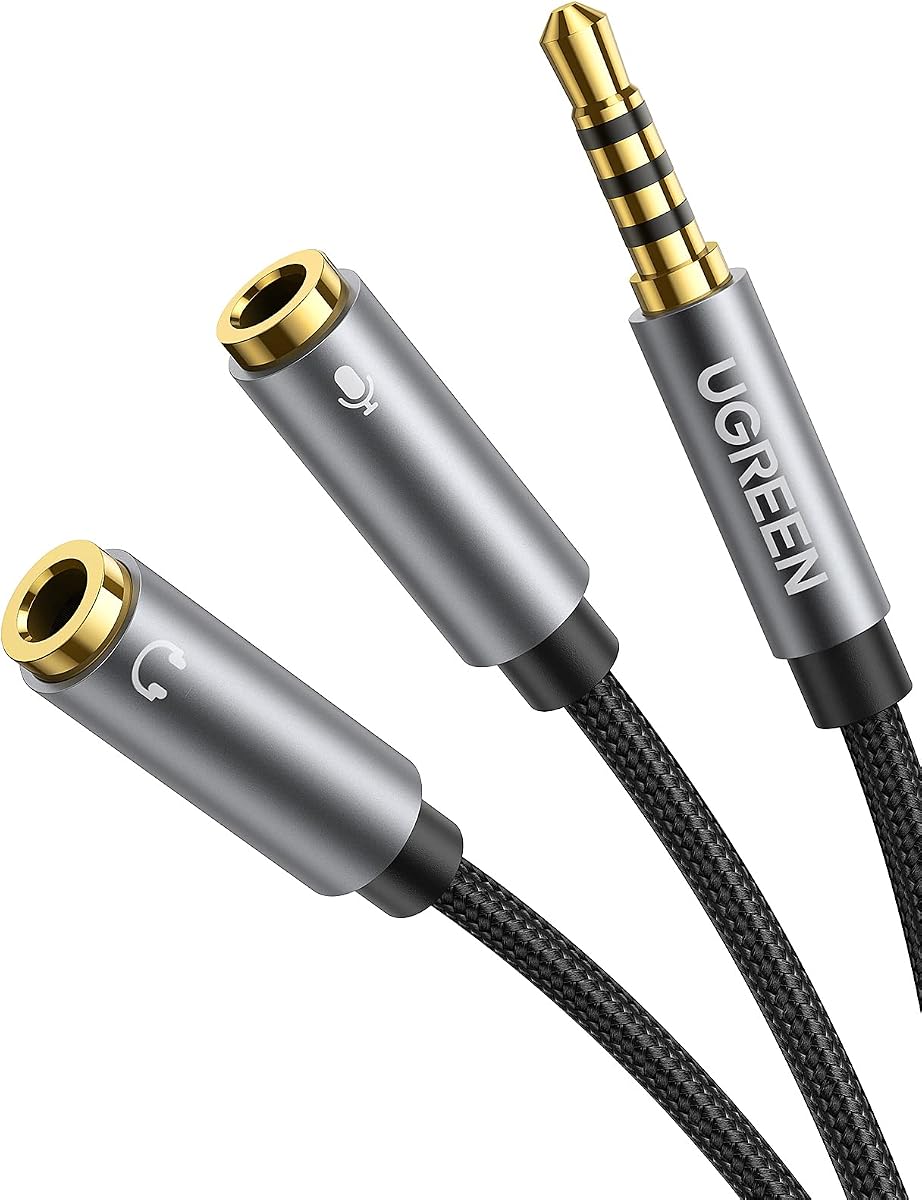
The UGREEN Headphone Splitter 3.5mm 2 Female to 1 Male reverses the common PC-adapter direction by providing one 3.5mm male plug and two female sockets. It is intended to connect a device with a combined headset jack to separate headphone and microphone cables, and it holds a 4.5 rating.
We may earn a commission when you buy through this link, at no additional cost to you.
The adapter uses soft TPE material for flexibility and a nylon-braided exterior for protection against scratches and everyday wear. A copper core and gold-plated connectors are included to support conductivity, corrosion resistance, and dependable audio performance. The 7.87-inch cable is short and designed to reduce tangling while remaining easy to carry.
The wiring standard remains important. The headphone side is compatible with CTIA headsets but does not support iPhone headsets or OMTP headphones. The product also requires the headset and microphone to be connected before the adapter is inserted into the host device, an ordering detail that can explain confusion when audio or microphone input is not detected immediately.
Choose this model when the source device has one combined male headset port and the peripherals use separate female-ended headphone and microphone leads. It is less appropriate for modern computers that have removed analog audio sockets. Confirm CTIA compatibility, connect the peripherals first, and it becomes a compact and flexible solution.
A male-to-dual-female arrangement is useful when the source has a single headset output and the connected microphone or headphones terminate in separate female plugs. It is not interchangeable with a female-to-dual-male PC adapter.
Soft TPE and braided construction help the short cable tolerate movement without becoming difficult to manage. It is particularly useful for changing a headset connection between a phone, tablet, or laptop at a shared workstation.
We may earn a commission when you buy through this link, at no additional cost to you.
The Bordsek Headphone Mic Splitter for PC is a 3.5mm TRRS-female-to-dual-male adapter for connecting a combined wired headset to a PC with separate microphone and audio sockets. It earned a 4.7 rating in the supplied data, making it a strong all-around choice among conventional analog PC adapters.
We may earn a commission when you buy through this link, at no additional cost to you.
Several details improve usability. The two male outputs are color coded, with black identified for headphone audio and red for the microphone, reducing the chance of plugging the wrong cable into a computer. The product is also described as plug-and-play, requiring no drive or application, and its 24K gold-plated contacts are intended to support clean stereo transmission.
The cable uses braided construction and aluminum connector housings, with a stated ability to withstand more than 40,000 bending tests. Its 20-centimeter length keeps it portable. As with many adapters in this category, however, the microphone is not expected to work with Apple original earphones or Beats headphones, and the host computer must have separate 3.5mm ports.
This is the most balanced recommendation for a traditional PC splitter because it combines a strong rating with clear connector identification and a broad stated compatibility list. It suits gaming headsets, calls, online classes, and VOIP applications when the computer has legacy analog ports and the headset follows CTIA wiring.
Black and red male plugs make the headphone and microphone roles easier to identify. This small design decision can save setup time and reduce frustration at a crowded desk.
Braided wiring, aluminum housings, and a high stated bend-test figure make the adapter a practical choice for users who connect and disconnect wired headsets frequently. The short length also resists becoming tangled in a laptop bag.
We may earn a commission when you buy through this link, at no additional cost to you.
The SYNCWIRE Headphone Splitter is a 3.5mm male-to-two-female Y-cable for sending one source's stereo audio to two compatible outputs. It has a 4.6 rating and is suited to phones, tablets, laptops, music players, and game consoles when both connected devices are designed for audio playback.
We may earn a commission when you buy through this link, at no additional cost to you.
Its construction combines double shielding, a polished 24K gold-plated connector, and a soft nylon jacket. The jacket is stated to withstand at least 15,000 ninety-degree bend cycles. These features make it relevant to portable use, where cables are repeatedly coiled, placed in bags, and connected to different devices.
This is primarily a shared-audio product rather than a microphone-routing solution. The two female outputs do not represent dedicated headphone and microphone channels in the manner of a PC headset adapter. Users who need call microphones should look for an explicit TRRS headset-sharing arrangement and confirm that the source supports that function.
It is best for friends who want to listen to the same music, movie, or game audio from one phone or laptop, and for setups using external speakers alongside headphones. Buy it when the goal is duplicate stereo output; do not choose it as a substitute for a mic-and-speaker adapter.
The dual-female design divides one analog source into two stereo outputs, allowing two headphones or a headphone-and-speaker setup to receive the same audio. It is a simple solution for travel and everyday media sharing.
Double shielding is intended to reduce interference, while the nylon jacket and bend-test rating address the repeated flexing associated with portable cables. The connector's slim shape is designed to fit most cases except LifeProof models.
We may earn a commission when you buy through this link, at no additional cost to you.
The KINGTOP Headphone Mic Splitter uses a TRRS male plug and two 3.5mm TRS female sockets to connect a dual-plug gaming headset to a device with one combined port. Its 4.4 rating and gaming-focused compatibility list make it a practical option for console players and PC gamers using older-style separated headset cables.
We may earn a commission when you buy through this link, at no additional cost to you.
The splitter is stated to work with PS4, PS5, Xbox One, Switch controllers, and newer laptops and Android phones. It also lists popular dual-plug gaming headsets from brands such as Logitech, Turtle Beach, HyperX, Razer, and SteelSeries. Gold-plated connectors support signal transfer, and the compact arrangement is convenient for a gaming setup.
Important limitations make this a specialized rather than universal adapter. The manufacturer expressly excludes Apple devices, including iPhone, iPad, MacBook Pro, iMac, and other Mac models, as well as Beats or Bose headphones designed for Apple. It is also explicitly a microphone-and-audio combiner rather than a standard splitter for sharing music between two people.
This is a good fit for a player with a dual-plug gaming headset and a console or CTIA-compatible device with a single combined port. Verify the headset connector layout and the host platform before buying, and avoid it if your equipment relies on Apple-specific wiring.
The one-male-to-two-female arrangement is tailored to headsets that already use separate microphone and headphone cables. It recombines those paths into one connector for a compatible console, controller, or laptop port.
The broad gaming-device list is useful, but the exclusions are equally important. This adapter is not designed for Apple hardware or Apple-oriented headsets, so platform compatibility should be checked before purchase.
We may earn a commission when you buy through this link, at no additional cost to you.
The Headset Headphone Splitter Adapter Cable for PC is designed around CTIA four-pole gaming headsets with separate microphone and headphone ports on the target computer. It has a 4.4 rating and supports an extensive selection of gaming headsets, including models from Astro, Turtle Beach, BENGOO, HyperX, SteelSeries, Razer, Sennheiser, and Sades.
We may earn a commission when you buy through this link, at no additional cost to you.
The configuration is a 3.5mm female input dividing into two 3.5mm male outputs. That arrangement lets a combined headset plug into a computer while its audio and microphone signals reach the appropriate legacy sockets. The eight-inch or 20-centimeter cable adds a modest amount of reach without creating a cumbersome accessory.
The product is also presented as suitable for PS4, Xbox One, Switch, and smartphone headsets when the relevant source uses a single 3.5mm CTIA jack. Its additional application includes VOIP software. Despite this broad gaming focus, it remains a passive analog splitter and cannot add microphone input to a computer that lacks a 3.5mm microphone socket.
Choose it for a conventional wired gaming setup with a CTIA headset and a host that has separate analog ports. It is particularly attractive when the headset brand is among those specifically listed, although the connector arrangement is more important than the brand name.
The listed console and headset support gives the adapter broad practical appeal. It can serve users who switch between a PC and supported gaming platforms without replacing their existing wired headset.
Splitting a CTIA headset into the correct audio and microphone outputs provides a straightforward path for voice communication in compatible games and VOIP applications.
We may earn a commission when you buy through this link, at no additional cost to you.
The 4FT USB to Dual 3.5mm Male Headphone/Speaker and Mic Splitter is the most technically advanced option in this group. Its stated 5.0 rating reflects a feature set aimed at computers, and it adds analog headphone, speaker, and microphone access through USB rather than merely rearranging existing 3.5mm ports.
We may earn a commission when you buy through this link, at no additional cost to you.
A high-resolution DAC chip is built in to decode audio and optimize analog signal amplification. The listing specifies support for audio output and noise reduction up to 16-bit/48kHz, while a pure copper core, 24K gold-plated contacts, and thickened aluminum shells support signal transfer and durability. The four-foot cable also provides considerably more reach than the short 3.5mm splitters.
It is compatible with a wide range of operating systems, including current and older Windows versions, Mac OS X, Linux, Chromebook, Windows Surface 3 Pro, and Raspberry Pi, as well as PS4 and PS5. CTIA-standard jacks are required for microphone support. Plug-and-play operation means no separate driver or external power is needed for the listed systems.
This is the premium recommendation for a USB-only laptop or desktop that lacks a usable 3.5mm audio jack. It can connect a microphone and speakers, support a headset, or serve as a longer male-to-female headphone Y extension. It is less suitable when the computer already has fully functional analog ports and no USB audio option is needed.
Unlike a passive Y-cable, this adapter actively decodes USB audio and provides dual analog outputs. That makes it valuable for streamlined laptops and desktops that omit the traditional headphone and microphone sockets.
The built-in DAC, stated noise reduction, and 16-bit/48kHz support distinguish this model from simple analog splitters. Its four-foot length is also more practical for positioning speakers or a microphone away from a computer.
We may earn a commission when you buy through this link, at no additional cost to you.
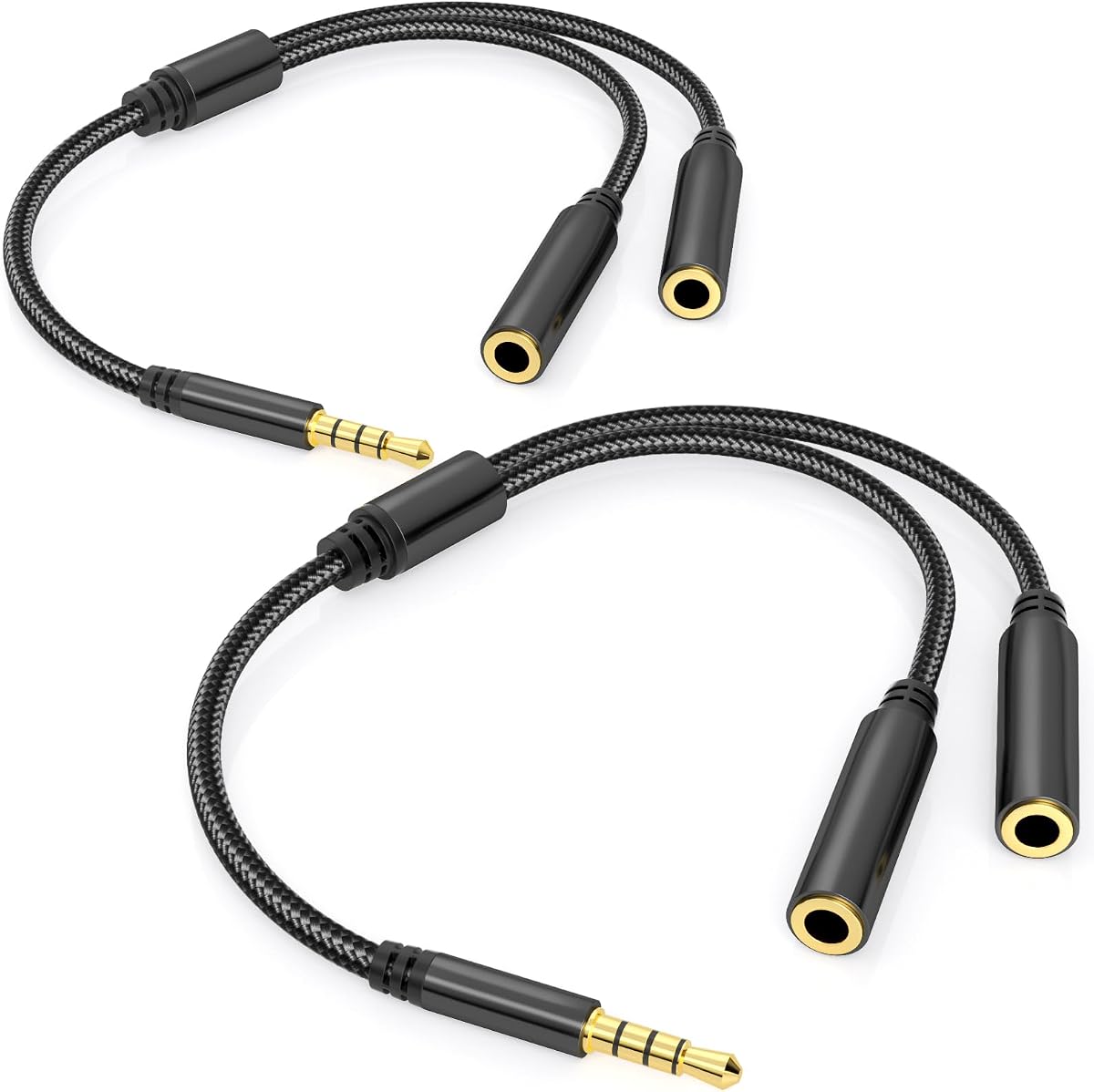
The Dual TRRS Headphone Splitter is a two-pack of 3.5mm adapters designed to connect two combined headset plugs to one source. It has a 4.5 rating and distinguishes itself from basic dual-female Y-cables by supporting both audio and microphone functions when two compatible TRRS headsets are used.
We may earn a commission when you buy through this link, at no additional cost to you.
Gold-plated contacts and an aluminum housing are included to support reliable connections and resist corrosion. The one-foot, or 30-centimeter, braided nylon cable is designed to resist wear and tangling, making the set suitable for travel or a shared desk. Its stated compatibility covers phones, tablets, laptops, PCs, game consoles, and other devices with a 3.5mm TRRS connection.
Compatibility depends on using the right type of headset. TRS headphones or speakers can receive sound through the splitter, but they do not provide a microphone path. For calls, both sides need a TRRS headset with an integrated microphone. Users should also expect shared-source behavior, because the adapter divides one device's output rather than creating independent audio channels.
This is a useful choice for two people sharing music, a movie, or a call with compatible TRRS headsets. The included two-pack is convenient for keeping one adapter in separate locations. It is not a conventional PC adapter for converting one male headset plug into two male legacy ports.
Because each output can accept a four-pole headset, both audio playback and microphone input can be shared when the source and both headsets support TRRS communication.
Including two adapters allows one to remain at a home setup and another to travel with the user. The short braided cables are compact enough for a pocket or laptop bag.
We may earn a commission when you buy through this link, at no additional cost to you.
The Maeline Headphone Splitter Adapter connects a newer combined headset to a computer or laptop with separate microphone and audio connections. It has a 4.4 rating and is aimed at wired communication applications such as Skype, chat programs, MSN Messenger, Google Voice, and similar VOIP services.
We may earn a commission when you buy through this link, at no additional cost to you.
The adapter combines polished 24K gold-plated contacts, an aluminum shell, oxygen-free copper wire, shielding, and a nylon-braided cable. Strain-relief rings are intended to improve stability at the connection points and allow more flexible movement. Its 20-centimeter, or eight-inch, length is short enough to carry comfortably while providing some cable slack.
It is designed for CTIA-standard Android headphones and explicitly does not support CTIA-standard Apple earbuds. Like other passive adapters, it also requires the target computer to have the appropriate 3.5mm ports. It cannot create microphone or speaker connectivity on a USB-only computer, and it is not intended to split music independently for two listeners.
The Maeline is a well-rounded option for someone with a compatible Android-style wired headset and an older PC. Its combination of shielding, metal housings, gold-plated contacts, and strain relief makes it especially sensible for regular call or gaming use. Check CTIA and port requirements before ordering.
Shielded copper wiring, gold-plated contacts, and strain-relief rings are intended to support consistent transmission in setups where the headset is connected and disconnected regularly.
The eight-inch braided cable is easy to carry and offers a little more slack than a rigid adapter. It is a practical companion for users who move between offices, classrooms, and shared workspaces.
We may earn a commission when you buy through this link, at no additional cost to you.
The correct adapter depends on matching the source connector, the microphone and audio output style, the device's electrical standard, and the physical layout of your setup. These factors determine whether the adapter can carry sound, microphone input, or both.
Begin by looking at the port you need to connect to. A 3.5mm female source socket requires a splitter with a male plug, while a source with a male headset socket requires a female-ended adapter. TRRS denotes a four-pole combined headset connection, whereas TRS denotes a three-pole connection commonly used for stereo audio or a dedicated microphone. Counting the contacts and understanding the direction of the cable prevents the most common purchasing mistake.
Match the source gender, not merely the cable length or advertised device compatibility. A male-to-dual-female splitter and a female-to-dual-male splitter may look similar but serve opposite equipment layouts.
A basic Y-cable may only divide stereo audio into two outputs. A headset adapter is designed to separate one combined audio-and-microphone signal into dedicated connections. Check the product description for explicit microphone support, and confirm that the source device exposes microphone input through the relevant jack or USB interface.
If the goal is to connect a microphone and speakers to a computer, look for a dedicated audio-and-mic output. If the goal is to let two people listen together, a dual-headphone splitter may be more appropriate.
CTIA and OMTP use different 3.5mm pin arrangements. Many gaming headsets and modern Android accessories use CTIA, while certain Apple accessories use OMTP, and some Apple or Beats products have further exclusions. The products in this guide are predominantly described as CTIA-compatible, often with explicit warnings about OMTP and Apple earbuds.
Use the manufacturer's compatibility notes as the deciding source. Connector shape alone cannot reveal the wiring standard, so a physically fitting plug may still fail to carry microphone audio.
A passive 3.5mm splitter cannot connect to a USB port and cannot add analog audio capabilities to a computer that lacks 3.5mm microphone and headphone sockets. For USB-only systems, choose an active USB audio adapter with a digital-to-analog converter, such as the four-foot USB-to-dual-3.5mm option in this guide.
Check operating-system support as well as the jack standard. The reviewed USB adapter is listed for multiple Windows, macOS, Linux, Chromebook, and Raspberry Pi environments, with no separate driver required for supported systems.
A microphone-and-audio Y-adapter and a shared-audio splitter solve different problems. The former routes a headset's combined signal to separate microphone and speaker channels. The latter feeds one source into two headphones or speakers, sometimes with full TRRS microphone sharing when every connected device supports it.
Read the stated orientation carefully. Some listings even include reminders that a male-to-two-female adapter is not the same as a two-male-to-female adapter, despite the shared adapter format.
Most dedicated PC headset splitters are about 7.87 to eight inches long. That length keeps them compact and reduces tangling but offers little distance between a computer and external microphone. A longer adapter is useful when speakers or a microphone sit away from the host, and the four-foot USB model offers substantially more placement freedom.
For a laptop bag or shared meeting kit, a short braided cable is convenient. For a desktop installation, reach and strain relief may matter more than making the adapter small enough to fit in a pocket.
Gold-plated contacts, copper cores, braided jackets, shielding, and aluminum housings are common quality indicators in this category. They can support corrosion resistance, stable signal transfer, and resistance to repeated bending, although they do not solve a wiring-standard mismatch.
Look for a stated bend-test figure when durability is important. Values ranging from 15,000 to more than 40,000 cycles are described among the reviewed products, and the two-pack option provides a spare for travel.
A splitter gives connected outputs access to the same source. Depending on the device, microphone activity or control changes may affect one or both sides, and sharing can be convenient for a call or movie but unsuitable when each user needs independent volume control. Some operating systems also change input behavior when a headset is connected.
For collaborative calls, use a device and application known to support shared headset audio. For independent listening, choose separate outputs or a multi-output audio system rather than assuming a Y-cable creates separate control channels.
First, confirm that every part of the connection matches. For a female-to-dual-male PC adapter, connect the combined headset plug to the adapter, then connect the black or headphone-marked output to the computer's headphone jack and the microphone-marked output to the microphone jack. For a male-to-dual-female model, connect the microphone and headphones to the female sockets before inserting the male plug into the host device.
Next, configure the source correctly. In the computer or mobile operating system, select the appropriate input and output, confirm that microphone permissions are enabled, and raise the application or system volume as needed. For a USB audio adapter, insert the USB plug and allow the system to recognize it; select the adapter as both the input and output when the application requires separate settings.
To preserve the connector and cable, unplug it by holding the metal housing rather than pulling the cable. Avoid sharp bends, moisture, and hanging loads on the wire. Periodically inspect the plug and jack for debris, and keep the adapter away from heat or liquids. Store short braided models loosely in a bag pocket, and use the included cable protector or a suitable case for longer USB models.
A TRS connector has three contacts and normally carries stereo audio or a dedicated microphone signal. A TRRS connector has four contacts and normally combines headphone audio, microphone audio, and controls. Because the extra contacts carry different functions, a TRRS headset may require a suitable adapter when connecting to separate headphone and microphone ports.
A passive 3.5mm Y-cable will not connect directly to a USB port. A USB-only laptop needs an active USB audio adapter with separate headphone and microphone jacks. The reviewed USB-to-dual-3.5mm model includes digital audio decoding and is designed to provide those analog connections on supported systems.
The most common causes are an OMTP-versus-CTIA wiring mismatch, an incompatible headset, a microphone input that was not selected in the operating system, or plugging the adapter into the source before attaching the headset. Confirm that the headset uses CTIA wiring, connect the headset and microphone first, and verify the selected audio input.
Only if the splitter is designed to provide two headphone outputs and the source device supports shared audio. The dual TRRS model in this guide can accommodate two compatible TRRS headsets, including microphone use. Basic stereo Y-cables share music but may not support microphone communication from both connected sets.
They depend on the exact Apple product and its wiring arrangement. Several reviewed adapters explicitly exclude original Apple earbuds, Beats headphones, or both. Even when a plug physically fits, the microphone contacts may follow a different standard or behave differently, so the manufacturer-specific compatibility warning should take priority.
Most 3.5mm splitters in this guide are passive and do not require external power. They simply route compatible analog signals. A USB audio adapter contains active electronics, but the reviewed USB model is also described as plug-and-play without external power, relying on USB power and the host system for normal operation.
Yes, when the adapter provides dedicated headphone and microphone outputs and the computer has corresponding inputs. Connect speakers to the headphone or audio output and the microphone to the mic input, then select each as the appropriate playback and recording device. A basic shared-audio Y-cable is not designed for this task.
Start with a compatible CTIA headset, confirm the correct input is selected, and keep the connection secure without bending the plug. If interference persists, try a different USB port or audio input, move the microphone cable away from power and high-traffic cables, and verify that the operating system is applying the expected level of input gain.
The Bordsek Headphone Mic Splitter for PC stands out as the strongest conventional option because it combines a 4.7 rating, color-coded headphone and microphone outputs, durable braided construction, and broad stated gaming compatibility. The USB to Dual 3.5mm Splitter is the feature-rich choice for computers without analog audio ports, while the D & K Exclusives adapter offers a compact, direct solution for compatible legacy PCs.
Prioritize connector direction, CTIA compatibility, and the actual task before considering construction details. Buy a TRRS female-to-dual-male adapter for a combined headset entering a PC with separate jacks, a TRRS male-to-dual-female adapter for a combined source feeding separated peripherals, a dual-headphone splitter for shared listening, or a USB audio adapter when the host has no suitable analog audio connection.
Finally, check the product listing at the time of purchase because prices, availability, and product details can change. Confirm the shape of the source port, the wiring of the headset, the type of microphone connection, and the host device's operating system. Those checks will prevent most compatibility problems and lead you to the adapter that best matches your equipment.