
HP Chromebook 14 x360 Plus
4.2Editor score
Convertible 360-degree touchscreen design
WUXGA anti-glare touch display
Intel N150 everyday processor
Wi-Fi 6 and Bluetooth 5.4
A MacBook alternative does not need to imitate macOS perfectly to be a compelling laptop. The strongest substitutes pair a comfortable keyboard, capable display, dependable battery, and enough processing power for browsing, documents, creative work, and online learning. ChromeOS, Windows, and macOS each offer distinct advantages, so the right choice depends on software, portability, and budget priorities.
We compared all ten products using the specifications and features supplied for each model. The list covers lightweight Chromebooks, touchscreen convertibles, Windows business laptops, and premium Apple hardware, with attention to processors, memory, storage, displays, ports, battery claims, weight, and practical extras. Every product earns its place by offering a distinct balance for a particular type of user.
Each review explains who should consider the device, what it does well, and where its compromises may matter. The shortlists make the strongest starting points easier to identify, while the comparison table and buying guide help narrow the field. Product listings and pricing can change over time, so confirm the current configuration, condition, availability, and seller details before purchasing.
4.2Editor score

4.4Editor score

4.6Editor score
As an Amazon Associate we earn from qualifying purchases.
This side-by-side comparison highlights each laptop's operating system, processor class, memory, storage, display, and defining feature, making it easier to separate lightweight web-focused models from full Windows systems and premium Apple hardware.


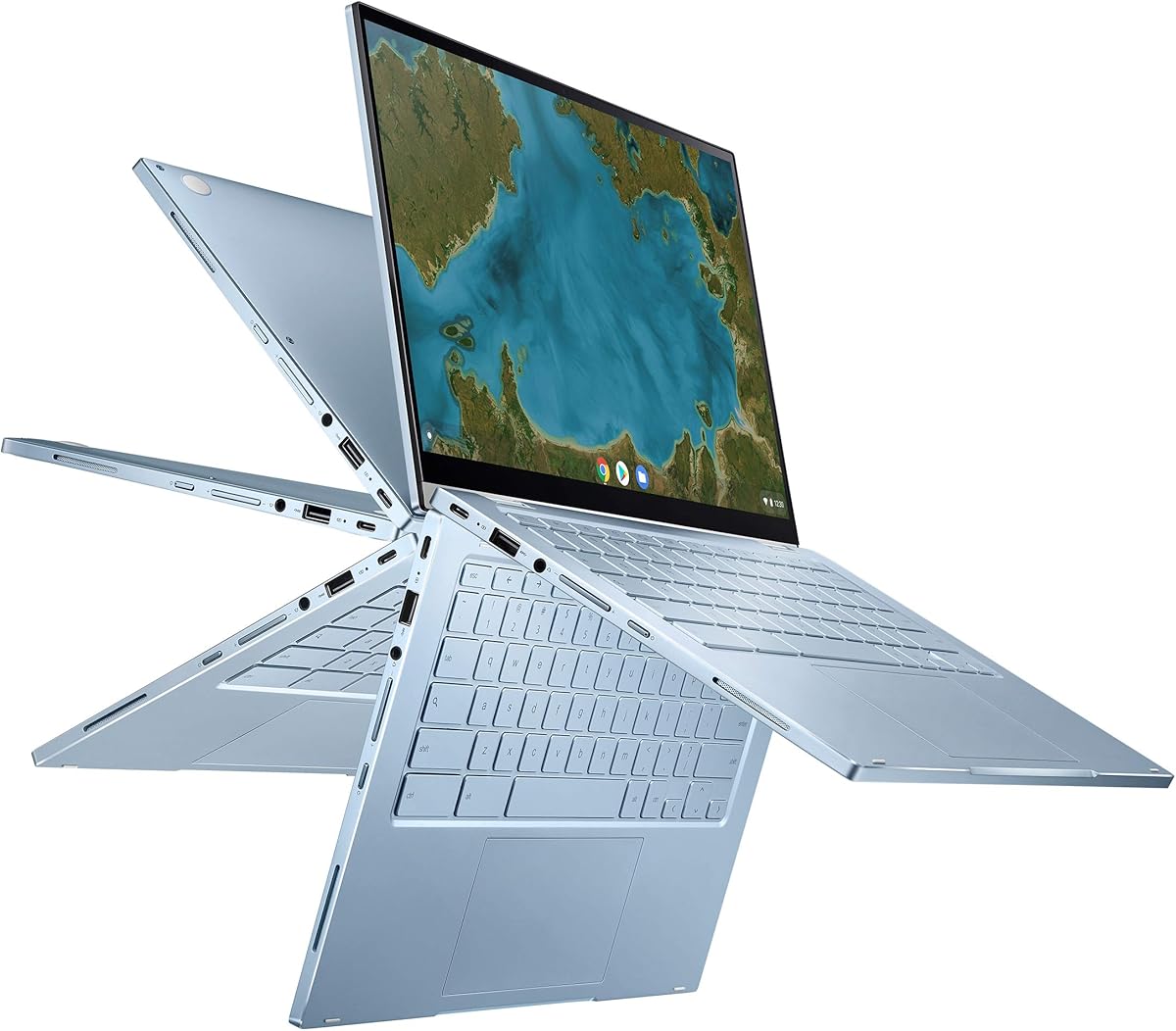


The HP Chromebook 14 x360 Plus has a 4.2 rating and stands out as a flexible, approachable alternative for anyone who wants more screen interaction than a conventional budget laptop provides. Its defining advantage is the 360-degree hinge, which converts the device among laptop, tent, stand, and tablet modes without requiring separate accessories.
We may earn a commission when you buy through this link, at no additional cost to you.
Inside, an Intel N150 processor, 4GB of LPDDR5 memory, and 128GB of UFS storage target browsing, document editing, video streaming, and light multitasking. The 14-inch WUXGA touchscreen operates at 1920 by 1200 resolution and includes narrow bezels, 300 nits of brightness, and an anti-glare coating. USB-C, USB-A, Wi-Fi 6, Bluetooth 5.4, and an FHD camera make it suitably equipped for classes, calls, and everyday home use.
The compromises are most visible in the amount of memory and storage. Four gigabytes can feel restrictive when many browser tabs and web applications remain open at once, while 128GB offers limited room for large offline files. ChromeOS also centers the experience on web-based workflows and Google services, so buyers dependent on specialist desktop software should verify compatibility before committing.
This model makes the most sense for students, families, and casual users who value touch, flexibility, and straightforward operation more than intensive software workloads. It is also a compelling option for browsing, research, communication, Google Workspace documents, and media consumption. Those priorities align neatly with the supplied 4.2 rating and make the HP x360 Plus a practical budget-oriented MacBook alternative.
The four-position hinge allows the display to rotate into tent or stand modes for watching, presenting, or collaborating, then fold into tablet mode for touch interaction. The design also carries MIL-STD 810H testing, which supports its positioning as a portable device for study, home use, and varied working environments.
USB-C and USB-A ports provide useful peripheral options, while Wi-Fi 6 and Bluetooth 5.4 handle modern wireless accessories. The FHD camera with temporal noise reduction adds a practical advantage for online classes and video calls, and ChromeOS supplies automatic updates, cloud backup, and built-in Google Assistant support.
We may earn a commission when you buy through this link, at no additional cost to you.
The ASUS Chromebook Flip CX1 carries a 4.3 rating and offers a balanced alternative for students and mobile users who want a full-size touchscreen without moving into a premium category. Its most appealing Chromebook-specific advantage is 8GB of RAM, which provides more breathing room for numerous browser tabs, Google Workspace applications, and simultaneous communication tools.
We may earn a commission when you buy through this link, at no additional cost to you.
The 14-inch Full HD NanoEdge display supports touch input and rotates through clamshell, tent, stand, and tablet positions. A durable chassis built to a US military-grade MIL-STD 810H standard weighs just 3.59 pounds. Connectivity is unusually complete for a convertible, with two USB-C ports, two USB-A ports, a microSD reader, and audio connections alongside Wi-Fi 6 and Bluetooth 5.2.
Its Intel Celeron N4500 processor is suited to web browsing, Google apps, communication, and everyday productivity, but it is not designed to replace a high-power workstation. The 128GB eMMC drive also demands attention if users plan to retain substantial files locally. The listed battery life reaches up to 11 hours, although actual results depend on working conditions.
For users who want a capable everyday Chromebook with a generous memory allowance, the CX1 is easier to recommend than many similarly priced alternatives. It suits schoolwork, browsing, media, and collaboration, and the convertible form broadens its usefulness. The trade-off is a modest processor and storage combination that best serves cloud-centered users rather than those running demanding native applications.
The 8GB configuration is particularly relevant for browser-heavy users. It allows a larger working set of tabs and applications than a 4GB Chromebook, making the Flip CX1 a sensible choice for students who keep class materials, messaging, video calls, and research pages open at the same time.
Two USB-A and two USB-C ports are helpful for peripherals, storage, displays, and charging. The USB-C ports support display and power delivery, while the microSD reader makes it easier to work with removable media. The included Google One AI Premium trial adds temporary access to Gemini Advanced and 2TB of cloud storage for qualifying users.
We may earn a commission when you buy through this link, at no additional cost to you.
The Samsung Galaxy Book4 has a 4.4 rating and is the strongest conventional Windows option in this group. Unlike a Chromebook, it provides the full Windows 11 Home environment and enough memory and storage for a broader mix of applications, making it suitable for users who want a MacBook-like balance without relying on web-focused workflows.
We may earn a commission when you buy through this link, at no additional cost to you.
The customized configuration includes 16GB of DDR4 memory, a 512GB NVMe solid-state drive, and Windows 11 Home. Its 10-core Intel Core 7 150U processor combines performance and efficiency cores with turbo boost capability, while Intel Graphics handles everyday visual workloads. The 15.6-inch Full HD IPS display offers 300 nits, anti-glare treatment, 100% sRGB color, and thin bezels.
This is also a notably complete business laptop. It includes a backlit keyboard, fingerprint reader, numeric keypad, Ethernet, HDMI, memory-card access, and a generous mix of USB-A and USB-C ports. Wi-Fi 6E and Bluetooth 5.1 provide modern wireless support. The stated battery life is up to 12 hours for non-gaming use, while a weight of 3.46 pounds keeps it reasonably portable.
The Galaxy Book4 is most appropriate for professionals, students, and families who need a larger display, substantial internal storage, and desktop-class application flexibility. Windows Home may not satisfy organizations that require centralized device management, and the 15.6-inch panel is less convenient for constant travel. Even so, its 4.4 rating and well-rounded specification make it a compelling all-purpose alternative for users moving beyond ChromeOS.
The 16GB memory upgrade and 512GB NVMe drive create a much more flexible foundation than most Chromebooks in the list. Local files, large documents, communication apps, and demanding browser sessions can coexist more comfortably, while the fast solid-state drive improves responsiveness and leaves room for downloaded media and installed software.
The anti-glare Full HD panel is well suited to offices, classrooms, and extended document work. Its 100% sRGB coverage is useful for color-consistent viewing, while the backlit keyboard, numeric keypad, large 54.4Whr battery, and fingerprint reader create a more mature everyday workstation than a typical entry-level Chromebook.
We may earn a commission when you buy through this link, at no additional cost to you.
The Google Pixelbook Go earns a 4.2 rating by prioritizing mobility above nearly everything else. At barely one kilogram and approximately 13 millimeters thick, it is a compelling option for students, commuters, and travelers who want a polished, compact alternative to a larger MacBook.
We may earn a commission when you buy through this link, at no additional cost to you.
ChromeOS starts quickly and emphasizes an approachable interface backed by automatic updates. The 8th-generation Intel Core processor supports common browsing, document, communication, and streaming tasks. A backlit keyboard, accurate and spacious touchpad, Hush Keys, fanless construction, and dual stereo speakers make the device comfortable for long sessions away from a desk.
Its portability is reinforced by battery life of up to 12 hours and the ability to gain up to two hours of use after a 20-minute charge. The touch display contains up to 8.3 million pixels for media and communication, while a Titan C security chip and built-in antivirus help protect the system. The main limitations are processing capacity and storage, which are less generous than newer alternatives.
The Pixelbook Go is ideal for web-based productivity, coursework, travel, and light creative tasks. It is less suitable for intensive software, local media libraries, or demanding multitasking. Its compact dimensions, quiet operation, and long stated runtime nevertheless make it one of the most compelling travel-friendly MacBook alternatives for users whose primary work happens in a browser.
The lightweight chassis, slim profile, and grippable shape make the Pixelbook Go easy to carry between classes, offices, and meetings. Its fanless design stays cool on the lap, and the claimed twelve-hour runtime reduces dependence on a charger during a typical day away from home.
ChromeOS updates automatically, while the Titan C security chip and integrated antivirus software add layered protection. This makes the laptop attractive to buyers who want a secure general-purpose system without manually maintaining a traditional desktop environment.
We may earn a commission when you buy through this link, at no additional cost to you.
The Lenovo Flex 14 has a 4.4 rating and combines a Windows environment, touchscreen, and convertible design in a package aimed at students and creative users. Its most distinctive feature is the included active pen, allowing direct drawing, annotation, and handwritten note-taking without purchasing a separate accessory.
We may earn a commission when you buy through this link, at no additional cost to you.
The 14-inch Full HD touchscreen is driven by an AMD Ryzen 5 3500U mobile processor and Radeon Vega 8 graphics. With 12GB of DDR4 memory and a 256GB NVMe SSD, the laptop has enough capacity for substantial browser use, office applications, media playback, and light photo or video editing. HDMI, USB-C, and USB 3.1 connections support a variety of accessories.
There are some age-related limitations. The Ryzen 5 3500U belongs to an earlier hardware generation, and Windows 10 is no longer the newest mainstream Windows release. Buyers needing demanding sustained performance or current platform support may prefer a more recent system. Even so, the Flex 14's 4.4 rating reflects a capable combination of memory, storage, display, and flexibility.
This laptop is a natural fit for note-taking, classroom work, drawing, and users who want a conventional desktop application environment in a touchscreen chassis. The physical webcam shutter is also valuable for privacy-conscious users. It works best when the priority is a versatile pen-enabled Windows notebook rather than cutting-edge processing performance or the absolute lightest possible design.
The included active pen transforms the touchscreen from a browsing and media feature into a more productive input method. Students can annotate presentations, sketch diagrams, or maintain handwritten notes in a Windows application, making the Flex 14 especially attractive for learning and creative workflows.
A true block privacy shutter physically closes the webcam, providing a clear visual indication that the camera is covered. USB-C, USB 3.1, and HDMI cover common accessory needs, while recharge technology can bring the battery to 80% in one hour and extend stated battery life to up to ten hours.
We may earn a commission when you buy through this link, at no additional cost to you.
The ASUS Chromebook Flip C433 has a 4.3 rating and delivers a useful combination of portability, a high-resolution touchscreen, and 8GB of memory. Its narrow 5-millimeter side bezels allow a 14-inch display to fit within a body closer to that of a 13-inch laptop, making it more manageable than many similarly sized convertibles.
We may earn a commission when you buy through this link, at no additional cost to you.
The 360-degree hinge supports tent, stand, and tablet modes in addition to the standard laptop arrangement. Its Intel Core m3-8100Y processor, which can boost up to 3.4 GHz, handles web browsing, Google applications, communication, and streaming. A backlit chiclet keyboard improves low-light usability, and USB-C and USB-A ports cover essential peripheral connections.
The primary concern is storage. At 64GB, the eMMC drive leaves relatively little room after the operating system, applications, browser data, and updates. Users who depend on offline files should plan to use cloud storage or external media. The m3 processor and eMMC combination also reflects an older Chromebook architecture, so demanding applications and intensive multitasking remain outside its strongest territory.
The Flip C433 is well suited to browsing, writing, streaming, remote learning, and users who value a full-size screen in a relatively compact body. Its 8GB memory is more generous than several competing models, helping ChromeOS remain responsive with many open tabs. It is best viewed as a portable, web-focused alternative rather than a replacement for a high-end creative or business workstation.
The four-way NanoEdge display reduces visual bulk while preserving a roomy 1920 by 1080 workspace. That combination can be more useful for students and commuters than an oversized screen, particularly when the laptop must fit into a smaller bag or be carried between locations.
ChromeOS boots quickly, updates automatically, and includes built-in virus protection. For Google Workspace users, web applications, and online learning, these features reduce administrative effort and create a relatively simple environment for documents, communication, and browsing.
We may earn a commission when you buy through this link, at no additional cost to you.
The Lenovo Flagship Chromebook earns a 4.2 rating and focuses on a light, touch-friendly design for education, remote learning, and general browsing. At 2.86 pounds, it is among the most portable full-size options here, while the 14-inch Full HD IPS touchscreen provides a comfortable surface for navigation, reading, and interaction.
We may earn a commission when you buy through this link, at no additional cost to you.
Its MediaTek Kompanio 520 processor uses an eight-core design with four A73 and four A53 cores operating at 2.0GHz. The chip is engineered with battery efficiency in mind and provides adequate performance for ChromeOS tasks, including Google Classroom, online classes, web applications, communication, and video playback.
The 4GB memory and 64GB eMMC storage are the model's main limitations. While the specifications can support normal browser use, heavy tab counts may reach the system's practical limits, and cloud dependence becomes more important. Connectivity includes one USB-A port, one USB-C port, a microSD reader, an audio jack, Wi-Fi 6, and Bluetooth 5.1.
This Chromebook is a sensible choice for students, families, and mobile users who prioritize low weight, a full HD touch display, and straightforward ChromeOS operation. The 720p camera, integrated microphones, and privacy shutter add value for online learning and calls. It is less compelling for heavy multitasking or extensive local media, but it fulfills its core mission as a slim everyday computer.
The 1920 by 1080 IPS panel provides sharp text, clear color, and wide viewing angles, which helps when collaborating around a screen. Touch navigation complements the 720p camera, dual-array microphone, and privacy shutter to create a practical package for online classes, Google Classroom, and remote learning.
The 2.86-pound chassis and 0.73-inch thickness make this device easy to carry throughout a school day or work week. The Kompanio 520 processor is designed around strong battery behavior, allowing the lightweight design to serve users who spend much of the day away from a power outlet.
We may earn a commission when you buy through this link, at no additional cost to you.
The Apple MacBook Neo has the highest listed rating in the group at 4.6 and provides a portable, premium Apple experience built around the A18 Pro chip. With its 13-inch Liquid Retina display, aluminum enclosure, and claimed battery life of up to 16 hours, it is positioned as a capable everyday notebook for school, work, communication, and entertainment.
We may earn a commission when you buy through this link, at no additional cost to you.
The display supports one billion colors, offering vivid photos and video with crisp text. A 1080p FaceTime HD camera, dual-microphone array, and two side-firing speakers support calls, presentations, and streaming. The A18 Pro chip is designed to run AI applications and Apple Intelligence features, while macOS provides access to built-in applications and a smooth connection with an iPhone.
Its stated specifications include 8GB of unified memory and 256GB of SSD storage. Those figures should be checked against the user's workload: heavy creative projects, large application libraries, and extensive local media may require more capacity than an 8GB configuration offers. The product also places users firmly within Apple's ecosystem, which is advantageous for iPhone users but less essential for those committed to another ecosystem.
The MacBook Neo is a strong choice for buyers who want a compact Apple notebook with an excellent screen, long claimed runtime, modern AI tools, and smooth iPhone continuity. Its recycled aluminum enclosure and four color options also add lifestyle appeal. Among the supplied alternatives, its 4.6 rating and premium feature set place it at the top of this roundup.
The Liquid Retina panel balances rich color with readable text, making the 13-inch model appropriate for media editing, presentations, reading, and communication. The durable recycled aluminum enclosure and four available finishes let users select a look that feels more personal than a typical business laptop.
Apple Intelligence is positioned as a central part of the experience, with tools for writing and expressing ideas while emphasizing privacy protections. Continuity features allow users to view and control an iPhone from the Mac, transfer an email between devices, and have photos or calls move more easily between Apple hardware.
We may earn a commission when you buy through this link, at no additional cost to you.
The renewed 14-inch MacBook Pro with the M1 Max chip has a 4.4 rating and is aimed at users whose workloads exceed the capabilities of an everyday laptop. Its 64GB of unified memory and 2TB SSD storage provide exceptional headroom for demanding applications, large creative projects, and advanced multitasking.
We may earn a commission when you buy through this link, at no additional cost to you.
The M1 Max platform is Apple's high-performance chip option, while the 14-inch Retina display offers the visual quality expected from a premium MacBook Pro. This combination makes the machine relevant to photographers, video editors, developers, and other power users who benefit from a large working memory and fast local storage.
Because it is renewed, buyers should pay particular attention to condition and seller details. The supplied information states that the product is not Apple certified, although Amazon-qualified suppliers professionally inspect, test, and clean it. It should have no visible cosmetic imperfections when held at arm's length, and its battery capacity is stated to exceed 80% relative to new.
Accessories may be compatible rather than original, and the device may arrive in generic packaging. It is also eligible for replacement or refund within 90 days if the buyer is not satisfied. For buyers comfortable with renewed hardware, this is a powerful and unusually well-equipped MacBook Pro. The 4.4 rating supports its quality, but condition and warranty terms remain central to the decision.
Sixty-four gigabytes of unified memory allows large applications and datasets to remain resident, reducing the need to close projects during a session. It also supports intensive multitasking, making the laptop more suitable than standard configurations for software development, high-resolution media, and specialized production.
The listing's inspection standards provide reassurance, but they do not make the device equivalent to a factory-certified new product. Buyers should review the visual condition, battery statement, included accessories, return window, packaging details, and any available warranty information before making a final decision.
We may earn a commission when you buy through this link, at no additional cost to you.
The renewed 15-inch MacBook Pro with a 2.6GHz Intel Core i7 has a 3.7 rating, the lowest among the listed products. It nevertheless offers a recognizable premium-laptop formula: a large Retina display, 16GB of memory, 512GB of storage, and the familiar MacBook Pro design for users who value screen space and Apple software.
We may earn a commission when you buy through this link, at no additional cost to you.
The 15-inch panel is particularly useful for document-heavy work, media viewing, and multitasking because it provides more room than the 13-inch alternatives. Sixteen gigabytes of memory supports a substantial number of applications, while 512GB of internal storage offers meaningful local capacity. The Intel Core i7 platform and renewed status are the main details that require the most careful evaluation.
As an older Intel-based design, this laptop does not benefit from the efficiency and performance characteristics of current Apple silicon. Buyers should verify macOS compatibility for all required applications, inspect the machine's physical and battery condition, and understand the return terms. The 3.7 rating may reflect variability commonly associated with renewed systems or dissatisfaction with the platform's age.
The configuration can still make sense for a buyer who wants a large Apple display, adequate memory, and familiar build quality without buying a current premium model. It is best for general productivity, browsing, media consumption, and lightweight creative tasks rather than buyers seeking the newest performance. Current condition, battery health, included accessories, and warranty coverage should take priority over the broad model name.
The 15-inch Retina display gives documents, browser windows, and media more visual room than the compact alternatives in this roundup. That extra space can reduce the need for frequent window switching, particularly for research, writing, spreadsheet review, and video viewing.
Because this is a renewed Intel Core i7 generation, compatibility and long-term support deserve attention. Check the installed macOS version, required application requirements, battery condition, cosmetic details, and seller guarantees. These checks can reveal more about the actual value than processor branding alone.
We may earn a commission when you buy through this link, at no additional cost to you.
The right MacBook alternative depends primarily on your software environment, workload, display needs, and tolerance for weight. Use the following factors to separate basic web-focused devices from full-featured Windows and premium Apple systems.
ChromeOS is designed around browser-based productivity, Google Workspace, cloud storage, and Android applications, making it straightforward for students, families, and light office users. Windows provides the broadest conventional desktop application selection and is the better choice for specialist business software, gaming libraries, file-based workflows, and established organizational tools. macOS is attractive for users invested in Apple applications, iPhone integration, and a polished creative or development environment. Check every essential application before deciding, because some professional software, peripherals, and internal components may be limited on ChromeOS.
Entry-level Intel N-series, Celeron, and Core m3 chips can handle browsing, documents, streaming, and communication, but they are less appropriate for heavy multitasking, sustained video editing, complex spreadsheets, engineering tools, or advanced development. Intel Core 7 processors, AMD Ryzen 5 configurations, and Apple M-series chips provide more headroom for intensive applications. Processor generation also influences efficiency, media support, connectivity, and external display capabilities. Match the chip to the heaviest task you expect rather than relying on a brand name or a single benchmark result.
Memory determines how comfortably a system handles many browser tabs, office documents, communication apps, and creative tools at once. Four gigabytes can work for basic ChromeOS use, though it leaves less room for sustained multitasking. Eight gigabytes is a more comfortable minimum for modern general-purpose computing, while 12GB, 16GB, and higher memory configurations better support large project files and professional software. Unified memory on Apple laptops cannot be upgraded, making its supplied capacity particularly important to verify.
Storage needs depend on how much of your work remains online. Chromebook users who rely on cloud storage may manage comfortably with 64GB or 128GB, provided they understand the limitations of offline access. A 256GB drive is more practical for downloaded media and mixed usage, while 512GB or 2TB accommodates larger application libraries and creative projects. SSD storage provides faster transfers and better responsiveness than traditional hard drives, and eMMC remains suitable for web-focused use. Consider both capacity and whether the storage can be expanded.
A Full HD 1920 by 1080 panel offers a practical balance of text clarity, media detail, and productivity. Touchscreens add navigation, drawing, annotation, and presentation flexibility, especially on convertible laptops. IPS displays provide wider viewing angles, while anti-glare finishes improve comfort in bright rooms. Consider the panel size against the device's weight: a 14-inch screen may be easier to carry than 15 inches, but larger displays are better for split-screen work and media. Also check narrow-bezel design without assuming that a compact exterior guarantees low weight.
Manufacturer battery claims provide a useful reference, but actual runtime depends on screen brightness, workloads, wireless connectivity, and power settings. Up to 10, 11, 12, or 16 hours of claimed use can suit a full school or workday, though demanding applications will consume energy faster. USB-C is increasingly important for charging, data transfer, displays, and docking. USB-A, HDMI, Ethernet, a memory-card reader, and an audio jack remain useful for peripherals. Check the full port list because thin designs often sacrifice legacy connections.
A backlit keyboard helps during travel and low-light use, while a numeric keypad improves data entry. Fingerprint readers provide convenient sign-in, and webcam privacy shutters offer a physical way to block the camera. Convertible hinges, active pens, touchscreen navigation, and wide viewing angles can materially improve note-taking and presentation work. These extras are not equally important for every buyer, so compare them against your daily tasks rather than treating a longer feature list as automatically better.
A new machine offers the most predictable warranty and component configuration, but customized or resealed systems may provide stronger specifications for the money. Renewed laptops can deliver premium hardware at a lower outlay, provided you review battery health, cosmetic condition, included accessories, and return coverage. The HP x360 Plus description notes that it was resealed to upgrade its system and carries a one-year HP warranty on remaining components. The Apple renewed listings have distinct inspection and accessory conditions. Always confirm seller quality, warranty scope, and return eligibility.
Start by signing into the operating system's primary account, completing operating-system updates, and configuring screen brightness, keyboard response, notifications, and backup settings. For a Chromebook, use the built-in cloud backup and confirm that important documents are synchronized. For a Windows laptop, check that the manufacturer has installed device drivers and that recovery or backup options are available. On macOS, configure the necessary iCloud synchronization and verify that all required applications are compatible with the installed system.
Protect the device by enabling automatic updates, a screen lock, secure sign-in where supported, and verified device encryption. Use the webcam privacy shutter when appropriate, and do not leave sensitive files in shared folders without proper permissions. For a touchscreen convertible, clean the display with a soft microfiber cloth and avoid pressing hard on flexible panels. For a pen-enabled device, store the stylus in its designated compartment and keep the charging contacts free of dust and adhesive residue.
Manage battery health by using plugged-in operation for extended heavy tasks, removing heat from vents, and avoiding unnecessarily high brightness. Keep liquids away from the keyboard, use a stable surface, and leave adequate space around the device. Save work regularly, maintain at least several gigabytes of free storage, and periodically verify backups. On renewed or customized systems, document the original condition and included accessories before use so that any later claim is easier to support.
For browsing, email, Google Workspace, online classes, video calls, and streaming, a Chromebook can replace a MacBook for many users. Its automatic updates, cloud integration, fast startup, and straightforward interface are particularly convenient. However, it is less suitable when a workflow depends on specialist desktop software, advanced creative applications, extensive local files, or operating-system features specific to macOS.
A Windows laptop is generally better for established business applications, local project files, device management, and specialized professional tools. Chromebooks are typically more convenient for web-based workflows, students, and users who want automatic maintenance. The right answer depends on the software your job requires, how often the computer works offline, and whether you need a broader range of ports and file formats.
Eight gigabytes is a sensible minimum for smooth general-purpose use, especially when considering modern browsers. Twelve or sixteen gigabytes is preferable for heavier multitasking, larger documents, creative applications, and development environments. Four gigabytes may be adequate for a lightly used Chromebook, but it can feel constrained when many tabs and applications remain open.
A renewed MacBook Pro can be worthwhile when its specifications, condition, warranty, and return terms are favorable. Large memory and storage configurations may be especially attractive for professional work. Buyers should inspect battery capacity, cosmetic condition, included accessories, operating-system compatibility, and seller guarantees, recognizing that renewed products may include non-original but compatible accessories.
Display size affects comfort, productivity, and portability together. A 13-inch or 14-inch laptop is often easier to carry, while a 15.6-inch screen provides more room for documents, media, and multiple open windows. Full HD resolution makes a 14-inch panel a useful middle ground, but touch support, brightness, anti-glare treatment, and overall weight may matter more than a small size difference.
The ASUS Chromebook Flip CX1 description specifically notes that users can edit, download, and convert Microsoft Office files in Google Docs, Sheets, and Slides. ChromeOS also supports web-based versions of common productivity services. For complex desktop-only Office features or extensive offline project work, verify application requirements or choose a Windows laptop.
A convertible touchscreen is valuable for note-taking, drawing, presentations, media viewing, and flexible work positions. It is less compelling if you mostly type at a desk, prefer a traditional clamshell, or prioritize maximum battery life and cooling over touch functionality. Evaluate the hinge, included stylus, keyboard quality, and overall weight alongside the display.
Treat claimed battery life as a maximum under particular conditions rather than a guaranteed result. Screen brightness, video playback, Wi-Fi activity, applications, and processor load can change runtime significantly. Look for efficient processors, consider your typical workload, and check independent usage patterns when available. Keeping software current, managing brightness, and avoiding sustained heat can also help preserve usable battery life.
The Samsung Galaxy Book4 is the most balanced all-purpose choice in this roundup, combining 16GB of memory, 512GB NVMe storage, a capable 10-core processor, a large color-accurate display, and extensive business-oriented connectivity. The HP Chromebook 14 x360 Plus is the budget-focused recommendation for students and casual users, while the Apple MacBook Neo brings the highest listed rating, a premium display, modern Apple features, and strong portable battery claims.
Prioritize the software you need, the amount of memory and storage you will actually use, and whether portability matters more than screen size or processing headroom. Chromebooks offer the simplest web-first experience, Windows laptops provide the broadest traditional application flexibility, and Apple hardware delivers the strongest ecosystem integration for committed Mac, iPhone, and iPad users. Renewed or customized systems require additional care around condition and coverage.
Listings can change in configuration, availability, condition, and cost over time, so verify the current details before purchasing. Read the full feature description, check compatibility with your essential applications, compare the included warranty and return policy, and confirm the exact memory, storage, display, and operating-system version. Those checks will help ensure that the selected MacBook alternative remains suitable after the purchase.