Omada ER706W Gigabit VPN Router
4.1Editor score
AX3000 dual-band WiFi 6
Five Gigabit RJ45 ports
Multiple VPN protocol support
Multi-WAN load balancing
Discover the best commercial wireless router options in this expert guide comparing WiFi 6, WiFi 7, business security, VPN, mesh, management, and multi-gig
A commercial wireless router must do more than provide fast internet. It needs to support growing numbers of users, separate business and guest traffic, protect sensitive data, and remain manageable as a site becomes more complex. The strongest options combine dependable wireless performance with useful business controls and flexible deployment options.
This guide compares ten routers and wireless systems based on wireless generation, throughput, wired connectivity, security, management, coverage, and practical business features. It includes traditional gateways, mesh systems, and access points that can form the foundation of a managed commercial network, helping buyers distinguish general-purpose equipment from purpose-built business solutions.
Each review explains the product's strongest capabilities, important limitations, and likely deployment scenario. Ratings reflect the available customer feedback, while technical details come from the supplied product information. Product pricing and availability can change, so compare current listings, warranties, management subscriptions, and installation requirements before purchasing.
4.1Editor score

4.6Editor score

The comparison below highlights the most important differences among the ten products, including wireless standard, aggregate performance, wired speed options, management approach, and the business features that make each system suitable for a particular type of deployment.






The ASUS ExpertWiFi EBR63 is a WiFi 6 business router built around the needs of small offices, retail spaces, clinics, and other environments that require more separation than a typical home router provides. It holds a 4.2 customer rating and stands out for its combination of multiple SSIDs, guest access customization, remote management, and a useful USB-based backup WAN option.
We may earn a commission when you buy through this link, at no additional cost to you.
Its most valuable feature is the ability to create up to five SSIDs for different business scenarios. That makes it possible to divide staff devices, guests, IoT equipment, and other categories without placing everything on one open network. The customizable guest portal can carry the business name and selected design templates, providing a more deliberate visitor experience. ASUS ExpertWiFi app management also makes the router practical for a small IT team or a business without a full-time network administrator.
Connectivity is designed for stability rather than headline-only speed. The AX3000 designation indicates a dual-band WiFi 6 class product, which remains practical for many business clients. A USB port can function as a backup WAN through a connected phone hotspot, giving administrators another way to preserve connectivity if the primary connection fails. AiProtection Pro and safe-browsing features add a commercial security layer, although buyers should understand the long-term management and subscription terms before deploying the system broadly.
This is the strongest general recommendation for a small or midsize organization that wants a self-contained commercial router without assembling every component separately. It is less suitable for a large enterprise that requires extensive high-density capacity, advanced site-to-site networking, or a large collection of centrally managed switches and access points. For those requirements, a managed access-point system may scale more cleanly. Even so, the EBR63 balances segmentation, security, guest services, and easy administration better than most general-purpose routers in this group.
Separate SSIDs let administrators place employees, visitors, and connected equipment into different network segments. This structure simplifies access rules and creates a more professional experience than a single shared password.
The customizable portal improves the guest onboarding experience, while the USB backup WAN option offers a practical response to an internet outage. Both features are valuable in offices where downtime can disrupt operations.
We may earn a commission when you buy through this link, at no additional cost to you.
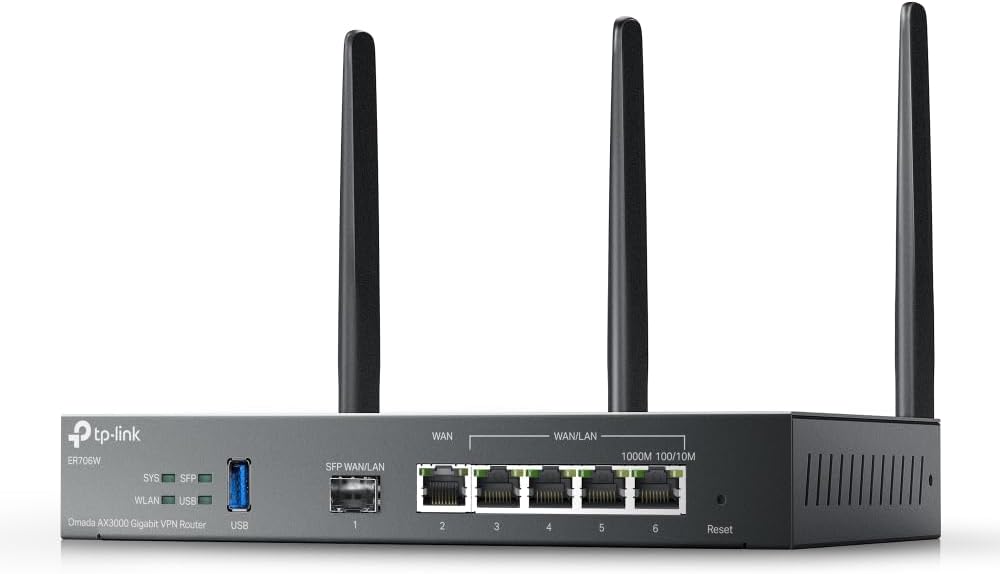
The TP-Link Omada ER706W is a compact AX3000 VPN router that offers an unusually useful collection of gateway features for a small business. Its 4.1 rating reflects a solid overall reception, and the combination of five Gigabit RJ45 ports, a Gigabit SFP slot, multi-WAN support, and extensive VPN options makes it one of the most versatile business gateways in the list.
We may earn a commission when you buy through this link, at no additional cost to you.
The wired design is particularly strong. Five Gigabit RJ45 ports can serve computers, phones, a PoE-compatible switch, and other infrastructure, while the SFP slot allows the router to connect over fiber without relying on a copper Ethernet port. Load balancing across up to five WAN ports can make better use of multiple broadband connections, improving resilience when one service experiences trouble or becomes congested.
Security and remote-access support are equally relevant to the product's value. The ER706W supports SSL, IPsec, GRE, WireGuard, PPTP, L2TP, and OpenVPN, giving administrators several choices for connecting remote staff, branch offices, or traveling employees. It can also work with Omada access points through the company's mesh and centralized management approach. That makes the router a sensible starting point for a small business that may begin with one location and add wireless expansion later.
The main limitation is that its wireless performance belongs to the AX3000 class rather than the newest WiFi 7 category. It is therefore best viewed as a feature-rich gateway whose strengths are connectivity, VPN support, and affordable business management. Buyers needing exceptionally dense WiFi should deploy additional Omada access points, while those focused on cutting-edge wireless speed should look to a WiFi 7 system. For the price-conscious business prioritizing ports, VPN capability, and multi-WAN resilience, the ER706W is difficult to dismiss.
Five Gigabit Ethernet ports and an SFP slot give administrators more choices than a basic dual-band router. This makes the ER706W suitable for a gradual buildout involving switches, access points, and a fiber handoff.
Support for major VPN types and load balancing across several WAN connections improves both remote connectivity and service resilience. These are meaningful advantages for distributed teams and sites using more than one broadband provider.
We may earn a commission when you buy through this link, at no additional cost to you.
The Ruckus WirelessR750 is an indoor WiFi 6 access point aimed specifically at ultra-dense environments. It is not a conventional all-in-one consumer router, but that distinction is important: organizations with crowded venues, demanding offices, or many connected devices often need a professionally managed access point rather than a basic gateway with antennas attached. The R750 carries a 4.3 rating and a strong reputation for density-focused deployments.
We may earn a commission when you buy through this link, at no additional cost to you.
The supplied product information identifies the unit as part number 901-R750-US00 and explicitly emphasizes its suitability for high-density wireless environments. That positioning suggests a design priority on serving many clients efficiently while maintaining usable throughput under load. Rather than relying on a single consumer-style access point, the R750 is intended to be incorporated into a broader Ruckus-managed network with appropriate controllers, switches, and coverage planning.
Its limitations are directly related to this specialized role. The available information does not provide a full list of throughput figures, port configurations, power options, or management details, so buyers should verify those specifications against the unit and current product documentation. It also does not function as a complete business router by itself. An internet connection, routing or gateway layer, and suitable cabling or wireless backhaul may still be required.
The R750 is best recommended for organizations that have outgrown consumer networking and specifically need density-oriented indoor coverage. Compared with the Ruckus R670 in this guide, it offers the established WiFi 6 generation rather than WiFi 7 and multi-gigabit wired capabilities. In return, its ultra-dense-environment focus may be highly relevant to buyers supporting large numbers of concurrent clients. Choose it when deployment density, rather than raw generation, is the leading requirement.
The R750 is explicitly targeted at ultra-dense indoor environments, making density management its defining feature. It is more relevant to a packed venue or heavily connected workplace than to a small site with occasional guest traffic.
This access point is intended to work with supporting infrastructure rather than serve as a stand-alone router. Buyers should budget for appropriate routing, switching, mounting, and centralized management before installation.
We may earn a commission when you buy through this link, at no additional cost to you.
The Ruckus R670 Unleashed is a premium WiFi 7 indoor access point with a broad set of features for modern enterprise environments. It offers a combined data rate of 9.34 Gbps, six spatial streams across three frequency bands, a built-in 5GbE port, and support for converged wireless technologies. No customer rating is available in the supplied information, so its evaluation here is based on the documented specifications rather than customer feedback.
We may earn a commission when you buy through this link, at no additional cost to you.
BeamFlex+ adaptive antenna technology is the defining hardware feature. Ruckus describes it as a way to maximize coverage, throughput, and network capacity while working across different client types. Six spatial streams are divided into 2×2 configurations on the 2.4 GHz, 5 GHz, and 6 GHz bands, allowing the R670 to support a broad mix of legacy and newer WiFi clients. The 5GbE connection also helps prevent the wired uplink from becoming a bottleneck for multi-gigabit wireless deployments.
The R670 goes beyond WiFi by including BLE and Zigbee with Matter and Thread support, plus a USB port for future wireless expansion. This converged approach can simplify management for organizations deploying more than conventional WiFi. On the security side, WPA3 and DPSK3 combine current wireless encryption with rotating or dynamic passphrases, while enhanced man-in-the-middle protection is included. Management options include on-premises physical or virtual appliances and automated control functions.
This product is best for enterprises, large offices, hospitality environments, campuses, and other demanding sites that value a premium access point and its management flexibility. It is not a stand-alone commercial router, and buyers will need compatible switches, routing, and potentially a controller. The lack of a customer rating also makes hands-on evaluation more important. Even so, the R670's WiFi 7 performance, 5GbE uplink, adaptive antennas, converged radio support, and enterprise security form one of the most complete feature sets in this comparison.
BeamFlex+ is designed to direct capacity intelligently and improve spatial multiplexing. That makes the R670 well matched to offices and venues where coverage, client mix, and radio efficiency are more important than simply installing the fastest possible access point.
Matter, Thread, BLE, and Zigbee support allow the access point to participate in a broader converged network. Future expansion through USB adds some flexibility, while the built-in 5GbE port supports modern multi-gigabit infrastructure.
We may earn a commission when you buy through this link, at no additional cost to you.
The NETGEAR Orbi 970 Series is a three-piece WiFi 7 mesh system built for large homes and flexible business environments needing very high aggregate throughput. It has a 4.6 customer rating, the highest confirmed rating among the products with available feedback. The system combines a router with two satellites, supports up to 200 devices, and uses a dedicated backhaul design intended to preserve performance for client traffic.
We may earn a commission when you buy through this link, at no additional cost to you.
Its headline capability is up to 27 Gbps across the wireless system, which is especially useful for high-bandwidth applications, modern client devices, and locations with many active users. Quad-Band technology and an Enhanced Dedicated Backhaul reserve a dedicated lane for communication between satellites, reducing the contention that can occur when wireless mesh units share the same airtime as client devices. Older WiFi 6 and WiFi 5 clients remain supported, which helps during a gradual equipment transition.
Wired connectivity is unusually strong for a mesh system. Across the router and satellites are a 10 Gig internet port, a 10 Gig LAN port, and 2.5 Gig LAN connections, with additional LAN capacity provided by the product family. This makes the system useful where file transfers, NAS access, high-resolution media, and high-speed internet plans all matter. Setup is guided through the NETGEAR app, and additional Orbi 970 satellites can extend coverage further.
The primary qualification is that Orbi is still a consumer-oriented mesh platform rather than a fully managed enterprise wireless system. It lacks many of the granular segmentation, centralized multi-site controls, and specialized access-point features found in products such as the Omada EAP650 or Ruckus R670. Its stated area and device limits also depend on layout, construction materials, interference, and placement. Even so, for a small business needing exceptionally fast whole-site coverage with simple administration, the Orbi 970 Series is one of the strongest options here.
A dedicated wireless lane between the router and satellites helps keep mesh traffic separate from client traffic. This design is particularly useful when streaming, conferencing, and large file transfers are occurring throughout the covered area.
The combination of 10 Gig and 2.5 Gig connections supports demanding local networks as well as modern internet service. It also allows administrators to connect high-speed storage, workstations, and switching equipment without relying on older 1 Gig ports.
We may earn a commission when you buy through this link, at no additional cost to you.
The TP-Link Omada EAP650 is a dual-band WiFi 6 access point that gives small and midsize organizations a capable path into centralized network management. It has a 4.5 customer rating, supports up to 2976 Mbps wireless throughput, and includes a five-year warranty. Its free Omada Essentials cloud management option is especially attractive to businesses that want remote oversight without purchasing a dedicated hardware controller.
We may earn a commission when you buy through this link, at no additional cost to you.
The platform can be managed in several ways. Organizations may use the cloud-based controller, an Omada software controller, or an Omada hardware controller, while standalone operation remains available for simpler deployments. That flexibility lets a buyer begin according to current staffing and scale up without abandoning the access point platform. The app also permits centralized management across sites, and Omada SDN can unify access points, switches, and gateways in one interface.
Wireless controls include WPA3, band steering, load balancing, airtime fairness, beamforming, mesh WiFi, and seamless roaming. Mesh and roaming require an Omada SDN controller. Powering is flexible: the EAP650 accepts 802.3at PoE+, 48V passive PoE, or the included 12V DC adapter. This matters in offices and hospitality spaces where a local outlet may be unavailable or where the installer needs to choose the most appropriate switching method.
The EAP650 is an excellent choice for organizations that value centralized management, flexible deployment, and long-term support more than access to the latest wireless generation. It is not a complete router and will need a gateway or existing network infrastructure. The depth of its controls also calls for some planning, especially when enabling mesh, roaming, and multi-site management. Even so, the combination of free cloud access, multiple control options, generous power support, and a five-year warranty makes this a highly practical business access point.
Free Omada Essentials cloud management gives smaller organizations a straightforward way to configure and monitor access points. Hardware, software, or cloud controllers provide additional choices as deployment requirements become more sophisticated.
Support for three power methods reduces installation constraints, while roaming, load balancing, airtime fairness, and beamforming help maintain a consistent network. These features make the EAP650 well suited to offices, classrooms, hotels, and cafes.
We may earn a commission when you buy through this link, at no additional cost to you.
The Ubiquiti U6+ is a dual-band WiFi 6 access point that offers a straightforward way to add enterprise-style wireless coverage to a business network. It holds a 4.6 customer rating and delivers up to 3 Gbit/s wireless transmission, supported by a Gigabit Ethernet port and PoE+. Its wall-mountable form factor makes it suitable for offices, retail spaces, hospitality environments, and other indoor areas where a discreet access point is appropriate.
We may earn a commission when you buy through this link, at no additional cost to you.
Its appeal lies in the balance between capability and simplicity. A single cable can carry both power and data through the PoE+ port, removing the need for a nearby power outlet at many installation locations. The compact physical design also helps the device blend into professional interiors without the visual bulk of a full router and multiple antennas. Support for IEEE 802.11 a/b/g/n/ac/ax lets it serve a broad range of modern and legacy wireless clients.
The product is positioned as an access point rather than an all-in-one commercial router, so a business will still need an appropriate gateway, switch, and network design. Data encryption is included for protecting network access, but buyers with complex segmentation, multi-site management, or detailed access policies should verify the capabilities of the controller or software platform they intend to use. The provided listing gives a concise feature set rather than a deep technical breakdown, so those details deserve confirmation during planning.
The U6+ is best recommended for small offices, professional studios, shops, and distributed teams that want a reputable indoor access point without a large, visually intrusive system. It is not the right choice for buyers seeking a complete router with multiple WAN ports or a consumer mesh system that includes satellite units. Compared with the Omada EAP650, however, it offers a particularly compact form, 3 Gbit/s wireless throughput, and a 4.6 customer rating. For a clean, capable, professionally mounted installation, it remains one of the most balanced choices.
PoE+ delivers data and power through the same connection, which can simplify access-point placement. This is particularly helpful in renovated spaces where adding new electrical outlets would be inconvenient.
The wall-mountable form factor is designed to blend into working environments while providing WiFi 6 service. Its Gigabit Ethernet port gives connected clients a suitably fast local network path.
We may earn a commission when you buy through this link, at no additional cost to you.
The TP-Link Archer BE400 is a dual-band WiFi 7 router that offers modern wireless performance and useful multi-gig connectivity in a relatively approachable design. It has a 4.3 customer rating, uses Multi-Link Operation, Multi-RUs, and 4K-QAM, and supports up to 6452 Mbps combined throughput. That makes it a credible all-in-one option for a small office, home office, or compact commercial site with newer clients.
We may earn a commission when you buy through this link, at no additional cost to you.
Its wired configuration provides more room for growth than a basic router. One 2.5Gbps WAN/LAN port, another 2.5Gbps LAN port, and three 1Gbps LAN ports allow administrators to connect a multi-gig modem and high-bandwidth local equipment. The router can be paired with an EasyMesh-compatible system to extend coverage, though it is not compatible with TP-Link Deco mesh products. That distinction should be checked before purchasing additional equipment.
The Archer BE400 also includes Tether app management, remote VPN server support, parental controls, IoT security features, and automatic firmware update support. It can operate a VPN for supported remote clients while maintaining regular internet access, a useful feature for a small traveling team. The device is also associated with TP-Link's participation in the CISA Secure-by-Design pledge, although that organizational commitment should not be confused with a complete substitute for careful account security and network configuration.
This is a strong recommendation for a buyer who wants a current-generation router without assembling a complex managed access-point system. Its two-band design and stated coverage target of up to 2,400 square feet and 90 devices are less suitable for high-density enterprise spaces than the Ruckus, Ubiquiti, or Omada access-point options. It also lacks some of the advanced multi-site controls found in dedicated business platforms. For a small organization that values WiFi 7, multi-gig ports, and uncomplicated expansion, however, the BE400 provides a compelling balance.
Multi-Link Operation, Multi-RUs, and 4K-QAM help the BE400 take advantage of compatible WiFi 7 clients. Older WiFi 6 and WiFi 5 equipment remains usable, allowing businesses to upgrade gradually.
A 2.5Gbps WAN/LAN port and additional multi-gig LAN connectivity support modern fiber service, fast storage, and demanding local transfers. The app-based setup and management keep routine administration approachable.
We may earn a commission when you buy through this link, at no additional cost to you.
The NETGEAR Nighthawk WiFi 7 router is a tri-band solution for growing homes and business spaces that need more than a basic dual-band gateway. It carries a 4.3 customer rating and offers up to 9.3 Gbps combined throughput, with a third high-speed band intended to keep demanding clients from interfering with the rest of the network.
We may earn a commission when you buy through this link, at no additional cost to you.
The supplied model targets up to 2,500 square feet and as many as 100 devices. Those figures make it relevant to offices, studios, and executive homes with a meaningful concentration of phones, laptops, televisions, and smart equipment. The dedicated 6GHz band gives compatible clients a separate lane, while the other bands continue supporting WiFi 6 and older devices. As with any wireless claim, walls, floors, interference, and placement can affect the result.
Its wired connections are well suited to a modern network. A 2.5Gbps WAN port supports compatible multi-gig internet plans, and two 2.5Gbps LAN ports plus two 1Gbps Ethernet ports can connect a NAS, high-performance computer, smart television, or switching equipment. The Nighthawk app provides guided setup, device management, speed tests, guest networks, and remote access to network controls. The router is compatible with common cable, fiber, DSL, and satellite services, although some gateway combinations may require bridge mode.
This router is best for a single business location that needs strong WiFi 7 performance, multiple connected clients, and straightforward management without installing a complete enterprise system. It does not provide the centralized multi-site controls, dynamic segmentation, or scalable access-point approach of a professional business network. NETGEAR also promotes its optional Armor security subscription, which may be relevant to buyers who want added protection but is separate from the router's core functionality. For a single-site organization, the Nighthawk is a capable and well-rounded option.
The 6GHz band provides compatible devices with additional wireless capacity. This can reduce contention in offices where modern laptops, phones, and other high-performance clients are active simultaneously.
The mobile app simplifies setup and everyday management, while support for major broadband types eases connection to existing service. Multi-gig ports provide a practical upgrade path beyond standard Gigabit connections.
We may earn a commission when you buy through this link, at no additional cost to you.
The ASUS RT-BE88U is a high-speed WiFi 7 router built for users who need more capable wired networking than a typical consumer model provides. It has a 4.3 customer rating, supports throughput up to 7200 Mbps, and includes both a 10G SFP+ port and a standard 10G WAN/LAN port. A quad-core 2.6GHz 64-bit processor supports demanding routing, VPN, and connected-device workloads.
We may earn a commission when you buy through this link, at no additional cost to you.
Multi-Link Operation and 4096-QAM are the key WiFi 7 technologies, allowing compatible devices to benefit from newer wireless capabilities. The 10G ports are especially valuable for local infrastructure, NAS systems, high-end workstations, and modern multi-gig internet connections. An AI WAN detection function supports flexible WAN configuration, while the USB port can accept 4G LTE or 5G mobile tethering for an additional connectivity path.
ASUS adds several business-oriented network controls. Guest Network Pro can establish as many as five SSIDs, supporting separate IoT, guest, and operational traffic. The router includes commercial-grade AiProtection Pro powered by Trend Micro, one-tap security scanning, comprehensive VPN support, site-to-site VPN functionality, and parental controls. AiMesh compatibility allows it to become part of a broader ASUS whole-home or small-office network when more coverage is required.
The RT-BE88U is most appropriate for buyers who want premium WiFi 7 performance and 10G wired connectivity in one box, particularly small creative businesses, advanced home offices, and technically capable administrators. It is not as focused on centralized access-point deployment as the Omada, Ubiquiti, or Ruckus products, and some of its advanced capabilities may be unnecessary for a small network. Those with demanding local storage, fast broadband, and multiple remote users will find the most value in its combination of wireless speed, processor capacity, and security features.
The 10G SFP+ and 10G WAN/LAN ports create headroom for fiber, high-speed local storage, and demanding workstations. This wired capability complements the router's WiFi 7 performance and makes it more than a basic wireless gateway.
Five SSIDs, commercial-grade protection, and multiple VPN options help separate users and secure traffic. Site-to-site VPN and mobile tethering also make the router relevant to distributed teams and locations with more demanding connectivity requirements.
We may earn a commission when you buy through this link, at no additional cost to you.
The right commercial wireless router depends on client density, building size, management resources, security requirements, wired network design, and future growth. Comparing these factors before purchasing prevents an expensive mismatch between the hardware and the environment it must serve.
WiFi 6 and WiFi 7 access points support different client capabilities, and the newest router does not automatically improve every device on the network. WiFi 6 products remain practical for offices running laptops, phones, and standard business applications, while WiFi 7 is most valuable when newer client devices, high-density traffic, and multi-gigabit wired infrastructure justify the upgrade. Buyers should also consider backward compatibility, because staff may bring a mixture of older and newer equipment.
Choose based on the devices that will actually connect. A newer generation is useful when clients support its features, but network layout, interference, and coverage design still determine the result.
Marketing speed is only one part of capacity. A commercial site may need less raw throughput but more stable service across many simultaneous users, especially in meeting rooms, classrooms, hotels, and retail locations. Access points designed for dense environments can distribute clients more effectively than a single home-style router placed in a central room. Wired backhaul, suitable antenna placement, and a deliberate channel plan can matter as much as the stated maximum rate.
Estimate both client count and client behavior. For a crowded venue, favor a density-focused access point and professional site survey rather than selecting solely on aggregate throughput.
A stated square-foot figure is only a starting point because walls, floors, building materials, and interference can substantially change the result. Larger spaces and multi-level properties usually benefit from multiple access points or a mesh system with a dedicated backhaul. Smaller offices may be served effectively by one well-positioned unit. Installation should account for where users work, where walls create dead zones, and where wired infrastructure can support each access point.
Plan coverage around real usage areas and accept that adding units is often better than forcing one router to cover too much. Verify the product's placement recommendations and compatible expansion options.
Centralized management matters when a business operates multiple locations, many access points, or a network maintained by a small IT team. Cloud management can reduce on-site hardware requirements, while hardware and software controllers may suit organizations that need specific deployment models. Standalone management is simpler but becomes difficult to scale. Products such as the Omada EAP650 support multiple control options, which can accommodate changing organizational needs.
Choose a management model that matches both the current network and likely future growth. A business that expects frequent policy changes or remote sites should avoid relying entirely on isolated standalone access points.
Commercial networks should separate employees, guests, IoT equipment, and other device groups whenever practical. Separate SSIDs, VLAN support, WPA3, encrypted VPN options, secure administration, and timely firmware updates all contribute to a stronger security posture. Some products include a security subscription or offer one free for a period, while others rely on built-in protections. Buyers should review the ongoing terms rather than assuming all security features remain free indefinitely.
Look for clear traffic separation and current wireless encryption. Also enable automatic updates, use strong administrative credentials, and give visitors an isolated network instead of extending the staff network.
Wireless performance cannot fully compensate for an inadequate uplink. A Gigabit connection may be sufficient for many small offices, but businesses using local storage, large file transfers, modern fiber service, or dense access-point deployments should consider 2.5, 5, or 10 Gigabit connectivity. SFP and SFP+ ports can also simplify fiber uplinks. Mesh systems need a reliable backhaul, and a dedicated backhaul design is generally preferable when wireless repetition would otherwise compete with client traffic.
Match the uplink to the busiest part of the network. A multi-gig plan or local server needs a matching router, switch, access point, and cabling path to deliver the expected benefit.
Remote staff and branch offices can require several forms of secure access. A business router may provide native support for IPsec, WireGuard, OpenVPN, GRE, and related protocols, while some models allow supported client devices to reach a remote VPN server without installing individual VPN software. Other important options include site-to-site tunnels, USB-connected 4G or 5G tethering, and backup WAN arrangements. The right choice depends on the organization's existing security policy and remote-work model.
Check protocol compatibility with the services the company already uses. A router with broad VPN support can reduce the need for separate services, but the relevant feature may still require configuration or a paid service.
Access points installed away from outlets can benefit from PoE, PoE+, or passive PoE support, but each standard requires compatible switches and adapters. Product listings may include a DC adapter while expecting PoE infrastructure in a professional installation. Warranty periods and technical support availability also influence long-term value. A five-year warranty on the EAP650, for example, provides a different ownership proposition from a consumer mesh product. Environmental mounting requirements and vendor management tools should be considered before ordering.
Confirm the complete power and mounting plan before deployment. The cost of a suitable PoE switch, adapter, controller, or cabling work can be part of the purchase decision, even when it is not listed as router hardware.
Begin with a site plan rather than immediately unpacking the router. Identify the internet source, required wired ports, likely high-traffic areas, and the best locations for access points or mesh satellites. For a managed access point, connect it to an appropriate switch and provide compatible PoE or a supported power adapter. For a combined router, position the unit centrally, away from cabinets, appliances, thick walls, and other sources of interference.
Configure the network with security in mind. Create separate SSIDs for staff, guests, and IoT devices where the hardware permits it, use WPA3 or the strongest compatible encryption, and change the administrative credentials from their defaults. Update the firmware before moving the system into regular operation. If the product supports a dashboard, alerts, or remote management, test those functions and set up the appropriate notification and access controls.
After installation, test performance in the places people actually work. Monitor wireless signal, connection stability, throughput, and device behavior rather than relying only on a speed result near the router. Keep cables and antennas unobstructed, schedule firmware updates during low-impact periods, and document passwords, network addresses, controller settings, and hardware placement. Periodic review of connected devices and access policies helps prevent the network from becoming slower or less secure as the business changes.
A business access point is often better for offices, shops, and venues with many users because it can provide centralized management, stronger segmentation, flexible PoE installation, and features designed for sustained concurrent traffic. A consumer router may be adequate for a very small site, but it usually becomes less manageable as the number of users, devices, or locations grows. The best choice depends on management needs and deployment complexity rather than the product label alone.
The list includes both WiFi 6 and WiFi 7 equipment. WiFi 7 models can take advantage of newer client devices, Multi-Link Operation, and faster wired connections, while WiFi 6 remains a practical choice for many business networks. Upgrading the router does not automatically upgrade every client, so buyers should consider the devices already in use and how quickly their users replace equipment.
One well-positioned access point may be sufficient for a small, open office with modest construction interference. Larger spaces, multiple floors, thick walls, or high client density may require several access points. Coverage should be tested in the areas where employees and visitors work, and professional guidance is valuable when walls or heavy interference make placement difficult.
A router typically connects the local network to the internet and provides routing functions, while an access point mainly provides wireless connectivity to an existing wired network. Some commercial products combine both roles, and many professional deployments use a dedicated gateway with multiple access points. A mesh system adds wireless coverage between units, but it remains different from a centrally managed enterprise access-point architecture.
PoE can simplify installation by delivering power and network data over one cable, especially where a nearby outlet is unavailable. It does require a compatible switch, injector, or passive PoE solution that matches the access point's electrical standard. Some access points include a DC adapter, but using PoE often makes larger deployments cleaner and easier to manage.
Usually, yes. The product normally connects to the modem or gateway through its WAN or internet port, although some gateway and modem-router combinations require bridge mode. Businesses using fiber, cable, DSL, or satellite service should verify the router's compatibility and current network settings. An experienced installer can also help when the existing equipment uses an unusual addressing or routing configuration.
No. Clients need compatible hardware, and actual performance depends on the internet plan, local network, distance, interference, and number of active users. Older WiFi 6 and WiFi 5 devices can still connect to a WiFi 7 router, but they will not receive WiFi 7-specific benefits. The value is greatest in areas with newer equipment and demanding local traffic.
A mesh system is convenient when simple whole-site coverage and quick setup are the main priorities. Separate managed access points offer more control over wired connectivity, centralized policies, placement, and network scaling, making them better for business environments with changing security or capacity requirements. The appropriate choice depends on staffing, building complexity, and the organization's willingness to manage infrastructure.
The ASUS ExpertWiFi EBR63 is the most balanced all-in-one recommendation, combining multiple SSIDs, a customizable guest portal, remote app management, security features, and a backup WAN option. The Omada ER706W stands out for buyers who prioritize wired flexibility, multi-WAN resilience, and broad VPN support, while the Omada EAP650 is a strong access point for organizations that want centralized cloud or controller-based management.
For demanding sites, the Ruckus R670 provides premium WiFi 7 performance, 5GbE connectivity, adaptive antennas, and converged wireless support, whereas the Ruckus R750 focuses on high-density WiFi 6 deployments. The Ubiquiti U6+ offers a compact, approachable enterprise access point, and NETGEAR's Orbi 970 and Nighthawk systems serve buyers seeking straightforward high-speed wireless for a single location.
Before purchasing, compare the current listing, management requirements, security subscription terms, warranty, compatible accessories, and installation expenses. Product prices and availability can change, and internet service, building materials, client equipment, and access-point placement ultimately determine the experience. Prioritize the controls and wired capacity that the business will actually need, then choose the product whose management model fits the team responsible for operating it.