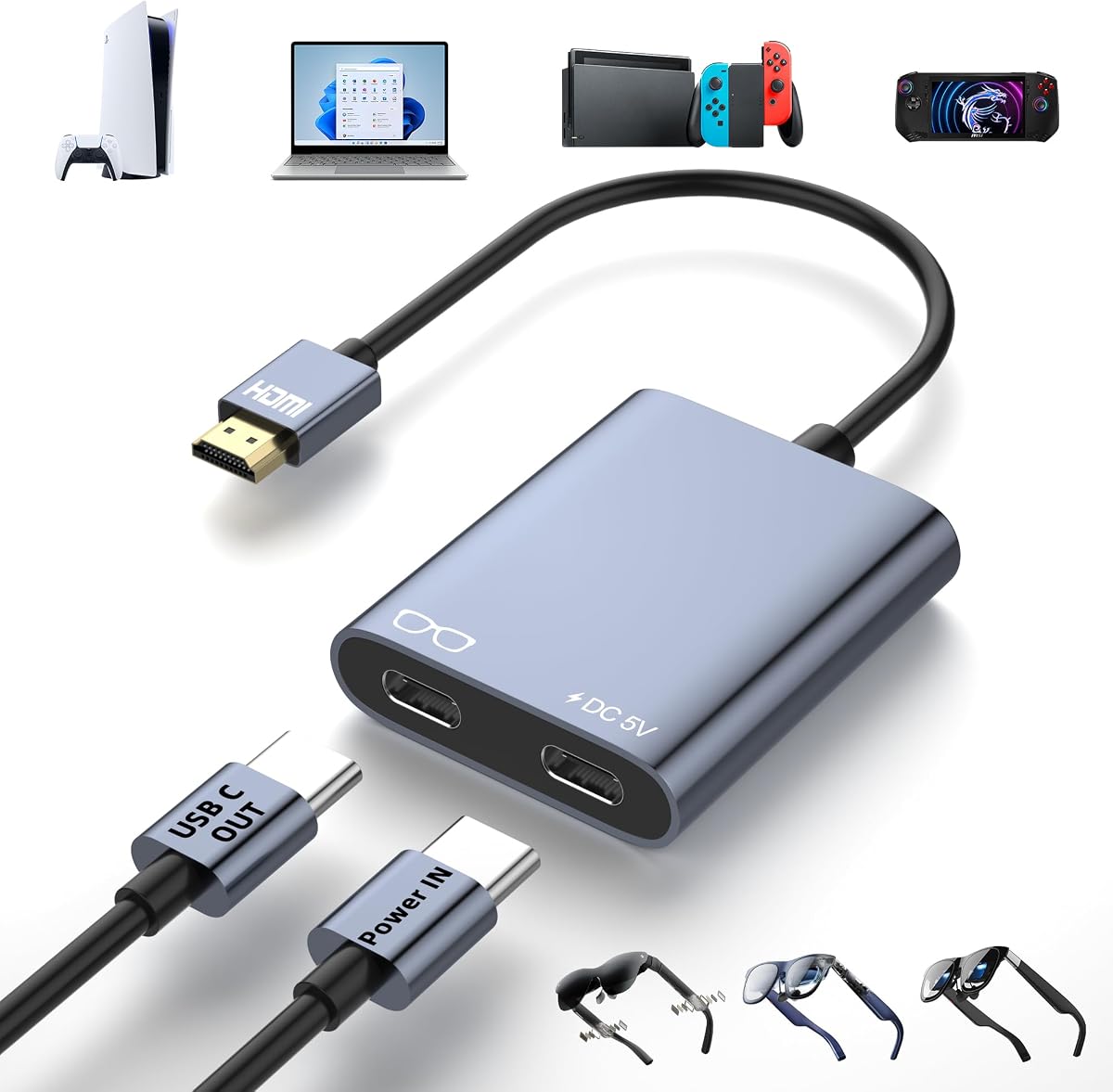
HDMI to USB C Adapter for AR Glasses
4.4Editor score
4K at 60Hz output
Play-and-charge power
Wide device support
No-driver setup
Discover the best AR Glasses HDMI Adapter options by comparing video, power, compatibility, audio, portability, and setup needs.
An AR Glasses HDMI Adapter connects an HDMI source, such as a game console or laptop, to USB-C smart glasses or portable displays. A worthwhile unit should provide stable video, adequate power, correct one-way signal conversion, and broad compatibility without demanding complicated software or driver installation.
This guide compares ten adapters using the specifications and compatibility information supplied for each product. It examines supported resolution, wired or wireless operation, power requirements, connector design, source compatibility, display compatibility, audio behavior, portability, and important limitations involving VR headsets or bidirectional conversion.
Each review explains where the adapter is strongest, where its requirements may affect setup, and who is most likely to benefit. Ratings and specifications can change as products and firmware evolve, and prices fluctuate, so readers should confirm the latest listing details and device requirements before purchasing.
4.4Editor score

4.6Editor score

4.3Editor score
The table below compares all ten adapters across their core video, connection, power, and compatibility characteristics. Special-purpose wireless and streaming designs are included alongside wired HDMI-to-USB-C converters so readers can choose the connection style that matches their source devices and mobility needs.


This AR Glasses XR Converter earns the top position because it combines a 4K at 60Hz specification with one of the broadest explicit device lists in the group. Its 4.6 rating also leads the ten products reviewed. The adapter is built around a straightforward HDMI-source-to-USB-C-display path, with external 5V power used to feed the connected glasses or other display.
We may earn a commission when you buy through this link, at no additional cost to you.
Compatibility is the principal strength. The listing names XREAL One and Air-series models, Rokid Air and Max, RayNeo Air 2s, VITURE Pro and One, and Thunderbird AR. Its source coverage includes Switch 2 and Switch 1, PS5 and PS4, Xbox One, Steam Deck, ROG Ally, streaming devices, laptops, MacBook, iMac, iPad, and video-capable Android or Windows devices. A full-function USB-C connection carries display information and power where supported.
There are meaningful constraints. The receiving USB-C device must support DisplayPort Alt Mode for video and audio input, and the adapter needs an external 5V source before it will output a signal. It cannot reverse the conversion path, serve as a docking station, send audio to headphones, or support Meta Quest, PICO, and HTC Vive headsets. Those are appropriate exclusions for a focused display converter, but users expecting a universal docking solution will need a different product.
This is the strongest general recommendation for an AR Glasses HDMI Adapter because it balances resolution, portability, useful power delivery, warranty coverage, and broad platform awareness. It suits console players, movie viewers, and mobile users who want a compact wired converter and have glasses with USB-C DP Alt Mode. The mandatory power connection makes it less convenient than a self-contained battery model, but that trade-off supports more stable operation.
The adapter combines a source-side HDMI connection, a display-side USB-C port, and a separate 5V power input. Connect power first when using a portable display, then secure the HDMI source and USB-C display connections to reduce the likelihood of flickering or a black screen.
AR glasses use different display modes and firmware behavior, so an adapter that only lists generic USB-C support can still create setup problems. This product explicitly covers several major smart-glasses families and directs XREAL users toward DisplayPort mode, making its guidance more useful before purchase.
We may earn a commission when you buy through this link, at no additional cost to you.
This HDMI-to-USB-C AR Hub is a strong value-oriented option for people who mainly want to connect consoles, laptops, streaming devices, and portable screens. Its 4.4 rating places it near the front of the group, while the 4K at 60Hz target provides a useful ceiling for modern gaming and streaming setups.
We may earn a commission when you buy through this link, at no additional cost to you.
The converter uses a male HDMI plug for the source and a female USB-C connection for the glasses or monitor. A dedicated 5V power port is designed to supply the connected display and keep the video path stable. The product information calls for 5V at 1A or higher and includes a USB-A-to-USB-C power cable. This arrangement is particularly useful for gaming sessions that could otherwise be interrupted by a depleted glasses battery.
Compatibility covers XREAL Air, Air 2, Air 2 Pro, One, One Pro, and Ultra; Rokid Air and Max; RayNeo Air 2s XR; VITURE Pro and One; and Thunderbird AR. Consoles and handheld gaming devices can use their HDMI output, while compatible portable monitors and USB-C projectors are also supported. As with many adapters in this category, XREAL users may need to select DP mode, and disabling HDMI-related DHCP behavior can be necessary on some laptops and PlayStation systems.
This hub is best for buyers who want broad wired compatibility, dependable external power, and a clear one-way signal path without paying for a wireless receiver. It is less convenient for spontaneous travel because it needs a separate power source, and Studio Display users will need external speakers. Within those limits, it combines useful features with an attractive rating and two-year warranty.
The source list includes Switch 2 and Switch 1, PS5 and PS4, Xbox One, Steam Deck, and ROG Ally. Using these devices in TV or docked output mode gives the adapter a straightforward role: accept HDMI video and deliver it to glasses that support USB-C DisplayPort Alt Mode.
A separate 5V supply reduces the chance of black screens, flicker, and disconnections during long use. It also allows power to reach compatible glasses or displays while the adapter carries video, although the power and video roles remain separate functions rather than a general-purpose USB-C docking arrangement.
We may earn a commission when you buy through this link, at no additional cost to you.
The RayNeo HDMI 2.0 Adapter is the most specialized premium choice. It is explicitly designed for RayNeo Air 4 Pro and GT-series glasses, along with compatibility for Air 3-series models. Its 4.3 rating and HDR10 support set it apart from generic converters whose primary appeal is basic signal conversion.
We may earn a commission when you buy through this link, at no additional cost to you.
HDR10 can improve contrast and color when the source device, glasses, and adapter all support it. The output ceiling is 4K at 30Hz, with 2K at 30Hz and 1080p at 120Hz also listed. That makes it especially relevant for cinematic viewing and a 201-inch virtual-screen experience, while high-refresh 4K gaming remains better served by adapters explicitly supporting 4K at 60Hz.
The adapter supports HDMI sources including Xbox, PS4, and PS5. It also offers a Lightning connection for compatible iPhones through the iPhone 14 generation, but an Apple Digital AV Adapter is required and is not included. Its simultaneous charging capability helps preserve battery life during extended gaming or streaming, and the product is described as using rugged materials for long sessions.
Choose this model when RayNeo glasses are central to the setup and HDR10 matters more than 4K at 60Hz. It offers a more tailored experience than a universal hub and avoids some of the generic compatibility caveats that come with broad third-party products. Buyers using a Lightning iPhone should plan for the additional Apple accessory and verify that their exact model and glasses firmware support the intended configuration.
The adapter's HDR10 support can produce richer contrast and more vibrant color when the content source and RayNeo display also support the format. Without an HDR10 source, the feature cannot create high dynamic range content on its own, so the complete playback chain matters.
Purpose-built compatibility makes this a sensible premium choice for Air 4 Pro, GT-series, and supported Air 3-series users. Its charging function and high-resolution options are particularly valuable during long gaming or streaming sessions where battery management becomes important.
We may earn a commission when you buy through this link, at no additional cost to you.
The Guermok HDMI to USB C Video Display Adapter offers a clean, portable wired conversion at 4K and 60Hz. Its 4.2 rating is competitive within the group, and the supplied 4.9-foot HDMI-to-USB-C adapter plus 3.3-foot full-function USB-C cable provide enough flexibility for most entertainment setups.
We may earn a commission when you buy through this link, at no additional cost to you.
The adapter works with XREAL One, One Pro, Air, Air 2, and Air 2 Pro; RayNeo Air-series glasses; Rokid Max; compatible USB-C displays; and projectors. Source options include Switch 2 and Switch 1, Steam or ROG through a dock with HDMI output, PS5 and PS4, Xbox Series X and S, desktop PCs, laptops, and media players. The aluminum housing is intended to dissipate heat during extended operation.
Its limits are functional and deliberate. Conversion runs only from an HDMI source to a USB-C display, with no reverse direction or device-recognition features. It cannot act as a video capture card, transmit USB data, enable spatial features, or activate 3D modes and companion-app functions. A 5V source between 1A and 1.5A must be connected, and using a higher-voltage supply or unsuitable multi-port fast charger is specifically discouraged.
This model suits travelers who want a compact, dedicated video adapter with a good cable package. It can serve gaming, presentations, mirroring, and movie viewing, but it is not intended to replace a full-featured USB-C dock. Buyers should prioritize the documented power limits and verify that their target glasses accept USB-C video and audio before ordering.
Including both a 4.9-foot HDMI-to-USB-C lead and a 3.3-foot full-function USB-C cable reduces the chance of discovering that a suitable cable is missing at setup time. The longer main cable is useful when the source sits away from the wearer's display position.
This adapter concentrates on moving HDMI video to a USB-C screen without adding capture, data, or docking functions. That narrow design can simplify use, but it also means that headphones, reverse conversion, and companion-app features should not be expected.
We may earn a commission when you buy through this link, at no additional cost to you.
The AIMIBO Wireless Display Adapter takes a different approach from the conventional wired converters. It can mirror an iPhone, iPad, Android phone, tablet, or laptop directly to AR glasses, televisions, portable monitors, or projectors. Its 4.2 rating reflects a useful alternative for mobile users who do not want an HDMI cable in the signal path.
We may earn a commission when you buy through this link, at no additional cost to you.
A 5000mAh internal battery provides up to seven days of standby time and approximately three to four hours of continuous use. Dual-band 2.4GHz and 5GHz Wi-Fi supports Full HD video at a 60Hz refresh rate, while AirPlay, Miracast, and DLNA cover common iOS, Android, Windows, and macOS workflows. Both HDMI and USB-C outputs expand support for XREAL, Rokid, RayNeo, and Viture glasses as well as standard displays.
The adapter does not provide every source capability out of the box. Direct wireless casting works with compatible mobile devices and computers, but an optional AIMIBO wireless transmitter is needed for HDMI or USB-C sources such as game consoles, cable boxes, DVD players, PCs, Switch, or PS5. That optional accessory can extend the range to as much as 165 feet and allows up to eight transmitters to be paired with a receiver.
This is the best option in the roundup for travel, presentations, and casual mobile viewing where wireless convenience outweighs 4K output. It is less appropriate for a gamer who needs a dependable wired 4K link between a console and glasses. Users should decide whether their priority is untethered casting or maximum wired fidelity before choosing.
The setup uses standard wireless-display functions rather than requiring a dedicated application. iOS and macOS users enter the startup PIN, while compatible Android and Windows devices can cast directly, making the adapter approachable for presentations and entertainment.
The internal battery removes the need for a wall charger during shorter sessions and makes the receiver easier to carry than a permanently cabled converter. Continuous runtime is shorter than standby time, so extended use still calls for the supplied USB-C charging cable.
We may earn a commission when you buy through this link, at no additional cost to you.
The Lemorele 4K 60Hz HDMI to USB C Adapter prioritizes a small body, straightforward operation, and enough video bandwidth for current gaming and media sources. Its 3.9 rating is the lowest among the ten products, but the stated 4K at 60Hz capability and broad source support remain relevant for compact setups.
We may earn a commission when you buy through this link, at no additional cost to you.
The adapter accepts HDMI signals from a Switch Dock, PS5, PS4, Xbox, Steam Deck Dock, laptops, and streaming boxes. It is compatible with XREAL Air, Rokid, RayNeo, and other mainstream AR glasses, as well as USB-C portable monitors. The dedicated DC 5V at 2A input is intended to address black screens and unstable output during prolonged operation.
Two Type-C ports have separate roles: one carries video to the display, while the other is exclusively for power input. This distinction is important and should be respected during setup. The package does not include a power adapter, and reverse signal transmission is unavailable. Although the product works with Windows and macOS systems, it does not require drivers or software installation.
Its 1.93-by-0.98-by-0.39-inch body and 0.57-ounce weight make it one of the more compact options in the guide. It is a reasonable choice for gamers who already own a suitable 5V supply and want a dedicated converter without wireless setup. The missing included charger and relatively low rating make the alternatives with bundled power cables more complete for first-time buyers.
The two Type-C connections are not interchangeable. One outputs video to the glasses or monitor, while the other accepts power. Knowing this before setup avoids connection errors and helps buyers determine what additional cable or charger they may need.
Support for docked Switch, PlayStation, Xbox, and Steam Deck sources reflects the adapter's main use case. It is best viewed as a compact link between an existing HDMI output and compatible USB-C display hardware rather than a general-purpose docking station.
We may earn a commission when you buy through this link, at no additional cost to you.
The HDMI to Type-C Adapter is one of the lightest dedicated converters in this roundup, with an aluminum body listed at 0.035 pounds. It supports up to 4K at 60Hz and targets AR glasses and portable monitors, making it appealing for mobile entertainment and productivity.
We may earn a commission when you buy through this link, at no additional cost to you.
Compatibility is broad, covering XREAL 1S, One, One Pro, Air 2 Pro, Air 2, and Air; VITURE XR, Luma, Pro, and One; Rokid Air and Max; RayNeo Air 4 Pro, 3S Pro, 3S, and 2S; and USB-C portable monitors. HDMI sources include PS5, PS4, Xbox, PCs, laptops, television boxes, and Fire TV Sticks. The adapter supports picture and audio, subject to the connected display's capabilities.
Power is a central limitation. The adapter cannot power USB-C devices above 5 watts, so external power may be necessary for more demanding displays. It supports only the HDMI-source-to-USB-C-display direction and is not compatible with Meta-series headsets. For XREAL Air glasses without sound, the listing advises updating firmware and using the specified brightness-button procedure to release the device correctly.
This model is a good choice when low weight matters and the connected display can run with limited adapter power. Setup is direct: power the adapter, connect an HDMI cable from the source, and attach the USB-C cable to the glasses or monitor. Buyers should still verify their exact glasses model and any firmware-specific instructions before use.
At only 0.035 pounds, the adapter adds little bulk to a travel kit. Its aluminum construction also promotes heat dissipation, which is valuable during extended display sessions.
The stated 5-watt ceiling means not every pair of glasses or portable screens can be powered by the adapter itself. Users with higher-demand displays should arrange external power and confirm that their USB-C port supports the required video input.
We may earn a commission when you buy through this link, at no additional cost to you.
The AR Glasses Video Converter is a compact one-way adapter designed to carry 4K at 60Hz from HDMI equipment to compatible USB-C glasses and displays. Its 4.1 rating is solid for a product whose main strengths are straightforward video conversion, external power, and broad device coverage.
We may earn a commission when you buy through this link, at no additional cost to you.
The supplied 1-meter full-function USB-C cable is an important inclusion because it should support the display path rather than merely power charging. Compatible receivers include XREAL One, Air 2 Pro, Air 2, Air 2 Ultra, Rokid Air and Max, RayNeo Air 2s XR, VITURE Pro, and Thunderbird AR. Consoles, media players, Fire TV Stick, Google TV, portable monitors, and USB-C projectors are also named.
External 5V power is mandatory. The adapter's Type-C power port accepts 1A to 1.5A and is intended to stabilize the connected glasses or display. Without it, the product produces no video. It also remains strictly one-way, cannot serve as a capture solution for Meta Quest, PICO, or HTC Vive headsets, and does not support audio on Studio Display.
The low-latency design makes this converter appropriate for gaming as well as movies, presentations, and mobile productivity. Its aluminum housing provides portability and heat management. It is best for users who understand the distinction between a video adapter and a full dock, and who can plan to carry an appropriate 5V power source.
For stable results, connect the required 5V source before expecting a picture. The separate power architecture is intended to prevent the black screens and signal interruptions that can occur when a display draws too much energy from the converter alone.
The included full-function USB-C cable is designed for display use rather than only charging. It gives buyers one fewer connection to source and makes it easier to complete a working setup with compatible glasses immediately.
We may earn a commission when you buy through this link, at no additional cost to you.
The HDMI-to-USB-C AR Glasses Adapter stands out for supporting 4K at 60Hz and refresh rates up to 144Hz at 1080p. Its 4.3 rating places it solidly within the group, and the hub-style package includes both a 60-centimeter 4K HDMI cable and a 50-centimeter power cable.
We may earn a commission when you buy through this link, at no additional cost to you.
The listing identifies RayNeo, VITURE, XREAL, and Rokid glasses as supported categories, as well as USB-C portable displays. HDMI sources include Switch OLED and Switch 2, PS4 and PS5, Xbox, television boxes, and laptops. The included cables make it easier to assemble a full system, while a portable charger can be connected during travel to maintain operation when a stable outlet is unavailable.
Its power path has limits. The hub can supply up to 10 watts to the glasses or display but cannot charge the source device, meaning a console or laptop still needs its normal power arrangement. Portable displays should receive external power before being attached to the hub to reduce intermittent shutdowns or blackouts. The adapter also does not support the listed touchscreen function or DHCP behavior on certain sources.
This is a good choice for high-refresh gaming and users who prefer a hub package with both essential cables. Its notable limitation is the advice not to update Viture Beast to a system version released after October 2026, with a May version offered as a rollback target. Buyers who rely on that model should read the current compatibility guidance carefully before updating.
Support for 1080p at 120Hz and 144Hz can benefit fast-paced games when the source, cables, and glasses all support those modes. The adapter cannot create missing source quality, so every device in the chain must be capable of the selected resolution and refresh rate.
The hub is designed to power the glasses or portable display, not the HDMI source. Keeping source charging separate avoids trying to make one compact adapter serve incompatible power roles, although users may need to carry a portable charger for long sessions.
We may earn a commission when you buy through this link, at no additional cost to you.
The Lemorele Built-in 5000mAh Battery HDMI to USB-C Adapter is designed for convenient streaming with AR glasses. Its 4.5 rating is the second highest in the group, and the integrated battery distinguishes it from the many converters that require a separate power source during every session.
We may earn a commission when you buy through this link, at no additional cost to you.
The adapter combines HDMI-to-USB-C DisplayPort conversion with a power path for a Fire TV Stick. According to the supplied information, it can power all Fire TV Stick models while also running compatible Xreal Air, Rokid AR glasses, and USB-C DisplayPort portable displays. Maximum output is listed at 4K at 60Hz for supported devices.
Battery life is the main compromise. Continuous runtime with a Fire TV Stick and AR glasses is approximately three hours and 40 minutes at 50 percent brightness and full volume. Recharging takes about three hours with no load attached, and only a 5V at 2A adapter is supported. The adapter is therefore most convenient for trips and sessions where avoiding a power bank takes priority over unlimited runtime.
Its durable PC-and-ABS body is designed for portability, travel, camping, and business trips. This is a focused alternative for users whose entertainment setup centers on a Fire TV Stick and compatible glasses. It is less flexible as a general console adapter because the supplied information does not describe the same broad HDMI source support offered by the conventional hubs in the roundup.
Combining a streaming-stick power supply with HDMI-to-USB-C conversion can simplify a travel entertainment kit. The design reduces the number of separate components needed when the main source is a Fire TV Stick.
The stated continuous runtime is measured at 50 percent brightness and full volume, making it a reasonable guide rather than an unlimited-use claim. Travelers should carry the supplied charging cable when the viewing session may exceed roughly three and a half hours.
We may earn a commission when you buy through this link, at no additional cost to you.
The right AR Glasses HDMI Adapter depends on signal direction, display capabilities, power needs, and how you travel. These factors help separate a useful dedicated converter from a dock, capture card, or wireless receiver that serves a different purpose.
Most products in this guide convert in one direction only: an HDMI source sends video to a USB-C display. They cannot turn a laptop or phone into a USB-C receiving monitor, send USB-C video to an HDMI screen, or act as a bidirectional bridge. A USB-C source can still work if the device itself supports HDMI output through an appropriate port or dock, but the adapter's USB-C side is intended for the glasses or display rather than the source.
A USB-C port does not automatically guarantee that an AR headset can receive video. The receiving device should support DisplayPort Alt Mode, commonly called DP Alt Mode, for video and potentially audio. Some glasses also require a particular display mode, such as DisplayPort mode, and firmware updates can affect recognition. The XREAL models mentioned across several listings may require switching to DP mode according to the glasses manual, while certain Viture and Rokid devices have their own setup guidance.
A 4K at 60Hz specification gives the adapter ample capacity for common UHD content, but the entire chain determines the result. The source must output the desired resolution, the cable must carry it, and the glasses or display must accept it. Some products also list 1080p at 120Hz or 144Hz, which may be useful for fast gaming. The RayNeo premium model supports HDR10 but lists 4K at 30Hz rather than 4K at 60Hz, illustrating that the best adapter is the one aligned with a user's source and content.
Many small HDMI-to-USB-C adapters require external 5V power and produce no image without it. Some can power the connected glasses or display while carrying video, but the available wattage differs: examples include a maximum 10-watt output, 5V at 1.5A, and DC 5V at 2A. Do not confuse power delivered to the display with charging the HDMI source. Battery-equipped adapters are more self-contained, yet their continuous runtime is shorter and may depend on brightness, volume, and attached devices.
Video support does not always mean full audio support. The connected glasses must accept audio over USB-C, and some models require a DisplayPort audio mode. Studio Display is specifically called out as lacking audio in multiple listings, so external speakers are appropriate for that configuration. For basic game or movie audio, users should also choose a full-function USB-C cable rather than a charging-only lead and configure the source to send audio to the appropriate HDMI output.
A strong compatibility list can be misleading if it omits the user's actual equipment. Look for the named AR-glasses family and model, the specific console or streaming source, and any docking requirements. Switch, Steam, and ROG devices may require a dock with HDMI output rather than a direct USB-C connection. Portable monitors and projectors should accept USB-C video, while VR headsets such as Meta Quest, PICO, and HTC Vive generally need a capture-card approach instead of direct conversion.
A wired converter normally provides a more direct path and a higher specified resolution, making it well suited to gaming and stationary viewing. A wireless receiver offers mobility and can mirror phones, tablets, and computers through AirPlay, Miracast, or DLNA, but the reviewed wireless model is limited to Full HD at 60Hz and may need an optional transmitter for console or HDMI sources. The best choice depends on whether portability or maximum wired fidelity matters more.
Adapters range from extremely light aluminum shells to larger powered or battery-equipped units. Weight alone is not the only consideration: include the required power cable, power bank, HDMI lead, and glasses battery capacity when planning travel. Warranty coverage is also useful. Two products explicitly list a two-year warranty, while others provide a setup guide or customer support. Useful documentation about one-way operation, supported modes, and troubleshooting can be just as valuable as a longer warranty.
Begin by identifying the source and display sides. The HDMI end connects to the game console, laptop, media player, or streaming device, while the USB-C end connects to AR glasses or a portable display that support DP Alt Mode. For adapters with a separate power port, connect a compatible 5V source first. This also helps confirm whether the glasses require their own DisplayPort or glasses display mode.
Power the source, select the desired HDMI output, and attach the USB-C end to the glasses or monitor. If the picture is missing, reseat both connections, confirm that the USB-C cable supports video, and verify the source's display or DP output setting. Some PS4, PS5, and laptop setups require DHCP to be disabled. Firmware updates may also be necessary for particular XREAL or other glasses, so follow the current manufacturer instructions rather than changing several settings at once.
During use, keep the converter and cables stable, provide ventilation around an aluminum housing, and avoid sharply bending connectors. Do not exceed the stated power limits or substitute a higher-voltage source. For portable displays, connect external display power before the video path when instructed. Clean the connector surfaces with a dry, soft cloth, store the adapter away from moisture and extreme heat, and carry its dedicated power cable whenever external power is required.
No. The receiving glasses must support USB-C video input, normally through DisplayPort Alt Mode, and some models also require a particular display mode. Compatibility can vary by exact model and firmware, so check the product's named device list and the glasses manual before purchasing.
Most adapters in this roundup are one-way converters that send video from an HDMI source to a USB-C display. They do not support USB-C-to-HDMI conversion, reverse transmission, laptop receiving mode, or general USB data functions.
First confirm that external power is connected when the adapter requires it, then reseat the HDMI and USB-C cables. Make sure the glasses support DP Alt Mode, the correct display or DP mode is selected, and the source is outputting through its intended HDMI port. Firmware and DHCP settings can also affect recognition.
No, but most conventional models in this guide specify required 5V power. Battery-equipped receivers can operate without a plugged-in supply for several hours. For powered models, use only the specified voltage and current, and note that power delivered to the glasses generally does not charge the HDMI source.
Yes, when the console has an active HDMI output and the glasses accept USB-C video. The reviewed adapters list PS4, PS5, Xbox, Switch, and Switch 2 support in varying combinations. Some handheld systems need their dock or TV mode, and the source and glasses must both support the selected resolution.
The listed products are not directly compatible with those VR headsets. VR systems generally require a compatible video capture card and the appropriate software workflow rather than a simple HDMI-to-USB-C display-converter path. Check current headset instructions for the recommended connection method.
Audio is possible when the source sends HDMI audio, the glasses accept USB-C audio, and the selected cable carries both video and audio. Some glasses require a DP audio setting, while Studio Display is specifically identified as lacking audio support in multiple listings and needs external speakers.
Wireless is often more convenient for phones, tablets, presentations, and travel, but it can introduce less predictable latency and may have a lower maximum resolution. Wired adapters are generally better for consoles, direct HDMI sources, high-resolution gaming, and a stable low-latency connection.
The AR Glasses XR Converter stands out as the strongest general pick because it combines a 4K at 60Hz target, broad smart-glasses and source-device lists, external power support, a compact aluminum body, and a two-year warranty. The HDMI-to-USB-C AR Hub is a similarly capable budget-oriented alternative, while the RayNeo HDMI 2.0 Adapter offers premium HDR10 support for compatible RayNeo users.
The right alternative depends on the setup. AIMIBO is the most mobile-oriented option through wireless casting and a built-in battery, while the Lemorele battery adapter is convenient for Fire TV Stick streaming. For buyers with a specific XREAL, VITURE, Rokid, or RayNeo model, exact compatibility and required display mode should take priority over a generic compatibility claim or headline refresh rate.
Before ordering, verify the direction of conversion, DP Alt Mode support, resolution, refresh rate, audio behavior, power requirements, and included cables. Product firmware and specifications can evolve, and prices change over time, so checking the current listing and the latest glasses guidance will help prevent avoidable setup problems.