
8Bitdo Ultimate 2C Wireless Controller for Windows PC and Android
4.4Editor score
Hall Effect stick and triggers
1000Hz low-latency polling
Remappable R4 and L4
Explore the best 8BitDo Controller options for PC, Switch, Android, Apple, and retro gaming, with features, compatibility, controls, and dock comparisons.
An 8BitDo Controller can suit nearly any gaming setup, from competitive PC sessions to nostalgic Nintendo-inspired layouts and expansive Switch libraries. The strongest choices balance dependable wireless performance, precise sticks and triggers, useful remapping options, and broad device compatibility without losing the playful retro character associated with the brand.
We compared all ten controllers by examining platform support, connection methods, joystick and trigger technology, polling rates, back controls, motion functions, charging options, and customization features. The guide covers modern Ultimate 2 variants, the compact Ultimate 2C, the retro-focused 64 and SN30 Pro, and the adaptable Pro 3.
Each review reveals where a controller stands out, which compromises or setup requirements deserve attention, and the type of player it suits best. Product listings and configurations can change over time, so verify the current platform requirements, included accessories, firmware details, and current price before making a final purchase.
4.4Editor score

4.5Editor score
4.6Editor score
The table below places all ten controllers side by side, emphasizing their principal connection options, control hardware, platform coverage, and standout extras so shoppers can quickly narrow the field before reading the detailed reviews.


The 8Bitdo Ultimate 2 Wireless Controller is the most complete general-purpose choice in this guide, combining TMR joysticks, switchable Hall Effect triggers, a 1000Hz polling rate, extensive wireless support, and a multifunctional charging dock. Its 4.5 rating reflects a controller designed for players who want modern responsiveness without giving up the familiar 8BitDo visual identity.
We may earn a commission when you buy through this link, at no additional cost to you.
Its most important feature is the 8Speed 2.4G system, which the product information describes as delivering a stable connection with latency under 1ms, strong interference resistance, and a range of up to 10 meters. The controller also supports 1000Hz polling over both 2.4G and wired connections, while customizable six-axis motion control, rumble, a turbo function, and two pro-style back paddles broaden its appeal across different game genres.
The trigger mode switch is especially useful because it lets the player move between linear Hall Effect triggers and non-linear tactile triggers. Meanwhile, extra R4 and L4 bumpers provide faster inputs than a standard four-button shoulder arrangement, and the included dock and USB-C adapter make it easier to keep the controller ready to play. The trade-off is that this is not a minimalist gamepad, and some of its advanced functionality takes more investigation than a straightforward retro controller requires.
This is the strongest recommendation for a player who primarily uses a PC, Apple device, Steam setup, or Android hardware and wants broad control options. It also suits buyers who value a dock, modern polling performance, programmable behavior, and extensive physical controls. Those who only need a basic controller for older games may find the Ultimate 2C or 64 more straightforward, but the flagship Ultimate 2 offers the most versatile feature set.
The combination of 8Speed 2.4G wireless technology, 1000Hz polling, and wired operation makes this controller well suited to games where timing matters. Its wide 2.4G range also gives players more freedom to sit back from a display without relying on a short cable.
Two pro-style rear buttons, additional R4 and L4 bumpers, remappable functions, trigger-mode switching, and support for 8BitDo Ultimate Software V2 make the controller adaptable to fast-paced titles, platform favorites, and different control preferences.
We may earn a commission when you buy through this link, at no additional cost to you.
The 8Bitdo Ultimate 2C Wireless Controller delivers a focused PC-and-Android experience, combining Hall Effect joysticks, Hall triggers, 1000Hz polling, and extra R4 and L4 bumpers. Its 4.4 rating makes it a compelling budget selection for players who want responsive modern hardware without paying for the flagship controller's full accessory and software ecosystem.
We may earn a commission when you buy through this link, at no additional cost to you.
The controller supports both 2.4G and wired connectivity, and its 1000Hz polling rate applies to those two modes. Hall Effect joysticks are paired with wear-resistant metal rings, while Hall triggers add another layer of precision-oriented hardware. The additional R4 and L4 bumpers can be remapped directly, and a turbo function is included without requiring the 8BitDo Ultimate Software V2 setup found on higher-tier models.
Its main limitation is platform scope. This model is designed for Windows and Android rather than the Switch family, and it does not include the charging dock found with the Ultimate 2. Some buyers may also expect motion control, software-managed profiles, or a wider range of connection methods, but the direct mapping and polished bumpers and D-pad keep the core experience practical.
Choose the Ultimate 2C if your games run on a Windows PC or Android device and you want a 1000Hz connection, Hall Effect controls, and extra rear-facing bumpers at a more restrained cost. It is particularly well suited to action games, platformers, and multiplayer titles. If your setup includes a Switch or you want a dock included, one of the Ultimate 2 Bluetooth versions will serve you better.
The Ultimate 2C keeps its most important adjustments close at hand. R4 and L4 mappings and the turbo function can be configured without software, reducing setup friction for players who want quick control changes rather than a deeper customization workflow.
Hall Effect joysticks, Hall triggers, and 1000Hz polling under 2.4G and wired modes create a strong foundation for PC games. The lighter, tactile shell also makes this a practical choice for shorter sessions and mobile gaming.
We may earn a commission when you buy through this link, at no additional cost to you.
The 8Bitdo Ultimate 2 Bluetooth Controller is tailored to players who move between Switch, Switch 2, and Windows. It combines TMR joysticks, a switchable trigger system, motion controls, vibration, an integrated charging dock, and support for 8BitDo Ultimate Software V2, earning a 4.3 rating for a well-rounded modern setup.
We may earn a commission when you buy through this link, at no additional cost to you.
Its integrated dock keeps the controller charged and allows it to reconnect automatically when removed. The TMR joystick system is designed to improve sensitivity, precision, and durability, while the RGB Fire Ring and wear-resistant joystick rings add visual and practical refinements. A trigger mode switch offers a choice between linear Hall Effect behavior and non-linear tactile response.
Motion control and vibration are supported for Switch, alongside turbo, wake-on-shake, and software-based customization. The important caveat is platform setup: Switch 2 compatibility requires both the controller and adapter to receive the latest firmware. Buyers who do not want to manage firmware updates, or who need motion functions on Windows, should check those limitations before buying.
This model is a strong choice for a Nintendo-centered library that also includes PC games. The dock is particularly convenient for a living-room setup, while the trigger and stick hardware should satisfy players who want more precision than a basic retro pad. If Apple or Android support is the priority, the flagship Ultimate 2 for PC and mobile is a closer match.
The integrated charging dock is designed for a stationary setup and reconnects the controller when it is removed. That makes the controller easy to move between docked and handheld play without treating battery management as a constant concern.
TMR joysticks, switchable triggers, and wear-resistant rings provide a modern control foundation. The extra R4 and L4 bumpers and support for Ultimate Software V2 make the controller suitable for players who alternate between Switch and Windows.
We may earn a commission when you buy through this link, at no additional cost to you.
The 8Bitdo 64 Bluetooth Controller is the list's clearest choice for players who want a nostalgic controller shape and broad platform support. Compatible with Analogue 3D, Switch, Switch 2, Windows, and Android, it combines Bluetooth and wired USB connectivity with a 4.6 rating that suggests strong satisfaction among buyers.
We may earn a commission when you buy through this link, at no additional cost to you.
Its defining feature is support for both D-input and S-input modes, making it especially appropriate for classic games and emulators while remaining usable with contemporary software. Vibration is available on Analogue 3D and Switch titles through Nintendo 64 Online, and a turbo function provides a familiar convenience from retro controllers.
The controller does not offer the extra rear paddles, high polling rates, motion sensors, or customizable trigger modes found in the Ultimate 2 family. Its layout also intentionally follows the classic N64 design, which will appeal to nostalgic players but may feel limited for modern action games. Switch 2 use also requires the latest firmware update.
This is ideal for a retro collection, a Nintendo 64-inspired gaming setup, or a player who wants one controller that can move between older-style experiences and modern platforms. It is less convincing for competitive shooters or games that depend on many additional buttons. For a simple, charming retro pad with modern wireless convenience, it remains an especially appealing option.
D-input and S-input modes preserve the control patterns associated with classic Nintendo games. That makes the controller more useful across an established retro library than a modern-layout controller would be.
Bluetooth and wired USB operation give the controller flexibility across Analogue 3D, Switch, Switch 2, Windows, and Android. Support for firmware updates also helps keep it ready for newer platform releases.
We may earn a commission when you buy through this link, at no additional cost to you.
The 8Bitdo Sn30 Pro Wireless Controller combines a compact retro design with modern control hardware, motion functions, and unusually broad platform support. Its 4.6 rating reflects a controller that works well for Switch, PC, Steam Deck, Android, Raspberry Pi, iPhone, iPad, macOS, and Apple TV users.
We may earn a commission when you buy through this link, at no additional cost to you.
Hall Effect joysticks form the precision centerpiece, while clickable sticks, a proper D-pad, rumble vibration, six-axis gyro controls, home and screenshot buttons, and a USB-C connector make it practical beyond simple retro games. Its rechargeable 480mAh battery is stated to provide up to 18 hours of play after a charging period of roughly one to two hours.
The main trade-off is portability versus physical scale. At 144 by 63.5 by 32.5 millimeters, the controller is easy to carry, but players with larger hands may prefer a full-sized gamepad. The listed battery capacity is also less advanced than the power systems highlighted in newer premium products, and exact runtime can depend on use and settings.
This Sn30 Pro is an excellent match for a player who wants nostalgia without settling for a limited feature set. Its compact body works particularly well for travel, and the broad compatibility makes it useful in mixed-device homes. Those who prioritize a large grip, charging dock, or high polling rate should instead examine the Ultimate 2 and Pro 3 models.
The SN30 Pro avoids the usual trade-off between nostalgic appearance and modern conveniences. Clickable joysticks, vibration, motion controls, programmable functionality, and a rechargeable battery make it a complete daily gamepad.
Official support across major desktop, mobile, and streaming platforms makes the controller unusually versatile. Bluetooth provides cable-free convenience, while the USB-C connection and compact dimensions suit travel.
We may earn a commission when you buy through this link, at no additional cost to you.
The Crystal Purple 8Bitdo SN30 Pro Bluetooth Controller delivers the same recognizable retro-inspired foundation in a visually distinctive transparent finish. Its 4.6 rating reflects a well-liked version of the SN30 Pro with clickable joysticks, rumble, motion controls, and compatibility across Switch, Switch 2, Windows, macOS, Android, and Steam.
We may earn a commission when you buy through this link, at no additional cost to you.
The classic cross button and four-shoulder design preserve a familiar retro identity, while the rechargeable battery, Bluetooth, and USB-C connectivity make it convenient for contemporary use. The stated battery life reaches 16 hours with a one-to-two-hour charging time, and home and screenshot buttons add platform-friendly conveniences.
Compared with the G Classic SN30 Pro in this guide, the Crystal Purple model is distinguished primarily by its transparent visual treatment rather than an entirely different control architecture. It does not include rear paddles or a charging dock, and its more compact proportions may not suit every hand. The listed platform support should still be checked against the exact games and applications you intend to use.
Choose this version if you want the SN30 Pro's useful feature set and a colorful, eye-catching shell for a gaming setup. It is a particularly good fit for retro libraries, handheld play, and players who want a controller to stand out visually. Those who need maximum speed, extensive remapping, or a docked charging system should look toward the Ultimate 2 line.
The translucent crystal purple shell gives the familiar SN30 Pro design a more expressive appearance. It suits a visible desk or display setup where the controller is as much a personal accessory as a gamepad.
Motion controls, rumble, clickable sticks, custom keys, and wireless connectivity expand what the classic appearance can do. Dual connection support also gives players a wired alternative when desired.
We may earn a commission when you buy through this link, at no additional cost to you.
The Dark Blue 8Bitdo Ultimate 2C Wireless Controller is a highly rated, focused option for Windows 10 or later and Android 9.0 or later. It pairs a 4.6 rating with 1000Hz polling, Hall Effect joysticks and triggers, and remappable R4 and L4 bumpers, making it one of the strongest budget choices in the lineup.
We may earn a commission when you buy through this link, at no additional cost to you.
Windows players can use the 2.4G receiver or a wired connection, while Android uses Bluetooth. The mode switch makes the distinction clear, and 1000Hz polling is supported under both 2.4G and wired modes. Hall Effect sticks are reinforced by wear-resistant metal rings, and the refined bumpers and D-pad add a more tactile feel.
Its limitations are purposeful. There is no listed support for Switch systems, no charging dock, and no software requirement for the main R4 and L4 remapping functions. That makes setup easier but also means the controller does not offer the deeper profile and sensitivity customization found in the premium Ultimate Software V2 models.
This is a strong recommendation for a PC or Android player who wants modern polling and stick technology in a lightweight package. It works especially well for action games, competitive multiplayer, and platformers where the extra bumpers can be assigned to useful commands. Switch owners should look at the Ultimate 2 Bluetooth editions, while buyers wanting a dock and more elaborate software control should consider the flagship versions.
A dedicated mode switch separates the controller's Windows and Android behavior. Windows can use 2.4G or wired connectivity, while Bluetooth serves Android, making the same controller practical for a desktop-and-mobile setup.
The R4 and L4 buttons can be personalized directly, and the turbo function is available without software. For players who want extra controls but prefer a straightforward setup, this is an efficient compromise.
We may earn a commission when you buy through this link, at no additional cost to you.
The Purple 8Bitdo Ultimate 2 Wireless Gaming Controller combines a striking colorway with a strong PC-and-mobile control package. Its 4.4 rating accompanies TMR joysticks, switchable Hall Effect triggers, 1000Hz polling, 8Speed 2.4G wireless technology, a charging dock, and an RGB Fire Ring.
We may earn a commission when you buy through this link, at no additional cost to you.
For PC, the controller supports 2.4G and wired connections, while Android uses Bluetooth. The product information highlights 8Speed wireless performance with latency as low as 1ms, interference resistance, and a range of up to 10 meters. Pro-style back buttons, extra bumpers, tactile shoulder controls, rumble, a turbo function, and motion control add breadth to the design.
Compared with the black flagship Ultimate 2, this version primarily changes the visual presentation rather than the core feature hierarchy. It still omits native Switch support, and its RGB Fire Ring may be less useful in games or applications that do not expose lighting controls. Buyers who need a large customization suite may also find the platform-specific support for 8BitDo Ultimate Software V2 less comprehensive than on the Switch-focused model.
This is the right choice for a PC or Android setup where color, lighting, and a dock matter. The modern control hardware makes it suitable for fast games, and the included USB-C adapter supports a tidy setup. If the priority is broad platform support rather than a purple design, the black Ultimate 2 or Pro 3 offers a more versatile alternative.
The purple shell and interactive RGB Fire Ring give the controller more visual personality than a standard gamepad. The lighting is designed to add real-time effects where the game or software supports it.
The 8Speed receiver, 1000Hz polling, TMR joysticks, and switchable triggers create a capable PC control package. Wired operation is also available when maximum consistency is preferred.
We may earn a commission when you buy through this link, at no additional cost to you.
The Black 8Bitdo Ultimate 2 Bluetooth Controller with Charging Dock is the premium all-rounder in this roundup, combining Switch, Switch 2, and Windows support with the highest supplied rating, 4.7. It adds TMR joysticks, switchable triggers, extra bumpers, pro-level rear buttons, an RGB Fire Ring, and a full charging dock.
We may earn a commission when you buy through this link, at no additional cost to you.
Its connection flexibility is extensive: Switch can use Bluetooth, 2.4G, or wired USB, while Windows uses 2.4G or wired USB. 8BitDo Ultimate Software V2 supports button mapping, joystick and trigger sensitivity adjustment, vibration control, macros, controller profiles, and profile switching. Software access requires a wired USB or 2.4G connection on Windows or macOS.
The controller also includes a charging dock, a USB-C adapter, wear-resistant joystick rings, tactile bumpers and D-pad, rumble, turbo, wake-on-shake, and motion control for Switch. As with other Switch 2-compatible options in this list, the controller and adapter need the latest firmware. Motion is limited to Switch, so PC players should not assume that every function carries across platforms.
This is an excellent recommendation for a serious Switch or mixed-platform setup, especially for players who want a dock, wireless flexibility, and deep customization. It also suits users who value physical rear controls and remappable shoulder buttons. Buyers who mostly game on Android or Apple devices may find the non-Bluetooth Ultimate 2 more appropriate, while the Pro 3 offers swappable ABXY buttons for another kind of premium flexibility.
Ultimate Software V2 goes well beyond basic button reassignment. Players can tune sensitivity, vibration, macros, and complete profiles, then switch between configurations with the dedicated profile button for different games or sessions.
TMR joysticks, switchable Hall Effect triggers, pro-style back buttons, and extra R4 and L4 bumpers offer multiple paths to faster input. The dock, adapter, and polished button layout make this a natural centerpiece for a dedicated gaming station.
We may earn a commission when you buy through this link, at no additional cost to you.
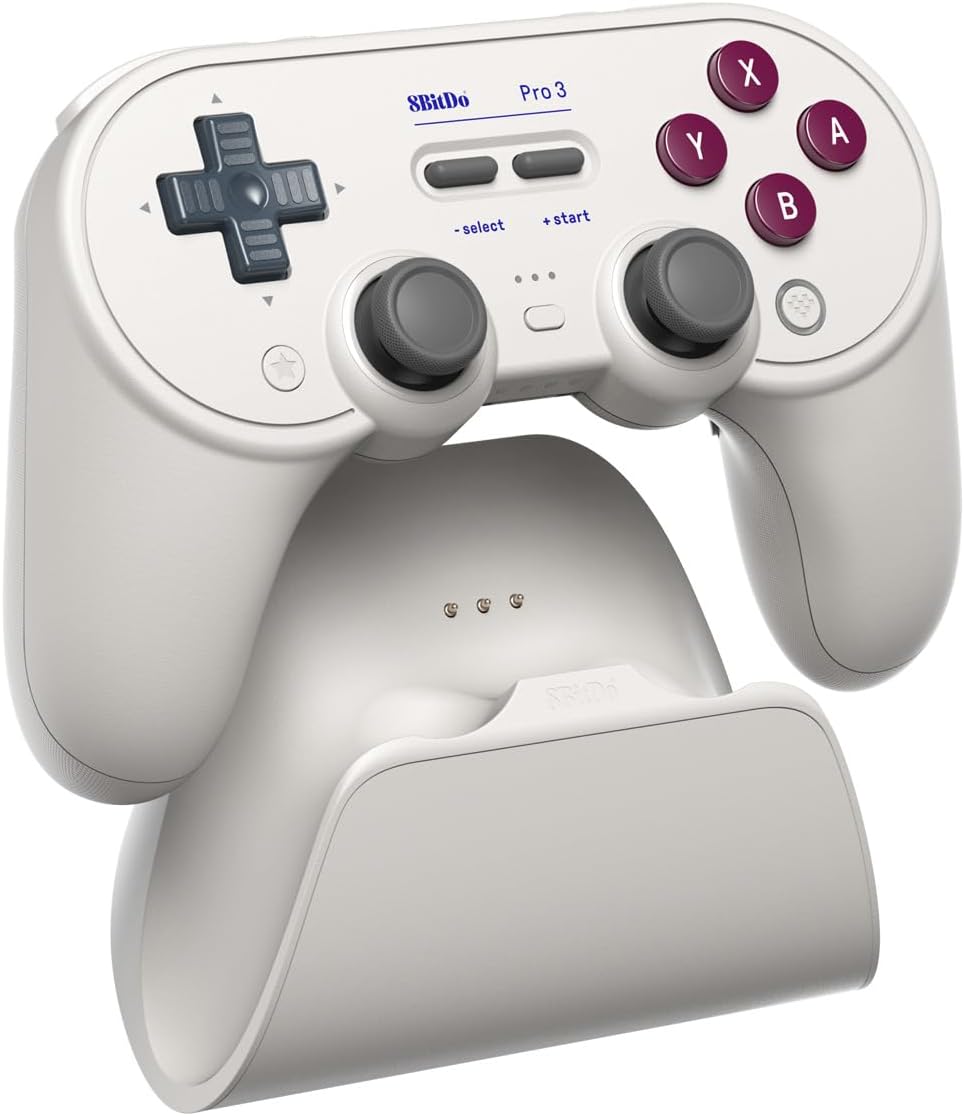
The 8Bitdo Pro 3 Bluetooth Controller with Charging Dock is the most adaptable premium option here, earning a 4.6 rating and supporting Switch 1, Switch 2, Windows PC, Apple, SteamOS, and Android. Its standout feature is a set of magnetic ABXY buttons that can be rearranged between Switch and Xbox layouts.
We may earn a commission when you buy through this link, at no additional cost to you.
The included button puller makes those layout changes accessible, while the integrated charging dock houses a USB-C 2.4G receiver that can be used separately or kept in the dock to extend signal range. TMR joysticks, a 12-bit ADC sampling chip, Hall Effect triggers, pro-style rear buttons, and remappable R4 and L4 bumpers complete the premium hardware package.
The controller includes two swappable ball-top joystick caps, adding a playful option to an otherwise advanced design. It supports three custom profiles, 8BitDo Ultimate Software V2, wake-on-shake, vibration, turbo, and motion control. Motion is limited to Switch and Steam, and the swappable ABXY mechanism adds a small amount of setup work for users who switch layouts often.
This is the recommendation for buyers who move between many ecosystems and want one premium controller to cover them. The magnetic buttons are especially valuable for players who alternate between Nintendo and Xbox conventions, while the receiver dock, TMR sticks, and trigger switching appeal to performance-focused users. If a simpler fixed layout and the lowest possible learning curve matter more, the Ultimate 2 line is easier to adopt.
Magnetic ABXY buttons can be rearranged to match Switch or Xbox conventions, and a dedicated puller is included. This is particularly useful for games, storefronts, and players whose preferred label positions differ by platform.
The dock charges the controller and stores the USB-C 2.4G receiver. Because the receiver can be used separately, it can also be repositioned to extend signal range or placed closer to a PC for a cleaner connection.
We may earn a commission when you buy through this link, at no additional cost to you.
The right 8BitDo Controller depends on your devices, preferred layout, desired level of customization, and tolerance for setup. Consider the following factors before comparing the final details on each listing.
Start with every device and service you expect to use. Some models focus on Windows and Android, the Ultimate 2C line excludes native Switch support, and the Pro 3 extends across Switch, Switch 2, Windows PC, Apple, SteamOS, and Android. The SN30 Pro and 64 also cover unusually broad collections, but the exact operating-system requirements and game support should be checked rather than assumed.
8BitDo controllers use a mixture of Bluetooth, 2.4G wireless, and wired USB depending on the model. The Ultimate 2 family and Ultimate 2C emphasize 1000Hz polling over 2.4G and wired modes, while the 8Speed system promises especially low-latency 2.4G performance. Bluetooth is convenient for mobile and Switch play, but players seeking the most consistent PC connection may prefer 2.4G or wired operation.
The lineup includes TMR and Hall Effect control systems. The Ultimate 2, Ultimate 2 Bluetooth, and Pro 3 use TMR joysticks, while the Ultimate 2C and SN30 Pro models use Hall Effect joysticks. TMR models also offer switchable Hall Effect triggers, allowing players to choose between linear behavior and non-linear tactile response. Whichever system you choose, check the feel and platform support before ordering.
The 64 and SN30 Pro prioritize classic shapes, clickable sticks, a proper D-pad, and a smaller footprint. The Ultimate 2 and Pro 3 provide additional shoulder inputs, rear paddles, and more conventional full-sized ergonomics. The Pro 3 goes further with magnetic ABXY buttons that can be rearranged between Switch and Xbox styles. Choose the layout that matches both your favorite games and your hand size.
Customization ranges from simple hardware shortcuts to full profile management. The Ultimate 2C and Ultimate 2 PC models offer remappable R4 and L4 buttons without requiring software, while 8BitDo Ultimate Software V2 supports mapping, sensitivity, vibration, macros, and profiles on supported Ultimate and Pro models. Software-based control offers greater depth, but it may also require a wired or 2.4G connection on a computer.
A charging dock is included with the Ultimate 2 Bluetooth, Ultimate 2 PC and mobile, and Pro 3 controllers. The SN30 Pro models use rechargeable batteries and USB-C charging, with stated play times of 18 and 16 hours for the respective listed versions. A dock is convenient at a fixed gaming station, while a compact cable-based setup may be easier for players who travel regularly.
Motion control and vibration can add meaningful value in supported action, adventure, and platforming games, but these functions vary by platform. The Ultimate 2 Bluetooth supports motion for Switch, and the Pro 3 supports it for Switch and Steam. RGB Fire Ring lighting on several Ultimate 2 models and Pro 3 offers visual flair, though it is most useful in games or software that expose lighting controls.
Some current-platform compatibility depends on updates. The Ultimate 2 Bluetooth and 64 require the latest firmware for Switch 2 support, and the Ultimate 2 Bluetooth listing also calls for updating the controller and adapter. Conversely, some packages include a dock, USB-C adapter, receiver, button puller, or swappable caps. Check the package contents as carefully as the headline features to avoid missing a needed accessory.
Begin by charging the controller according to the instructions, then install any required firmware before attempting platform-specific features. For 2.4G models, connect the supplied receiver to the intended device and use the controller's mode switch to select the appropriate connection. Bluetooth controllers require pairing, while wired models should be connected with their included USB cable. Confirm button orientation and stick behavior in the game or operating system before assigning custom commands.
Take a few minutes to configure the controls that matter most. The Ultimate 2C's R4 and L4 buttons and turbo function can be adjusted without software, while compatible Ultimate and Pro controllers can be opened in 8BitDo Ultimate Software V2. Available options may include mapping, sensitivity, vibration, macros, and profiles. If using the Pro 3's magnetic ABXY buttons, power the controller off before changing the arrangement and reinstall them carefully with the supplied puller.
For storage, keep the controller away from moisture, direct heat, and heavy impact, and do not pull on a cable while the device is connected. Clean the shell and control surfaces with a soft dry or lightly damp cloth, avoiding harsh liquids that could damage the finish. Charge the controller periodically, inspect the USB-C port and contacts for debris, and update firmware when a new version addresses compatibility or fixes problems. A controller used less often should be stored without a tightly wrapped cable around it.
The Ultimate 2 and Ultimate 2C families are the most direct choices for Windows because they emphasize 2.4G and wired performance with 1000Hz polling. The Ultimate 2 adds more connectivity options, a charging dock, and deeper software customization, while the Ultimate 2C offers the more focused and restrained package. Players who also use a Switch should also consider the Ultimate 2 Bluetooth or Pro 3.
Yes. The Pro 3 uses magnetic ABXY buttons that can be rearranged between Switch and Xbox layouts. A dedicated button puller is included for removing and repositioning the caps. The controller should be powered off during the change, and each button should be fitted securely before the controller is used again.
No. The Ultimate 2 Bluetooth and 64 listings specifically mention Switch 2 compatibility when the latest firmware is installed, while the SN30 Pro Crystal Purple is also described as compatible with Switch and Switch 2. Other models, such as the Ultimate 2C, are focused on Windows and Android. Verify each product's platform list and current firmware requirements before purchasing.
Both approaches are intended to provide improved precision and sensitivity compared with conventional stick designs. TMR appears on the premium Ultimate 2 and Pro 3 models, while Hall Effect joysticks appear on the Ultimate 2C and SN30 Pro products. The meaningful practical difference is the complete control package, ergonomics, and platform support surrounding each system rather than the technology label alone.
A 1000Hz polling rate sends input reports more frequently than a standard lower-rate controller, which can be useful for games where quick reactions matter. The Ultimate 2 family and Ultimate 2C support it over their 2.4G and wired connections. It does not guarantee better performance in every game, so display performance, the game, and the player's sensitivity settings still matter.
Software is optional for basic use but valuable for deeper customization on compatible models. Ultimate Software V2 can provide button mapping, joystick and trigger sensitivity adjustment, vibration control, macros, and user profiles. Some of the 2C functions, including R4 and L4 remapping and turbo, can be handled directly without software. Connection requirements vary, so check the controller's instructions before configuring it.
The 64 and SN30 Pro are the strongest retro-oriented options. The 64 emphasizes classic N64 aesthetics and D-input and S-input modes, while the SN30 Pro adds clickable sticks, a proper D-pad, motion controls, vibration, and broader device compatibility. Both are smaller than a typical full-sized gamepad, which can be a benefit for portability and compact gaming spaces.
A dock is especially useful if the controller stays near a television, desktop, or gaming station. The Ultimate 2 Bluetooth, Ultimate 2 PC and mobile, and Pro 3 include integrated docks, with the Pro 3 dock also storing the 2.4G receiver. If you travel often, a smaller controller with USB-C charging may be more convenient than a larger permanent dock setup.
The 8Bitdo Ultimate 2 Wireless Controller for PC, Apple, Steam, and Android is the strongest all-around recommendation because it combines 1000Hz polling, TMR joysticks, switchable triggers, useful rear controls, and a charging dock. The Ultimate 2C is the budget-oriented PC choice, while the Pro 3 is the premium model for buyers who value broad platform support and swappable magnetic ABXY buttons.
Prioritize the features that affect your daily play rather than the longest specification list. PC-first players should examine 2.4G and wired performance, Switch owners should check firmware requirements, retro fans should consider the 64 or SN30 Pro, and owners of several different devices should look for broad compatibility. Remapping, motion, dock design, ergonomics, and button layout can be just as important as stick technology.
Before purchasing, recheck the current listing, included accessories, operating-system requirements, and connection details. Product configurations and firmware can evolve, and current prices change as well. Comparing the final listing against the intended games, devices, and preferred layout will help ensure that the selected 8BitDo Controller provides the right balance of precision, comfort, and versatility.