
AIMZENIX Keyboard Mouse Adapter for Xbox One/Xbox Series/Switch/NS2/PS4
4.3Editor score
Bluetooth app-assisted configuration
Supports Switch 2
Auxiliary USB-C power
This Nintendo Switch Keyboard Mouse Adapter guide compares compatibility, mapping options, wireless support, sensitivity controls, and setup ease.
A Nintendo Switch Keyboard Mouse Adapter can transform console play for shooters, strategy games, and other titles that reward precise aiming or rapid movement. The best adapter should translate familiar keyboard and mouse inputs smoothly while remaining easy to configure, dependable during play, and clearly compatible with the console and peripherals you own.
This guide compares ten adapters based on the information supplied for each product, including platform support, custom mapping, profile storage, sensitivity adjustment, connection methods, and setup requirements. It also highlights important limitations involving Bluetooth devices, original controllers, newer consoles, and particular input configurations.
Each review identifies the adapter's strongest feature and explains its trade-offs, from profile capacity and controller requirements to wired and 2.4GHz support. The list covers options for standard Switch, Switch OLED, Switch Lite, Switch 2, Xbox, and PlayStation users, although product availability and prices can change over time.
4.3Editor score

4.1Editor score

3.9Editor score
The table below compares all ten adapters by console reach, mapping controls, profile capacity, peripheral support, and setup requirements, making their different strengths and limitations easy to identify.


The arVin Multi-Console Adapter combines broad platform support with eight stored mapping profiles and a 4.0 rating. It is designed for Nintendo Switch, Switch OLED, PS4, PS3, Xbox One, and Xbox 360 systems, giving it useful appeal for players who own more than one supported console.
We may earn a commission when you buy through this link, at no additional cost to you.
Its strongest feature is the depth of configuration. PS4 and PS3 users can create and recall as many as eight keyboard-and-mouse mappings by pressing F12 with F1 through F8, while Xbox One and Xbox 360 users can adjust mouse sensitivity with F12 and number keys. Wired and 2.4GHz peripherals are supported, and setup is handled through an original controller without downloadable software.
The limitations are important: it does not support PS5, Xbox Series consoles, Switch Lite, PC input, Bluetooth-only keyboards or mice, or third-party controllers. A modern buyer should therefore verify that their exact console and peripherals fall within those boundaries. The product's claims of precise, delay-free control are manufacturer claims rather than independently confirmed test results.
This is a sensible choice for owners of the original Switch or older Xbox and PlayStation systems who want multiple game-specific profiles. Those with newer hardware should choose a product explicitly listing their console. For older supported platforms, the combination of eight profiles, sensitivity controls, and broad peripheral acceptance makes arVin a flexible option.
Eight stored profiles are particularly useful for games that assign different actions to movement, aiming, firing, and accessory buttons. The supplied controls for selecting and editing profiles also make it possible to maintain several layouts without rebuilding the mapping for every session.
This adapter covers several established console families, but it deliberately excludes newer platforms. Checking the exact model before purchasing will prevent disappointment, particularly for PS5, Xbox Series, or Switch Lite owners.
We may earn a commission when you buy through this link, at no additional cost to you.
The INF Multi-Console Adapter is a straightforward option for Nintendo Switch, Switch OLED, PS4, PS3, Xbox One, and Xbox 360. Its 3.9 rating reflects a generally practical feature set, particularly its plug-and-play process and controller-guided button mapping.
We may earn a commission when you buy through this link, at no additional cost to you.
A major convenience is that no software or driver installation is required. Players connect the console, an official game controller, and compatible keyboard and mouse through labeled ports. The official controller is then used to assign controller functions to keyboard keys and mouse clicks, offering a practical way to build a familiar PC-style layout.
The adapter supports most wired USB devices as well as 2.4GHz wireless keyboards and mice. Its compact, lightweight enclosure is convenient for travel or a shared gaming setup. However, the supplied information does not mention saved profile slots, sensitivity adjustment, Bluetooth support, or compatibility with the latest Xbox and PlayStation systems.
INF is best for a console gamer who values straightforward setup over elaborate customization. It is particularly suitable for a Switch, PS4, or Xbox One owner who primarily needs a mouse for aiming and a keyboard for movement or commands. Users who need multiple stored layouts should look for an adapter with explicit profile memory.
The absence of required downloads makes this adapter appealing to players who want to connect hardware and begin configuring it quickly. The manual-based mapping process remains necessary, so keeping the included instructions accessible is useful.
Using an official controller as the setup guide makes it easier to translate game actions into keyboard and mouse commands. Players should verify they have the required controller before purchase, especially on Xbox and PlayStation systems.
We may earn a commission when you buy through this link, at no additional cost to you.
The Joso Eight-Profile Adapter earns the Editor's Choice position for its balanced feature set and 4.1 rating. It supports the original Switch, Switch OLED in dock mode, Xbox One, PS4, and PS3, making it a versatile option for players who want PC-style controls across several established systems.
We may earn a commission when you buy through this link, at no additional cost to you.
Customization is the central advantage. An official controller is required for key mapping, and the adapter can save eight distinct profiles with sensitivity adjustment for FPS, RTS, and other games. Wired and 2.4GHz devices are supported, while Bluetooth is excluded. The supplied information also points buyers toward setup videos and a downloadable PDF manual, which is helpful for a product that performs several configuration tasks.
Compatibility requires care. The adapter does not work with Xbox Series X, Xbox Series S, PS5, Switch 2, or Switch Lite. On Xbox One, PS4, and PS3, an official controller must be connected to provide the guide or authentication signal. The console may also prioritize a wirelessly paired Pro Controller unless it is powered off or connected through the adapter.
This is the most well-rounded choice for a standard Switch or Switch OLED user who plays several games and wants to retain distinct layouts. Its eight profiles, sensitivity controls, and clear guidance compensate for the lack of newer-console support. Buyers should not choose it for Switch 2, but it is a strong fit for the mainstream older platforms it expressly supports.
Saving distinct profiles reduces the need to rebuild controls whenever the player changes genres or titles. This is valuable for users who move between shooters, tactical games, and RPGs with different action requirements.
The product guidance addresses the common problem of a Switch prioritizing a wirelessly paired Pro Controller. Powering that controller off or routing it through the adapter gives keyboard and mouse users a more predictable input path.
We may earn a commission when you buy through this link, at no additional cost to you.
The Multi-Console Mapping Adapter combines familiar console conversion with a practical reset button and eight preset key configurations. Its 4.0 rating and broad supported-console list make it a credible option for standard Switch, Switch OLED, PS3, PS4, and multiple Xbox One variants.
We may earn a commission when you buy through this link, at no additional cost to you.
The adapter translates keyboard and mouse signals into controller inputs, allowing them to operate games in place of a conventional gamepad. An official genuine controller is used to guide configuration, and no drivers or separate applications are needed. Its USB compatibility extends beyond keyboards and mice to accessories such as storage devices, card readers, digital tablets, and other common USB peripherals.
A wired connection is best for reliability, although 2.4GHz wireless keyboards and mice are accepted. Bluetooth is not supported. The reset button is a particularly thoughtful feature for players who experiment with mappings and need a quick way to return to a usable state after an incorrect assignment.
This model suits console owners who want a portable, flexible converter and do not need the newest hardware. Its exclusions—PS5, Xbox Series S and X, and Switch Lite—must be considered before buying. For supported systems, the combination of stored profiles, broad USB support, and easy reset behavior is compelling.
Custom mappings can become confusing when many keys are reassigned. A dedicated reset control offers a quicker way to recover a known configuration without navigating the complete setup process again.
Support for several common USB device categories adds practical flexibility. It does not change the adapter's core function, but it can reduce the number of separate hubs needed in a compact console setup.
We may earn a commission when you buy through this link, at no additional cost to you.
The BLADER Multi-Console Adapter is built for Nintendo Switch, Xbox One, Xbox Series X and S, and PS4. Its 3.5 rating places it behind several higher-rated alternatives, although the inclusion of newer Xbox models gives it a distinct compatibility advantage.
We may earn a commission when you buy through this link, at no additional cost to you.
Shortcut-based mapping and sensitivity adjustment let players personalize movement, aiming, and action controls for FPS, TPS, and RTS games. The adapter simulates controller signals, so a keyboard and mouse can operate games that support suitable input methods. Setup is plug-and-play without complicated software, although an original controller for the target console is required.
There are two noteworthy restrictions. Once the controller is connected through the adapter, its 3.5mm headphone jack becomes unusable. The documentation also states that an authorized controller is not supported, which appears to refer to third-party or unofficial controller models rather than the genuine original controller required for operation.
This is a reasonable option for a gamer who specifically needs the adapter to span Switch and current Xbox Series hardware. The absence of explicit Switch 2 or PS5 support means those owners should look elsewhere. Players who rely on controller-connected headphones should account for the lost 3.5mm connection.
Support for Xbox Series X and S differentiates this adapter from many products limited to Xbox One. It remains important to distinguish this stated compatibility from support for PS5 or Switch 2, neither of which is listed.
The supplied guidance recommends maximizing the game's view sensitivity and related options so mouse switching behaves as intended. Players may need to balance that setting with adapter-level sensitivity controls for comfortable aiming.
We may earn a commission when you buy through this link, at no additional cost to you.
The AIMZENIX BLADER Adapter is a multi-platform converter listed for Switch 2, the original Switch, Xbox One, Xbox Series X and S, and PS4. It receives a 4.0 rating and stands out for explicitly supporting Switch 2 alongside newer Xbox systems.
We may earn a commission when you buy through this link, at no additional cost to you.
Keyboard and mouse actions are translated into controller signals, while shortcut controls provide customizable mapping and sensitivity adjustment. The package includes the converter, a Type-C data cable, an OTG adapter, and an instruction manual. No complicated software installation is required, though the official controller appropriate for the target console must be connected.
Users need to account for two limitations. Mice requiring driver installation are not supported, and the controller's 3.5mm headphone jack becomes invalid after routing the controller through the adapter. The product guidance also recommends maximizing view sensitivity in supported games and refers players to the manual or tutorial for editing mappings.
This AIMZENIX model is a strong fit for players who want one adapter to cover Switch 2 and current Xbox consoles. PS5 users should not assume support merely because the adapter works with PS4, and the headphone limitation may matter to players using wired gaming headsets.
Explicit Switch 2 compatibility is particularly relevant as the console generation expands. This support should be considered alongside the adapter's package contents, which include both a Type-C cable and an OTG adapter for different connection needs.
Shortcut-based editing keeps configuration tied to the adapter rather than a required computer application. Players still need to learn the shortcut sequence, so the included manual and electronic documentation remain important.
We may earn a commission when you buy through this link, at no additional cost to you.
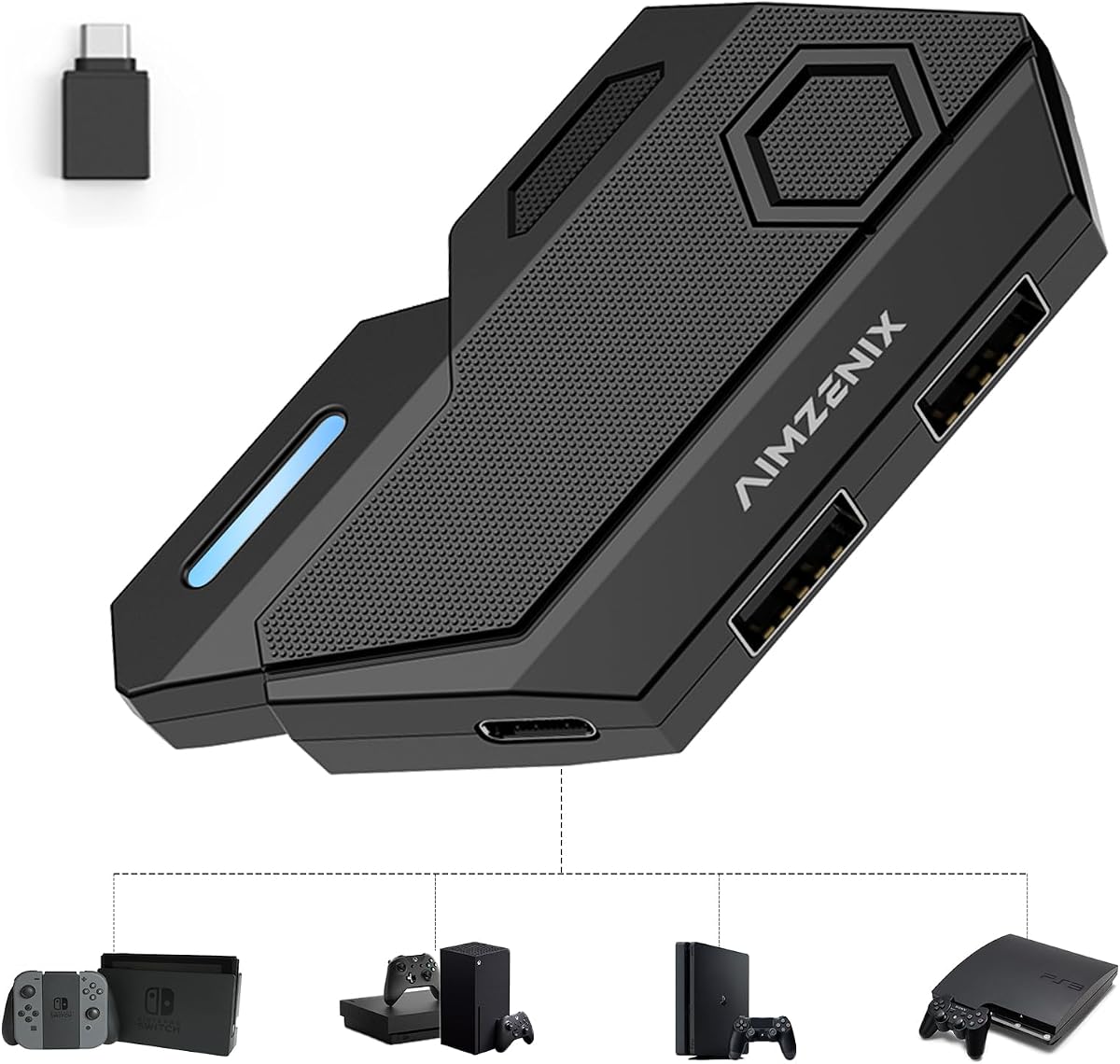
The AIMZENIX Blader Pro is the strongest premium-style option in this guide, combining a 4.3 rating with the most advanced configuration approach. It supports Switch, Switch 2, PS4, Xbox One, and Xbox Series X or S, giving it broad relevance across current and previous-generation hardware.
We may earn a commission when you buy through this link, at no additional cost to you.
Instead of relying only on complicated shortcut combinations, the Blader Pro connects to the GEEKVICE app through Bluetooth for key mapping, basic mouse sensitivity adjustment, and one-tap official game presets. The app refers to the phone or nearby Bluetooth-enabled device, while the game peripherals themselves can remain wired or use their 2.4GHz receivers.
Most standard wired and 2.4GHz keyboards and mice are supported, and a USB-C 5V auxiliary port can help stabilize power-hungry RGB peripherals. The integrated USB-A console cable creates a tidier setup, while RGB indicators provide visual connection feedback. The adapter is optimized for standard 1000Hz mouse polling rates.
There are meaningful exclusions: Bluetooth-only, magnetic-switch, Hall effect, and optical keyboards are not supported. Those restrictions make a peripheral check essential before purchase. For users with conventional wired or 2.4GHz equipment who want effortless configuration and modern console coverage, the Blader Pro is the most sophisticated and approachable choice here.
The GEEKVICE app replaces the need to memorize elaborate editing shortcuts and provides official game presets. This is especially useful for beginners or anyone who expects to change mappings frequently between games.
Auxiliary USB-C power can improve stability for power-hungry RGB devices, while 1000Hz optimization suits players seeking responsive mouse movement. These features add value without changing the adapter's core controller-signal conversion.
We may earn a commission when you buy through this link, at no additional cost to you.
The Mcbazel KX Converter provides broad compatibility with standard Nintendo Switch, PS3, PS4, Xbox 360, Xbox One, and Xbox Series X or S systems. Its 3.7 rating reflects a practical approach, and the adapter is particularly notable for supporting both docked and handheld Switch use with the included OTG Type-C adapter.
We may earn a commission when you buy through this link, at no additional cost to you.
The converter targets HID-protocol keyboards and mice, reportedly covering more than 90 percent of models. It can map aiming, shooting, and camera movement in FPS games, although the mouse has no function on the home screen. Most games are supported in both standalone and network modes, and setup is described as a three-step process.
Wireless limitations are significant. Players can use two wired devices, one wired device with one wireless device, or one wireless device paired with a wired one, but not a wireless keyboard and wireless mouse together because only one receiver can be connected. Keyboards with built-in USB hubs are also unsupported.
On PS4 and Xbox, an original controller must remain connected for authorization. Players should power it off before connection and use a charging and data-sync cable rather than a charge-only cable. Neither controller nor cable is included. The KX is best for owners of the listed older systems who already understand these setup conditions.
The single-receiver restriction is the most important technical detail for prospective buyers. A mixed wired and 2.4GHz setup is possible, but two separate wireless receivers are not, making receiver management part of normal use.
Keeping the original controller connected is required for authorization on these systems. Correct cable choice and powering the controller off first can prevent the console from bypassing the adapter through Bluetooth.
We may earn a commission when you buy through this link, at no additional cost to you.
The Joso Four-Profile Adapter supports Nintendo Switch models, Switch 2, Xbox Series X or S, Xbox One, PS4, and PS3. Its 3.8 rating reflects a balanced design that combines broad platform reach with custom key mapping and a four-profile memory system.
We may earn a commission when you buy through this link, at no additional cost to you.
Players can save four distinct layouts for different games, switch between them, and adjust sensitivity for aiming and movement. The adapter supports most wired USB and 2.4GHz wireless keyboard-and-mouse combinations without requiring downloads or drivers. The package includes the adapter, a USB-C-to-USB-A cable, an OTG converter, and a user manual.
An official Xbox or PlayStation controller is recommended for full functionality and fewer connection issues, particularly during setup. Bluetooth and driver-dependent devices are not supported. Although the product is described as compatible with all Switch models, the explicit exclusion of PS5 means that platform should be treated as unavailable.
This Joso model is a good compromise for gamers who want Switch 2 and current Xbox support without an app-driven setup. Four profiles are fewer than the eight offered by some rivals, but the streamlined package and broad console coverage make it attractive for players who switch between a manageable number of game layouts.
Four stored profiles cover several common play styles without making configuration overly complex. Players with a larger library may prefer an eight-profile model, while casual users may find four sufficient.
Including a USB-C-to-USB-A cable, an OTG converter, and a manual gives buyers the core connection accessories in one package. Website tutorials add further guidance for setup and mapping.
We may earn a commission when you buy through this link, at no additional cost to you.
The Arvin Multi-Device Adapter supports the Nintendo Switch, Switch OLED, Switch Lite, Xbox 360, Xbox One family, Xbox Series S and X, PS3, and PS4. Its 3.8 rating and broad platform range make it appealing to households with several generations of console hardware.
We may earn a commission when you buy through this link, at no additional cost to you.
The PS4 and PS3 configuration system can store up to four keyboard and mouse layouts, while Xbox One users can adjust sensitivity with Ctrl and the mouse wheel. Wired and 2.4GHz peripherals are supported, and setup uses an original controller as the mapping guide. The adapter includes three USB-A ports, a Type-C port, an OTG adapter, a Type-C cable, and a manual.
PS5 compatibility requires careful interpretation. The supplied details state that the adapter may connect using a PS4 controller, but it cannot support PS5 controllers or PS5 games. That makes it a PS4-focused solution rather than a genuine PS5 peripheral. Bluetooth keyboards and mice are also excluded.
Arvin is a good choice for users who want Switch Lite and current Xbox support alongside the standard Switch and older systems. The four profile slots and straightforward sensitivity controls provide enough customization for common game needs, while the multiple USB ports offer practical expansion. Buyers should confirm that their desired console and controller fall within the stated limits.
The stated PS5 limitation is not a minor firmware caveat: PS5 games and PS5 controllers are unsupported. A PS4 owner may still use the adapter for PS4 titles, but current PS5 users should choose another product.
Ctrl plus mouse-wheel up or down provides a direct method for adjusting sensitivity on Xbox One. This can be quicker than opening a full configuration interface, particularly when testing different games.
We may earn a commission when you buy through this link, at no additional cost to you.
The right console keyboard and mouse adapter depends on exact hardware compatibility, peripheral support, mapping flexibility, and how much setup effort you want to manage. Use the following factors to narrow the field before making a purchase.
Start with the complete list of supported consoles and exclude any model that is not explicitly named. The products in this guide vary considerably: some cover the standard Switch and Switch OLED, while others also support Switch Lite, Switch 2, Xbox Series, or PS5 with restrictions. Console support alone does not guarantee that every game accepts the adapter, so check the game's input options as well. Games without a suitable mouse-control or cursor mode may continue to require conventional controller input.
In short, match the adapter to your exact console model, then confirm that the game supports keyboard-and-mouse-style controls.
Most adapters support standard wired USB keyboards and mice, and many also accept devices using a 2.4GHz wireless receiver. Bluetooth-only devices are repeatedly excluded because they do not appear as ordinary USB HID peripherals. A wireless keyboard and mouse that each use separate receivers can also create receiver conflicts, so the Mcbazel KX permits only one wireless receiver at a time.
Choose wired devices for the simplest and often most predictable connection, or verify that your 2.4GHz setup fits the adapter's receiver limitations.
Custom mapping lets you assign movement, aiming, firing, and other actions to familiar keyboard keys and mouse buttons. Adapters with multiple stored profiles are especially useful for players who move between games with different control schemes. Joso and arVin models advertise eight-profile storage, while two other Arvin and Joso options provide four. If a product does not specify saved profiles, it may still allow mapping but could require rebuilding the layout for each game.
Prioritize enough profile slots for your usual game rotation and confirm that sensitivity can be adjusted alongside the button assignments.
Many adapters use an official controller to guide setup or provide the console with an authentication signal. PS4 and Xbox systems frequently require the original controller to remain connected. Some documentation also advises powering a wireless controller off before connecting it through the adapter, preventing the console from bypassing the converter through Bluetooth. Third-party controllers are not universally supported and should not be assumed to work.
Check whether an original controller is required and whether it must be connected continuously, not merely during initial configuration.
Mouse sensitivity is a central part of adapting PC-style aiming to console games. Several products provide shortcut-based adjustment, and the Arvin Multi-Device Adapter uses Ctrl plus the mouse wheel on Xbox One. The BLADER products also offer sensitivity controls, although their guidance says in-game view sensitivity and related options should be maximized. Adjusting both the adapter and game is often necessary to make aiming feel consistent.
Pick a product with clearly documented sensitivity controls, then pair it with the mouse's own DPI settings and the game's sensitivity options.
Most converters are marketed as plug-and-play, but plug-and-play does not mean every game automatically recognizes the keyboard and mouse. Mapping often requires an original controller, specific cables, or a sequence of shortcut commands. Products with manuals, electronic instructions, and tutorial videos can make the initial setup more accessible. The AIMZENIX Blader Pro goes further by using the GEEKVICE app for configuration through Bluetooth.
Favor clear documentation and an easy-to-understand editing method, particularly if this is your first console keyboard and mouse adapter.
A multi-port adapter can be useful when other USB devices are already connected to the console. The Arvin Multi-Device Adapter includes three USB-A ports and a Type-C port, while the Multi-Console Mapping Adapter supports several USB device categories. The Blader Pro offers auxiliary USB-C power, which may help stabilize high-power RGB peripherals. Build quality and a compact enclosure are useful for travel, although a heavy or bulky design is not necessary for reliable operation.
Count your needed USB connections, check for auxiliary power when using demanding peripherals, and choose a compact layout that suits your console area.
Advanced keyboards and mice may rely on software, Bluetooth, magnetic switches, Hall effects, or optical sensing. The products reviewed generally exclude driver-dependent or Bluetooth-only devices, and the AIMZENIX Blader Pro additionally excludes magnetic-switch, Hall-effect, and optical keyboards. These limitations can matter if you already own a modern gaming peripheral set. Before purchasing, confirm that the keyboard and mouse appear as standard USB HID devices and that neither requires special drivers.
Standard wired and 2.4GHz HID equipment offers the broadest chance of compatibility across the adapters reviewed.
Begin by confirming console, controller, keyboard, and mouse compatibility. Connect the adapter to the console using the appropriate cable or OTG adapter, then connect the mouse and keyboard through their labeled USB ports. If the target console requires an original controller, connect it as directed. On Switch, a wirelessly paired Pro Controller may take input priority, so power it off or connect it through the adapter when you want keyboard and mouse control.
Use the included controller and instructions to assign keyboard keys and mouse buttons to game actions. Create a separate saved profile for each distinct game or control style, and adjust mouse sensitivity after establishing the mapping. Test the configuration in a noncompetitive game or practice area first, then refine aim speed, movement keys, fire actions, and any secondary controls. If input is erratic, reconnect the devices and check for a second wireless receiver or a controller pairing conflict.
Keep the adapter dry, protect its cable connectors from bending or pulling, and avoid leaving it in direct heat. Disconnect the console before changing ports or moving a wired peripheral. Use a data-capable cable when a product requires a charging and synchronization connection, and do not expect a charge-only cable to work. Periodically revisit the mapping if a game update changes its controls, and keep the manual accessible for resetting or reconfiguring saved profiles.
No. An adapter can translate keyboard and mouse signals into controller inputs, but the game itself must support suitable mouse aiming or cursor behavior. Shooters, strategy games, and some RPGs are more likely to work than games built entirely around controller prompts. Check the game's settings and control documentation before assuming mouse input will be useful.
Most of the adapters reviewed do not support Bluetooth-only keyboards and mice. Their supported peripheral types are primarily standard wired USB HID devices and devices using a 2.4GHz wireless receiver. The AIMZENIX Blader Pro uses Bluetooth for its configuration app, but Bluetooth peripherals still remain unsupported as the main input devices.
It depends on the product and console. Some adapters require an original controller for mapping or authorization, especially on PS4 and Xbox systems, while the standard Switch and PS3 may not require one. Even where setup is possible without a controller, the included documentation may recommend one for reliable configuration. Check the product-specific instructions before ordering.
A common cause is a wirelessly paired controller taking priority over the adapter. Power the controller off or connect it to the adapter's controller port so the console can use the converter. Other possible issues include Bluetooth-only peripherals, a second conflicting wireless receiver, an unofficial controller, or a charge-only cable where data synchronization is required.
Saved profiles let you preserve different keyboard and mouse layouts without rebuilding them for every game. Eight profiles accommodate a larger game rotation or more control schemes, while four are usually sufficient for players who mainly switch among a few genres. Neither option improves mouse precision by itself; profile capacity simply makes configuration management more convenient.
They can provide mouse-based aiming, which many players find familiar from PC gaming. The result also depends on the game, mouse sensitivity, in-game view settings, mapping, and the player's technique. An adapter does not guarantee better results, and some console shooters may offer limited mouse support or require specific aiming modes.
Some adapters explicitly list both Switch and Switch 2, including the AIMZENIX BLADER and Blader Pro. Compatibility of the physical adapter does not guarantee that every Switch 1 game accepts keyboard and mouse on Switch 2, because game and system input behavior can differ. Verify both the hardware compatibility and the specific game's controls.
An app-based model is easier for beginners and players who change mappings frequently. The AIMZENIX Blader Pro provides official presets and sensitivity controls through the GEEKVICE app. Traditional adapters can also work well, but their configuration relies on shortcut commands and an original controller, so their documentation should be read before setup.
The Joso Eight-Profile Adapter is the strongest all-around choice for standard Switch, Switch OLED, PS4, PS3, and Xbox One users because it combines eight saved mappings, sensitivity controls, useful setup resources, and a straightforward controller-guided process. The AIMZENIX Blader Pro is ideal for buyers who want app-assisted configuration, newer console coverage, and auxiliary power for demanding peripherals.
For a simpler and more budget-conscious setup, the INF Multi-Console Adapter offers broad compatibility, controller-based mapping, and no required software installation. Before choosing any model, prioritize exact console compatibility, standard HID peripheral support, original-controller requirements, and enough profile storage for your games. Do not assume that support for a console family automatically includes every model or game.
Prices, product revisions, and compatibility details can change, so check the current listing and instructions before purchasing. Confirming the adapter against your console, controller, keyboard, mouse, and intended games will prevent most common setup disappointments.