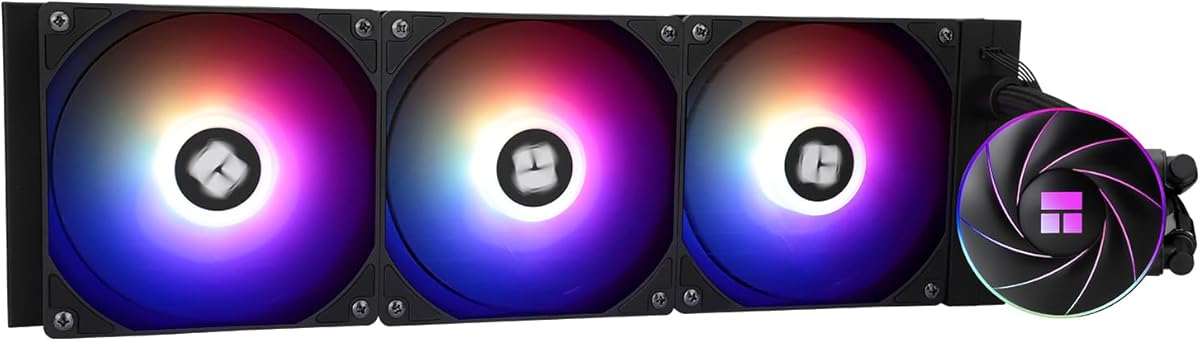
Thermalright Aqua Elite 360 ARGB
4.6Editor score
360mm radiator with three fans
ARGB lighting synchronization
Pump speeds up to 2600 RPM
Broad AM4 and AM5 support
Aio for Am4am5 guide compares ten AM4 and AM5 liquid CPU coolers on radiator size, pump performance, noise, lighting, display features, and ease of installation
An all-in-one liquid cooler can give an AM4 or AM5 processor more room for sustained boost clocks, quieter operation, and a cleaner-looking build than a basic tower heatsink. A strong AIO also needs a suitably sized radiator, a dependable pump, compatible mounting hardware, and fans capable of moving air through dense radiator fins without creating excessive noise.
This guide compares ten liquid coolers suitable for AMD AM4 and AM5 systems, including 120mm, 240mm, and 360mm models from ARCTIC, MSI, NZXT, CORSAIR, and Thermalright. The comparison considers radiator capacity, pump specifications, fan characteristics, socket support, ARGB lighting, LCD displays, cable management, and the practical details that affect installation.
Each review explains the product's strongest features, possible compromises, and the builders most likely to benefit from it. The top selections represent different priorities, including a feature-rich option, a strong all-round choice, and a premium display model. Product listings and prices can change, so confirm current specifications and availability before purchasing.
4.6Editor score

4.7Editor score

4.2Editor score
The table below compares radiator size, pump and fan specifications, lighting or display features, and AM4/AM5 compatibility. It provides a quick way to narrow the field before considering case clearance, installation, and overall build priorities.


The ARCTIC Liquid Freezer III Pro 360 A-RGB combines a 360mm radiator, three P12 PRO fans, and an integrated cooling fan for the motherboard's voltage-regulator area. Its 4.5 rating reflects a well-rounded design aimed at powerful AM4 and AM5 builds, particularly where a full-size radiator, coordinated lighting, and tidy routing are priorities.
We may earn a commission when you buy through this link, at no additional cost to you.
The most distinctive feature is the integrated VRM fan. Instead of directing every fan exclusively through the radiator, this additional PWM-controlled fan helps cool the surrounding power circuitry. The cold plate also uses native offset mounting on Intel and AMD platforms, shifting its center toward the processor hotspot to improve heat transfer where the CPU design benefits from that alignment.
Cable management is handled unusually well for a 360mm AIO. ARCTIC integrates the radiator fan PWM cables into the hose sheathing, reducing the number of visible wires connected to the motherboard. The included P12 PRO fans are described as stronger and quieter than earlier P12 models, especially at lower speeds, while their higher maximum speed supports demanding thermal loads. The principal compromise is physical: a 360mm radiator is a substantial component and will not fit every chassis.
This is a strong choice for a high-output AM4 or AM5 processor in a full-tower or spacious mid-tower case. It suits builders who want serious radiator capacity, ARGB lighting, and less clutter without moving to a premium model with a large screen. Buyers should verify the case's top and front radiator clearance and ensure that the motherboard's RGB software supports the selected lighting ecosystem.
The dedicated VRM fan is a meaningful addition for sustained high-power workloads because it circulates air around the motherboard's voltage regulators. It does not replace CPU cooling, but it adds another cooling path in a densely populated component area.
ARCTIC's native offset mounting shifts the cold plate toward the processor's heat-producing region. For compatible AMD processors, this can make better use of the available contact area than a conventionally centered plate.
We may earn a commission when you buy through this link, at no additional cost to you.
The non-RGB ARCTIC Liquid Freezer III Pro 360 retains the core advantages of the A-RGB model while omitting decorative lighting. With a 4.3 rating, it presents 360mm liquid cooling, P12 PRO fans, native offset mounting, and integrated VRM cooling for builders who prioritize thermal capability and a restrained appearance.
We may earn a commission when you buy through this link, at no additional cost to you.
Its three P12 PRO fans are designed to provide greater maximum speed and improved low-speed behavior compared with the original P12 design. The integrated VRM fan adds airflow over the power-regulation area, while the cold plate's offset position is intended to improve contact with the CPU hotspot. These are meaningful features for high-power Ryzen processors and sustained gaming or rendering workloads.
The major advantage over the illuminated version is simplicity. Builders do not need to connect or configure ARGB software, and the black hardware can fit naturally into a restrained theme. ARCTIC also integrates the radiator fan PWM wiring into the hose sheathing, leaving fewer visible cables than a conventional three-fan radiator arrangement. The trade-offs are the absence of lighting and the physical demands of mounting a 360mm radiator.
The ARCTIC is well suited to an AM4 or AM5 gaming system that needs generous cooling headroom but does not require synchronized lighting. It may also appeal to workstation builders who prefer an understated appearance. Before buying, inspect the chassis for 360mm support and make sure the included mounting hardware is suitable for the exact AMD socket in the system.
Removing RGB makes this model easier to integrate with mixed-component builds. It also avoids another software and connection concern, leaving the cooler focused on airflow, pump performance, and CPU contact quality.
The P12 PRO design is described as more powerful and quieter than the standard P12, particularly at low speeds. That makes it useful across both idle and heavy-load periods, subject to the fan and pump curve selected in the system.
We may earn a commission when you buy through this link, at no additional cost to you.
The Thermalright Peerless Vision 360 ARGB is the most visually ambitious cooler in this group, with a 3.95-inch magnetic IPS display, 480-by-480 resolution, 60Hz refresh rate, and three RGB-equipped fans. Its 4.6 rating makes it an appealing option for AM4 and AM5 builders who want a large customizable screen rather than a conventional logo-lit pump head.
We may earn a commission when you buy through this link, at no additional cost to you.
The pump display can show video, animation, custom images, system parameters, and user-defined text. The magnetic pump head can be removed quickly, and TRCC software adds further personalization options. The three TL-M12Q fans use infinity-mirror side lighting, S-FDB bearings, and a maximum speed of 2000 rpm. Their PWM control allows automatic adjustment with CPU temperature, while the ARGB connection is designed to work with motherboard lighting software.
A 360mm radiator and three fast fans make this a capable platform for high-power processors, and the display adds useful information as well as visual appeal. However, installation requires attention. The product supports AM4 and AM5, but the original motherboard backplate is not included for AMD platforms, so builders may need to source that part separately. Display software and the requirement to connect both PWM and ARGB headers also add setup steps compared with a simple cooler.
This cooler is ideal for a showcase gaming PC where the pump display is visible through a glass side panel. It also suits creators who want monitoring or rotating artwork on the cooler. For a compact or purely functional build, the same thermal concept could be achieved with less complexity by a non-display 360mm AIO, but for visual customization the Peerless Vision stands out.
The large IPS panel can display system information, custom text, images, animation, and supported gameplay content. Its magnetic attachment makes the screen easier to detach and handle than a permanently fixed display assembly.
The fan lighting is described as wireless splicing, reducing visible connections around the radiator. The side-mounted infinity-mirror effect adds visual depth while motherboard ARGB software remains the control point for synchronized lighting.
We may earn a commission when you buy through this link, at no additional cost to you.
The MSI MAG Coreliquid A13 360 is a well-balanced 360mm AIO with a 4.7 rating, the highest among the products in this guide. It combines a split-flow aluminum radiator, an integrated three-phase pump, three 120mm ARGB PWM fans, and explicit support for both AM4 and AM5 sockets.
We may earn a commission when you buy through this link, at no additional cost to you.
Its pump can operate at speeds up to 3800 RPM, giving builders a broad performance range for quiet idle operation or aggressive cooling under sustained load. Ceramic bearings are used to support a balance of performance and quiet operation. The split-flow radiator design is intended to improve cooling performance and reduce motor resonance, while the integrated pump simplifies the overall assembly.
MSI also gives particular attention to durability. The 390mm tubing uses triple-layered netting beneath reinforced mesh sheathing to help keep coolant inside the closed loop. Installation is supported across AMD AM4 and AM5 as well as Intel LGA 1700, and the product includes thermal paste. The main compromises are the size of a 360mm radiator and the presence of a large ARGB-equipped design that may not suit a minimal or compact build.
This is an excellent general recommendation for a powerful AM4 or AM5 gaming or workstation system. It offers enough radiator capacity for demanding processors, a broad pump adjustment range, and coordinated lighting without a large display or complicated app-based presentation layer. Buyers should confirm radiator support in the selected case and ensure the mounting hardware matches their exact motherboard and socket combination.
The radiator's split-flow design routes coolant through separate channels while using an integrated three-phase pump. MSI presents this as a way to improve thermal performance and reduce motor resonance compared with a more conventional arrangement.
A maximum pump speed of 3800 RPM provides considerable headroom for demanding AM4 and AM5 processors. Users can reduce the speed during lighter tasks or increase it when maintaining thermal headroom becomes more important than acoustics.
We may earn a commission when you buy through this link, at no additional cost to you.
The Thermalright Aqua Elite 240 V3 offers liquid cooling in a more manageable 240mm format while retaining a 4.7 rating. It pairs a fourth-generation pump head with an aluminum radiator, two 120mm ARGB PWM fans, and compatibility with AM4, AM5, and numerous Intel sockets.
We may earn a commission when you buy through this link, at no additional cost to you.
The pump is rated for up to 2800 RPM plus or minus 10 percent and has a stated lifespan of up to 40,000 hours. The included TL-C12B-S V2 fans operate at 1500 RPM plus or minus 10 percent, move up to 66.17 CFM, and are specified at no more than 25.6 dBA. PWM control allows fan speeds to respond to CPU temperature, while the S-FDB bearing is intended to reduce vibration and noise.
The octagonal pump head includes an ARGB halo that can synchronize with motherboard lighting through a 5V three-pin connection. Protective mesh around the tubing and a one-piece closed-loop design are also highlighted for reliability. As a 240mm unit, however, it provides less thermal surface area than a 360mm radiator and may be less comfortable under prolonged heavy CPU loads or in compact cases with limited airflow.
This cooler is a strong fit for an AM4 or AM5 system that wants liquid cooling without the footprint of a 360mm model. It works especially well for mainstream gaming configurations and builders who value ARGB, broad socket support, and straightforward installation. The main decision is whether the more compact radiator provides enough performance for the selected processor and planned workload.
A 240mm radiator is easier to position in many mid-tower cases than a 360mm model. That makes the Aqua Elite 240 V3 useful when the priority is a sealed liquid cooler and coordinated lighting without committing to a very large radiator.
The included 120mm fans are specified at up to 1500 RPM and no more than 25.6 dBA. S-FDB bearings help reduce vibration, making sensible PWM curves effective for balancing cooling and background noise.
We may earn a commission when you buy through this link, at no additional cost to you.
The NZXT Kraken Plus 360 is a premium 360mm AIO built around a bright 1.54-inch square LCD, a high-flow turbine pump, and three high-static-pressure fans. Its 4.2 rating reflects a distinctive feature set, and the design is particularly appealing to builders who want a customizable display, monitor temperatures, and support AM5 alongside the latest Intel platforms.
We may earn a commission when you buy through this link, at no additional cost to you.
The LCD can show real-time system temperatures, animated GIFs, custom images, and supported web integrations such as Spotify and YouTube through NZXT CAM. That software layer is a major part of the product's value, allowing the pump head to function as a compact information display rather than merely a logo. The turbine pump is engineered for high flow and head pressure, while the fans are designed to move air effectively through radiator fins.
Zero RPM Mode can stop the fans completely at low loads, which is particularly useful for quieter desktop or gaming use. Installation is streamlined with pre-applied thermal paste and a single breakout cable from the pump cap. Tool-free brackets support AM5 and LGA 1851. The compromises are inherent to the premium design: the display needs software configuration, and the extra visual and connectivity features cost more than a conventional AIO.
The Kraken Plus 360 is best for a showcase build with a glass side panel and an enthusiast who wants both cooling capacity and digital customization. It may be unnecessary for a practical work system where quiet, simple, and inexpensive cooling matter more. For the intended audience, the LCD and software integration deliver a clear advantage over conventional logo lighting.
Real-time temperature readouts turn the LCD into more than decoration. Custom images and supported web integrations can also personalize the pump head, making the display useful as a compact system-status panel.
Pre-applied thermal paste removes one familiar installation step, while the single pump-cap breakout cable simplifies routing. Tool-free mounting brackets also support the latest AMD and Intel sockets.
We may earn a commission when you buy through this link, at no additional cost to you.
The Thermalright Aqua Elite 120 V3 brings liquid cooling to a particularly compact form, with a 4.6 rating, a fourth-generation pump head, and a 120mm radiator. It supports AM4 and AM5 as well as a broad range of Intel sockets, making it useful for smaller cases or builds where radiator size is the main constraint.
We may earn a commission when you buy through this link, at no additional cost to you.
The product data lists dual TL-C12B-S V2 fans rated at 1500 RPM, up to 66.17 CFM, and no more than 25.6 dBA. The pump can run at 2800 RPM plus or minus 10 percent and has a stated life of up to 40,000 hours. Both the fans and pump head offer 5V three-pin ARGB synchronization, while PWM control allows automatic adjustment based on CPU temperature.
The compact radiator is the defining benefit, but it also places a ceiling on sustained thermal performance compared with 240mm and 360mm options. The listed dual-fan arrangement is also unusual for a 120mm radiator, so buyers should carefully review the physical layout, included components, and case clearance before installation. A 120mm liquid cooler generally makes the most sense for moderate processors or systems constrained by a small chassis.
This is a practical pick for an AM4 or AM5 compact build that wants a closed-loop cooler, coordinated lighting, and broad mounting support without a full-size radiator. It is less suitable for a high-end processor expected to sustain heavy workloads in a poorly ventilated case. Correct case measurements and socket confirmation are especially important before choosing this unusual compact format.
The 120mm radiator is the main reason to consider this model over larger alternatives. It can open up placement options in compact cases, although the final fit depends on the actual fan and mounting arrangement.
Both the pump halo and included fans support 5V three-pin ARGB synchronization. Four-pin PWM control provides the separate path needed for temperature-responsive fan speed and pump tuning.
We may earn a commission when you buy through this link, at no additional cost to you.
The NZXT Kraken Core 360 RGB delivers a 360mm radiator and RGB lighting without a display, earning a 4.6 rating. It is aimed at builders who want a clean, high-capacity AIO with simple motherboard connections and fewer installation complications.
We may earn a commission when you buy through this link, at no additional cost to you.
Its pump operates at up to 3100 RPM, offering a useful range for balancing quiet operation and sustained cooling. The included Core fans use optimized blades and high static pressure to push air through dense radiator fins. PWM control allows users to adjust their speed, and the single-frame design groups the radiator fans into one solid frame to reduce the number of screws and cables involved.
Direct motherboard connectivity is another practical advantage. NZXT states that no extra controller is required, which can simplify both installation and software management. RGB lighting provides visual coordination for compatible builds without adding the complexity, power demands, and configuration options of an LCD. The main limitations are the absence of a screen and the physical space required by a 360mm radiator.
The Kraken Core 360 RGB is a strong fit for an AM4 or AM5 gaming PC where a full-size radiator, straightforward setup, and subtle lighting are desired. It offers many of the thermal benefits of a large AIO without the premium emphasis on screen customization. Buyers should check case clearance and confirm that the motherboard's RGB software or hardware supports the selected lighting connection.
Combining the radiator fans in one frame reduces the number of individual screws and cables to manage. That makes the cooler tidier and can shorten the installation process compared with three separate fan units.
The Core fans are designed to move air through radiator fins efficiently. Their high-static-pressure focus is valuable in a 360mm radiator, where adequate pressure helps maintain airflow across the full fin surface.
We may earn a commission when you buy through this link, at no additional cost to you.
The CORSAIR Nautilus 360 RS is a 360mm AIO centered on low-noise operation and straightforward wiring. Its 4.6 rating accompanies specifications for a 20 dBA pump, three RS120 fans, a convex cold plate, and daisy-chained fan connections for AM4 and AM5 systems.
We may earn a commission when you buy through this link, at no additional cost to you.
The pump is designed to maintain a high coolant flow rate while operating quietly, which makes the Nautilus appealing for a gaming PC or workstation where background noise matters. RS120 fans generate the static pressure required to push air through the radiator, while AirGuide technology supports airflow and Magnetic Dome bearings help reduce noise. The fan curve remains under the user's control through the motherboard.
Installation is a major strength. The fans can be daisy-chained and connected to a single four-pin PWM motherboard header, reducing wiring inside the case. The slightly convex cold plate is designed to maximize contact with the CPU's integrated heat spreader, and thermal paste is already applied in an optimized pattern. The trade-off is that it does not include an LCD or elaborate integrated lighting for display-oriented builds.
This cooler is a strong recommendation for an AM4 or AM5 user who values quiet cooling, direct motherboard control, and a clean setup over visual effects. It pairs well with restrained cases and professional or gaming systems where a large radiator is appropriate. As with other 360mm units, checking chassis support and ensuring the motherboard has a usable PWM header remains essential.
A 20 dBA pump specification and noise-conscious RS120 fans make the Nautilus a sensible choice for quiet builds. The actual system noise still depends on pump curves, radiator position, case airflow, and the workloads placed on the processor.
Connecting the radiator fans in sequence to one PWM header means fewer motherboard headers and less loose wiring. The approach is especially helpful in cases with limited cable-management space.
We may earn a commission when you buy through this link, at no additional cost to you.
The Thermalright Aqua Elite 360 ARGB combines a 360mm radiator, three 120mm PWM ARGB fans, and an illuminated pump head. Its 4.6 rating makes it a compelling value-focused option for AM4 and AM5 builders who want full-size liquid cooling and synchronized lighting without paying for a screen-equipped premium design.
We may earn a commission when you buy through this link, at no additional cost to you.
Its 0.1mm-pitch copper base and swirl-style illuminated pump head are designed to transfer heat efficiently and provide a distinctive appearance. The pump reaches up to 2600 RPM plus or minus 10 percent and has a stated lifespan of up to 40,000 hours. Three TL-C12C-S ARGB fans operate at up to 1550 RPM, provide up to 66.17 CFM, and are specified at no more than 25.6 dBA.
Fan and pump lighting synchronize through the motherboard's 5V three-pin ARGB connection. PWM control allows the fan speed to respond automatically to CPU temperature, and the fans use S-FDB bearings to reduce vibration. Compatibility covers AM4, AM5, and several Intel sockets. The important practical note is the recommended case width of more than 250mm, so the full assembly should be checked against the chassis and its position.
This cooler is well suited to a high-performance gaming build that wants 360mm capacity, ARGB, and straightforward cooling controls at a more restrained feature level. It is a good alternative to premium display models when the pump only needs to show a synchronized logo. Before installation, confirm radiator support, available mounting hardware, and enough clearance for the full fan-and-radiator assembly.
The Aqua Elite 360 ARGB focuses on radiator capacity, pump performance, and synchronized lighting. That makes it useful for builders who want the visual impact of a 360mm RGB cooler but do not need a programmable information display.
The pump uses a fine-pitch copper base for heat transfer, while the fans use S-FDB bearings intended to limit vibration and noise. These features support steadier operation across different fan-control settings.
We may earn a commission when you buy through this link, at no additional cost to you.
Choosing an AIO for an AM4 or AM5 system involves balancing processor heat output, case dimensions, fan characteristics, lighting, display features, installation requirements, and budget. The most important starting point is the processor's thermal demand, followed by a realistic assessment of available radiator space.
A powerful Ryzen processor can generate enough heat to benefit from a 360mm radiator, especially during sustained gaming, rendering, compiling, or other prolonged multicore workloads. A 240mm AIO may be entirely adequate for efficient chips and moderate activity, while a 120mm liquid cooler is primarily appropriate when case size is the overriding constraint. Match the cooler to the processor rather than treating every AM4 or AM5 chip as if it has identical thermal behavior.
A 120mm radiator offers the easiest fit, a 240mm model provides a stronger middle ground, and a 360mm radiator offers the most surface area. Measure the case before buying, including the width of the radiator-and-fan assembly, the length of the tubes, and clearance for memory modules, motherboard VRM heatsinks, and the top of the case. One Thermalright model specifically recommends a case width greater than 250mm, illustrating why manufacturer guidance matters.
Every product reviewed here states support for AMD AM4 and AM5, but the exact mounting hardware and installation procedure still deserve attention. Some designs use the motherboard's original backplate, which may not be included in the package. Confirm that the supplied brackets fit the processor socket and whether a separate backplate is required. Socket compatibility alone does not guarantee that every required piece is in the box.
Liquid cooling performance depends not only on radiator size but also on pump output, plate quality, coolant flow, and the relationship between pump and CPU contact. The pumps in this guide range from 2600 to 3800 RPM, with the MSI A13 offering the highest listed maximum. A broad adjustment range is useful because quiet operation and maximum cooling rarely represent the same operating point in every build.
Fans mounted to a radiator must overcome the resistance created by dense fins, making static pressure at least as important as headline airflow. Several included fans are specified at no more than 25.6 dBA, while models such as the Thermalright Peerless Vision use higher maximum fan speeds. A sensible PWM curve and balanced radiator airflow can keep noise reasonable, but actual acoustics vary with case design, fan position, and operating temperature.
ARGB lighting adds coordinated color without requiring a large screen, but it usually depends on a compatible 5V three-pin header and motherboard software. LCD-equipped coolers provide temperature monitoring, images, animations, and web integrations through their own applications. Those displays are visually engaging and informative, yet they also increase cost, add software dependencies, and can make a cooler feel unnecessarily elaborate in a restrained build.
A clean AIO installation depends on how the pump, fan, lighting, and power cables are routed. The ARCTIC Pro models integrate fan PWM wiring into the hose sheathing, the CORSAIR Nautilus supports daisy-chained fans, and the NZXT Kraken Plus uses a single pump-cap breakout cable. The Thermalright Peerless Vision describes wireless splicing for its illuminated fans, while the MSI emphasizes tool-friendly mounting. Compare the number of required headers as well as the physical installation steps.
A large radiator needs a suitable path for warm air to leave the case, particularly when installed at the front or top. A rear or top placement may benefit from a case design that directs intake through the cooler and exhaust toward the rear. Appearance also matters: a screen-equipped model can dominate a glass-sided build, while a non-RGB cooler may integrate more easily with a professional or understated theme.
Before installation, confirm the CPU socket, mounting kit, radiator position, and available case clearance. Install the appropriate AMD backplate if the motherboard design requires one, apply the specified thermal paste if it is not pre-applied, and secure the mounting hardware evenly. Connect the pump, fans, and ARGB or display leads to the correct motherboard headers before routing the tubing.
After assembly, power the system and check for leaks, unusual pump noise, loose fittings, and fan operation. Enter the motherboard or cooling software, set a gentle startup curve, and confirm that the pump and fans respond to CPU temperature. Establish a quiet idle profile and a higher-load profile rather than leaving every fan and pump at maximum speed unless the build's acoustics allow it.
For ongoing care, keep the radiator fins and intake areas free of dust, especially in cases with restricted airflow. Monitor pump noise, fan vibration, and CPU temperatures for changes over time. Do not add coolant to a sealed all-in-one loop, and avoid operating the pump while the CPU is not installed or whenever the product manual warns against dry operation. For display-equipped models, keep the software current and use the supplied or manufacturer-approved connection methods.
Yes, all ten products in the guide list support for AMD AM4 and AM5 platforms. However, buyers should still confirm the included mounting kit matches the exact socket and check for platform-specific requirements. The Thermalright Peerless Vision 360, for example, states that the original motherboard backplate is not included for AMD installation.
No. A 360mm radiator is most useful for high-power processors, sustained heavy workloads, or builds that prioritize maximum thermal headroom. Efficient AM5 chips in ordinary gaming or productivity use may be well served by a 240mm unit. A compact 120mm design is more about fitting a sealed liquid cooler into limited space than maximizing cooling capacity.
ARGB lighting primarily synchronizes a logo, halo, or fan illumination with a motherboard and its control software. An LCD adds a screen that can present temperatures, custom images, animation, or supported online content. LCD coolers are more customizable and informative, but they generally cost more and introduce additional software and setup considerations.
No. A radiator may fit physically while the combined radiator-and-fan thickness does not, and the tubes and pump head also require room. Check the case manufacturer's maximum radiator size, supported mounting positions, and clearance guidance. Measure the complete assembly and leave enough space for ports, memory modules, and other motherboard components.
Several models include fans specified at no more than 25.6 dBA, and the CORSAIR Nautilus has a pump specified at 20 dBA. Actual noise depends heavily on the fan and pump curves, processor load, case airflow, and mounting quality. A moderate idle curve and intelligent temperature control usually provides the best balance between cooling and acoustics.
It depends on the product and mounting method. The MSI MAG Coreliquid A13 360 includes thermal paste, and the CORSAIR Nautilus 360 RS has thermal paste pre-applied to its convex cold plate. Other models may include paste or require a small amount during installation, so consult the included instructions before mounting the cold plate.
The featured coolers with 5V three-pin ARGB connections are generally designed to synchronize with compatible motherboard lighting software. Both the motherboard header and the software must support the appropriate standard, and using an incompatible header can prevent synchronization or create connection problems. A five-pin RGB header is not interchangeable with a three-pin ARGB header.
Keep the radiator fins and nearby air filters free from dust so the fans can move enough air through the fins. Listen for changes in pump noise and monitor CPU temperatures for signs of a problem. Because an AIO contains a sealed coolant loop, it normally does not require users to add or replace coolant under normal operating conditions.
The MSI MAG Coreliquid A13 360 stands out as the strongest all-round selection, combining a 360mm split-flow radiator, a pump rated up to 3800 RPM, and three ARGB fans in a package built for AM4 and AM5 systems. The Thermalright Aqua Elite 360 ARGB is the budget-focused alternative, while the NZXT Kraken Plus 360 leads for builders who want a customizable LCD and polished software features.
Prioritize radiator size, processor thermal demand, fan static pressure, and case clearance before appearance. AM4 and AM5 support is widespread across this list, but mounting hardware, display requirements, lighting headers, and cable connections can still determine which cooler will be easiest to install. A larger radiator is not automatically the best option if it creates airflow or fit problems.
Ratings and feature sets provide a useful shortlist, but product listings, software compatibility, and prices can change over time. Confirm the current specifications, included components, socket support, and case requirements immediately before purchasing. With those checks completed, any of these options can provide a practical upgrade over a basic CPU heatsink for a well-matched AM4 or AM5 build.