
GameSir G8 Plus
4.3Editor score
Hall effect controls
Motion sensing support
Dual vibration motors
Extendable device fit
Explore the best Android joystick controller options, comparing connectivity, controls, compatibility, ergonomics, battery life, and features for mobile gaming.
An Android joystick controller can transform touch-screen play by adding analog movement, physical buttons, better feedback, and a more comfortable grip. The right model depends on device fit, connection method, game support, stick technology, and whether you need features such as turbo, vibration, remapping, or pass-through charging.
This guide compares ten controllers using the supplied specifications, ratings, compatibility details, control layouts, power options, and customization features. It covers phone-clamping models, compact wireless gamepads, and a Windows-and-Android controller, helping readers choose by platform, play style, and portability.
Each pick highlights the product's strongest contribution to an Android gaming setup, along with practical limitations. Ratings and availability can change over time, and current prices vary, so readers should confirm the latest listing details and game compatibility before purchasing.
4.3Editor score

4.4Editor score

4.4Editor score
The table below compares all ten controllers by control technology, connection style, device support, and standout functions, making it easier to identify the right Android option for different gaming needs.



The GameSir X5 Lite is a wired mobile controller designed to combine the familiarity of a full gamepad with a lightweight frame. It carries a 4.1 rating, while its Hall effect sticks, broad device compatibility, and Type-C connection make it a strong all-around option for Android players who value reliable input more than wireless convenience.
We may earn a commission when you buy through this link, at no additional cost to you.
Its extendable frame accommodates devices up to 213mm long, covering most Android phones and compatible tablets in the product specifications. The secure Type-C connection avoids the need to manage a controller battery, while pass-through charging allows the connected device to charge during longer sessions. Hall effect sensing provides smooth 360-degree control for movement, aiming, and camera adjustments.
The controller also includes cushioned membrane buttons and triggers designed for quieter, more comfortable repeated input. A 135.4g body and laser-engraved textured grips help keep the setup manageable, while the GameSir app can personalize supported settings. Some functions also use on-the-fly button combinations, reducing the need to open software for routine changes.
The main trade-off is the dependency on a compatible wired Type-C interface. A phone without a usable Type-C port or with a restricted connector layout may not be ideal, and the supplied details note that app availability is limited to Android. For players seeking a dependable, battery-free mobile controller with charging support, this is an especially well-rounded recommendation.
Because the X5 Lite draws power from the connected device, it avoids battery degradation and unexpected shutdowns. Pass-through charging further supports long mobile, cloud, and remote-play sessions while preserving a physical controller layout.
Hall effect sensing supplies smooth 360-degree movement, while cushioned membrane controls reduce noise during repeated inputs. These characteristics make the controller suitable for action games, shared spaces, and longer play sessions.
We may earn a commission when you buy through this link, at no additional cost to you.
The 8Bitdo Ultimate Mobile is an officially licensed, premium-feeling Bluetooth controller for Android, Apple devices, and Xbox Cloud Gaming. Its 4.3 rating reflects a balanced design that combines Hall effect sticks, tactile controls, rear paddles, and a stretchable frame for phones between 100mm and 170mm.
We may earn a commission when you buy through this link, at no additional cost to you.
The most distinctive additions are the two pro back buttons, which can provide extra inputs for games that support remapping or expanded controller layouts. The controller also includes an Xbox button, tactile bumpers and D-pad, and wear-resistant metal joystick rings. Support for 8Bitdo Ultimate Software V2 adds another layer of mobile customization.
Its Hall effect sticks and triggers are presented as upgraded, robust components capable of higher precision and sensitivity. The wireless Bluetooth connection removes cable clutter, making the controller natural for cloud gaming, supported Android games, and casual play on a couch or while traveling. Official Apple support also broadens its usefulness across mobile devices.
This is not the smallest or lightest mobile controller, and its feature set may be more than some casual players need. It also cannot make unsupported games accept physical controls. Nevertheless, for Android users who value paddles, polished controls, wireless freedom, and official platform support, the 8Bitdo Ultimate Mobile stands out as a premium selection.
The two pro back buttons expand the available input layout beyond a conventional gamepad. Gamers can potentially assign shortcuts or use the paddles in supported titles, though actual behavior depends on game and software compatibility.
Tactile bumpers, a distinct D-pad, metal joystick rings, and Hall effect controls give the controller a more refined feel. Official Apple and Xbox support adds confidence for users who move between Android phones, cloud gaming, and other compatible devices.
We may earn a commission when you buy through this link, at no additional cost to you.
The black Mocagen MC1 is a Bluetooth mobile controller with a 4.4 rating and a generous collection of practical features. It supports Android and iPhone devices, works with controller-compatible games, and provides a case-friendly clamp, Hall effect sticks, adjustable turbo, vibration, lighting, and customization through the KeyLinker app.
We may earn a commission when you buy through this link, at no additional cost to you.
Its Hall effect joystick is rated for a five-million-cycle lifespan and is designed to resist drift. The ergonomic handle uses laser-engraved texture for grip, while the joystick and button layout are shaped to support longer sessions. Turbo can be set to 5, 12, or 20 shots per second, and dual vibration motors add feedback to compatible games.
The controller includes a 600mAh battery that is listed for up to six hours in brightness mode. A seven-color adjustable joystick light ring provides visual feedback, and the ABXY lights can be disabled, although their colors are not adjustable. The clamp supports phone cases up to 12mm thick, while a shallow camera recess helps prevent scratches.
The MC1 identifies itself as an Xbox Wireless Controller during Bluetooth pairing, allowing compatible mobile games and apps to recognize it more readily. It does not support PlayStation Remote Play, and it only works with games that accept controller input. For Android users seeking many features, a comfortable case-friendly design, and strong user ratings, it is an excellent value-focused choice.
The clamp accommodates cases up to 0.47 inches thick and provides a dedicated camera recess. This makes the MC1 more practical for users who prefer keeping protective cases installed during normal smartphone use.
Three turbo rates, dual vibration, programmable settings, and app-based customization give players several ways to adapt the controller. These options are most useful in games that permit standard gamepad input and expose customization support.
We may earn a commission when you buy through this link, at no additional cost to you.
This Mocagen MC1 listing shares the feature-rich design of the black MC1 and carries a 4.4 rating. It combines a wireless Bluetooth connection, Hall effect sticks, an ergonomic case-friendly frame, adjustable RGB lighting, vibration, programmable turbo, and a 600mAh battery.
We may earn a commission when you buy through this link, at no additional cost to you.
The sticks are described as having a five-million-cycle lifespan and a drift-free electromagnetic induction design. The controller supports cloud gaming services, remote play features, emulators, and native mobile games, provided the title accepts standard controller input. Its joystick light ring offers seven adjustable colors, and the ABXY lighting can be turned off.
A major practical advantage is the ability to retain a phone case as thick as 12mm. The 0.2-inch camera recess also helps protect the phone lens from accidental contact. Three turbo levels can be assigned to continuous inputs, while dual motors provide adjustable vibration through the KeyLinker app.
This model is best for Android users who want extensive controls without moving to a full console-style controller. It shares several limitations with other mobile gamepads: supported games are required, PlayStation Remote Play is excluded, and some functions depend on the companion app. Even so, the strong rating and broad customization suite make it an attractive pick.
The stated five-million-cycle design targets durability and consistent movement. Hall effect sensing avoids the physical contact arrangement associated with conventional potentiometer sticks, supporting the product's drift-free positioning.
Seven-color joystick lighting can suit different gaming environments, while separate ABXY light controls help simplify the visual profile. The lighting is intended to remain eye-friendly even during extended sessions.
We may earn a commission when you buy through this link, at no additional cost to you.
The XPT Portable Mini is built for travelers and players who want a gamepad that takes up minimal space. Its 3.9 rating is the lowest in this list, but the compact design, broad platform support, and combination of Bluetooth 5.0 and wired USB-C provide a clear reason to consider it.
We may earn a commission when you buy through this link, at no additional cost to you.
It supports Nintendo Switch 2 and Switch 1 through direct pairing, PC through X-INPUT mode, iOS 14.0 and later, and Android 9.0 or later. The dedicated mode switch makes moving between Switch and X-INPUT configurations straightforward. Its pocket-sized body is easier to carry than a full-size mobile controller.
Despite its small size, the controller includes two 3D joysticks, responsive buttons, a six-axis gyroscope, and dual rumble motors. Its dedicated turbo button offers 5, 10, or 20 shots per second, making it useful for action games and other titles that support gamepad input. A non-slip grip is intended to maintain comfort during longer sessions.
The central compromise is control scale. Players accustomed to console-sized sticks and buttons may find the mini layout less precise or comfortable, and it does not hold a phone on its own. For travel, shared devices, and quick Android sessions where a full-size controller would be burdensome, however, the XPT makes a practical case for portability.
The compact enclosure is intended to fit into a pocket or small bag with minimal bulk. That makes the XPT easier to carry than a wide phone-clamping controller, especially for commuting and travel.
A six-axis gyroscope, rumble, and three-speed turbo provide more capability than a simple basic gamepad. Users should still consider the smaller joysticks and buttons if precise control is their top priority.
We may earn a commission when you buy through this link, at no additional cost to you.
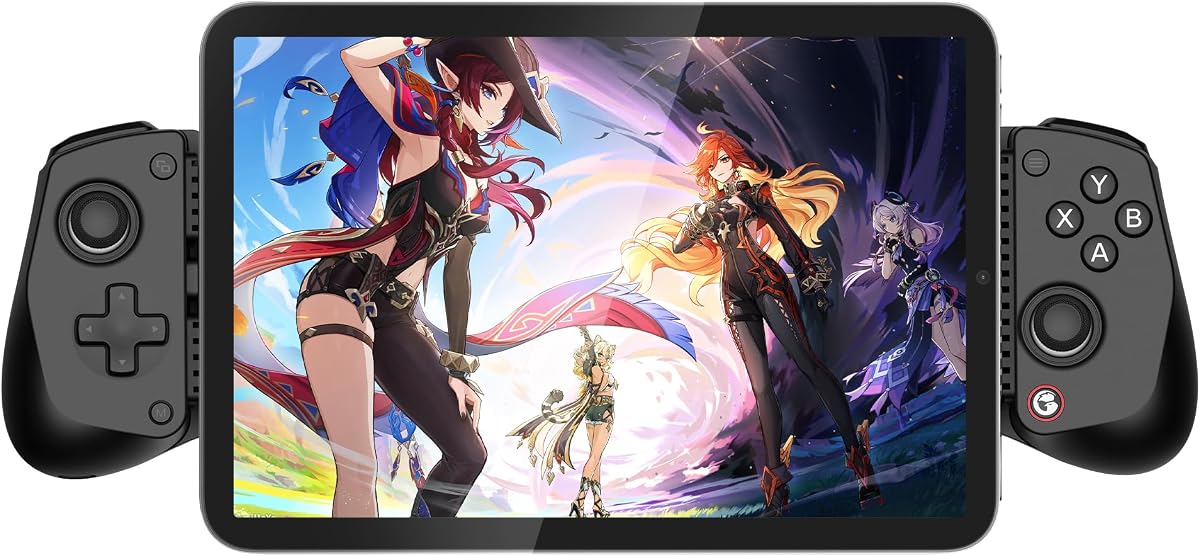
The GameSir G8 Plus is a substantial console-style mobile controller with a 4.3 rating. It is aimed at players who want large sticks and buttons, support for multiple device families, and features associated with a more complete gaming setup rather than a lightweight travel accessory.
We may earn a commission when you buy through this link, at no additional cost to you.
Hall effect sensing is used for both the sticks and triggers, emphasizing precision and durability. The extendable design accommodates phones, tablets, and Nintendo Switch systems. Bluetooth handles mobile devices, while a wired connection is available for PC gaming. Each side contains a 500mAh battery according to the supplied specifications.
A six-axis gyroscope adds motion control for compatible Switch games, and dual motors deliver both strong and subtle vibrations. Interchangeable magnetic components let users personalize the controller's appearance and possibly its functional arrangement. Its full-size stick and button layout resembles a traditional console gamepad, which can reduce the learning curve for existing console players.
Its size is the main tradeoff for users who travel often or play while standing. The broad device support and motion features also do not guarantee support in every mobile game. For an Android player who prioritizes familiar ergonomics, large controls, vibration, and optional motion input, the G8 Plus offers one of the most console-like experiences in this guide.
Large sticks and buttons give the G8 Plus a traditional gamepad feel. Android players accustomed to console layouts can adapt quickly, while the extendable frame offers a more substantial grip than compact alternatives.
The six-axis gyroscope supports motion-controlled play in compatible titles, while dual motors provide a range of vibration feedback. Both features add value for users who regularly move between mobile, Switch, and PC gaming.
We may earn a commission when you buy through this link, at no additional cost to you.
The KICKDOT Mobile Controller is a high-spec Bluetooth gamepad with a 4.4 rating. Its central attraction is the use of TMR joystick sensors, which are presented as offering greater precision and lower power consumption than standard Hall effect sensing, alongside Hall effect triggers and a 1000mAh battery.
We may earn a commission when you buy through this link, at no additional cost to you.
The sticks use 3000-point resolution per axis with 4096 levels of sampling. Because the TMR system has no physical contact between internal components, the product is positioned as resistant to stick drift. The telescopic clamp holds phones with most standard cases, although bulky or irregular cases may need to be removed.
The controller includes two programmable back paddles, a three-speed turbo function, macro recording, a six-axis gyro, and RGB lighting on the joysticks and ABXY buttons. It supports Android, iPhone, iPad Mini, Nintendo Switch 2 and Switch 1, Xbox Cloud Gaming, Steam Link, GeForce Now, and Apple Arcade, subject to the relevant platform and title requirements.
This is an advanced controller for users who value specification, programmability, and battery endurance. The stated 15-hour playtime depends on the efficiency of the TMR sensors and real-world use, while macro and remapping functions require configuration. Even so, the combination of precision, paddles, macros, and broad compatibility makes it a compelling high-performance Android choice.
The TMR sensing system is designed to eliminate contact-related wear while providing very fine movement resolution. This makes it attractive for aiming-heavy games and users who want a controller marketed as resistant to drift.
Programmable paddles, macro recording, and three turbo rates support advanced input setups. The 1000mAh battery and lower-power TMR sensors are also positioned as useful for long sessions away from a charger.
We may earn a commission when you buy through this link, at no additional cost to you.
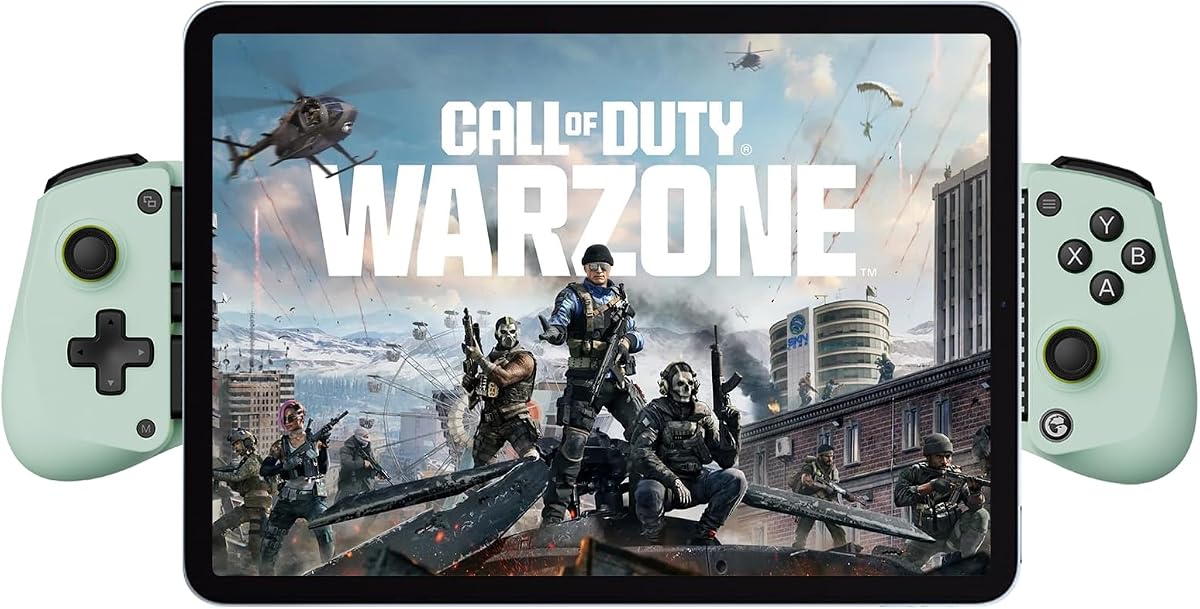
The Wasabi edition of the GameSir X5 Lite is a lightweight, wired controller with a 4.3 rating. It combines a broad 105mm-to-213mm device range with Hall effect sticks, pass-through charging, turbo customization, and a 135.4g body, making it a practical option for Android players who prefer plug-and-play operation.
We may earn a commission when you buy through this link, at no additional cost to you.
The controller supports Android phones, iPhone 15 and 16 series devices, and the USB-C version of iPad mini according to the supplied listing. Its Type-C connection provides a stable physical link and lets the phone charge while play continues. That makes the controller useful for long cloud gaming, remote play, and mobile sessions.
GameSir's app allows supported settings to be customized, and turbo can be assigned across A, B, X, Y, shoulder, and trigger buttons. Cushioned membrane buttons and triggers are designed to feel comfortable while operating more quietly. Hall effect sticks provide smooth 360-degree control for movement, aiming, and camera work.
The central limitation is compatibility with the physical connector. A phone without a compatible Type-C port cannot use the wired link, and the listing explicitly notes that customization app availability is for Android only. The product's combination of charging support, low weight, and precise sticks nevertheless makes it a strong choice for the right Type-C-equipped device.
Pass-through charging removes the usual tradeoff between using a wired controller and keeping a phone powered. It is especially helpful during extended cloud-gaming and remote-play sessions.
At 135.4g, the controller minimizes the burden of a full phone-and-gamepad combination. Textured grips, cushioned controls, and hall effect sticks improve comfort and precision without adding excessive weight.
We may earn a commission when you buy through this link, at no additional cost to you.
The Wireless Phone Controller is a Bluetooth gamepad with a 4.3 rating and broad support for Android and iPhone devices. It is designed for cloud gaming, remote play features, and controller-supported mobile applications, with a Hall effect joystick, adjustable turbo, dual vibration motors, and a rechargeable 600mAh battery.
We may earn a commission when you buy through this link, at no additional cost to you.
The extendable clamp accepts phones between 10cm and 17.5cm long, allowing many users to keep a protective case installed. A textured, non-slip grip helps secure the device and improve comfort. The controller's internal battery is listed for more than eight hours of gaming and can be fully charged in approximately two to three hours.
Turbo offers three rates—5, 12, and 20 shots per second—while dual motors add tactile feedback. The controller uses the Xbox Controller Input Protocol, so a phone may display it as an Xbox Wireless Controller. This can broaden recognition across mobile games and apps that officially support Xbox-style gamepads.
PlayStation Remote Play is not supported, and cloud gaming still depends on a fast, stable network. The pairing guide also asks users to check the fourth pairing light and avoid using the controller while it is charging. For Android players who want wireless freedom, adjustable turbo, and strong broad game compatibility, these limitations are reasonable.
The Xbox Controller Input Protocol gives compatible mobile software a familiar gamepad identity. This is useful across Android games and cloud applications that explicitly support standard Xbox-style controllers.
A rechargeable 600mAh battery is stated to deliver more than eight hours of play. Adjustable turbo and dual vibration add useful competitive and immersion features without requiring a cable during use.
We may earn a commission when you buy through this link, at no additional cost to you.
The 8Bitdo Ultimate 2C is a lightweight Windows-and-Android controller with a 4.4 rating. Instead of clamping a phone, it provides a conventional wireless gamepad layout for supported Android devices, making it especially relevant to users who also play on a Windows PC.
We may earn a commission when you buy through this link, at no additional cost to you.
Its most notable specification is a 1000 Hz polling rate for 2.4G wireless and wired connections. Hall effect joysticks and Hall effect triggers support precise, durable input, while wear-resistant metal joystick rings add robustness. The controller also includes refined bumpers and a D-pad designed to feel light and tactile.
Remappable L4 and R4 bumpers are controlled without software, which makes customization more convenient than solutions that require an app. A turbo function is also included. These controls can provide extra actions in compatible games, although the game itself must recognize the relevant inputs and remapping behavior.
The important limitation is platform focus. The product is specified for Windows and Android, not as a universal controller for iPhone, Switch, or other systems, and it does not physically secure a phone. For Android gamers who want a console-style device for use with a handheld, tablet, or another supported screen, its 1000 Hz polling and remappable bumpers are major advantages.
The stated 1000 Hz polling rate applies to both 2.4G and wired modes. This specification can appeal to players who value fast input reporting in games that support standard gamepad controls.
The L4 and R4 bumpers can be remapped directly, avoiding a mandatory companion app. That makes the controller easier to tailor and reduces setup friction for users who want quick changes.
We may earn a commission when you buy through this link, at no additional cost to you.
Choosing an Android joystick controller means balancing connection reliability, control precision, device fit, battery needs, and supported features. The most important starting point is how and where you play, followed by the games and accessories you expect to use.
A wired controller usually provides the simplest and most consistent connection because the phone supplies power and the data link is continuous. It also removes charging-planning concerns and may offer a lower-latency experience. The downside is cable dependence, which can be inconvenient during travel or when using a phone in a stand. Check the connector type and make sure your Android device has a compatible port without an obstruction that prevents the controller from fitting.
Hall effect sticks are common among the phones-focused controllers in this guide because they use contactless sensing and are marketed as resistant to drift. TMR sensing takes the concept further in the KICKDOT, with the product claiming greater resolution and lower power use. Traditional entry-level sticks can still work well, but sensor technology becomes increasingly relevant for competitive aiming, long ownership periods, and games with small directional inputs.
A controller that fits your specific phone is essential. Published length ranges are useful, but users should also consider width, camera position, case thickness, and the shape of their device. Some models accommodate standard cases, while the KICKDOT specifically warns that bulky or irregular cases may need removal. A recessed camera area can also help prevent the phone lens from contacting the controller during use.
Wireless controllers need enough battery capacity for the length of a typical session. Listed runtimes range from about six hours in brightness mode for the Mocagen MC1 to a stated 15 hours for the KICKDOT. Actual results depend on lighting, vibration, motion sensors, and wireless conditions. Wired models avoid this issue entirely, and some support pass-through charging so the phone can recharge while the controller remains connected.
Standard face buttons, shoulder controls, and a D-pad cover most Android games, while rear paddles offer additional actions in supported titles. Turbo can automate repeated presses at different rates, and programmable macros enable more complex sequences. These features are helpful for shooters, action games, and menu-heavy experiences, but they depend on software support and correct assignment. Always verify whether customization occurs through the controller, an app, or both.
A physical controller cannot make a touch-only game accept gamepad input. Confirm that your preferred games support controllers, then check the controller's protocol, platform list, and remote-play limitations. Several products identify as Xbox Wireless Controllers, which can help with recognition, but PlayStation Remote Play is excluded from some models. Cloud gaming also needs a fast, stable network even when the controller itself is working perfectly.
A mobile controller should remain comfortable during long sessions and keep the phone secure without pressing on sensitive areas. Pay attention to stick size, grip texture, handle shape, trigger spacing, and weight. Full-size models generally favor precision and familiar console ergonomics, while mini controllers prioritize portability. Phones with cases may need extra clearance, and textured grips can help prevent slipping during vigorous movement.
Rumble, RGB lighting, motion sensors, and companion software can make a controller feel more immersive and adaptable. Dual motors provide varying vibration intensity in supported games, while a six-axis gyroscope supports motion-controlled titles. App-based tools often handle remapping, vibration, lighting, and stick settings, but they can add setup complexity. Controllers with direct remapping or on-the-fly combinations are convenient for players who change settings frequently.
Begin by fully charging a wireless controller and checking its pairing indicator. For Bluetooth models, enable Bluetooth on the Android device, place the controller in pairing mode by holding its Home button as directed, and select the displayed controller name. Wired models should be connected directly, preferably before launching a game. Confirm that the game appears in its controller settings and test each input before starting a match.
Adjust the phone position, grip, and stick range so the device sits naturally within the player's hands. Use the companion app or built-in button combinations to assign turbo, vibration, lighting, and macros, then check the settings inside the game as well. For cloud gaming, prioritize a low-latency network and close unnecessary applications. Keep the controller away from liquids, avoid leaving it on crowded surfaces, and follow the manufacturer's charging guidance.
Storage matters because phone-clamping controllers can place pressure on the display when squeezed. Loosen the adjustable arms before placing the device in a pocket or bag, and do not leave the phone attached to the controller while it is unattended. Clean the grips and controls with a soft, dry cloth, remove lint from recessed areas, and periodically inspect the connector, clamp, and stick motion for wear or looseness.
No. The game must officially support controller input or be modified through a compatible emulator or accessory. Touch-only games generally cannot benefit from a physical controller. Before buying, check the game's control options and confirm that it supports standard Bluetooth or USB gamepads.
Hall effect sticks use contactless magnetic sensing, which is intended to reduce wear and the drift associated with traditional contact-based sensors. They can provide consistent control over time, although actual performance also depends on the stick mechanism, calibration, and game response. TMR sensors in newer designs aim to improve precision and power efficiency further.
Wired controllers are straightforward, continuously powered, and useful when connection stability or pass-through charging is important. Wireless controllers offer greater freedom and are often better for travel or couch gaming, but they require charging and can occasionally need reconnection. Choose based on where you play and how much you value cable-free use.
Several models support services such as Xbox Cloud Gaming, Steam Link, GeForce Now, and Apple Arcade, but support depends on the service, device, and controller protocol. Cloud gameplay also requires a fast, stable network. The controller can provide clean physical input, but it cannot compensate for network congestion or a service that does not recognize its gamepad.
It depends on the controller and case. The Mocagen MC1 supports cases up to 12mm thick, while other products may fit only standard cases or require removal. Check the published length range, case thickness, phone width, and camera position. A recessed camera area is useful because it can prevent the lens from touching the controller.
Turbo automatically repeats a selected button at a fixed rate, which can be useful for continuous actions in compatible action games. Macros can record and replay a sequence of inputs for more complicated actions. Both features depend on correct configuration and game support, so the shortcut must be assigned carefully to avoid unintended behavior.
Not every model does. The Mocagen MC1 and the Wireless Phone Controller in this guide specifically state that PlayStation Remote Play is unsupported. Other products focus on mobile games, cloud services, or non-PlayStation remote-play functions. Confirm the exact service and protocol requirements before purchasing.
Keep the sticks free of dust, sticky residue, and excessive moisture, and avoid forcing them against their limit positions. Clean the controller with a soft dry cloth rather than aggressive liquid cleaners. If a stick begins to drift, feel uneven, or register movement when untouched, reconnect or recalibrate it first and then follow the manufacturer's troubleshooting guidance.
The Mocagen MC1 stands out as a feature-rich, well-rated option with Hall effect sticks, adjustable turbo, vibration, and a case-friendly design. The GameSir G8 Plus is ideal for players who want large console-style controls, motion sensing, and a substantial grip, while the 8Bitdo Ultimate 2C delivers a high-polling, remappable alternative for Android and Windows setups.
For a more portable experience, the XPT Portable Mini prioritizes a pocket-size body over full-size ergonomics. Players who prefer stable wired input should examine the GameSir X5 Lite and its Wasabi counterpart, especially for pass-through charging. Before buying, prioritize exact device fit, confirmed game support, battery needs, and the connection style that suits your routine.
Ratings, software behavior, and current prices can change, so check the latest product listing and verify compatibility with your phone, case, and favorite games before making a final decision. The right Android joystick controller is the one that fits securely, connects reliably, and supports the features you will actually use.