
Iota C70 BK Curve ARGB
4.3Editor score
270-degree panoramic glass view
Four preinstalled Gamma F12 Elite fans
Digital CPU and GPU temperature display
Supports 360mm AIO radiators
Our PC Case with Curved Glass guide compares ten stylish enclosures for viewing angles, cooling support, component clearance, build ease, and everyday
A PC case with curved glass turns the build itself into a display piece, creating a broader view of the motherboard, graphics card, lighting, and cooling hardware. The best enclosure balances that visual drama with useful airflow, manageable dimensions, accessible components, and enough clearance for modern hardware.
This guide compares ten curved-glass cases across viewing angle, tempered-glass design, motherboard format, graphics card limits, radiator support, included fans, cable-management options, displays, and ease of installation. It covers ATX, micro-ATX, and extended-ATX models for gaming builds, workstations, and showcase systems.
Each pick reveals a different reason to consider a panoramic enclosure: the JONSBO TK-3 prioritizes a dramatic wraparound view, the CORSAIR FRAME 4500X RS-R emphasizes modular flexibility, and the ASUS ROG Cronox combines an integrated display with extensive hardware support. Product listings and prices can change, so confirm current details before buying.
4.3Editor score

4.8Editor score

5.0Editor score
The comparison below highlights the essential differences among these curved-glass cases, including chassis size, glass coverage, component limits, cooling provisions, and standout features such as digital displays or modular mounting systems.




The JONSBO TK-3 Black earns a 4.6 rating and stands out with a single-piece curved-glass design that produces a 270-degree side view without the interruption of a supporting column. The result is one of the most dramatic display cases in this guide, exposing the internal hardware from several directions while giving a compact ATX mid-tower an unusually premium appearance.
We may earn a commission when you buy through this link, at no additional cost to you.
Cooling versatility is a major strength. The case provides ten possible fan positions and supports a particularly flexible arrangement of top, bottom, motherboard-side, and rear mounting locations. It can accept dual 360mm AIO radiators, while its stated GPU length allowance reaches 420mm and the power supply area supports ATX units up to 220mm. A separated cabinet layout and support for backplane motherboards further improve its appeal to modern builders.
There are trade-offs to consider. Its listed dimensions of 288mm wide, 438mm deep, and 415mm high make it larger than many mid-towers, and a 165mm CPU-cooler ceiling excludes some of the tallest tower coolers. The curved panel also requires more care during installation, and the product instructions specifically warn buyers not to remove the explosion-proof glass film.
This is a strong choice for builders who want a dramatic panoramic centerpiece and have a powerful graphics card, liquid cooling, or a backplane motherboard. It is particularly suitable when the computer will be viewed from more than a desk, although buyers should carefully measure their desk area and confirm every component dimension before ordering.
The one-piece panel and 270-degree viewing area keep the motherboard, graphics card, and lighting visible from broad angles. That makes the TK-3 more visually engaging than a conventional case with narrow side glazing and a vertical support.
Ten fan positions, optional dual 360mm AIO radiators, and a 420mm graphics card allowance provide room for enthusiast cooling configurations. The separated cabinet design also supports backplane motherboards that conceal connectors behind the tray.
We may earn a commission when you buy through this link, at no additional cost to you.
The darkFlash L280 carries a 4.3 rating and distinguishes itself through three glass sides, including a curved full-view panel, plus an integrated digital display. The display can report CPU and GPU temperatures and usage, making this case more functional than a basic visual enclosure and particularly useful for quick system monitoring during gaming or work.
We may earn a commission when you buy through this link, at no additional cost to you.
The spacious interior supports graphics cards up to 410mm and 360mm radiators. Four PWM ARGB fans arrive preinstalled, reducing the number of separate purchases needed for a basic build. A snap-on chassis design, dedicated cable-management areas, rear mounting holes, and a bottom dust filter all point toward practical assembly and maintenance rather than appearance alone.
One important qualification is that the RGB hub controller is not included. Builders who want the installed lighting and display to operate as a coordinated system should verify the required controller or connection method before assembling the PC. The product information also provides less detail about individual fan speed and noise characteristics than it does for some competing cases.
Choose the L280 if a wraparound display and live hardware monitoring matter more than having every controller included in the box. It is a good fit for gaming systems that want a glass-heavy appearance, a useful digital readout, and enough internal room for contemporary components.
The integrated display provides live CPU and GPU temperature and usage information, turning the case into a small monitoring hub. That functionality is especially useful during stress tests, long gaming sessions, and troubleshooting.
Compatibility extends to 410mm graphics cards and 360mm radiators. The included fan set, snap-on construction, and bottom dust filter make this a practical base for a gaming build.
We may earn a commission when you buy through this link, at no additional cost to you.
The CORSAIR FRAME 4500X RS-R earns a 4.6 rating by combining panoramic curved glass with an unusually adaptable chassis system. Its front and side panel use a single piece of glass, creating a wraparound view of the components, while the FRAME platform allows the motherboard tray, side fans, and power-supply shroud to be changed later.
We may earn a commission when you buy through this link, at no additional cost to you.
Three side-mounted 120mm reverse-rotor RGB fans come preinstalled. Their orientation directs cool air inward while presenting a clean view of the RGB lighting to the observer. The InfiniRail mounting system uses a steel multipoint rail that can be repositioned for 120mm or 140mm roof fans, giving the case more flexibility than a fixed fan bracket arrangement.
The main drawback is that the package includes only three fans, and the modular concept requires more thought than a fixed-layout chassis. Buyers must decide which FRAME elements suit their build and whether to add cooling hardware. The value of the system is realized over time, particularly for builders who enjoy changing components or expect future upgrades.
The FRAME 4500X RS-R is ideal for enthusiasts who value design, future adaptability, and a clean showcase presentation. It suits builders willing to plan the layout, compare the available modular options, and add any fans or radiators not included in the box.
The FRAME system separates the tray, fan area, and power-supply shroud into configurable elements. Owners can alter the case as their hardware or preferences change, extending usefulness beyond a single fixed build.
A single-piece panel gives the build a broad, uninterrupted presentation. Reverse-rotor side fans combine inward airflow with a visually tidy face toward the glass, while the movable InfiniRail supports flexible roof configurations.
We may earn a commission when you buy through this link, at no additional cost to you.
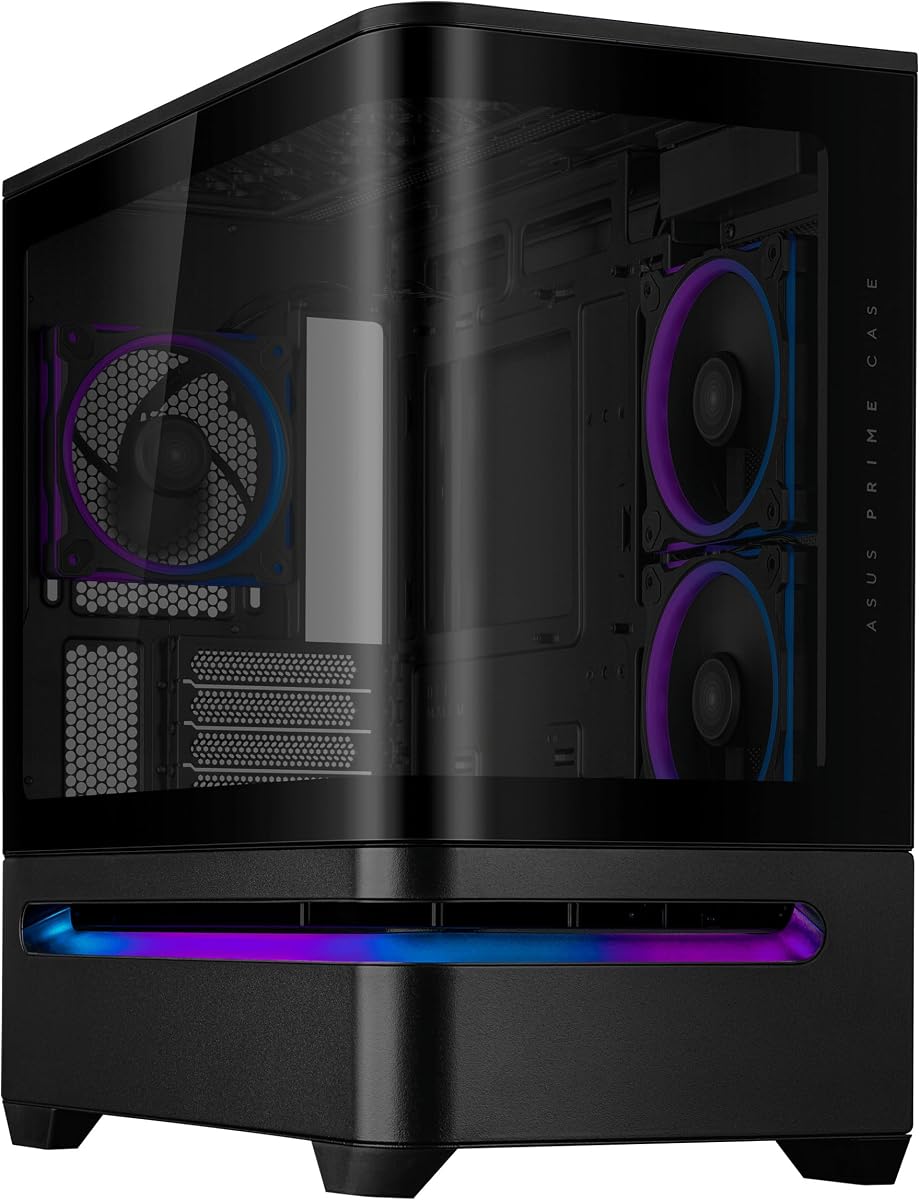
The ASUS Prime AP202 Black has a 4.7 rating and focuses on a clean, sweeping design rather than maximum internal volume. Its curved tempered-glass panel extends seamlessly from the front to the side, creating a panoramic view that can show components from almost any angle while complementing a compact micro-ATX build.
We may earn a commission when you buy through this link, at no additional cost to you.
An easy-detach rail is one of the most useful practical details. Builders can remove and reattach the glass panel with less risk of awkward handling, which is especially helpful during initial assembly or when the system needs maintenance. A patented slot vent is positioned to help graphics card cooling, while the integrated ARGB light band can coordinate with compatible Aura Sync ecosystems.
The supplied data does not list included fans, radiator dimensions, graphics card limits, or power-supply measurements. Those omissions make careful listing verification important, particularly for builders with unusually long or powerful components. The micro-ATX format also means the case is not intended for full-size ATX motherboards.
The AP202 Black is a compelling match for a smaller system where visual continuity and straightforward glass removal matter. It is especially attractive to builders using Aura Sync lighting and a standard micro-ATX motherboard, but those creating a high-end system should confirm cooling and clearance figures before finalizing the purchase.
The easy-detach rail simplifies removal and reattachment of the panoramic panel. This reduces the likelihood of accidental contact with the glass and makes routine component access more convenient.
Although designed for micro-ATX boards, the AP202 does not sacrifice the showcase effect. The uninterrupted glass sweep keeps the interior visible while the case occupies a smaller footprint than many ATX models.
We may earn a commission when you buy through this link, at no additional cost to you.
The Antec C8 Curve Wood has a 4.4 rating and brings a more natural, furniture-like identity to the curved-glass category. Its wide single-piece curved tempered-glass panel combines with an exotic wood front panel, creating a case that can look at home on a desk or as part of a refined office or entertainment setup.
We may earn a commission when you buy through this link, at no additional cost to you.
The dual-chamber layout provides a generous extended-ATX interior and separates airflow paths in a way that can help organize a large system. The case can support three 140mm fans or two 160mm fans at both the top and bottom, and it accepts thick 360mm radiators at the top, bottom, and side simultaneously. Interchangeable 120mm and 140mm mounting brackets add further flexibility.
No fans are included, so buyers must budget for a complete cooling setup. A full-tower chassis also demands substantially more desk or floor space than a conventional mid-tower, and the wood aesthetic is intentionally more distinctive than the all-black or all-white styling found elsewhere in the list.
The C8 Curve Wood is best for builders who want a large, visually refined workstation or entertainment PC and are comfortable assembling their own cooling configuration. Its combination of panoramic glass, dual chambers, and multiple radiator positions is particularly attractive for a powerful extended-ATX system.
The wood front and broad curved glass create a warmer appearance than the industrial designs common in gaming cases. The result can integrate more naturally with a refined desk or living-room environment.
Dual chambers, interchangeable fan brackets, and top, bottom, and side radiator support provide several paths for a high-output cooling system. The absence of fans gives buyers complete freedom over color, performance, and layout.
We may earn a commission when you buy through this link, at no additional cost to you.
The white JONSBO TK-3 holds a 4.8 rating, making it one of the strongest all-around choices in this guide. It combines a one-piece curved-glass panel with a 270-degree side view, presenting the internals in a nearly column-free enclosure. The white finish further enhances the light, modern appearance when paired with coordinated components.
We may earn a commission when you buy through this link, at no additional cost to you.
Its interior is designed for high-performance configurations. The case supports dual 360mm AIO radiators, ten fan positions, ATX power supplies up to 220mm, CPU coolers up to 165mm, and graphics cards up to 420mm. Motherboard support covers ATX, micro-ATX, and ITX, with added compatibility for backplane motherboards that place connectors behind the tray.
The same caveats that apply to the black TK-3 remain relevant. Its 288mm width, 438mm depth, and 415mm height give it a larger footprint than many ATX mid-towers, and the tallest air coolers may not fit. The manufacturer specifically advises against tearing off the curved-glass explosion-proof film, so buyers should leave it in place during initial setup.
This is the recommendation for a builder who prioritizes the combination of visual drama and serious cooling flexibility. It works particularly well for a high-end system with a long graphics card and dual radiators, provided the case has enough physical space and the builder understands how to handle the protective glass.
The broad one-piece glass design removes a central visual obstruction and exposes the system across a much wider area. The result is especially effective in a white-themed build with coordinated lighting and clean cables.
Dual 360mm AIO support, ten fan positions, and generous graphics card clearance allow the enclosure to serve as a high-output showcase rather than a limited display shell. Backplane motherboard support improves the internal presentation further.
We may earn a commission when you buy through this link, at no additional cost to you.
The Iota C70 BK Curve ARGB has a 4.3 rating and packs several useful features into a curved-glass enclosure. Its high-transparency panel provides a 270-degree panoramic view, while the integrated Ocypus digital display can show live CPU and GPU operating temperatures and offer selectable temperature units.
We may earn a commission when you buy through this link, at no additional cost to you.
Four Gamma F12 Elite fans come preinstalled, making this one of the more complete packages in the guide. The case supports 360mm AIO radiators, 120mm and 140mm fans, air coolers up to 160mm, graphics cards up to 445mm, and power supplies up to 240mm. Magnetic dust filters sit at both the top and bottom, while large openings and dedicated cable-routing positions support airflow and a tidy interior.
The digital display must be connected to a USB 2.0 port, so the builder must reserve that connection and understand its software or utility requirements. The 160mm CPU-cooler limit is also lower than some premium alternatives. Otherwise, the tool-free installation and snap-on front-glass release make initial assembly more approachable.
The C70 BK is a well-rounded pick for a gamer who wants a dramatic 270-degree view, integrated monitoring, and a useful set of preinstalled fans. It also provides the longest stated GPU clearance in this comparison, making it worth checking for builds using especially long graphics cards.
Four preinstalled Gamma F12 Elite fans reduce the number of additional components needed for a functional build. Their presence also helps establish a sensible front-to-rear airflow path from the first installation.
Tool-free installation, a snap-on glass release, magnetic filters, and dedicated cable-routing positions simplify the experience. The result is a case that balances visual appeal with practical everyday maintenance.
We may earn a commission when you buy through this link, at no additional cost to you.
The Thermaltake Vision 330 CR ARGB receives a 4.0 rating and offers a polished white build with a one-piece curved tempered-glass front and side panel. Its broad viewing area is intended to make the entire system visible from open and spacious angles, giving the enclosure a more formal showcase quality.
We may earn a commission when you buy through this link, at no additional cost to you.
Six 120mm Infinity ARGB PWM fans are installed on the bottom, side, and rear. This creates a useful intake-and-exhaust foundation for a system that does not begin with an AIO, and the chassis can accommodate up to nine 120mm fans in total. It also supports 360mm radiators, 420mm graphics cards, 175mm air coolers, and 250mm power supplies.
Hidden-connector motherboard cutouts support boards such as ASUS BTF, MSI PROJECT ZERO, and GIGABYTE PROJECT STEALTH, helping conceal cables behind the motherboard tray. The hinged panel and push clips allow tool-free removal, although the preconfigured fan arrangement offers less freedom than a case with extensively adjustable mounting rails.
The Vision 330 CR is a good fit for buyers who want an attractive white system, a curved display panel, and a substantial included fan set. It is especially suitable for a conventional air-cooled or entry-level liquid-cooled build, while its lower rating suggests prospective buyers should assess the current product details carefully.
The included Infinity ARGB PWM fan set creates an established cooling and lighting foundation. It can be especially convenient for builders who prefer a ready-made arrangement over selecting every fan separately.
Dedicated support for hidden-connector motherboards allows power and other cables to run behind the tray. Combined with the hinged glass and push-clip teardown, it supports a cleaner final presentation.
We may earn a commission when you buy through this link, at no additional cost to you.
The white ASUS Prime AP202 offers a 4.4 rating and the same sweeping glass treatment as the black edition in a brighter finish. Its curved tempered-glass panel extends from the front to the side, creating a panoramic view that complements a clean micro-ATX system with pale components and coordinated lighting.
We may earn a commission when you buy through this link, at no additional cost to you.
The easy-detach rail makes the large glass surface safer and simpler to remove, an important consideration for a curved panel. A patented slot vent supports graphics card cooling, and the integrated ARGB light band can work with Aura Sync. These details show that the case is intended to combine visual appeal with practical thermal and installation features.
Like the black version, the supplied information does not state the included fan configuration, radiator support, graphics card length, power-supply limit, or CPU-cooler height. It is also designed for micro-ATX rather than full ATX motherboards. These constraints mean the AP202 is better suited to compact builds than to expanding a system around a full-size board.
The white AP202 is an attractive option for a coordinated, relatively compact build where the glass shape and white finish are central to the design. Buyers should consult the current listing and component documentation before ordering to ensure the cooling hardware and dimensions align with their components.
The white finish complements light motherboards, power supplies, and peripherals while making the curved glass edge more visually distinct. It is a natural choice for a clean, bright showcase build.
The easy-detach rail improves access and handling, while the patented slot vent addresses a common challenge in glass-sided cases. These practical features help balance visual openness with cooling needs.
We may earn a commission when you buy through this link, at no additional cost to you.
The ASUS ROG Cronox White Edition carries a 5.0 rating and is the most feature-oriented enclosure in the guide. Its curved tempered glass is framed with aluminum for a seamless internal view, while the hinged 9.2-inch LCD module adds a substantial visual element beyond the usual case display.
We may earn a commission when you buy through this link, at no additional cost to you.
The screen can present system statistics, notifications, a digital clock mode, or custom visuals. It is integrated into a full-tower extended-ATX chassis designed for robust cooling, including support for up to fourteen 120mm fans and as many as two 360mm radiators. A patented rotatable side-fan bracket lets users direct the side airflow channel to suit the internal layout.
Hidden-connector motherboard support helps maintain a clean cable-managed appearance. A robust graphics card holder and patented slot clamps support cards up to 400mm long, providing both physical support and organized installation. The included full-tower format nevertheless requires a large desk or floor area, and buyers seeking a compact system should not expect the flexibility of a micro-ATX or mid-tower design.
The Cronox is ideal for a premium showcase build where the integrated display is central to the concept. It is best suited to a builder who values large-screen information, extensive cooling capacity, and a dramatic white presentation over minimizing desk space or purchase cost.
The hinged 9.2-inch display can show statistics, notifications, clock information, or custom visuals. That creates a more interactive centerpiece than a conventional enclosure with only a small temperature readout.
Support for fourteen 120mm fans and two 360mm radiators provides extensive cooling options. The rotatable side bracket, graphics card holder, and slot clamps help manage both airflow direction and the physical security of large components.
We may earn a commission when you buy through this link, at no additional cost to you.
Curved glass improves visibility, but the right enclosure also depends on motherboard format, hardware dimensions, cooling layout, airflow, display features, and the practical realities of assembling and maintaining a finished system.
Begin with the motherboard size because it establishes which cases are physically compatible. ATX cases accept full-size ATX boards and usually support smaller micro-ATX and ITX formats as well. Micro-ATX models are more compact but may not accept an ATX board, while extended-ATX cases are designed for larger boards and often accompany more elaborate component and cooling arrangements.
A full-size ATX board is the most flexible common choice, while micro-ATX can reduce footprint requirements and extended ATX suits specialized high-end systems. Match the case to the board rather than relying only on visual dimensions.
Modern graphics cards can occupy much of a mid-tower, so the case's maximum GPU length deserves careful attention. Limits in this list range from 400mm to 445mm. A card that is technically longer than the stated allowance may interfere with the front fans, radiator, drive cage, or cable-routing area, even if it can physically enter the chassis.
Measure the card from its outer edge to its power connector and compare that figure with the manufacturer's clearance. Also account for the connector's height or bend, especially on models with side-mounted power cables.
Curved glass cases vary substantially in their cooling capacity. A basic design may accept 120mm fans and a single 360mm radiator, while enthusiast models can support dual AIO radiators, 140mm fans, thicker radiators, and numerous mounting locations. Fans may be included in some products and entirely absent in others, which changes both the initial build requirements and the visual result.
Compare the number and location of fan mounts, not just the largest supported radiator size. Check whether the supplied fans are positioned for balanced intake and exhaust, and note any optional brackets that may need to be purchased separately.
The maximum CPU-cooler height determines whether a large air tower can be installed. The cases reviewed support limits ranging from 160mm to 175mm, with the JONSBO TK-3 listed at 165mm. A mismatch can prevent the side panel from closing or force the cooler to be raised, potentially interfering with the side glass or adjacent fans.
Check the dimensions of the intended cooler, including its fan and mounting hardware. Liquid cooling avoids the height restriction, but radiator thickness and mounting space still need to be considered.
Power supply support is usually expressed as a maximum length, and the cases here range from 220mm to 250mm. Modular and fully modular units are generally more convenient in display cases because unused power cables do not need to be stored. A tightly fitted power-supply chamber may also reduce the available space for cable bends behind the motherboard tray.
Compare the exact power supply length with the case specification and consider the depth required for a right-angle connector. High-power graphics cards may also require additional power cables or separate high-density adapters, which need room to route.
A single curved panel that transitions from the front to the side creates a more seamless panorama than separate flat side and front windows. Other cases emphasize one broad side view, while the darkFlash L280 uses three glass sides for maximum visibility. A 270-degree view is particularly dramatic, but it is not automatically better if a case has awkward structural supports or more difficult access.
Look for a continuous view of the motherboard, graphics card, and cooling hardware. Consider how the case will be positioned on the desk, since the most impressive angle may only be visible from one side.
Digital displays can show CPU and GPU temperatures, usage figures, system notifications, clock information, or custom visuals. The Iota C70 uses a relatively compact temperature display, the darkFlash L280 includes a monitoring screen, and the ROG Cronox takes the concept further with a hinged 9.2-inch panel.
Displays may require a USB connection, software, or a specific cable, so installation should be planned before the system is completed. Buyers should also consider whether the display adds enough utility to justify the additional complexity.
Tool-free panels, quick-release glass, magnetic dust filters, and dedicated cable-routing positions simplify long-term ownership. These details are often more valuable than an extra decorative element because they affect how easily a builder can install components, clean filters, and service the system.
Pay particular attention to access to the front fans, power supply, storage devices, and underside. A case that looks excellent but requires excessive disassembly to reach a dusty filter may be less convenient in everyday use.
Prepare the chassis before installing components. Remove the protective glass film only when the manufacturer permits it; the JONSBO TK-3 explicitly instructs users not to remove its explosion-proof film. Work on a clean, padded surface, keep screws in a labeled container, and install the power supply, motherboard, storage, and graphics card in an order that avoids reaching past sharp edges or tightly routed cables.
Treat the curved panel as a separate precision component. Lift or detach it using the provided rail, hinge, latch, or tool-free mechanism rather than pulling on an edge. Before closing the case, verify that headers, fan connectors, front I/O leads, and display cables are connected and that no cables press against the glass or obstruct fans.
Maintain the enclosure by cleaning removable filters on a regular schedule and using gentle, dry methods on the glass and metal surfaces. Avoid spraying cleaner directly onto the panel, and do not use harsh chemicals that could damage coatings, printed surfaces, or adjacent components. Check airflow paths and cable areas whenever a fan is removed or the internal layout changes.
Curved glass can create a wider, more seamless view of the internal components, especially when one panel curves from the front to the side. It does not automatically improve cooling or make a system quieter. The practical benefits still depend on airflow, fan placement, component clearance, and the quality of the enclosure design.
The shape of the glass itself usually has less influence than the case's ventilation, fan configuration, and airflow path. A visually open case may have fewer mesh intake areas, while well-placed vents can compensate. Builders should compare supported fan and radiator positions and ensure the glass does not block any intake openings.
Only remove the film if the manufacturer specifically instructs you to do so. Some curved panels include an explosion-proof or shipping film that is intended to remain during installation because it helps prevent accidental cracking. The JONSBO TK-3 listing explicitly warns against tearing off that film.
Curvature itself does not necessarily make assembly difficult, but the larger panels deserve more careful handling than small metal covers. Cases with quick-release rails, hinged panels, magnetic filters, and tool-free fasteners are generally easier to service. Builders should also plan for extra cable-management space behind a wide glass panel.
It depends on the model. The Iota C70 includes four fans, the Thermaltake Vision 330 CR includes six, and the darkFlash L280 includes four, while the Antec C8 Curve Wood has no fans included. Other cases may provide a smaller included set. Buyers should compare the case's fan layout and intended radiator position before ordering additional cooling.
Most of the cases reviewed explicitly support 360mm radiators, although mounting positions and simultaneous radiator arrangements differ. The JONSBO TK-3 can support dual 360mm AIO radiators, while the ROG Cronox supports up to two 360mm radiators. Always verify radiator thickness, fan thickness, and the exact mounting area in the product documentation.
Choose a case that explicitly supports the board you already own or plan to buy. ATX mid-towers provide broad flexibility, micro-ATX cases can reduce the footprint, and extended-ATX full towers suit large boards and complex cooling systems. A visually similar case may still be incompatible if its motherboard tray or interior proportions do not match your board.
They often benefit from it because the glass makes cables and clutter highly visible. Dedicated routing positions, hidden-connector motherboard support, and removable cable covers can create a cleaner result. Plan the cable paths before final assembly and avoid bunching excess wiring behind the panel where it can obstruct airflow.
The JONSBO TK-3 White is the leading all-around recommendation for its 4.8 rating, expansive 270-degree view, and support for dual 360mm AIO radiators. The Iota C70 BK Curve ARGB stands out as the budget-minded feature package with four fans and a temperature display, while the ASUS ROG Cronox White Edition delivers the most premium experience through its large integrated screen and extensive cooling support.
Before choosing, prioritize the hardware you already own. Confirm motherboard format, graphics card length, CPU-cooler height, power supply dimensions, radiator placement, and included accessories. Then consider build convenience, dust filtration, cable management, and whether a digital display or modular chassis will genuinely improve your particular system.
Finally, check the current listing and all manufacturer specifications before purchasing. Component compatibility, included accessories, support policies, and prices can change, and a case that looks ideal in a product gallery may not match a compact desk, unusual cooling plan, or future upgrade. Confirm the latest details to ensure the curved-glass enclosure fits both the build and the space.