
GLOTRENDS M.2 NVMe to PCIe 4.0 X4 Adapter with Heatsink for NVMe SSD
4.6Editor score
Four included M.2 sizes
Regular and low-profile brackets
Windows and Linux support
Our Pcie NVME Adapter guide compares ten options for speed, drive support, slot compatibility, cooling, installation, and expansion needs in 2026 for buyers.
A Pcie NVME Adapter lets you install an M.2 NVMe solid-state drive in a desktop computer that lacks a suitable M.2 connector. The best choices combine broad motherboard compatibility, proper PCIe lane support, effective cooling, and an installation process that does not demand advanced hardware experience.
This guide compares ten adapters based on the supplied product specifications, including supported drive formats, physical slot requirements, PCIe generations, heatsink design, bracket options, operating-system compatibility, and the number of drives each card can accommodate. It covers single-drive, dual-drive, and four-drive options for different storage-expansion needs.
The selections show where each product stands out, from straightforward adapters for older PCs to specialized cards that require motherboard bifurcation or a full-length slot. Ratings and specifications can change as new revisions arrive, and current prices fluctuate, so shoppers should confirm the latest listing details before buying.
4.6Editor score
4.7Editor score

4.2Editor score
The following comparison covers drive count, physical slot fit, cooling hardware, and major compatibility considerations for all ten adapters, helping you identify the right option for a particular desktop and storage plan.




The GLOTRENDS M.2 NVMe to PCIe 4.0 X4 Adapter is a well-rounded single-drive solution with a 4.6 rating. Its strongest qualities are broad drive support, a useful pair of case brackets, and compatibility with current PCIe 4.0 and 3.0 NVMe SSDs. It is a practical choice when an older desktop has an unused expansion slot but no accessible M.2 connector.
We may earn a commission when you buy through this link, at no additional cost to you.
This adapter converts a physical PCIe x4, x8, or x16 slot into an M.2 Key M mounting point. It supports the four common NVMe lengths of 2230, 2242, 2260, and 2280, as well as large 2TB and 4TB drives according to the supplied specifications. A cooling solution is included, and the manufacturer states that it can reduce M.2 SSD temperatures by approximately 5–20°C.
The important limitation is that the adapter does not create a faster interface than the computer already has. Full PCIe 4.0 x4 operation requires compatible support in the CPU, motherboard slot, and installed SSD. Intel processors below 11th generation do not support PCIe 4.0, and M.2 SATA drives are explicitly unsupported. Older motherboards may also use the card for storage even when they cannot boot from it.
This is an attractive general-purpose adapter for builders who want flexible drive sizes, straightforward OS support, and the option to install a high-capacity NVMe drive. It suits Windows 11, 10, and 8 users as well as Linux and Mac OS systems. Buyers should confirm BIOS NVMe support, physical clearance, and the protocol printed on their proposed SSD before purchasing.
Support for 2230, 2242, 2260, and 2280 lengths means the card can accept most mainstream M.2 NVMe SSDs without requiring a specific physical format. The lack of a stated capacity limit also makes it suitable for users considering larger modern drives, subject to normal operating-system and hardware limits.
The included heatsink is particularly useful because an M.2 drive installed on an expansion card may have less airflow than one mounted directly on a motherboard. Regular and low-profile brackets allow the adapter to fit different case layouts, although the card still needs sufficient room around the drive and slot.
We may earn a commission when you buy through this link, at no additional cost to you.
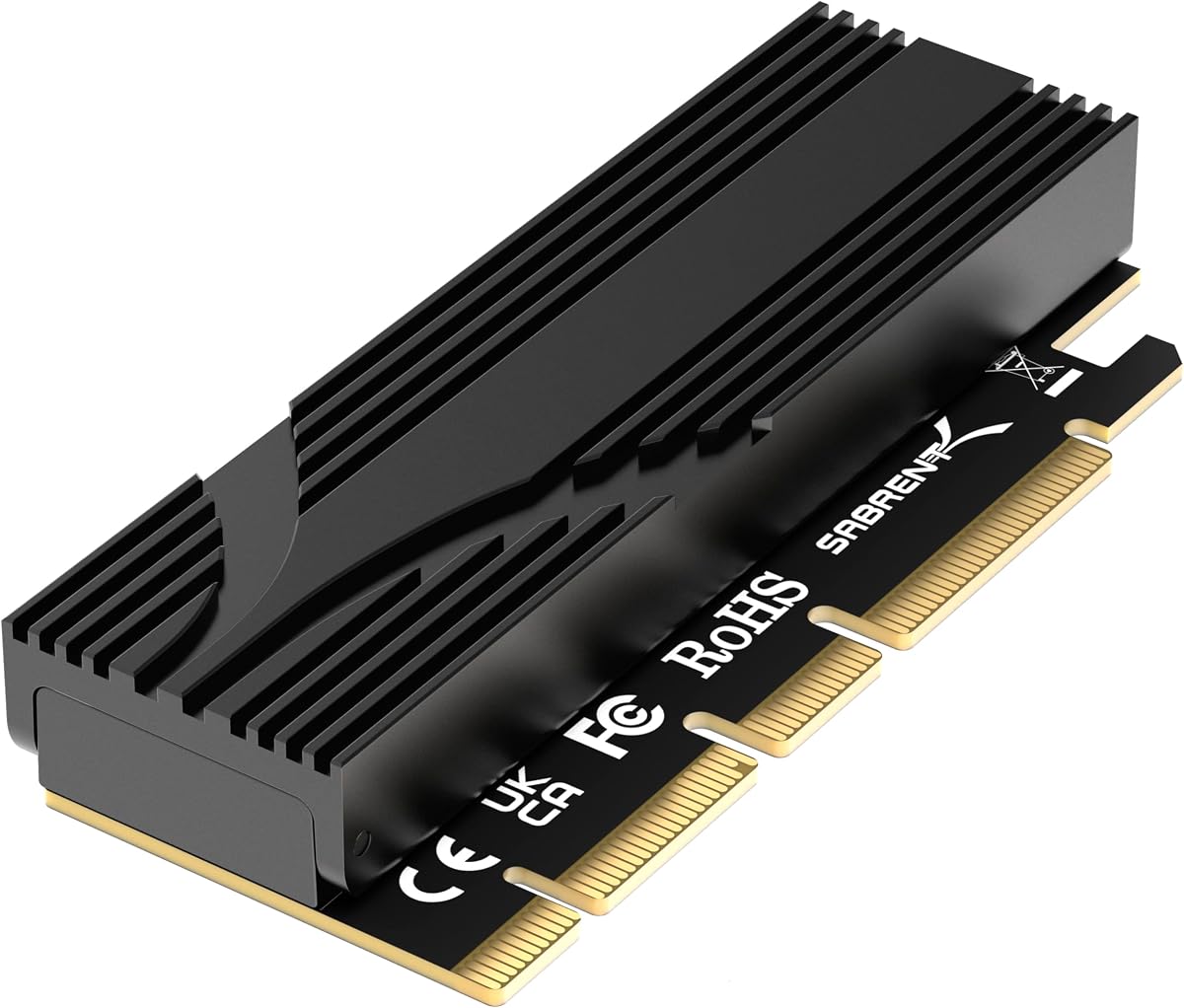
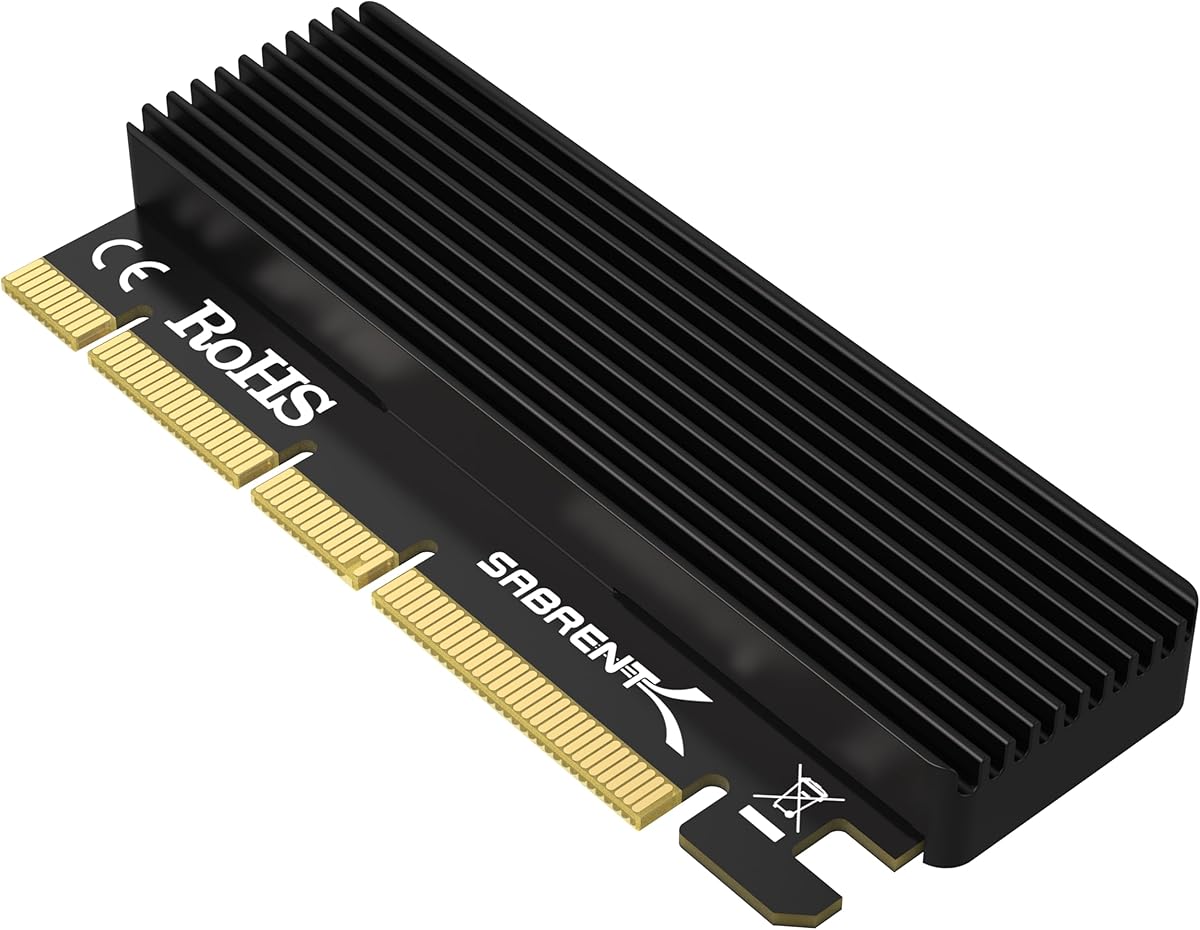
The SABRENT M.2 NVMe SSD to PCIe X16/X8/X4 Adapter Card earns a 4.5 rating and focuses on simple installation and dependable physical construction. It accepts standard M.2 NVMe drives across 2230, 2242, 2260, and 2280 sizes, while the included aluminum heatsink and thermal pads help manage sustained heat.
We may earn a commission when you buy through this link, at no additional cost to you.
Its passive design has no onboard controller, so the motherboard must handle NVMe communication over PCIe lanes. This distinction is important: a correctly installed card can still remain invisible to an older system whose BIOS does not support reading or booting NVMe drives. Compatible systems can use the adapter with modern Windows releases, Linux, and Windows 7 when the appropriate NVMe hotfixes are installed.
The adapter requires a physical PCIe x16, x8, or x4 slot and will not fit a PCIe x1 slot. M.2 SATA drives are also excluded. Although the card supports tool-free SSD mounting, the supplied specification separately mentions included screws and a screwdriver, so buyers should not assume every fastening step is tool-free without checking the package contents.
This SABRENT card is well suited to a builder who wants a straightforward way to reuse an M.2 NVMe drive in a desktop and values straightforward installation. It is less suitable for systems with limited physical expansion space or very old motherboards that lack NVMe support. Verify the drive interface, slot dimensions, BIOS capabilities, and case clearance before ordering.
Because the adapter contains no controller, the installed SSD is handled through the host motherboard's PCIe and NVMe support. This keeps the hardware design simple, but it also means firmware and boot compatibility are determined by the system rather than by an onboard controller.
Thermal pads are included for use between the SSD and heatsink, with spare pads intended to accommodate different drive thicknesses. A proper thermal interface helps the card maintain consistent performance during sustained transfers, although users should still leave room for airflow around the assembly.
We may earn a commission when you buy through this link, at no additional cost to you.
The SABRENT M.2 NVMe SSD to PCIe x16 Adapter Card, Gen5, has the highest rating in this group at 4.7. It is aimed at users with newer platforms, connecting through a physical x16 edge while operating at x4 and potentially reaching PCIe 5.0 throughput when the motherboard slot and drive support it.
We may earn a commission when you buy through this link, at no additional cost to you.
The card accepts M.2 M-key NVMe drives in the 2230, 2242, 2260, and 2280 formats, and its specifications also mention older B+M-key PCIe drives. It does not support SATA-only M.2 drives. Its full-length physical edge offers stability and may fit some x4 or x8 slots, but clearance around a graphics card, CPU cooler, or case fan must be checked before installation.
One major advantage over many multi-drive cards is that a single-drive x16 design does not require motherboard bifurcation. The drive locks into place without a tiny M.2 screw, and the built-in aluminum heatsink uses passive thermal padding rather than an active fan. This keeps installation clean and avoids adding fan noise, although real-world speed still depends on the SSD itself.
This is the strongest choice for a modern PCIe 5.0 or PCIe 4.0 platform, particularly when tool-free installation and a quiet cooling solution matter. It is not a way to upgrade an old computer to Gen5, because the adapter cannot manufacture a faster host interface. Confirm the motherboard's slot generation, available space, BIOS support, and the protocol on the SSD before buying.
In a compatible Gen5 x4 host slot, the specification allows up to 16GB/s bidirectional throughput. In Gen4 or Gen3 systems, the card operates at the available generation, making platform capability the decisive factor when evaluating expected transfer performance.
The tool-free locking mechanism makes it convenient to install or remove an SSD without searching for a small screw. Because the card carries only one drive, it also avoids the lane-splitting and bifurcation requirements associated with high-capacity multi-drive adapters.
We may earn a commission when you buy through this link, at no additional cost to you.
This M.2 NVMe to PCIe 4.0 x4 Adapter with Aluminum Heatsink Solution carries a 4.6 rating and offers a direct route between an M.2 NVMe SSD and a conventional expansion slot. It supports 2230, 2242, 2260, and 2280mm drives and can be used in physical PCIe x4, x8, or x16 slots.
We may earn a commission when you buy through this link, at no additional cost to you.
The main distinguishing feature is its included aluminum heatsink, which the supplier says can deliver a cooling effect of approximately 5–20°C. That is useful for a card-mounted SSD because the drive may not have the same airflow or mounting arrangement as an SSD placed directly on a motherboard. A cooler installation is particularly relevant to sustained transfers or systems with limited case ventilation.
The supplied product information focuses on M-key NVMe support and lists examples of compatible drives from Samsung, Plextor, and Kingston. It does not mention support for SATA-formatted M.2 drives, and the NVMe protocol should be verified before installation. Like other passive adapters, its ultimate speed and boot behavior remain tied to the CPU, motherboard slot, firmware, and installed SSD.
For a user who wants a straightforward PCIe 4.0 x4 adapter and values the presence of an aluminum heat-management solution, this card is a practical choice. It works particularly well in a desktop with an open expansion slot and a compatible NVMe drive. Checking physical clearance, BIOS recognition, and the adapter's full included-hardware list before ordering would help prevent surprises.
The adapter keeps the layout simple by providing one M.2 mounting position and a conventional PCIe card edge. That makes it easier to reason about lane compatibility than with a card that has to divide one physical slot among several drives.
The aluminum heatsink provides a basic passive means of reducing drive temperature. While the stated cooling range should not be treated as a guarantee for every chassis, adding a heatsink is still a meaningful advantage over mounting a high-performance SSD with no thermal solution.
We may earn a commission when you buy through this link, at no additional cost to you.
The M.2 NVMe to PCIe X4 Adapter with Heatsink has a 4.6 rating and stands out for a comprehensive package. It supports PCIe 4.0 and 3.0 NVMe SSDs, works in physical x4, x8, or x16 slots, and is backward compatible with PCIe 1.0, 2.0, and 3.0 interfaces.
We may earn a commission when you buy through this link, at no additional cost to you.
Drive compatibility covers 2230, 2242, 2260, and 2280mm M.2 NVMe and AHCI SSDs. The package includes an adapter PCB, spare SSD bolts, a screwdriver, regular and low-profile brackets, two thermal pads in different thicknesses, an aluminum heatsink, spring fasteners, and several types of fixing screws. That level of inclusion reduces the chance of discovering a missing part after opening the case.
The adapter is listed for Windows 11, 10, and 8, Windows Server 2012 R2, Linux, Fedora, SUSE, Ubuntu, and Red Hat. Windows 7 and Windows Server 2008 R2 require an additional NVMe driver, and the supplier advises obtaining a driver from the SSD manufacturer if a compatible system does not recognize the drive. The card does not add speed to an unsupported host interface.
This is a good general pick for builders who want the necessary mounting and cooling parts in one package. The thermal-pad arrangement is useful because SSD thickness can vary, and the two bracket options improve case compatibility. Confirm that the chosen drive uses PCIe NVMe rather than SATA and that the motherboard can read NVMe before purchasing.
The supplied list covers the drive fasteners, card fasteners, brackets, screwdriver, thermal pads, and heatsink. This makes the package especially attractive for first-time builders who may not have the correct small tools or replacement mounting hardware on hand.
Although the electrical interface is backward compatible with earlier PCIe generations, an old motherboard must still support NVMe detection and booting. Windows 7 also needs the appropriate driver support, so interface generation alone does not guarantee that every older computer will recognize the drive.
We may earn a commission when you buy through this link, at no additional cost to you.
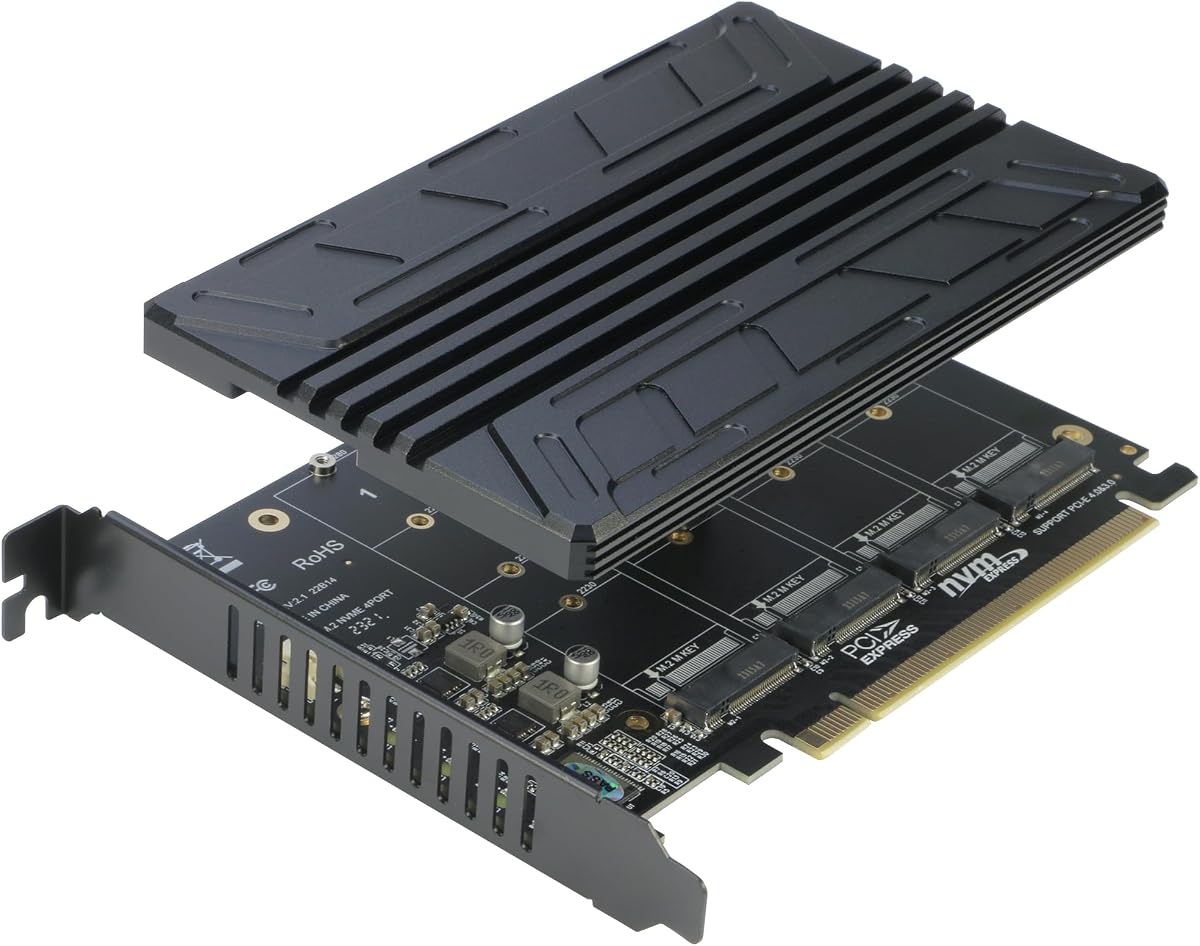
The RIITOP Quad PCIe NVMe Adapter is the specialized choice in this roundup because it can hold four M.2 NVMe SSDs at once. Its 4.4 rating reflects an ambitious design aimed at compatible server and enthusiast platforms rather than ordinary PCs whose firmware does not support lane bifurcation.
We may earn a commission when you buy through this link, at no additional cost to you.
To recognize all four drives, the motherboard must provide a PCIe 4.0 or 3.0 x16 slot, support x16 bifurcation, and allow the BIOS configuration described as PCIe x4x4x4x4. The CPU also needs enough channels. Most server boards and X299 or X399 platforms may be suitable, but the buyer should consult the exact motherboard manual rather than rely on a chipset-family generalization.
The card supports 2280, 2260, 2242, and 2230 M.2 PCIe NVMe drives, while excluding SATA-based B+M-key models. Its low-profile 0.32-inch heatsink is designed to limit interference with neighboring expansion slots, while individual LEDs indicate whether each drive is active. A slim heatsink also means users should pay particular attention to airflow around four densely packed SSDs.
The card does not support hardware RAID. It can form a software RAID in Windows 10 or through third-party software, and the supplied guidance recommends using four SSDs of the same model. This is an excellent choice for storage-heavy workstations or compatible servers, but an excessive and potentially costly complexity for a desktop that only needs one additional drive.
A four-drive card needs the host to divide one physical x16 slot into four x4 groups. If the motherboard cannot enable that arrangement in BIOS, only one M.2 drive may be recognized even though all four are physically installed.
Four drives in a compact card create a concentrated heat load. The low-profile heatsink helps manage that load and preserves neighboring slot space, but adequate case airflow remains important when all four SSDs operate under sustained workloads.
We may earn a commission when you buy through this link, at no additional cost to you.
The PCIe NVMe Adapter Card with Heat Sink has a 4.4 rating and emphasizes flexible installation across x4, x8, and x16 slots. Its full x16 physical interface is designed for stability while still allowing the card to be used in shorter compatible slots. It supports PCIe 2.0, 3.0, and 4.0 NVMe SSDs.
We may earn a commission when you buy through this link, at no additional cost to you.
The adapter accepts 2230, 2242, 2260, and 2280 M.2 NVMe SSDs and is described as a plug-and-play upgrade for many desktop motherboards. Gold-plated contacts are included to support stable signal transmission, while a heatsink and mounting screws are supplied. These details make it suitable for adding storage to an older PC that has an unused expansion slot but lacks a convenient native M.2 connector.
The product's performance language should be understood carefully. Direct PCIe connectivity removes the bottleneck of an external enclosure, but the SSD and host slot still determine actual read and write speeds. Older motherboards may require driver or BIOS support, and a crowded case can make a full-length card inconvenient even when the electrical slot is compatible.
This card is best for a desktop builder seeking a no-frills way to repurpose an NVMe drive. It offers broad physical fit and includes basic cooling, but system builders should check whether a graphics card or other expansion device blocks the available slot. As with every adapter, confirmation of M.2 NVMe—not SATA—compatibility remains essential.
The x16 edge gives the adapter a conventional expansion-card shape that may seat more securely than a very short riser-style design. Although it can fit certain x4 and x8 slots, the available space and mechanical positioning should be inspected in the case.
Connecting the M.2 drive directly to motherboard PCIe lanes can provide lower overhead than an external storage route. The result still depends on the protocol generation, negotiated link width, drive capability, and the amount of data being transferred.
We may earn a commission when you buy through this link, at no additional cost to you.
The StarTech M.2 PCIe SSD Adapter, model PEX4M2E1, has a 4.6 rating and is aimed at practical IT-oriented use. It connects an M.2 M-key NGFF drive through a PCIe 3.0 x4 interface and works in x4, x8, and x16 slots, with backward compatibility for PCIe 2.0 and 1.0 systems.
We may earn a commission when you buy through this link, at no additional cost to you.
Unlike adapters limited strictly to NVMe, this model supports both NVMe and AHCI M.2 SSDs. It accommodates 2242, 2260, 2280, and the stated 22110 form factor. A full-profile bracket is equipped, and a half-height or low-profile bracket is included for compact computer cases. That focus on case fit is valuable for system integrators and office workstations.
Native operating-system support makes setup relatively direct, but users should still verify that the computer can boot from or read the chosen M.2 protocol. The product information does not specifically mention an aluminum heatsink, so buyers seeking a thermal solution for a high-performance or continuously loaded drive may wish to confirm the complete package or consider a separate compatible cooling approach.
This adapter is a strong choice for business users and IT teams that value a recognizable manufacturer, stated support coverage, and low-profile installation flexibility. It is less suited to a PCIe 5.0 platform seeking the newest link generation, although a PCIe 3.0 drive in that system will still function at the available generation. Matching the adapter to the expected workload is more important than choosing a card based only on its maximum generation.
Supporting both NVMe and AHCI broadens the pool of usable M.2 SSDs compared with adapters that accept only one protocol. It can be useful in mixed IT inventories, provided the selected drive's interface and the computer's firmware support are verified.
The included low-profile bracket makes the adapter a better fit for small-form-factor systems than a card with only a full-height bracket. Case depth, neighboring components, and the drive's orientation should still be checked before final assembly.
We may earn a commission when you buy through this link, at no additional cost to you.
The ELUTENG Dual M.2 NVMe to PCIe Adapter is designed for users who want two NVMe SSDs in one expansion card. It carries a 4.2 rating, the lowest in the group, but its dual-drive design, cooling hardware, and broad slot support give it a distinct purpose beyond ordinary single-drive adapters.
We may earn a commission when you buy through this link, at no additional cost to you.
The card accepts 2280, 2260, 2242, and 2230 M.2 NVMe drives and is listed for both M-key and M+B key configurations. It does not support M.2 SATA SSDs. Two drives can operate at the same time, while the package includes two heatsinks, copper strips, a long bracket, a short bracket, screws, and a screwdriver.
Power is drawn from the PCIe slot, and the supplied specifications state that no external power adapter is required. Solid capacitors are included for voltage regulation, while copper strips and a multi-hole design are intended to dissipate heat. That makes the card appealing for compact dual-drive builds, provided the motherboard supplies enough lanes and the chosen SSDs are appropriately sized.
The listed data transfer speed of 5Gbps is modest compared with the headline throughput of newer PCIe interfaces, so buyers should examine the exact drive-sharing behavior and real-world needs. It is best suited to adding moderate-capacity storage, maintaining a second working drive, or organizing separate data sets. Users should confirm lane sharing, boot requirements, and OS support before committing to a dual-drive configuration.
The dual M.2 layout provides a convenient way to retain two SSDs while using a single physical expansion position. Because the card draws power from the motherboard slot, the builder does not need to route an additional SATA or peripheral power connector to it.
Copper strips, a perforated cooling layout, and two dedicated heatsinks create several paths for heat removal. These features are particularly valuable when two drives share a card, although case airflow and the actual thermal design of each SSD still affect results.
We may earn a commission when you buy through this link, at no additional cost to you.
The ELUTENG M.2 NVMe PCIe Adapter with Aluminum Heatsink has a 4.4 rating and offers broad physical compatibility for adding one NVMe drive. It supports physical PCIe x1, x4, x8, and x16 slots and is compatible with PCIe 1.0 through 4.0, making the electrical format usable across a wide range of desktop systems.
We may earn a commission when you buy through this link, at no additional cost to you.
The adapter accepts M.2 PCIe NVMe M-key SSDs and includes an aluminum heatsink to help reduce operating temperature. Its listed theoretical read/write speed is 16Gb/s, while the supplied information cautions that real transfer speed depends on the interface and working environment. M.2 SATA drives are not supported, and booting from the drive requires motherboard BIOS support for PCIe booting.
Operating-system support is listed for Windows 11, 10, 8, and 7, Windows Server 2012 R2, Linux, Fedora, SUSE, Ubuntu, and Red Hat. Windows 7 and older environments need the appropriate NVMe driver. Solid-state capacitors are used for voltage regulation, and the card is described as automatically recognized by compatible Windows installations.
The low-profile bracket and direct backplate attachment make this a sensible option for smaller cases or systems with limited expansion clearance. It is a balanced choice for adding one fast NVMe drive without moving to a more complex dual- or quad-drive card. Shoppers should still verify boot support, protocol labeling, physical room, and the availability of any required legacy driver.
Support for x1, x4, x8, and x16 physical positions makes this adapter unusually flexible. The negotiated speed will still reflect the weakest part of the path, so a faster host slot cannot compensate for a slower drive or a motherboard with limited lane support.
The included backplate attaches to the card with a supplied screw, reducing the number of separate pieces that must be assembled. This is convenient in compact cases where a full-height bracket would not fit or might interfere with other hardware.
We may earn a commission when you buy through this link, at no additional cost to you.
Choosing a Pcie NVME Adapter requires matching the card to your drive protocol, motherboard slot, intended drive count, physical case layout, and operating-system requirements. The most important checks happen before the SSD is installed.
Most PCIe NVMe adapters are designed for M.2 M-key NVMe SSDs, and several products in this guide explicitly exclude M.2 SATA drives. The distinction matters because SATA and NVMe use different protocols, even though both can use the physical M.2 form factor. Read the label and documentation for the exact drive you plan to use, and confirm that it is PCIe NVMe rather than SATA or a SATA-compatible B-key configuration.
The adapter and SSD must both speak NVMe, and the host system must recognize that protocol. Some older motherboards can use an NVMe adapter as secondary storage but cannot boot from it. A current operating system simplifies detection, while Windows 7 and older systems may require an NVMe hotfix or driver supplied by the SSD manufacturer.
PCIe connectors are electrically associated with x1, x4, x8, and x16 lanes, but a card's physical edge determines where it can actually fit. A full-length x16 edge may fit a shorter x4 or x8 slot on some boards, while a card designed around an x16 physical connector will not fit a tiny x1 slot. Check the manual and compare the card's length and bracket height with the available space.
Choose a slot with a compatible physical connector, then inspect the case for clearance around the GPU, CPU cooler, fans, and rear I/O area. The best adapter is one you can install without forcing the card or shortening another component's clearance.
The fastest generation supported by the adapter, motherboard slot, CPU, and SSD must all line up. A PCIe 4.0 adapter does not create PCIe 4.0 support on a platform limited to PCIe 3.0, and a Gen5-capable card cannot accelerate a system whose slot operates at an older generation. Lane width also matters, since an x4 device in an x16 slot normally negotiates the narrower x4 link.
For most desktop upgrades, the SSD itself is the deciding factor in real transfer speed. If you already own a PCIe 3.0 NVMe drive, a newer adapter may still offer useful fit and convenience, but it will not raise the drive's performance. Check the SSD's stated interface and your motherboard's specifications before optimizing around a particular generation.
A single-drive adapter is the simplest and most broadly compatible option. Dual-drive cards can hold two SSDs, but require suitable lane availability and may split bandwidth or share boot resources. Quad-drive adapters are specialized: they generally require motherboard PCIe bifurcation, such as a BIOS x4x4x4x4 configuration, along with sufficient CPU channels.
Choose the drive count based on present storage needs rather than the highest number the card can hold. A single 2280 drive may serve a simple system upgrade, while a multi-drive card is more useful for a dedicated workstation, server, or high-capacity storage project. Also review RAID expectations, because the supplied RIITOP model supports software arrangements rather than hardware RAID.
M.2 SSDs can become warm under sustained transfers, particularly when multiple drives are mounted close together on one card. Aluminum heatsinks are common among the options here, while the ELUTENG dual card adds copper strips and a multi-hole layout, and the SABRENT Gen5 card uses a built-in heatsink with thermal padding. These passive solutions are generally simpler and quieter than adding a dedicated fan.
Apply the supplied thermal pad or paste according to the product instructions and make sure it covers the appropriate controller or NAND area. A heatsink cannot compensate for a completely blocked slot, so leave airflow around the card and avoid placing it directly beneath a graphics card when the case layout makes that unavoidable.
Most of the single-drive adapters support 2230, 2242, 2260, and 2280 M.2 lengths, allowing users to reuse drives from laptops, compact systems, and full-size desktops. The RIITOP quad card and ELUTENG dual card also list these common formats. Always verify the exact dimensions, since a longer 2280 drive is the norm but not universal.
The key layout must match as well. M-key is typical for NVMe, but some compatible products also mention B+M-key PCIe drives. No adapter in this roundup should be assumed to support a SATA-only M.2 drive, regardless of whether the physical connector appears to fit.
An adapter can be electrically perfect and still remain invisible if the firmware does not support NVMe over PCIe. Confirm that the motherboard can boot from an NVMe drive or at least enumerate one from an expansion slot. New SSDs also need to be initialized and formatted before normal use, and a new drive may require the appropriate installation steps for the chosen operating system.
Current Windows, Linux, and Mac systems are generally straightforward when the hardware is supported, but older platforms are less predictable. Windows 7 and Windows Server 2008 R2 are specifically identified as needing additional NVMe drivers in several product descriptions. For a business system, a well-documented motherboard and stable OS can be more important than the newest advertised link generation.
The quality and completeness of the mounting hardware can make installation much easier. In this list, the M.2 NVMe PCIe X4 model includes a screwdriver, spare bolts, fixing screws, thermal pads, and both regular and low-profile brackets. Other products include equivalent essentials, but packages vary, so the box contents should be reviewed before assembly.
For a compact chassis, a low-profile bracket can be decisive. For a full-size case, the regular bracket may be easier to align with rear openings. Make sure the drive is held without bending, the heatsink does not press unevenly on components, and every screw is the correct length for the card and bracket.
Before installation, power down the computer completely, disconnect the power cable, and use suitable precautions when handling internal components. Confirm that the SSD is M.2 NVMe, determine its length and key layout, and compare both the adapter and drive with the available expansion slot. Read the motherboard manual if you are unsure about physical fit, lane support, bifurcation, or boot capabilities.
Seat the M.2 SSD at the correct angle, secure it with the specified screw or locking mechanism, and install the appropriate thermal pad or interface material if it is not already attached. Fit the required case bracket, align the card with the PCIe slot, and secure it firmly without overtightening. Reconnect power, boot the system, install the operating system or initialize the drive as needed, and verify that its full reported capacity appears.
During use, leave the adapter and heatsink unobstructed, keep the chassis intake and exhaust fans working properly, and avoid moving the drive while the system is running. Monitor temperatures during sustained file transfers or other demanding tasks. If a drive is not detected, shut down and reseat the SSD, check the protocol label, review BIOS settings, and install any required NVMe driver rather than repeatedly hot-plugging the card.
Yes, if the motherboard supports booting from an NVMe drive through a PCIe slot and the selected drive uses the NVMe protocol. Some older systems can read the adapter as secondary storage but cannot boot from it. Check the motherboard manual and update its firmware when appropriate before assuming the card will work as a system drive.
Usually not. The products in this guide are primarily designed for M.2 PCIe NVMe drives, and several explicitly state that M.2 SATA SSDs are unsupported. SATA and NVMe may use a similar physical connector but communicate through different protocols, so confirm the drive label before buying an adapter.
A physical x16 adapter has a long card edge, while it may communicate over only x4 lanes. Some such cards fit shorter x4 or x8 slots for stability. The negotiated link width is what determines bandwidth, and it will also depend on the motherboard, CPU, and SSD.
A heatsink is recommended for high-performance drives, sustained transfers, or systems with limited airflow. Most options in this roundup include an aluminum heatsink, while one dual-drive card also uses copper strips. A card-mounted SSD can run warmer than one installed directly on the motherboard, so retaining the supplied cooling solution is sensible.
Only if you choose a card designed for that drive count and the motherboard supplies compatible lanes. The dual-drive ELUTENG card supports two drives, while the RIITOP quad card supports four and explicitly requires PCIe bifurcation. A single-drive card cannot simply be populated with multiple SSDs.
Common causes include using an M.2 SATA drive, placing the adapter in an incompatible physical slot, insufficient BIOS NVMe support, or missing drivers on an older operating system. Shut down, verify the drive protocol and card seating, check BIOS settings, and consult the motherboard manual. On legacy Windows versions, install the appropriate NVMe driver.
It can improve storage responsiveness, application loading, and file-transfer performance if the system previously relied on a slower drive. It does not increase CPU or graphics performance. The overall benefit depends on the SSD, negotiated PCIe link, operating system, and the tasks being performed.
A low-profile bracket is often necessary in small-form-factor cases because a full-height card may not align with the case opening. Several products include both regular and low-profile brackets. Measure the available space and check neighboring components before selecting the bracket position.
The SABRENT PCIe 5.0 Gen5 card is the leading choice for newer systems because it combines the highest listed rating, tool-free drive mounting, passive aluminum cooling, and a single-drive design that avoids motherboard bifurcation. The GLOTRENDS PCIe 4.0 X4 adapter is the stronger all-around value, while the ELUTENG dual card suits users who specifically need two NVMe drives.
Prioritize protocol compatibility, physical fit, and BIOS support before considering headline speed. A card cannot add a PCIe generation the motherboard lacks, and most of the adapters in this guide do not support M.2 SATA drives. Multi-drive users should pay particular attention to lane sharing, bifurcation, cooling, and power requirements rather than assuming every drive will operate independently at full speed.
Prices and product revisions can change, so review the current listing, package contents, warranty information, and compatibility notes before ordering. Confirm the exact SSD interface, available slot dimensions, operating-system requirements, and case clearance. With those checks completed, a PCIe NVMe adapter can provide a clean and effective way to add fast storage to a compatible desktop.