
Redragon K585
4.4Editor score
Seven onboard macro keys
Hot-swappable switch sockets
Five RGB lighting modes
Explore the best gaming keypads for MMO, MOBA, FPS, and productivity use, comparing layouts, switches, macros, RGB, and connectivity.
Gaming keypads place frequently used commands within easy reach while leaving the other hand free for the mouse. The best model depends on your game, hand size, preferred switch feel, need for macros, and tolerance for wired versus wireless operation.
This guide compares ten gaming keypads across key count, layout, actuation, lighting, connectivity, programmability, and practical extras. It includes membrane, mechanical, and Hall Effect designs for competitive shooters, MMO ability bars, creative workflows, and compact gaming setups.
Each pick highlights the features that distinguish it from the alternatives, from onboard macro storage and thumbsticks to rapid-trigger adjustment and detachable wrist rests. Ratings and product details reflect the supplied information, while prices and availability can change.
4.4Editor score

4.5Editor score

4.3Editor score
This side-by-side comparison highlights the most important differences in layout, switching technology, programmability, connectivity, and specialized controls across the complete gaming keypad list.




The Razer Tartarus V2 Left-Handed Gaming Keypad earns a 4.3 rating and stands out as a polished option for players who want dedicated movement control without sacrificing a conventional mouse hand. Its 32 programmable keys, directional thumbpad, and individually illuminated keys make it especially useful for console-oriented games, MMOs, and titles with frequent ability commands.
We may earn a commission when you buy through this link, at no additional cost to you.
The mecha-membrane switches aim to combine a soft, cushioned feel with clear mechanical-style feedback. That makes the keypad approachable for long gaming sessions and for users who do not need the pronounced sound or rigidity of a conventional mechanical board. Razer Hypershift expands the remapping possibilities by allowing keys and key combinations to be assigned to more complex commands.
The eight-way directional thumbpad is the model’s defining feature. Instead of asking the left hand to cover conventional movement keys, it offers a compact control surface that can feel more natural for players accustomed to console controllers. The trade-off is specialization: a left-handed thumbpad is a major advantage for the intended audience but offers little value to someone who specifically wants a conventional arrow-key arrangement.
This is a strong overall recommendation for a left-handed gamer who values Razer software, Chroma integration, programmable macros, and thumbpad movement. Check that its 32-key arrangement and directional control fit the commands used in your favorite games. It is less suitable for buyers seeking a wireless keypad, adjustable analog movement, or the broader layout of a 42-key tactical model.
The eight-way thumbpad provides an alternative to using four separate directional keys. For supported games, it can reduce finger travel and make continuous movement inputs feel more like console-style control.
Razer Hypershift supports extensive key and combination remapping, while Chroma can synchronize the keypad with popular games, Razer hardware, Philips Hue, and more than 30 partner products across 16.8 million colors.
We may earn a commission when you buy through this link, at no additional cost to you.
The Redragon K585 combines a useful 42-key layout with an approachable feature set and a 4.4 rating. It is one of the most convincing budget choices for MMO, MOBA, and action players because it provides more room for commands than many smaller keypads without moving into the specialized category of premium analog or rapid-trigger devices.
We may earn a commission when you buy through this link, at no additional cost to you.
Seven dedicated macro keys can be assigned to longer command sequences, with 28 macro assignments available across four profiles. The keypad also supports more conventional functions through its professional software, which can record custom sequences and adjust lighting. Hot-swappable sockets broaden the appeal further because they accept almost any three-pin or five-pin mechanical switch.
A USB pass-through port helps keep the desk organized by providing a connection point for a mouse or headset. The magnetic wrist rest can also be detached when desk space is at a premium. Five RGB modes and support for 16.8 million colors add visual customization, although the practical advantages remain the large key count, macro controls, and switch flexibility.
Choose the K585 if you want a feature-rich wired keypad without paying for premium competitive controls. It is best suited to players who routinely use macros, want room for many bindings, and appreciate the ability to tune the switch feel. The wired design and software dependency make it less attractive if cable-free placement is a priority, but its overall balance is excellent.
Seven onboard macro keys simplify the most repetitive MMO and MOBA actions. Four profile sets let you retain multiple configurations, while dedicated software can record longer sequences and create custom lighting effects.
The upgraded hot-swappable sockets accept nearly any three-pin or five-pin switch. This lets users choose a lighter, quieter, or more tactile feel without soldering and keeps the keypad adaptable as preferences change.
We may earn a commission when you buy through this link, at no additional cost to you.
The Redragon K585 PRO is the wireless counterpart to the K585 and carries the same practical 42-key tactical layout into a more flexible form. Its 4.2 rating reflects a product designed for players who want the freedom to position a keypad wherever it fits their grip rather than following a fixed keyboard-and-mouse arrangement.
We may earn a commission when you buy through this link, at no additional cost to you.
Bluetooth and 2.4GHz connectivity provide two wireless options, and the stated battery life is 15 to 20 hours of continuous play on one charge. Seven onboard macro keys can be configured across four profiles, while the upgraded sockets accept almost any three-pin or five-pin switch. The included Red switches are rated for 50 million keypresses.
Its detachable magnetic wrist rest is useful when desk space is limited, and RGB lighting allows the keypad to fit within a coordinated gaming setup. Pro software adds another layer of customization for recorded macros and lighting. The main consideration is that wireless flexibility comes with the usual trade-offs: you must remember to recharge the keypad, and some competitive players may prefer a guaranteed wired path for absolute predictability.
This model is a strong fit for MMO and MOBA players, hybrid work setups, and anyone rearranging their desk regularly. It is especially attractive if macro capacity and a large one-handed layout matter more than analog movement or competitive rapid-trigger controls. Ensure the battery specification suits your session length before committing.
Bluetooth and 2.4GHz connectivity allow the keypad to sit at a different angle from the main keyboard or move between desks. That freedom is particularly useful for players using unconventional grips or large mice.
A stated 15 to 20 hours of continuous battery life covers many gaming sessions, and the removable wrist rest lets users trade bulk for a smaller footprint. Hot-swappable sockets preserve control over the final feel.
We may earn a commission when you buy through this link, at no additional cost to you.
The AZERON Cyborg II is the most specialized and premium-oriented gaming keypad in this group, earning a 4.3 rating. It combines 30 individually mappable inputs with a Hall Effect analog thumbstick, offering a level of control that goes well beyond a conventional grid of mechanical keys and a basic directional pad.
We may earn a commission when you buy through this link, at no additional cost to you.
The thumbstick is designed to eliminate stick drift and can support WASD-style or 360-degree analog movement in compatible games. Users can adjust dead zones, sensitivity, cone angles, eight directional zones, and analog smoothing. It can also function as a mouse, includes a mid-click function, and provides a straightforward calibration process for establishing consistent movement.
The right-handed design places this keypad in the left hand while the mouse remains on the right, matching the needs of FPS, MOBA, and RPG players. Adjustable components are intended to improve fit, but the medium-sized format is listed for hand sizes from 6.3 to 7.5 inches, with comfort potentially varying for smaller hands. Thirty direct connections avoid a keyboard matrix, while six layouts can be stored directly on the device.
Choose the Cyborg II when analog precision, extensive control, and premium customization justify a more specialized purchase. It is especially compelling for players who want a console-like thumbstick without surrendering a large bank of programmable commands. The trade-offs are its right-handed orientation, the need to learn software and calibration, and its higher position in the market.
Unlike a fixed directional thumbpad, the Hall Effect stick can provide proportional movement in compatible games. Sensitivity, dead zones, cone angles, directional zones, and smoothing can be tuned to suit a particular control style.
The keypad can retain up to six control layouts on the device. Its 30 inputs are individually wired and can function as keyboard commands, controller or mouse inputs, or macros, reducing the need to rebuild bindings every session.
We may earn a commission when you buy through this link, at no additional cost to you.
The RedThunder One Handed Gaming Keyboard is a straightforward 35-key option with a 4.4 rating. It focuses on the essentials that matter to many players: a compact layout, anti-ghosting support, simple macro recording, responsive operation, and compatibility across major desktop operating systems without requiring a driver.
We may earn a commission when you buy through this link, at no additional cost to you.
Its 35 keys are designed to prevent ghosting in most PC games, and the listed three-millisecond response claim gives buyers a clear performance target. Macro recording is handled through FN combinations that begin and end a sequence. The process is less granular than professional macro software, but it is direct and accessible for users who want a few repeatable actions.
A large wrist rest supports the hand during extended sessions, while the portable construction helps conserve desk space and simplify transport. RGB backlighting offers static and breathing modes across seven colors. That is less visually expansive than the 16.8-million-color systems found elsewhere, but it delivers enough illumination to distinguish keys and personalize the setup.
This keypad suits users who want gaming macros and portability without a complicated configuration process. It works with Windows, macOS, Linux, and other listed systems, making it a practical choice for shared computers. It is less suitable for advanced users who need layered profiles, analog controls, rapid triggering, or fine-grained per-key adjustment.
The keypad operates through a direct USB connection and does not require driver installation. That simplicity makes setup quick and reduces the software maintenance associated with more configurable devices.
The compact body saves desk space, while the broad wrist rest helps support the palm and wrist. Together, these qualities make the keypad suitable for mobile setups and extended gaming.
We may earn a commission when you buy through this link, at no additional cost to you.
The Keychron C0 HE is built around competitive FPS control, combining a 35-key one-handed layout with Hall Effect magnetic switches, an eight-kilohertz polling rate, and Rapid Trigger behavior. Its 4.2 rating reflects a highly specialized tool for players who value immediate resetting and finely tuned actuation.
We may earn a commission when you buy through this link, at no additional cost to you.
Each magnetic key supports adjustable actuation with a stated precision of 0.01 millimeters. Rather than relying only on a fixed physical trigger point, the system detects key travel in real time. Rapid Trigger can reset a key as soon as it leaves the configured actuation range, helping players perform repeated actions without waiting for a conventional switch to fully return.
The browser-based configurator handles key mapping, actuation settings, and per-key RGB lighting without requiring a local software installation. Compatibility with Windows and macOS also makes the keypad practical for multi-system users. Although the target audience is competitive gaming, the keypad can also control streaming software, push-to-talk functions, editing shortcuts, and complex production workflows.
Choose the C0 HE for high-frequency FPS play, especially if your preferred game supports its rapid-trigger behavior. It may be excessive for casual players who only need a handful of macro keys, and the wired design sacrifices some placement freedom. Within competitive gaming, however, its precise actuation and polling rate make it one of the most technically advanced options here.
Adjustable magnetic actuation lets players choose exactly where each key registers. Combined with Rapid Trigger and an eight-kilohertz polling rate, this supports precise, rapid inputs in compatible competitive titles.
The web-based configurator opens in a browser and handles mapping, actuation, and RGB settings. This reduces installation friction and is particularly convenient for users who move between Windows and macOS systems.
We may earn a commission when you buy through this link, at no additional cost to you.
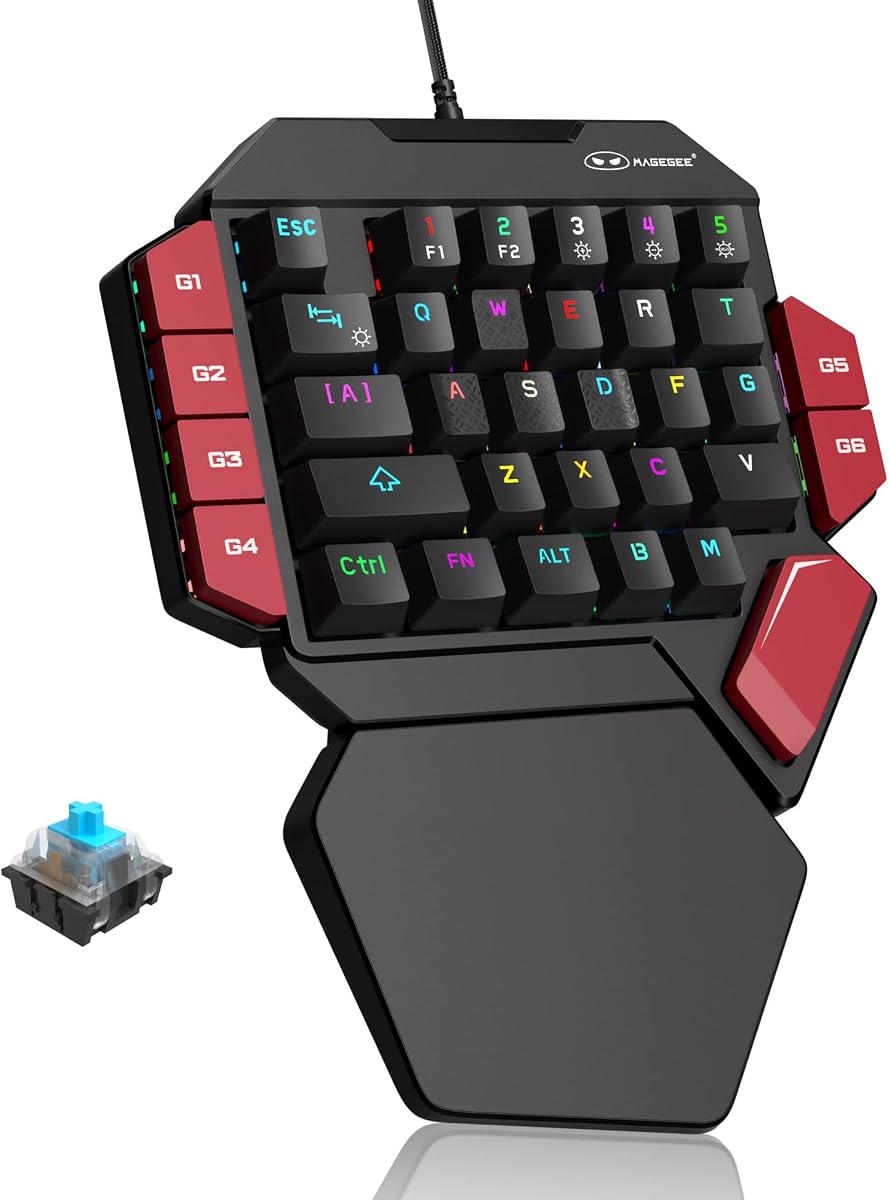
The MageGee One Handed Professional Gaming Keyboard delivers a traditional mechanical-switch experience in a compact 35-key format. Its 4.3 rating makes it a notable option for gamers who want tactile feedback and onboard macro functions without adopting a more complicated magnetic-switch or analog system.
We may earn a commission when you buy through this link, at no additional cost to you.
All 35 keys are non-conflicting, allowing multiple inputs to register without interference. The supplied blue switches provide a loud, crisp mechanical feel that is easy to identify by touch. This may satisfy players who want pronounced feedback, although users in shared or quiet spaces may prefer a less audible switch type.
Six macro recording keys are assigned through FN combinations, and the keypad includes commands for clearing stored macros and restoring defaults. RGB lighting includes static and dynamic effects, along with brightness and effect controls. The available lighting is less flexible than dedicated RGB systems, but the physical indicators and backlighting make key locations easier to follow.
Choose the MageGee for a straightforward mechanical keypad with dedicated macro storage and broad compatibility. It works without drivers across the listed Windows, Linux, and macOS environments, and the large palm rest offers wrist support. It is best for users who value mechanical character and compactness more than analog motion, rapid triggering, or wireless freedom.
The non-conflicting design allows all 35 keys to register independently. Paired with blue mechanical switches, it provides a clear and forceful typing or gaming feel for users who prefer tactile feedback.
Six dedicated macro keys can record and replay sequences directly from the keypad. Clearing functions are also built in, making the device manageable without a separate configuration utility.
We may earn a commission when you buy through this link, at no additional cost to you.
The AJAZZ AK029 holds the highest rating in the lineup at 4.5 and stands out as a compact, technically advanced option for competitive players. Its 29 keys, magnetic switches, eight-kilohertz polling rate, Rapid Trigger, and web-based configuration system place it squarely in the modern high-performance keypad category.
We may earn a commission when you buy through this link, at no additional cost to you.
Actuation can be adjusted from 0.1 to 3.5 millimeters with a stated precision of 0.01 millimeters. A 30-gram-force initial force provides a light touch, while Rapid Trigger allows an immediate reset on lift-off. The contact-free magnetic system is designed to avoid debounce delay and maintain a zero dead zone, supporting consistent input registration.
Onboard memory stores dedicated profiles, so switching computers does not require rebuilding the configuration. A browser-based driver provides remapping, RGB adjustments, and twenty lighting modes without a local download. The internal aluminum plate, gasket mount, five-layer sound-dampening structure, and double-shot PBT keycaps add refinement to the otherwise performance-focused design.
This is a compelling recommendation for competitive FPS or MOBA players who value fast polling, precise actuation, and a compact footprint. It also appeals to editors and streamers who can map complex controls to one hand. The main compromises are the reduced 29-key capacity and the learning curve associated with advanced magnetic-switch settings.
The 0.01-millimeter adjustment range allows precise control over when each key activates. Rapid Trigger then resets the input during release, which can make repeated movement or action inputs feel more immediate.
Profiles remain on the keypad through onboard memory, and the 29-key format occupies less space than a tactical keypad. The result is a practical device for low-sensitivity mouse setups, travel, and shared computers.
We may earn a commission when you buy through this link, at no additional cost to you.
The Razer Tartarus V2 is a familiar 32-programmable-key gaming keypad with a 4.2 rating. It remains a recognizable option for players who want a dedicated left-hand command surface and a cushioned mecha-membrane feel without moving to analog or magnetic controls.
We may earn a commission when you buy through this link, at no additional cost to you.
The supplied information confirms the product identity, programmable key count, and mecha-membrane design, but provides fewer detailed specifications than the more extensively documented Razer listing elsewhere in this guide. As a result, the clearest way to judge it is by its established core format: a compact grid of programmable keys positioned for one-hand use.
A conventional keypad format can be easier to configure than an analog thumbstick or rapidly adjustable magnetic switches. It also offers more dedicated command positions than a very compact 29-key model. Its limitation is that it does not provide the specialized actuation, polling, or analog controls emphasized by the newest competitive devices in the list.
Choose the Tartarus V2 when you prefer Razer’s established keypad approach and want 32 programmable keys in a one-handed layout. It is sensible for MMO, MOBA, and general gaming use where a grid of remappable commands is enough. Buyers seeking detailed rapid-trigger specifications, wireless freedom, or a new thumbstick design should examine the more specialized alternatives.
Thirty-two programmable keys provide a practical number of dedicated command positions. The familiar grid arrangement is straightforward for assigning abilities, macros, and common in-game actions.
The mecha-membrane design emphasizes a soft, cushioned feel while retaining mechanical-style feedback. It is a practical middle ground for players who want a distinct gaming keypad without a very stiff board.
We may earn a commission when you buy through this link, at no additional cost to you.
The Redragon RM104 is a compact full keyboard rather than a dedicated one-handed keypad, but its 4.4 rating, tri-mode wireless connectivity, programmable buttons, and multifunction knob make it a useful companion for gaming and productivity. It offers the broadest device type in this list and should be judged on those terms.
We may earn a commission when you buy through this link, at no additional cost to you.
Bluetooth, 2.4GHz, and USB-C connectivity allow the keyboard to work across different setups and reduce cable clutter. The 4,000mAh battery supports wireless use, while anti-ghosting is included for gaming. Compatibility with Windows, macOS, and major consoles broadens the possible audience beyond dedicated PC competition.
The control knob can adjust volume, mute with a press, and cycle RGB modes when held. Companion software lets users assign macros, remap commands, and create profiles for games or applications. Dynamic RGB can also be coordinated with other Redragon equipment. These features make the keyboard useful for quick audio or lighting changes during a session.
Choose the RM104 if you want a compact wireless keyboard with customizable auxiliary controls rather than a one-handed game-control surface. It may be a better fit for small desks, travel, and mixed gaming and office use. If your priority is a dedicated cluster of macros beside the mouse, choose a true gaming keypad from the earlier selections instead.
Bluetooth supports convenient wireless use, 2.4GHz provides a dedicated wireless connection, and USB-C offers a wired path. This flexibility makes the keyboard practical across changing desktop arrangements.
Rotating the knob adjusts volume, pressing it mutes audio, and holding it cycles lighting modes. These shortcuts reduce the need to open software for common real-time adjustments.
We may earn a commission when you buy through this link, at no additional cost to you.
A useful gaming keypad should match your games, control style, and desk arrangement. The most important factors are layout compatibility, switch technology, macro flexibility, connectivity, and the amount of physical control the device offers.
Layout is the first practical filter because it determines which commands can be assigned and how naturally they can be reached. The Redragon K585 models provide a tactical 42-key arrangement, while the AZERON Cyborg II uses 30 individually connected inputs around an analog thumbstick. The Keychron C0 HE, RedThunder, and MageGee use 35-key grids, the AJAZZ AK029 reduces the count to 29 for maximum compactness, and the Razer Tartarus V2 models use 32 programmable keys with a directional thumbpad.
Mecha-membrane switches such as those in the Razer Tartarus V2 seek a soft, cushioned feel with mechanical-style feedback. Blue mechanical switches in the MageGee deliver sharper tactile character and more noticeable sound. Hot-swappable sockets in both Redragon K585 models allow users to install three-pin or five-pin switches. Hall Effect magnetic switches, found in the Keychron C0 HE and AJAZZ AK029, detect travel electronically and support adjustable actuation.
Rapid Trigger can be valuable in high-frequency competitive games because it resets a key as soon as it rises above the configured threshold, rather than waiting for complete mechanical travel. Both the Keychron C0 HE and AJAZZ AK029 support this approach. Their Hall Effect systems also allow fine adjustment of individual activation points, making them more appropriate for competitive shooters than simple macro-focused keypads.
Directional thumbpads and analog sticks serve different purposes. The Razer Tartarus V2 Left uses an eight-way thumbpad for fixed directional movement. The AZERON Cyborg II takes the more specialized route with a Hall Effect analog stick that supports proportional 360-degree movement, WASD-style behavior, mouse functions, sensitivity controls, dead zones, cone angles, and smoothing. Analog control is valuable when supported by a game, while a fixed thumbpad is simpler and more predictable.
Macros can turn several actions into one button, but their usefulness depends on how they are created and stored. The Redragon K585 and K585 PRO provide seven onboard macro keys across four profiles. The MageGee includes six macro recording keys, and the RedThunder provides two macro sets. The Keychron C0 HE supports 35 programmable keys, while the AZERON stores six complete layouts onboard. Browser-based tools on the AJAZZ can save profiles directly to the device.
Wired keypads provide a consistent connection and reduce the need to manage charging, making them suitable for stationary gaming desks. The Redragon K585 PRO offers Bluetooth and 2.4GHz wireless connectivity, allowing the keypad to sit independently of the main keyboard. The AZERON and Keychron C0 HE prioritize advanced control rather than wireless freedom, while the Redragon RM104 uses tri-mode connectivity as a complete compact keyboard. Consider battery life, desk flexibility, and any sensitivity to input timing.
A one-handed keypad is only useful if it fits the player’s hand and supports a comfortable gaming posture. The AZERON Cyborg II offers adjustable components and is listed for hand sizes from 6.3 to 7.5 inches, though comfort may vary. The Redragon K585 models and MageGee use detachable or broad wrist rests. The RedThunder also emphasizes a large palm rest. Keypad depth, wrist angle, thumb reach, and room for the mouse should be considered before settling on a layout.
Software determines how easily bindings, lighting, and profiles can be adjusted. The Keychron C0 HE and AJAZZ AK029 use browser-based configurators, reducing installation requirements. Professional software on the Redragon K585 models supports recorded sequences and lighting, while Razer Chroma integrates with games and a broad hardware ecosystem. RGB is not purely decorative because illumination can make key positions easier to locate, but color depth should be balanced against the layout and programmability you need.
Begin by connecting the keypad through its supported USB, wireless, or Bluetooth method and placing it where the left hand can reach every key without interfering with the mouse. Open the appropriate configuration utility or use the documented onboard shortcuts to assign essential actions before entering a game. Start with frequently used commands, then add longer macros only after confirming that the target game accepts them.
For competitive magnetic keypads, calibrate Hall Effect controls and set actuation carefully. Begin with a moderate trigger point, test rapid repeated actions, and avoid settings so sensitive that accidental presses occur. Keep analog stick sensitivity, dead zones, and cone angles consistent between sessions. For fixed thumbpad models, verify that each directional input produces the expected movement before relying on it in competitive play.
Care for the keypad by keeping it away from liquids, heavy impact, and excessive dust. Clean keycaps and the wrist rest with a soft, lightly dampened cloth, and avoid spraying cleaner directly onto the switches or controls. Charge wireless models between long sessions, retain firmware and configuration backups where available, and periodically check that saved profiles, lighting, and switch settings remain intact.
A gaming keypad places programmable commands in one hand so the other can remain on the mouse. It is especially useful for MMOs, MOBAs, strategy games, and competitive shooters with frequent movement or ability inputs. It can also control streaming, editing, and productivity shortcuts.
They are not universally better, but they can be more effective when a game benefits from many dedicated bindings or analog movement. A regular keyboard remains preferable for typing, navigation, and games that require a standard layout. Many players use both by placing a keypad beside a full-size keyboard.
Mechanical keypads use physical switch contacts and generally provide a familiar tactile or audible feel. Hall Effect keypads detect key travel through magnetic sensors, allowing actuation points to be adjusted more precisely. Hall Effect models are especially attractive to competitive players who want rapid resets and fine control.
Some models do, including the Redragon K585 PRO with Bluetooth and 2.4GHz connectivity. Other keypads, such as the Keychron C0 HE and AJAZZ AK029, are wired designs focused on consistent operation and performance. Check the connection method before purchasing if clean desk placement is important.
It depends on how many commands you need in one hand. A compact 29-key design can provide excellent access to essential actions while conserving desk space, but a 35- or 42-key tactical layout offers more binding positions. Consider the most frequently used commands rather than assuming more keys are always better.
Yes. The Keychron C0 HE explicitly supports editing shortcuts, timeline controls, OBS scene changes, push-to-talk, and macro-style workflows. The AZERON also permits keyboard, mouse, controller, and macro inputs, while the Redragon RM104 includes programmable buttons and a multifunction knob.
Check the number of macro buttons, the number of profiles, and whether complete layouts are stored on the device. Also consider whether configuration requires a browser or separate program and whether software is available for your operating system. Ease of editing is nearly as important as the raw number of macros.
Start with a slightly higher actuation setting and increase sensitivity gradually. Rapid Trigger and analog smoothing can also improve control, while dead-zone and cone-angle settings help define stick movement. Testing outside a ranked match allows you to establish a stable configuration before relying on it competitively.
The best overall option in this guide is the Razer Tartarus V2 Left for players who value a dedicated directional thumbpad, 32 programmable keys, and broad Chroma support. The Redragon K585 stands out as the best budget choice with 42 keys, seven macro buttons, hot-swappable sockets, and multiple profiles, while the AZERON Cyborg II is the premium selection for analog movement and extensive onboard control.
For competitive shooters, the Keychron C0 HE and AJAZZ AK029 deserve the closest attention because their magnetic switches support adjustable actuation and rapid-trigger workflows. Players who need more conventional macro capacity should consider the Redragon K585 models, and those who want a simple mechanical experience can look to the MageGee. The right choice ultimately depends on game support, hand fit, control style, and configuration needs.
Ratings, layouts, software features, and product options can evolve, and prices and availability change over time. Review the current listing, supported operating systems, game compatibility, and manufacturer documentation before making a final purchase. That last check helps ensure the chosen keypad matches your setup at the moment you buy it.